
🏥 quarantine




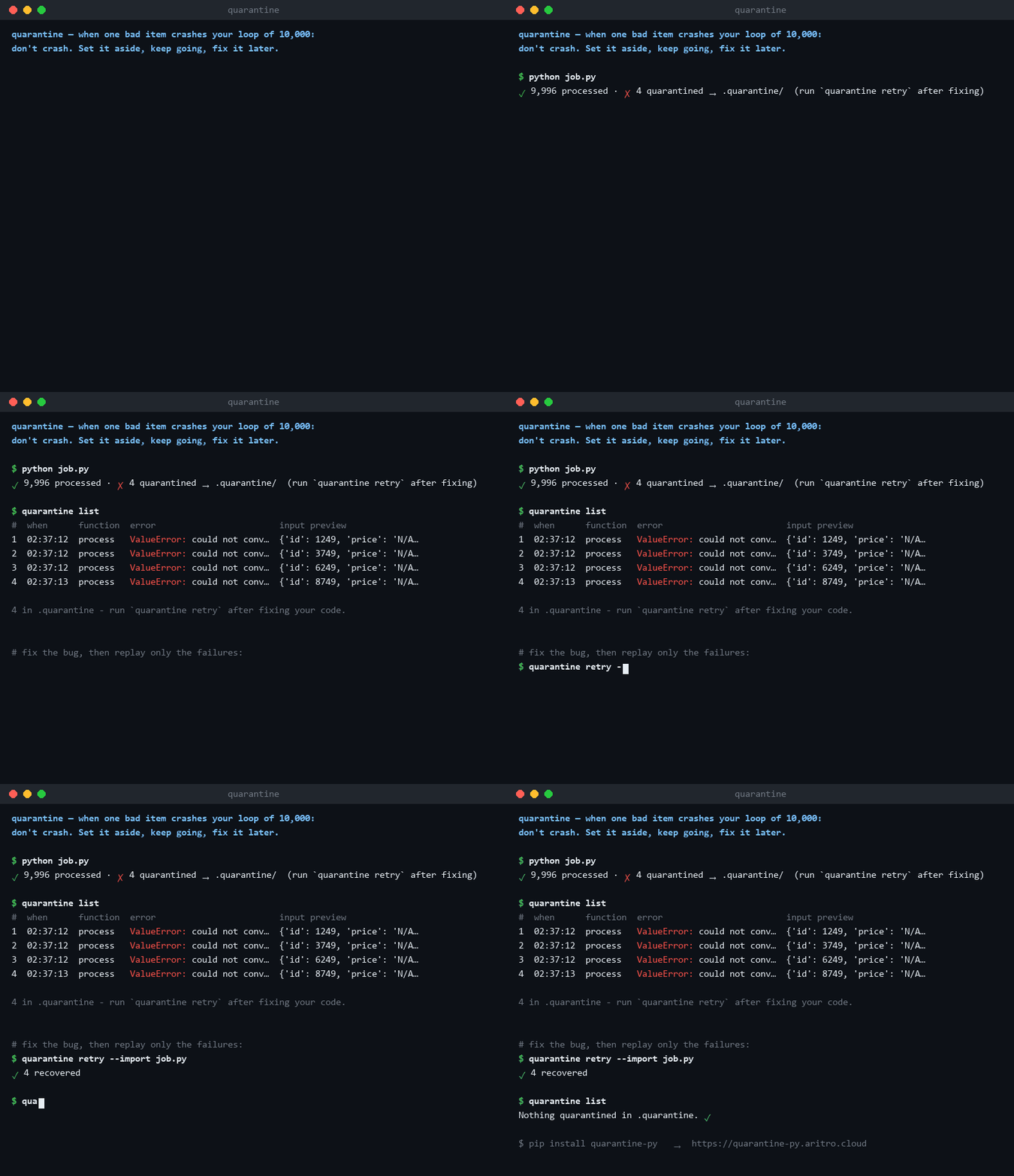
When one bad item crashes your loop of 10,000 — don't crash. Set it aside, keep going, fix it later.
pip install quarantine-py
from quarantine import quarantine


@quarantine
def process(item): ...  # your normal code, unchanged


for item in items:
    process(item)
That's it. Bad items no longer kill your job. They get saved to a .quarantine/ folder — with their full error and the exact input that caused it — and your loop keeps running.
At the end:
✓ 9,996 processed · ✗ 4 quarantined → .quarantine/ (run `quarantine retry` after fixing)
The problem (explained like you're new to this)
Imagine you're processing 10,000 records — rows from a CSV, URLs to scrape, images to resize. You write a loop:
for item in items:
    process(item)
You run it. It works... until item #5,247, which is malformed in some way you didn't expect. Your script crashes. You lost 5,246 items of finished work and 3 hours.
So you fix the bug for that one weird item and rerun from the start. Three hours later it crashes again — at item #7,913, for a different reason.
This cycle is one of the most common, most painful experiences in programming. quarantine ends it.
"Can't I just use try/except?"
Yes — try/except is exactly what quarantine uses under the hood. But here's the try/except version once you make it actually safe:
failed = []
for item in items:
    try:
        process(item)
    except Exception as e:
        failed.append(item)  # ❌ lost forever if the script dies later
        print(f"failed: {e}")  # ❌ traceback gone — good luck debugging tomorrow
        # ❌ how do I re-run JUST these failures after I fix the bug?
        # ❌ what if 500 fail in a row because the API is down — keep going?!
        # ❌ how do I save a weird object (DataFrame row? bytes?) to look at later?
Every ❌ is a real problem you'd have to solve yourself, in every script, forever. quarantine solves them once:
try/except by hand |
@quarantine |
|
|---|---|---|
| Loop survives bad items | ✅ | ✅ |
| Failures survive a crash/restart | ❌ in RAM, gone | ✅ saved to disk instantly |
| Full traceback kept for later | ❌ usually just printed | ✅ stored with the item |
| The exact bad input saved | ❌ you'd have to serialize it | ✅ automatic |
| Re-run only the failures | ❌ build it yourself | ✅ quarantine retry |
| Debug with the real bad input | ❌ archaeology in logs | ✅ quarantine debug 2 |
| Detects "everything is failing, stop" | ❌ | ✅ halts on failure streaks |
| Skips already-known-bad items on rerun | ❌ | ✅ |
quarantine is not a replacement for try/except. It's the 200 lines of bookkeeping you'd have to write around it — done correctly, once.
The idea in one picture
Hospitals don't shut down when one patient has an infection. They quarantine the patient, treat everyone else, and come back with the right medicine.
items ──▶ process() ──▶ ✓ done
              │
              ✗ raises an exception
              ▼
        .quarantine/          ◀── the "sick bay" folder
          ├── item + its data
          ├── the full error traceback
          └── when/why it failed
Your job finishes. The sick items wait for you, with their full medical charts.
Installation
Available on PyPI and conda-forge as quarantine-py:
pip
pip install quarantine-py
conda / mamba / pixi
From conda-forge:
# conda
conda install -c conda-forge quarantine-py

# mamba
mamba install -c conda-forge quarantine-py

# pixi
pixi add quarantine-py
uv
uv add quarantine-py            # inside a uv project
uv pip install quarantine-py    # standalone with uv
pipx (CLI standalone)
If you only want the standalone quarantine command-line tool isolated:
pipx install quarantine-py
For development / from source
# Install latest unreleased main directly from GitHub
pip install git+https://github.com/halcyon-past/quarantine

# Or clone for local development
git clone https://github.com/halcyon-past/quarantine.git
cd quarantine
pip install -e ".[dev]"       # includes pytest, ruff, mypy, hypothesis
Requirements
| Python | 3.10 or newer (CPython; tested on 3.10 - 3.13) |
| Runtime dependencies | none - it is standard library only. (The optional s3:// backend adds boto3: pip install "quarantine-py[s3]".) |
| Operating systems | Linux, macOS, Windows (tested on all three in CI) |
| Type checking | Fully typed, ships py.typed - works with mypy and Pyright out of the box (the codebase itself passes strict mypy) |
Installing also puts a quarantine command on your PATH. Check both halves:
$ quarantine --version
quarantine 1.2.0
$ python -c "import quarantine; print(quarantine.__version__)"
1.2.0
If the command is not found (a common --user install wrinkle), the module
form always works and takes the same arguments:
python -m quarantine list
Nothing needs configuring. The first time a call fails, .quarantine/ appears
next to wherever you started Python. Add it to your .gitignore -
quarantined inputs are real data, and real data does not belong in git.
.quarantine/
Usage
1. Basic — decorate and forget
from quarantine import quarantine


@quarantine
def process(row):
    price = float(row["price"])  # crashes on "N/A"? quarantined.
    save_to_db(row["id"], price)


for row in rows:
    process(row)
2. See what got quarantined
$ quarantine list
  #  when         function   error                          input preview
  1  09:14:02     process    ValueError: could not convert  {'id': 8812, 'price': 'N/A', ...}
  2  09:31:44     process    KeyError: 'price'              {'id': 9107, ...}
3. Fix your code, then retry only the failures
$ quarantine retry
✓ 3 recovered · ✗ 1 still failing (kept in quarantine)
No rerunning the 9,996 items that already worked.
(Note: If your function lives in a standalone script rather than an installed package, use -i to tell quarantine where to import it from: quarantine retry -i my_script.py)
4. Debug with the actual bad input
$ quarantine debug 2
# opens a Python debugger with `item` set to the exact input that failed
(You can use -i here too: quarantine debug 2 -i my_script.py)
The single biggest time-saver: you never have to reproduce the bug. The bug's exact input is sitting on disk.
5. Safety valve — when it's not the data's fault
If 50 items fail in a row, that's not bad data — that's your database being down. Quarantining 10,000 items would be silly. quarantine halts instead:
✋ 50 consecutive failures — this looks systemic, not bad data. Halting.
   Last error: ConnectionError: db.internal:5432 refused
Tune it: @quarantine(halt_after=100).
6. Options (all optional)
@quarantine(
    dir=".quarantine",  # where the sick bay lives - a folder, or s3://bucket/prefix
    only=(ValueError, KeyError),  # only quarantine these; others still crash
    halt_after=50,  # consecutive-failure circuit breaker
    max_items=10_000,  # cap disk usage
    retries=2,  # retry transient failures
    backoff=0.5,  # base delay between retries
    backoff_factor=2.0,  # grow the delay per retry (exponential backoff)
    jitter=0.25,  # randomise the delay so workers spread out
    dead_after=5,  # records failing 5+ retries are skipped by blanket retries
    redact=["api_key", "password"],  # scrub these fields before saving inputs
    on_quarantine=my_alert_fn,  # e.g., send a Slack ping
    on_retry_success=my_metric_fn,  # hooks for the retry lifecycle too
)
def process(item): ...
7. Works on loops too, without a decorator
from quarantine import shield

for item in shield(items, using=process):
    ...
What's in the .quarantine/ folder?
Plain files. No database, no magic — you can inspect everything yourself:
.quarantine/
├── 0001/
│   ├── input.pkl        # the exact item (pickle, JSON fallback for simple data)
│   ├── input.txt        # human-readable repr, so you can just *look* at it
│   ├── traceback.txt    # full error, exactly as it would have printed
│   └── meta.json        # function name, timestamp, attempt count, python/pkg versions
└── index.json
Design rules:
- Atomic writes — a crash mid-save never corrupts the folder.
- Redaction before disk — fields you mark as secret never touch the filesystem.
- Dedup on rerun — an item already in quarantine is skipped (no log spam), unless you
quarantine retryit. - Serialization fallbacks — pickle → JSON → repr. Something readable is always saved, even for exotic objects.
Command-line reference
Every command takes -d/--dir PATH (default: $QUARANTINE_DIR, else
./.quarantine), and list, show, retry and stats all take --json so
you can pipe them somewhere useful.
| Command | What it does |
|---|---|
quarantine list |
Table of everything quarantined. ls works too. -f/--function NAME, -n/--limit N. |
quarantine show ID [ID...] |
One record in full: metadata, the input, the whole traceback. |
quarantine retry [ID...] |
Re-run records; delete the ones that now succeed. -f/--function NAME, --dry-run, -i/--import FILE.py (for functions that live in a script). |
quarantine debug ID |
Re-run one record and drop you into pdb on the frame that raised. -p/--print to just dump it, --no-post-mortem to skip re-running and get the input in scope, -i/--import FILE.py as above. |
quarantine clear [ID...] |
Delete records. With no ids it clears everything and asks first; -y/--yes skips the prompt. rm works too. |
quarantine stats |
Counts by function and by error type, plus how much disk the folder is using. |
quarantine reindex |
Rebuild index.json from the record folders and sweep up leftover temp files from a hard crash. |
quarantine uispins up a local web dashboard to view tracebacks visually.
Exit codes, for scripts and CI:
| Code | Meaning |
|---|---|
0 |
Everything you asked for succeeded. |
1 |
The command ran, but something is still wrong - a retry failed again, or a record could not be replayed. |
2 |
Bad usage, or the folder could not be read. |
# fail a nightly job if anything is still sitting in quarantine
quarantine retry || echo "still broken - look at: $(quarantine list -n 3)"
Python API reference
from quarantine import quarantine, shield, Quarantine, QUARANTINED, records, retry
Decorating and looping
@quarantine / @quarantine(...) |
Wrap one function. Options are listed under Options. Works on async def. |
shield(items, using=fn, **options) |
Iterator yielding only the results that worked. |
ashield(items, using=fn, **options) |
Same, for async def work and/or async iterables. |
Return values. A quarantined call returns the QUARANTINED sentinel; an
input recognised as already-bad returns SKIPPED. Both are falsy, so
if process(item): does the sensible thing. Use is_quarantined(result) /
is_skipped(result) when you want to be explicit.
The explicit object, when you would rather pass something around than rely on a decorator:
from quarantine import Quarantine

q = Quarantine("build/bad-rows", halt_after=10, redact=["api_key"])

safe = q.wrap(process)  # same as the decorator
q.call(process, item)  # one-off call, same protection
await q.acall(fetch, url)  # async one-off
q.records()  # list[Record], oldest first
q.retry()  # -> RetryResult(recovered, still_failing, unretryable)
await q.aretry()  # for records from async functions
q.clear()  # empty the folder
q.stats  # Stats(processed, quarantined, skipped, recovered)
q.summary_line()  # the one-line report, or None
len(q), list(q)  # how many records; iterate them
Module-level shortcuts operate on the default folder (or dir=):
records(), retry(), aretry(), clear(), summary().
A Record is what you get back from records():
record = records()[0]
record.id  # 1
record.function  # "process" (qualified name in .qualified_name)
record.error_type  # "ValueError"
record.summary  # "ValueError: could not convert string to float: 'N/A'"
record.attempts  # 2, after one retry
record.redacted  # ["api_key"] - what was scrubbed
record.path  # Path(".quarantine/0001")
record.traceback_text()  # the stored traceback
record.load_call()  # Call(args=({...},), kwargs={}) - the original input
record.load_call().item  # the item itself
Exceptions (all subclass QuarantineError, and none of them are ever
quarantined themselves):
SystemicFailure |
The halt_after circuit breaker tripped. .count, .last_error. |
QuarantineFull |
max_items reached. Nothing is dropped silently - this is raised instead, chained from the original error. |
StorageError |
The folder could not be read or written. |
ResolutionError |
A retry could not import the function a record came from. |
Environment
QUARANTINE_DIR |
Default folder for both the library and the CLI. |
Documentation
Rendered and searchable at quarantine-py.aritro.cloud, or browse the sources:
| PyPI: quarantine-py | The released package - versions, wheels, and metadata. |
| Conda-forge: quarantine-py | Conda feedstock package for conda, mamba, and pixi. |
| Releases | New versions, with notes. Watch → Custom → Releases on this repo to get notified. |
| docs/installation.md | Installing, verifying, upgrading, uninstalling. |
| docs/usage.md | The full guide: options, async, threads, retry loops, alerting, recipes. |
| docs/examples.md | Practical real-world examples and the file structure behind the scenes. |
| docs/recipes.md | Framework recipes: a pandas ETL job, a web scraper, an Airflow task, a FastAPI background worker. |
| docs/cli.md | Every command, flag and exit code, with output samples. |
| docs/api.md | Complete Python API reference. |
| docs/on-disk-format.md | What is in .quarantine/, and the guarantees about it. |
| docs/remote-storage.md | One shared quarantine on S3 for a fleet of workers: setup, credentials, IAM. |
| docs/observability.md | Wiring the hooks into Prometheus, Datadog, Sentry and plain logging. |
| docs/benchmarks.md | What the decorator costs when nothing fails, with the methodology. |
| docs/troubleshooting.md | "It skipped my item", "retry says it cannot import", and friends. |
| docs/faq.md | Longer answers to the questions below. |
| docs/adr/ | Architecture decision records: why rename-based atomicity, why not JSONL, why pickle-first, and friends. |
| CHANGELOG.md | What changed, and when. |
| ENHANCEMENTS.md | What is coming next - more storage backends (GCS, Azure, Redis, Databricks) - and why. |
| SECURITY.md | Reporting vulnerabilities, the threat model, and the supply-chain posture. |
| CONTRIBUTING.md | Setup, the checks, and the ground rules for changes. |
When NOT to use quarantine
Honesty section:
- You want the crash. In a bank transfer pipeline, stopping on the first error might be correct. Silently continuing is a choice — make it deliberately.
- You're already on Celery/Kafka/Airflow. Those have dead-letter queues; use them. quarantine is for the 95% of scripts that will never justify that machinery.
- Failures are expected and normal (e.g., "404 means skip"). Handle those with a normal
if/except— quarantine is for unexpected failures you'll want to investigate.
FAQ
Is this just a dead-letter queue? Yes — that's exactly the pattern, ported from message-queue infrastructure to a plain Python for-loop. No broker, no server, one decorator.
Async?
@quarantine works on async def too.
Threads/processes?
Yes — safe under threading, multiprocessing and concurrent.futures. Writes are atomic, ids cannot collide, and the folder is append-only per item; the test suite proves it with real concurrent processes sharing one folder. Details in docs/usage.md.
Created by Aritro Saha
Made for everyone whose overnight job died at item 5,247.
1 maintainer

Metadata
1 maintainer
Release files for quarantine-py 1.2.0
For a detailed explanation of source distributions (sdists) and built distributions (wheels), please see the package formats documentation.
Source distribution (sdist)
| File | Size | Uploaded | |
|---|---|---|---|
| quarantine_py-1.2.0.tar.gz | 135.6 kB | Details |
Built distribution (wheel)
| File | Interpreter | ABI | Platform | Reset |
|---|---|---|---|---|
| quarantine_py-1.2.0-py3-none-any.whl | Python 3 | none | any | Details |
Total release size: 197.8 kB
Release files / quarantine_py-1.2.0.tar.gz
| Download URL | quarantine_py-1.2.0.tar.gz |
|---|---|
| Size | 135.6 kB |
| Tags | Source |
|
SHA-256 checksum How to use checksums |
027ef09d81bf913c06e8206da42d9b09cbf2e03891e75691c244d8111c13cb4b
|
|
BLAKE2b-256 checksum How to use checksums |
e33fcfe842951ad6db8ae9e33e83c07f306df7d692ca53cfde9c4123446e1695
|
| Upload date | |
|
Uploaded using Trusted Publishing? What is trusted publishing? |
Yes |
| Uploaded via |
twine/7.0.0 CPython/3.13.14
|
Provenance
Provenance describes where a file came from. On PyPI, provenance is shared via attestations, which provide a verifiable record of the build or publishing details. View details, limitations and caveats.


PyPI Publish Attestation
PyPI verified that this artifact, at this checksum, originated from the publisher listed below.
Signed by GitHub Actions, verified by PyPI on Sep 27, 2026.
Transparency logRelease files / quarantine_py-1.2.0-py3-none-any.whl
| Download URL | quarantine_py-1.2.0-py3-none-any.whl |
|---|---|
| Size | 62.3 kB |
| Tags | Python 3 |
|
SHA-256 checksum How to use checksums |
5c6e75a0107f76dfb374321ba5f45bf361190418b340ed278ff3c3f56f3c49e0
|
|
BLAKE2b-256 checksum How to use checksums |
3ae15838595fd96246dbe592038a310ec91572479567b71a2f93b198197a25c9
|
| Upload date | |
|
Uploaded using Trusted Publishing? What is trusted publishing? |
Yes |
| Uploaded via |
twine/7.0.0 CPython/3.13.14
|
Provenance
Provenance describes where a file came from. On PyPI, provenance is shared via attestations, which provide a verifiable record of the build or publishing details. View details, limitations and caveats.
PyPI Publish Attestation
PyPI verified that this artifact, at this checksum, originated from the publisher listed below.
Signed by GitHub Actions, verified by PyPI on Sep 27, 2026.
Transparency log













