
Open Source Solar Forecasting for a Site

Project description
Quartz Solar Forecast

The aim of the project is to build an open source PV forecast that is free and easy to use.
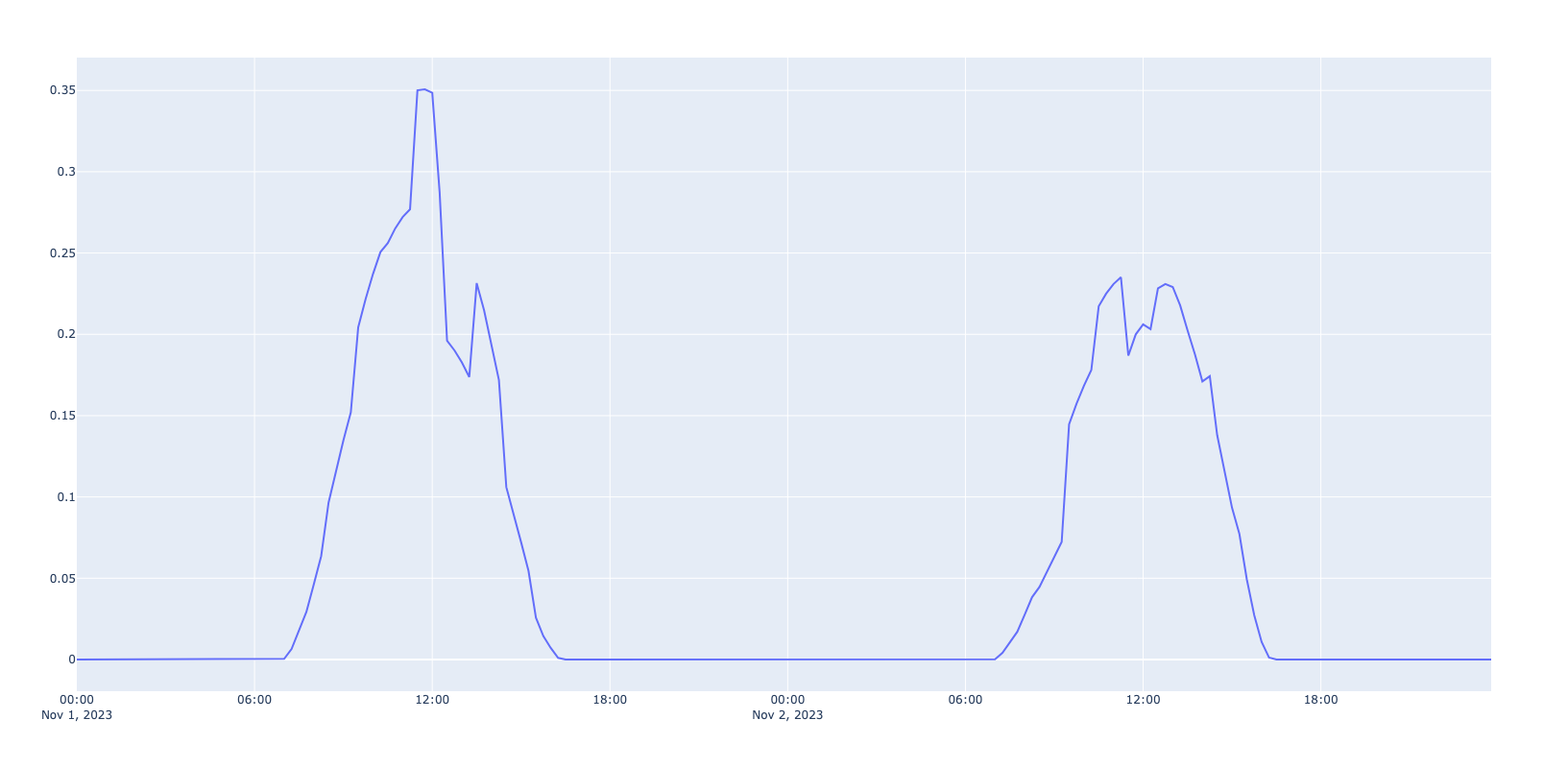
The forecast provides the expected generation in kw for 0 to 48 hours for a single PV site.
Open Climate Fix also provides a commercial PV forecast, please get in touch at quartz.support@openclimatefix.org
The current model uses GFS or ICON NWPs to predict the solar generation at a site
from quartz_solar_forecast.forecast import run_forecast
from quartz_solar_forecast.pydantic_models import PVSite

# make a pv site object
site = PVSite(latitude=51.75, longitude=-1.25, capacity_kwp=1.25)

# run model, uses ICON NWP data by default
predictions_df = run_forecast(site=site, ts='2023-11-01')
Which gives the following prediction
Generating Forecasts
To generate solar forecasts and save them into a CSV file, follow these steps:
- Navigate to the scripts directory
cd scripts
- Run the forecast_csv.py script with desired inputs
python forecast_csv.py
Replace the --init_time_freq, --start_datetime, --end_datetime, and --site_name with your desired forecast initialization frequency (in hours), start datetime, end datetime, and the name of the forecast or site, respectively.
Output
The script will generate solar forecasts at the specified intervals between the start and end datetimes. The results will be combined into a CSV file named using the site name, start and end datetimes, and the frequency of forecasts. This file will be saved in the scripts/csv_forecasts directory.
Installation
The source code is currently hosted on GitHub at: https://github.com/openclimatefix/Open-Source-Quartz-Solar-Forecast
Binary installers for the latest released version are available at the Python Package Index (PyPI)
pip install quartz-solar-forecast
You might need to install the following packages first
conda install -c conda-forge pyresample
This can solve the bug: ___kmpc_for_static_fini.
Model
The model is a gradient boosted tree model and uses 9 NWP variables. It is trained on 25,000 PV sites with over 5 years of PV history, which is available here. The training of this model is handled in pv-site-prediction TODO - we need to benchmark this forecast.
The 9 NWP variables, from Open-Meteo documentation, are mentioned above with their appropariate units.
- Visibility (km), or vis: Distance at which objects can be clearly seen. Can affect the amount of sunlight reaching solar panels.
- Wind Speed at 10 meters (km/h), or si10 : Wind speed measured at a height of 10 meters above ground level. Important for understanding weather conditions and potential impacts on solar panels.
- Temperature at 2 meters (°C), or t : Air temperature measure at 2 meters above the ground. Can affect the efficiency of PV systems.
- Precipiration (mm), or prate : Precipitation (rain, snow, sleet, etc.). Helps to predict cloud cover and potentiel reductions in solar irradiance.
- Shortwave Radiation (W/m²), or dswrf: Solar radiation in the shortwave spectrum reaching the Earth's surface. Measure of the potential solar energy available for PV systems.
- Direct Radiation (W/m²) or dlwrf: Longwave (infrared) radiation emitted by the Earth back into the atmosphere. confirm it is correct
- Cloud Cover low (%), or lcc: Percentage of the sky covered by clouds at low altitudes. Impacts the amount of solar radiation reachign the ground, and similarly the PV system.
- Cloud Cover mid (%), or mcc : Percentage of the sky covered by clouds at mid altitudes.
- Cloud Cover high (%), or lcc : Percentage of the sky covered by clouds at high altitude
We also use the following features
- poa_global: The plane of array irradiance, which is the amount of solar radiation that strikes a solar panel.
- poa_global_now_is_zero: A boolean variable that is true if the poa_global is zero at the current time. This is used to help the model learn that the PV generation is zero at night.
- capacity (kw): The capacity of the PV system in kw.
- The model also has a feature to check if these variables are NaNs or not.
The model also uses the following variables, which are currently all set to nan
- recent_power: The mean power over the last 30 minutes
- h_mean: The mean of the recent pv data over the last 7 days
- h_median: The median of the recent pv data over the last 7 days
- h_max: The max of the recent pv data over the last 7 days
Known restrictions
- The model is trained on UK MetOffice NWPs, but when running inference we use GFS data from Open-meteo. The differences between GFS and UK MetOffice could led to some odd behaviours.
- It looks like the GFS data on Open-Meteo is only available for free for the last 3 months.
Evaluation
To evaluate the model we use the UK PV dataset and the ICON NWP dataset. All the data is publicly available and the evaluation script can be run with the following command
python scripts/run_evaluation.py
The test dataset we used is defined in quartz_solar_forecast/dataset/testset.csv.
This contains 50 PV sites, which 50 unique timestamps. The data is from 2021.
The results of the evaluation are as follows The MAE is 0.1906 kw across all horizons.
| Horizons | MAE [kw] | MAE [%] |
|---|---|---|
| 0 | 0.202 +- 0.03 | 6.2 |
| 1 | 0.211 +- 0.03 | 6.4 |
| 2 | 0.216 +- 0.03 | 6.5 |
| 3 - 4 | 0.211 +- 0.02 | 6.3 |
| 5 - 8 | 0.191 +- 0.01 | 6 |
| 9 - 16 | 0.161 +- 0.01 | 5 |
| 17 - 24 | 0.173 +- 0.01 | 5.3 |
| 24 - 48 | 0.201 +- 0.01 | 6.1 |
If we exclude nighttime, then the average MAE [%] from 0 to 36 forecast hours is 13.0%.
Notes:
- The MAE in % is the MAE divided by the capacity of the PV site. We acknowledge there are a number of different ways to do this.
- It is slightly surprising that the 0-hour forecast horizon and the 24-48 hour horizon have a similar MAE. This may be because the model is trained expecting live PV data, but currently in this project we provide no live PV data.
Abbreviations
- NWP: Numerical Weather Predictions
- GFS: Global Forecast System
- PV: Photovoltaic
- MAE: Mean Absolute Error
- ICON: ICOsahedral Nonhydrostatic
- KW: Kilowatt
Contribution
We welcome other models.
Contributors ✨
Thanks goes to these wonderful people (emoji key):
 Peter Dudfield 💻 |
 Megawattz 🤔 📢 |
 EdFage 📖 💻 |
 Chloe Pilon Vaillancourt 📖 |
 rachel tipton 📢 |
 armenbod 🖋 💻 |
 Shreyas Udaya 📖 |
 Aryan Bhosale 📖 |
 Francesco 💻 |
 Rosheen Naeem 📖 |
 Bikram Baruah 💻 |
 Jakob Gebler 🐛 |
 Om Bhojane 💻 |
This project follows the all-contributors specification. Contributions of any kind welcome!
Release history Release notifications | RSS feed


Download files
Download the file for your platform. If you're not sure which to choose, learn more about installing packages.
Source Distribution
Built Distribution
Filter files by name, interpreter, ABI, and platform.
If you're not sure about the file name format, learn more about wheel file names.
Copy a direct link to the current filters
File details
Details for the file quartz_solar_forecast-1.0.22.tar.gz.
File metadata
- Download URL: quartz_solar_forecast-1.0.22.tar.gz
- Upload date:
- Size: 275.1 kB
- Tags: Source
- Uploaded using Trusted Publishing? No
- Uploaded via: twine/5.0.0 CPython/3.9.19
File hashes
| Algorithm | Hash digest | |
|---|---|---|
| SHA256 |
b83d5b91b5bc2c7412050cc55437d4d1ae33ebc9e017d2f704794e5fda9b363a
|
|
| MD5 |
8f26c17cc9ab5437048ebdede54db643
|
|
| BLAKE2b-256 |
20de1c836feabefb687949af9f72d4e769a2f6a724b94c0c16d269340b4efdd7
|
File details
Details for the file quartz_solar_forecast-1.0.22-py3-none-any.whl.
File metadata
- Download URL: quartz_solar_forecast-1.0.22-py3-none-any.whl
- Upload date:
- Size: 194.2 kB
- Tags: Python 3
- Uploaded using Trusted Publishing? No
- Uploaded via: twine/5.0.0 CPython/3.9.19
File hashes
| Algorithm | Hash digest | |
|---|---|---|
| SHA256 |
d22470ddbe08a967d7d88d64a5e0c97448b6332e8d82a794327199a484522299
|
|
| MD5 |
f8ca9576bf3f0b649f18e04f176d87fc
|
|
| BLAKE2b-256 |
1daef916965919930676048ebd8b2c97598b3de0c095c72384df3b747ca8cb3c
|






