
queenbee-python-dsl
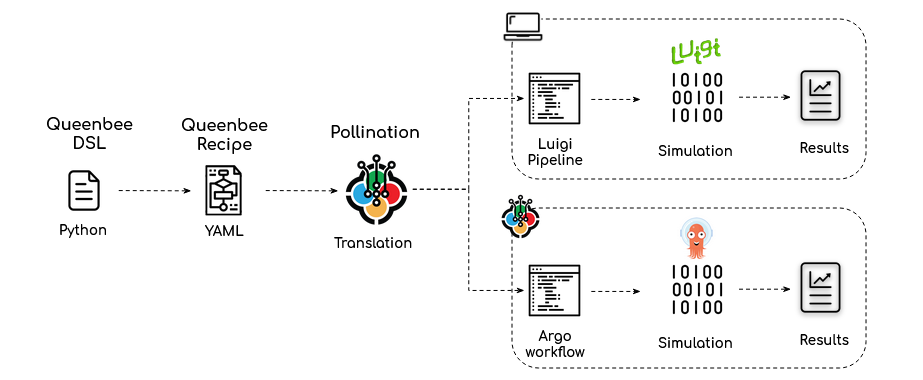
A Python Domain Specific Language (DSL) to create Queenbee Plugins and Recipes as Python objects.
API docs
Requirements
Python >=3.7
Installation
- Clone this repository.
- Change directory to root folder of the repository.
pip install .
Quick Start
If you are interested to start writing your own plugins and recipe see the introduction post.
Function
from dataclasses import dataclass
from queenbee_dsl.function import Function, command, Inputs, Outputs


@dataclass
class CreateOctreeWithSky(Function):
    """Generate an octree from a Radiance folder and sky!"""

    # inputs
    include_aperture = Inputs.str(
        default='include',
        description='A value to indicate if the static aperture should be included in '
        'octree. Valid values are include and exclude. Default is include.',
        spec={'type': 'string', 'enum': ['include', 'exclude']}
    )

    black_out = Inputs.str(
        default='default',
        description='A value to indicate if the black material should be used. Valid '
        'values are default and black. Default value is default.',
        spec={'type': 'string', 'enum': ['black', 'default']}
    )

    model = Inputs.folder(description='Path to Radiance model folder.', path='model')

    sky = Inputs.file(description='Path to sky file.', path='sky.sky')

    @command
    def create_octree(self):
        return 'honeybee-radiance octree from-folder model --output scene.oct ' \
            '--{{self.include_aperture}}-aperture --{{self.black_out}} ' \
            '--add-before sky.sky'

    # outputs
    scene_file = Outputs.file(description='Output octree file.', path='scene.oct')
The Queenbee class is accessible from queenbee property.
Try print(CreateOctreeWithSky().queenbee.yaml()) and you should see the full Queenbee
definition:
type: Function
annotations: {}
inputs:
- type: FunctionStringInput
  annotations: {}
  name: black-out
  description: A value to indicate if the black material should be used. Valid values
    are default and black. Default value is default.
  default: default
  alias: []
  required: false
  spec:
    type: string
    enum:
    - black
    - default
- type: FunctionStringInput
  annotations: {}
  name: include-aperture
  description: A value to indicate if the static aperture should be included in octree.
    Valid values are include and exclude. Default is include.
  default: include
  alias: []
  required: false
  spec:
    type: string
    enum:
    - include
    - exclude
- type: FunctionFolderInput
  annotations: {}
  name: model
  description: Path to Radiance model folder.
  default: null
  alias: []
  required: true
  spec: null
  path: model
- type: FunctionFileInput
  annotations: {}
  name: sky
  description: Path to sky file.
  default: null
  alias: []
  required: true
  spec: null
  path: sky.sky
  extensions: null
outputs:
- type: FunctionFileOutput
  annotations: {}
  name: scene-file
  description: Output octree file.
  path: scene.oct
name: create-octree-with-sky
description: Generate an octree from a Radiance folder and sky!
command: honeybee-radiance octree from-folder model --output scene.oct --{{inputs.include-aperture}}-aperture
  --{{inputs.black-out}} --add-before sky.sky
Since the functions are standard Python classes you can also subclass them from one another.
Plugin
To create a Queenbee plugin use the functions to create a standard Python module. The only
change is that you need to provide the information for Queenbee plugin in the __init__.py
file as dictionary assigned to __queenbee__ variable.
In the near future we might be able to use Python package's information to collect most of these information.
Follow the standard way to install a Python package. Once the package is installed you
can use queenbee-dsl to load the package or write it to a folder.
from queenbee_dsl.package import load, write

# name of the queenbee package
python_package = 'pollination_honeybee_radiance'

# load this package as Queenbee Plugin
plugin = load(python_package)

# or write the package as a Queenbee plugin to a folder directly
write(python_package, './pollination-honeybee-radiance')
See pollination-honeybee-radiance plugin for a full project example.
Recipe
Recipe is a collection of DAGs. Each DAG is a collection of interrelated tasks.
You can use queenbee-dsl to create complex recipes with minimum code by reusing the functions
as templates for each task.
Packaging a plugin is exactly the same as packaging a plugin.
from queenbee_dsl.package import load, translate

# name of the queenbee package
python_package = 'daylight-factor'

# load this package as Queenbee Recipe
recipe = load(python_package, baked=True)

# or translate and write the package as a Queenbee plugin to a folder directly
translate(python_package, './daylight-factor')
See daylight factor recipe for a full project example.
How to create a queenbee-dsl package
Queenbee-dsl uses Python's standard packaging to package queenbee plugins and recipes.
It parses most of the data from inputs in setup.py file and some Queenbee specific
information from __init__.py file. Below is an example of how these file should look
like.
setup.py
#!/usr/bin/env python
import setuptools

# These two class extends setup.py to install the packages as queenbee packages
from queenbee_dsl.package import PackageQBInstall, PackageQBDevelop

# Read me will be mapped to readme strings
with open("README.md", "r") as fh:
    long_description = fh.read()

setuptools.setup(
    cmdclass={'develop': PackageQBDevelop, 'install': PackageQBInstall},    # required - include this for queenbee packaging
    name='pollination-honeybee-radiance',                                   # required - will be used for package name unless it is overwritten using __queenbee__ key in __init__.py
    version='0.1.0',                                                        # required - will be used as package tag. you can also use semantic versioning
    url='https://github.com/pollination/pollination-honeybee-radiance',     # optional - will be translated to home
    description='Honeybee Radiance plugin for Pollination.',                # optional - will be used as package description
    long_description=long_description,                                      # optional - will be translated to ReadMe content on Pollination
    long_description_content_type="text/markdown",
    author='author_1',                                                      # optional - all the information for author and maintainers will be
    author_email='author_1@example.com',                                    # translated to maintainers. For multiple authors use comma
    maintainer='maintainer_1, maintainer_2',                                # inside the string.
    maintainer_email='maintainer_1@example.come, maintainer_2@example.com',
    packages=setuptools.find_packages('pollination_honeybee_radiance'),     # required - standard python packaging input. not used by queenbee
    keywords='honeybee, radiance, ladybug-tools, daylight',                 # optional - will be used as keywords
    license='PolyForm Shield License 1.0.0, https://polyformproject.org/wp-content/uploads/2020/06/PolyForm-Shield-1.0.0.txt'  # optional - the license link should be separated by a comma
)
init.py
Here is an example __init__.py for a plugin.
__queenbee__ = {
    'name': 'honeybee-radiance',  # optional - new name for queenbee package. this will overwrite the Python package name
    'icon': 'https://ladybug.tools/assets/icon.png',  # optional - package icon
    'config': {                   # required for Pollination - docker information for this specific plugin
        'docker': {
            'image': 'ladybugtools/honeybee-radiance:1.28.12',
            'workdir': '/home/ladybugbot/run'
        }
    }
}
Here is an example __init__.py for a recipe.
from .entry import AnnualDaylightEntryPoint

__queenbee__ = {
    'name': 'annual-daylight',                # optional - new name for queenbee package. this will overwrite the Python package name
    'icon': 'https://ladybug.tools/assets/icon.png',  # optional - package icon
    'entry_point': AnnualDaylightEntryPoint,  # required - this will point queenbee to the class that should be used to start the run
}
1 maintainer

Metadata
1 maintainer
Release files for queenbee-dsl 0.7.2
For a detailed explanation of source distributions (sdists) and built distributions (wheels), please see the package formats documentation.
Source distribution (sdist)
| File | Size | Uploaded | |
|---|---|---|---|
| queenbee-dsl-0.7.2.tar.gz | 32.2 kB | Details |
Built distribution (wheel)
| File | Interpreter | ABI | Platform | Reset |
|---|---|---|---|---|
| queenbee_dsl-0.7.2-py2.py3-none-any.whl | Python 3, Python 2 | none | any | Details |
Total release size: 64.9 kB
Release files / queenbee-dsl-0.7.2.tar.gz
| Download URL | queenbee-dsl-0.7.2.tar.gz |
|---|---|
| Size | 32.2 kB |
| Tags | Source |
|
SHA-256 checksum How to use checksums |
218d1269d5f26243dc1a7671ecab5f6670e5178377f0e263cc93377b05379169
|
|
BLAKE2b-256 checksum How to use checksums |
14b4f7730294df8481e62d4e51ab9cafd00ad42f6851859daa9c3d5f2a618f4d
|
| Upload date | |
|
Uploaded using Trusted Publishing? What is trusted publishing? |
No |
| Uploaded via |
twine/3.3.0 pkginfo/1.7.0 requests/2.25.1 setuptools/52.0.0 requests-toolbelt/0.9.1 tqdm/4.56.0 CPython/3.7.9
|
Release files / queenbee_dsl-0.7.2-py2.py3-none-any.whl
| Download URL | queenbee_dsl-0.7.2-py2.py3-none-any.whl |
|---|---|
| Size | 32.7 kB |
| Tags | Python 2 Python 3 |
|
SHA-256 checksum How to use checksums |
035408d9ef313750ea15094abf8a50fe2d9faeb8a070f76ce38d4cae6678527f
|
|
BLAKE2b-256 checksum How to use checksums |
4fd158c25eed1f70af413f201f96fe86f217ff0dc369fe6b4bac0c622d8441c0
|
| Upload date | |
|
Uploaded using Trusted Publishing? What is trusted publishing? |
No |
| Uploaded via |
twine/3.3.0 pkginfo/1.7.0 requests/2.25.1 setuptools/52.0.0 requests-toolbelt/0.9.1 tqdm/4.56.0 CPython/3.7.9
|














