
QueryAPIGate








Turn SQL queries into secure, governed REST APIs.
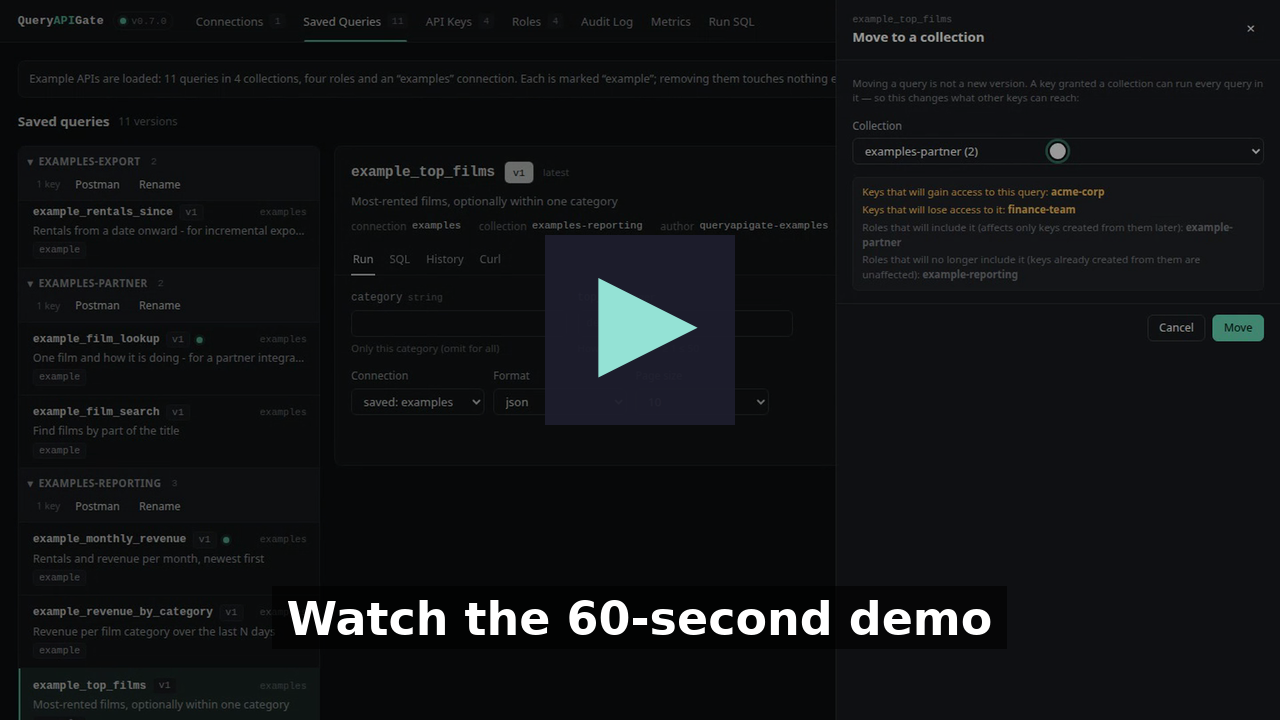
Every feature, one by one: the full walkthrough (6 minutes, in chapters)
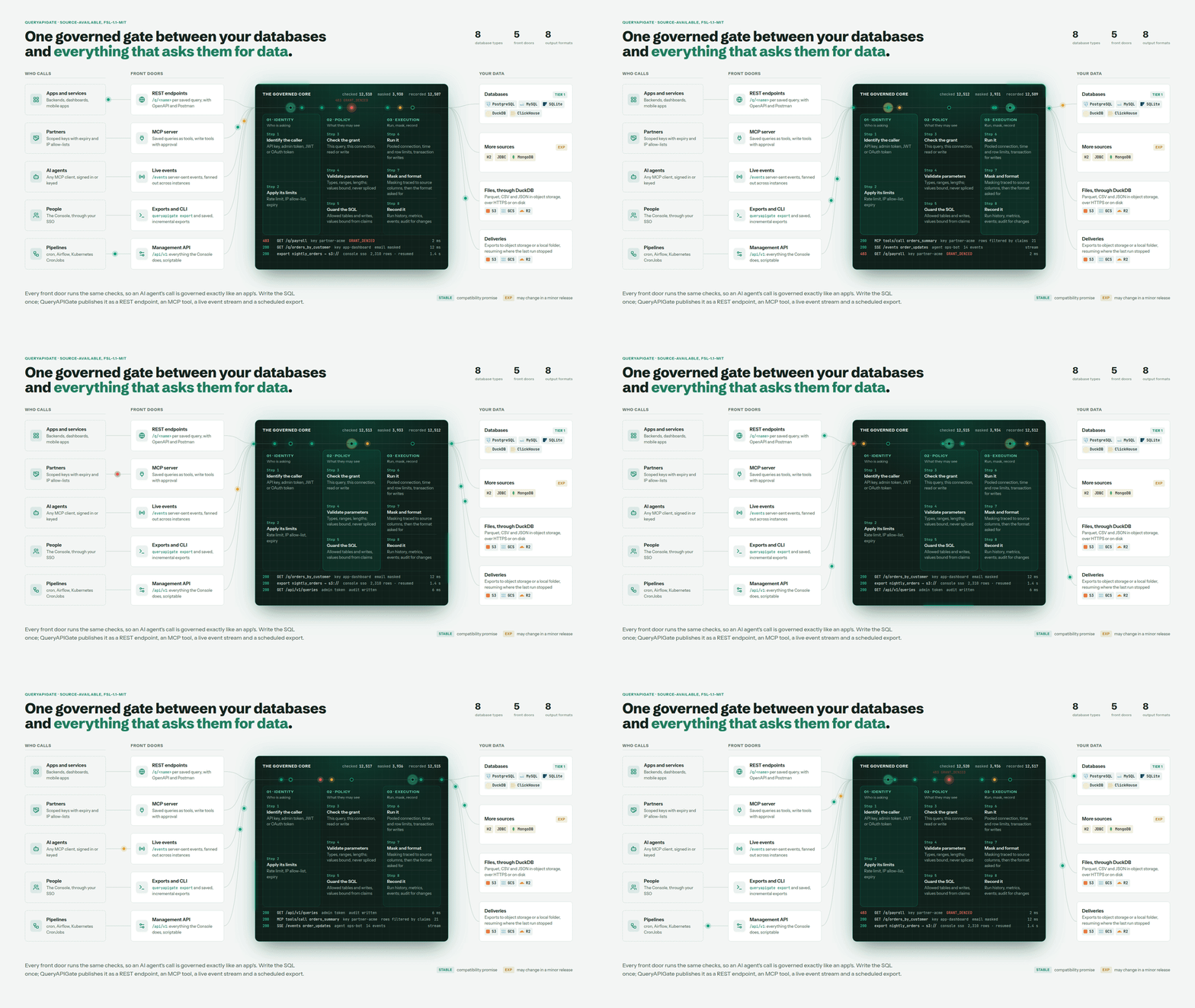
Every front door runs the same checks, so an AI agent's call is governed exactly like an app's. Write the SQL once; it's a REST endpoint, an MCP tool, a live event stream and a scheduled export.
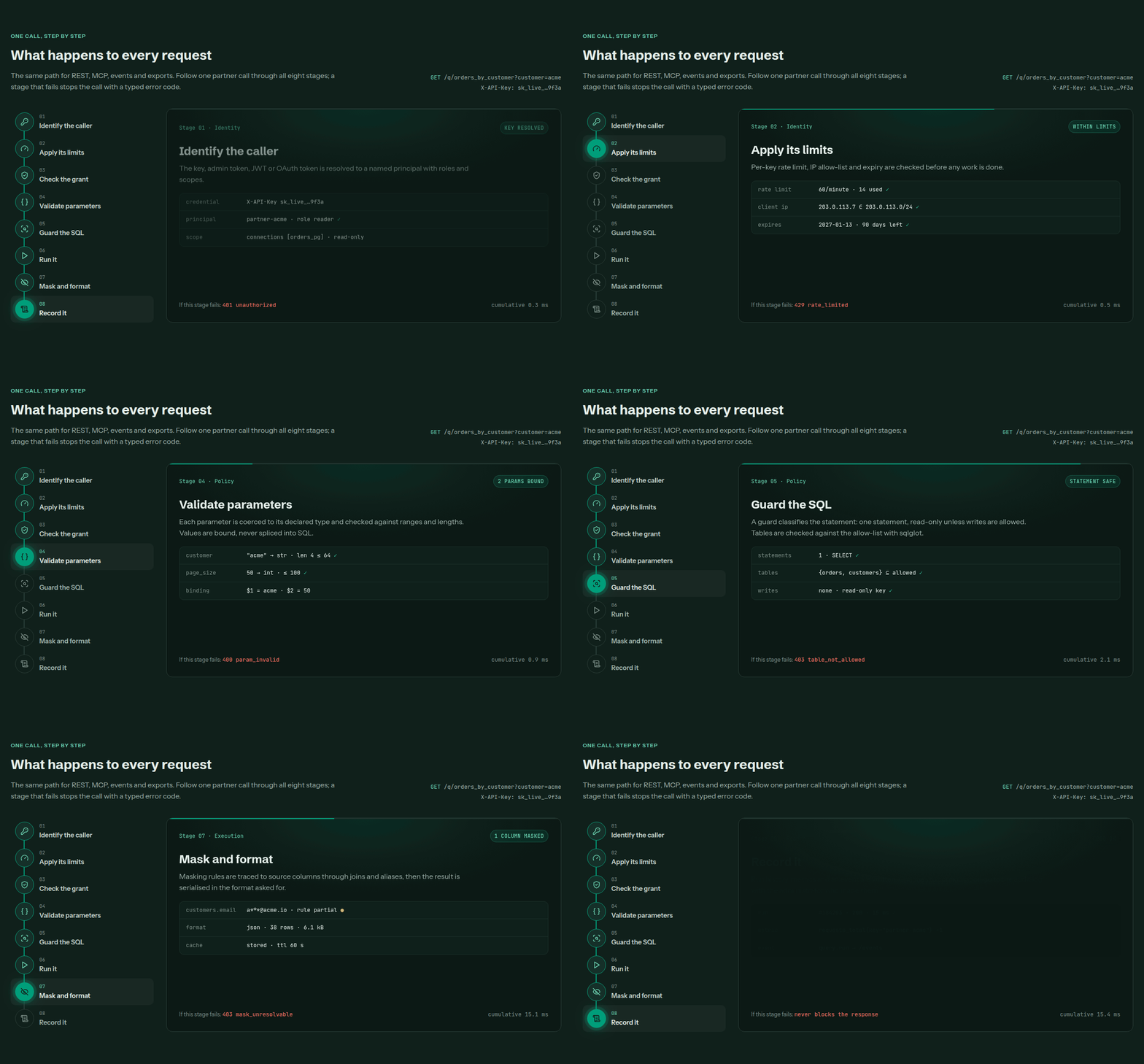
One path for REST, MCP, events and exports. A stage that fails stops the call with a typed error code - except recording, which never blocks the response.
QueryAPIGate is a self-hosted service that runs SQL against your databases - and against Parquet, CSV and JSON files on disk, S3, GCS or the web, through DuckDB - and returns the results as JSON, NDJSON, XML, YAML, CSV, TSV, Excel or Parquet. Save a query once and it becomes a versioned endpoint with typed, injection-safe parameters and run history - without writing a controller, a repository layer, pagination, auth or serialization boilerplate for it.
Write SQL. Configure the query. Apply access controls. Get an API.
$ curl 'http://127.0.0.1:5000/q/example_film_search?text=Harbor&page_size=2' -H 'X-API-Key: demo-key'
[{"film_id":48,"title":"Broken Harbor","category":"Action","rating":"PG-13"},{"film_id":44,"title":"Electric Harbor","category":"Documentary","rating":"G"}]

$ curl 'http://127.0.0.1:5000/q/example_top_films?top_n=2&category=Comedy&format=csv' -H 'X-API-Key: demo-key'
title,category,rating,rentals,rank
Electric Signal,Comedy,PG,977,1
Crimson Garden,Comedy,PG-13,631,2
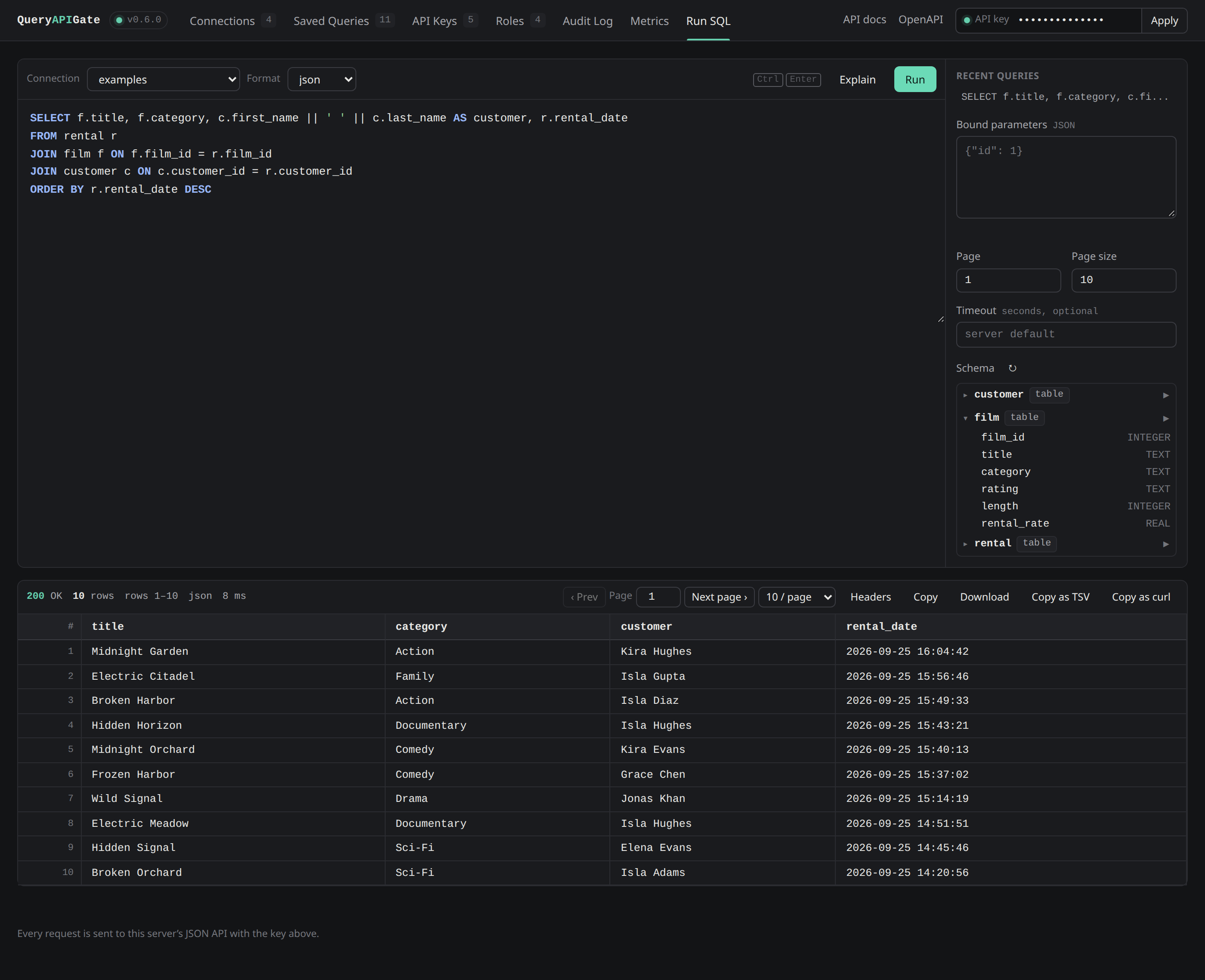
The built-in Console at /console: write SQL with completion and a schema browser, run it, then save it as an API - no separate tool to install.
More of the Console - Home, connections, keys and roles, history, the audit log, metrics, alerts, the access map - screen by screen: a tour of the Console.
Contents
- Why QueryAPIGate
- Features
- Install · Quick start · Saving a query as an endpoint
- Try it with Docker
- Documentation
- Contributing · Security · License · Contact
Why QueryAPIGate
Valuable SQL sits in reports, dashboards, ETL jobs and application code, with no way to a REST endpoint except a backend service written around each query. QueryAPIGate makes the query itself the API: write the SQL once, and it is a versioned endpoint with typed parameters, governed by who may call it, how often and what they may see - and the same query is an MCP tool for AI agents, a live event stream and a scheduled export.
It doesn't replace an application backend; it removes the boilerplate when the requirement is "expose this query safely". Use cases, how it compares to PostgREST, Hasura and others, and the thinking behind it: why QueryAPIGate.
Features
- Saved, versioned queries as endpoints -
GET /q/<name>, typed and injection-safe parameters, drafts and publishing, run history. - Scoped API keys, roles and collections - per connection, per query or per collection; expiry, IP allow-lists, rate limits, quotas, table allow-lists.
- Named administrators and SSO - admin roles and tokens, Console sign-in through your identity provider, signed-in users' JWTs.
- Column masking - hash, mask or drop what a caller mustn't see, traced through the SQL to the source column.
- An MCP server for AI agents - saved queries as tools, OAuth sign-in, write tools that wait for a person's approval.
- Eight database types, and files - PostgreSQL, MySQL, SQLite, DuckDB and ClickHouse; H2, JDBC and MongoDB; Parquet, CSV and JSON on S3, GCS, R2 or disk.
- Eight output formats, and streaming - JSON, NDJSON, XML, YAML, CSV, TSV, Excel and Parquet; whole results streamed from the database cursor.
- Exports to object storage - scheduled, incremental, to S3, GCS, R2 or a folder.
- Live events - every run as it happens, per key, with resume.
- A tamper-evident audit log - a signed hash chain, streamed to your SIEM.
- Observability - Prometheus metrics, OpenTelemetry tracing, alerts that clear themselves, a Grafana dashboard.
- Configuration as code and secrets from files and Vault.
- OpenAPI and Postman - every saved query a typed endpoint in
/openapi.jsonand/docs. - Docker, Helm and several instances - one PostgreSQL store, Redis for shared limits; signed releases with SLSA provenance.
Every feature in detail: features. Every setting: configuration.
Install
pip install "queryapigate[postgres]"         # pick the drivers you need: mysql, postgres, clickhouse, h2, duckdb
# or everything:                        pip install "queryapigate[all]"
SQLite needs no extra driver. H2 and generic JDBC connections (queryapigate[h2]) also need a Java runtime; H2's own
driver jar is bundled, a JDBC connection to another vendor brings its own. DuckDB (queryapigate[duckdb]) needs no
external runtime either - it's a native Python extension, same as SQLite. queryapigate[encryption] adds
encryption at rest for connection passwords -
only needed if you set QUERYAPIGATE_SECRET_KEY.
From a clone: pip install -e ".[dev]". Or use Docker - see below.
Quick start
Fastest: queryapigate examples load && queryapigate serve installs four worked example APIs
(reporting, dashboard, export, partner) you can try, and queryapigate examples unload removes them again. Loading
them creates a real API key per scenario, which also means the server now requires a key for every request - set
QUERYAPIGATE_API_KEY yourself first so you have an admin key on hand for ad-hoc SQL too:
QUERYAPIGATE_API_KEY=demo-key queryapigate examples load    # also prints one scoped key per scenario - store them now
QUERYAPIGATE_API_KEY=demo-key queryapigate serve             # http://127.0.0.1:5000
The examples come with a small generated examples database (films, customers and rentals), so you can also run ad-hoc SQL
straight away:
curl -X POST 'http://127.0.0.1:5000/execute_sql?page_size=3' -H 'X-API-Key: demo-key' -H 'Content-Type: application/json' \
     -d '{"sql": "SELECT film_id, title, rating FROM film WHERE film_id > :min", "params": {"min": 10}, "connection_name": "examples"}'
Open http://127.0.0.1:5000/docs for the interactive API reference, or http://127.0.0.1:5000/console for the admin UI to manage connections and saved queries and run ad-hoc SQL without leaving the browser.
For your own databases, run queryapigate init in an empty folder: it creates queryapigate.db with an
inactive template connection for every supported database type. Edit them (admin UI, or PATCH /api/v1/connections/<name>), set "active": true, and start the server there.
Saving a query as an endpoint
This uses the examples connection that queryapigate examples load sets up:
curl -X POST http://127.0.0.1:5000/api/v1/queries -H 'X-API-Key: demo-key' -H 'Content-Type: application/json' -d '{
  "name": "film_by_id",
  "sql": "SELECT * FROM film WHERE film_id = :id",
  "parameters": {"id": {"type": "int", "min": 1, "max": 60, "description": "Film id"}},
  "connection_name": "examples",
  "author": "me", "description": "Look up a film",
  "publish": true
}'

curl 'http://127.0.0.1:5000/q/film_by_id?id=7&format=yaml' -H 'X-API-Key: demo-key'
curl 'http://127.0.0.1:5000/q/film_by_id?id=0' -H 'X-API-Key: demo-key'
# {"error": "Invalid parameters: id must be at least 1", "errors": {"id": "must be at least 1"}}
Rules: type (int, float, str, bool), default, required, enum, min/max, min_length/max_length,
pattern and description - see the API reference.
POST /api/v1/queries/film_by_id/versions adds version 2 - a draft until published ("publish": true, or
POST .../publish); DELETE /api/v1/queries/film_by_id/versions/1 removes one version.
Add "cache_ttl": 60 to cache a response for that many seconds (X-Cache: HIT/MISS, ETag, Cache-Control) -
opt-in, and never used for a query that writes. See
Response caching.
Try it with Docker
Every release is published for linux/amd64 and linux/arm64, signed:
docker run -p 5000:5000 -v queryapigate-data:/data -e QUERYAPIGATE_API_KEY=change-me ghcr.io/anantharajuc/queryapigate:latest
Or start it in front of a PostgreSQL database seeded with sample films, with
docker-compose.yml:
docker compose up --build
curl -H 'X-API-Key: demo-key' 'http://127.0.0.1:5000/q/films_by_rating?rating=PG&max_length=90'
Open http://127.0.0.1:5000/docs, paste demo-key into the box at the top, and both saved queries are there as
endpoints; docker compose down -v cleans up.
The image tags, volumes and a real deployment - TLS, secrets, backups, Prometheus and Grafana, several instances, Kubernetes: deployment.
Documentation
The documentation site has all of it; on GitHub:
| Start | Installation and setup · Configuration · Example APIs · How-to guides |
| Reference | API · MCP server · Database connections · Query metadata · Features |
| Run it | Deployment · Technology stack · A tour of the Console |
| Security | Security policy · Threat model · Where data goes |
| Project | Why QueryAPIGate · Changelog · Roadmap · Architecture decisions |
Contributing
Contributions are welcome - database drivers, security, performance, the Console, documentation, tests. Please read CONTRIBUTING.md first: the development setup, the tests, and how a change gets in.
Security
Report a vulnerability privately - see SECURITY.md, which also has the hardening checklist for a deployment and how to verify a release.
Third-party components
The wheel bundles the H2 Database JDBC driver (MPL 2.0 / EPL 1.0). The example data is generated
locally by queryapigate examples load; no third-party datasets are included.
License
QueryAPIGate is source-available, under the
Functional Source License, Version 1.1, MIT Future License
(FSL-1.1-MIT) © Anantha Raju C. It is not an OSI-approved open source license.
In plain terms - the LICENSE is the only authoritative text:
- You may use, copy, modify and redistribute it for any purpose that is not a Competing Use - including running it inside your own company, non-commercial education and research, and professional services you provide to someone who is themselves licensed to use it.
- You may not make it available to others in a commercial product or service that substitutes for QueryAPIGate or offers the same or substantially similar functionality (for example, selling it, or hosting it as a paid service).
- Each version becomes MIT on the second anniversary of the date it was released, and can then be used under MIT terms.
- Versions up to and including 0.6.1 were released under the MIT license. They are no longer distributed (and the repository history was reset in 0.7.0), but a copy you already obtained under MIT remains yours under those terms.
Need something the license does not cover, such as offering it as part of a hosted service? Get in touch - commercial licensing may be available. This is a summary, not legal advice.
Contact
Anantha Raju C - @anantharajuc - arcswdev@gmail.com
Project link: https://github.com/AnanthaRajuC/QueryAPIGate
1 maintainer

Metadata
1 maintainer
Release files for queryapigate 0.36.0
For a detailed explanation of source distributions (sdists) and built distributions (wheels), please see the package formats documentation.
Source distribution (sdist)
| File | Size | Uploaded | |
|---|---|---|---|
| queryapigate-0.36.0.tar.gz | 3.5 MB | Details |
Built distribution (wheel)
| File | Interpreter | ABI | Platform | Reset |
|---|---|---|---|---|
| queryapigate-0.36.0-py3-none-any.whl | Python 3 | none | any | Details |
Total release size: 6.8 MB
Release files / queryapigate-0.36.0.tar.gz
| Download URL | queryapigate-0.36.0.tar.gz |
|---|---|
| Size | 3.5 MB |
| Tags | Source |
|
SHA-256 checksum How to use checksums |
5e127db2efaa8cdb2330cf9477db36430c7a012c6785c896d22a1126684f209c
|
|
BLAKE2b-256 checksum How to use checksums |
6b8b1c44f1f622155742b56462f2635915637b683e7f5afacb9a7b3ab3e71a06
|
| Upload date | |
|
Uploaded using Trusted Publishing? What is trusted publishing? |
Yes |
| Uploaded via |
twine/7.0.0 CPython/3.13.14
|
Provenance
Provenance describes where a file came from. On PyPI, provenance is shared via attestations, which provide a verifiable record of the build or publishing details. View details, limitations and caveats.


PyPI Publish Attestation
PyPI verified that this artifact, at this checksum, originated from the publisher listed below.
Signed by GitHub Actions, verified by PyPI on Oct 16, 2026.
Transparency logRelease files / queryapigate-0.36.0-py3-none-any.whl
| Download URL | queryapigate-0.36.0-py3-none-any.whl |
|---|---|
| Size | 3.3 MB |
| Tags | Python 3 |
|
SHA-256 checksum How to use checksums |
88ecc5453f818b8985cfe90f552f57a9204fabf5809b32ae6a8d036441e036d1
|
|
BLAKE2b-256 checksum How to use checksums |
063da64565f9703e761b1a137448f6b26af4a68fc608133cf7a2c7f777949c10
|
| Upload date | |
|
Uploaded using Trusted Publishing? What is trusted publishing? |
Yes |
| Uploaded via |
twine/7.0.0 CPython/3.13.14
|
Provenance
Provenance describes where a file came from. On PyPI, provenance is shared via attestations, which provide a verifiable record of the build or publishing details. View details, limitations and caveats.
PyPI Publish Attestation
PyPI verified that this artifact, at this checksum, originated from the publisher listed below.
Signed by GitHub Actions, verified by PyPI on Oct 16, 2026.
Transparency log













