
Query Commander · 


Introducing Query Commander, the opensource browser-based SQL tool designed for secure and efficient database management.
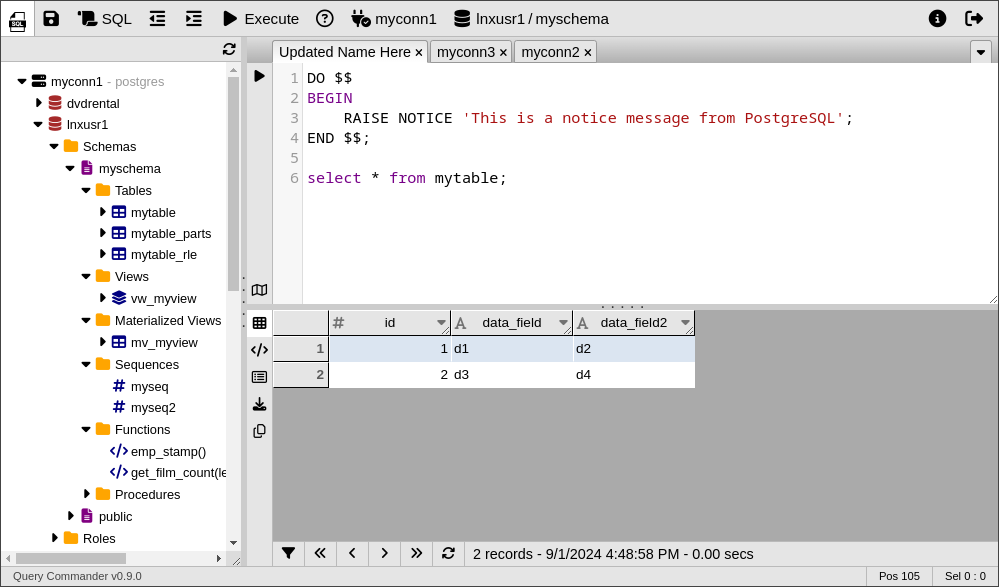
Features:
-
Database Connectivity
- Support for multiple server connections and heterogeneous targets
- Support for multiple database types:
(Oracle, PostgreSQL, Redshift, MySQL, Trino, Presto, etc.)
-
Database Management
- Viewing of database objects
- Browse Schemas
- Data export capabilities
- Explain Plain visualization
-
Metadata Access
- View table structures, constraints, indexes, relationships, roles, and permissions
- Generate ddl for views, materialized views, procedures, functions, and much more
-
User Interface
- Intuitive, familiar, and user-friendly interface
- Browser-based multi-tab and multi-window interface
- SQL Editor: Custom SQL Execution and results display
- Syntax highlighting
-
Enhanced Security
- Support for End-to-End Encryption
- Multiple authentication options (Database login-based, LDAP/Active Directory)
- Optional time-based rate limits for queries executed and/or total records retrieved by user
- Advanced permissions management with "Persona proxies" and group-based authorization
- Ideal for cloud-hosted and remote database server access
- Support for AWS Secret Manager for secure credential storage and database server info
-
Modern Hosting Options
- Traditional installation with CGI executions
- Optional Serverless installation (AWS API Gateway, Lambda, S3, DynamoDB, and Secrets Manager)
Installation
» Check out the Apache 2.x and AWS Lambda installation options.
General Installation
For local installations the easiest way to get started is to use pip as shown below:
pip install querycommander
The above installs the basic software with no built-in connectors. To install specific connectors or components use one or more of the following commands:
# Database Connectors
pip install querycommander[postgres]
pip install querycommander[mysql]
pip install querycommander[oracle]
pip install querycommander[redshift]
pip install querycommander[trino]

# Other connectors
pip install querycommander[aws] # For DynamoDB, S3, and SecretsManager features
pip install querycommander[redis] # For Redis session token storage
pip install querycommander[ldap]  # For LDAP authentication

# Install everything in one command
pip install querycommander[all]
Learn More
1 maintainer

Metadata
1 maintainer
Release files for querycommander 1.0.1
For a detailed explanation of source distributions (sdists) and built distributions (wheels), please see the package formats documentation.
Source distribution (sdist)
| File | Size | Uploaded | |
|---|---|---|---|
| querycommander-1.0.1.tar.gz | 455.5 kB | Details |
Built distribution (wheel)
| File | Interpreter | ABI | Platform | Reset |
|---|---|---|---|---|
| querycommander-1.0.1-py3-none-any.whl | Python 3 | none | any | Details |
Total release size: 700.4 kB
Release files / querycommander-1.0.1.tar.gz
| Download URL | querycommander-1.0.1.tar.gz |
|---|---|
| Size | 455.5 kB |
| Tags | Source |
|
SHA-256 checksum How to use checksums |
db9433e1cf4dbe541085dc1eb932dbfdcef7d9572f606d213203b35afb319e24
|
|
BLAKE2b-256 checksum How to use checksums |
3826286137d0020cf0685b612c87db1f5078a6fe2cb293cd846ddf169f5d49ad
|
| Upload date | |
|
Uploaded using Trusted Publishing? What is trusted publishing? |
No |
| Uploaded via |
twine/5.1.1 CPython/3.11.2
|
Release files / querycommander-1.0.1-py3-none-any.whl
| Download URL | querycommander-1.0.1-py3-none-any.whl |
|---|---|
| Size | 244.9 kB |
| Tags | Python 3 |
|
SHA-256 checksum How to use checksums |
074438201f10d25bc66c585320c0aa0dfceb49d13aaaf878fd7e7017d05caee0
|
|
BLAKE2b-256 checksum How to use checksums |
2be6a0c522bfbb3b094e1b92d557c2e0a9bbacfd85edd0edd4c267a76cea2182
|
| Upload date | |
|
Uploaded using Trusted Publishing? What is trusted publishing? |
No |
| Uploaded via |
twine/5.1.1 CPython/3.11.2
|














