
queue-watch
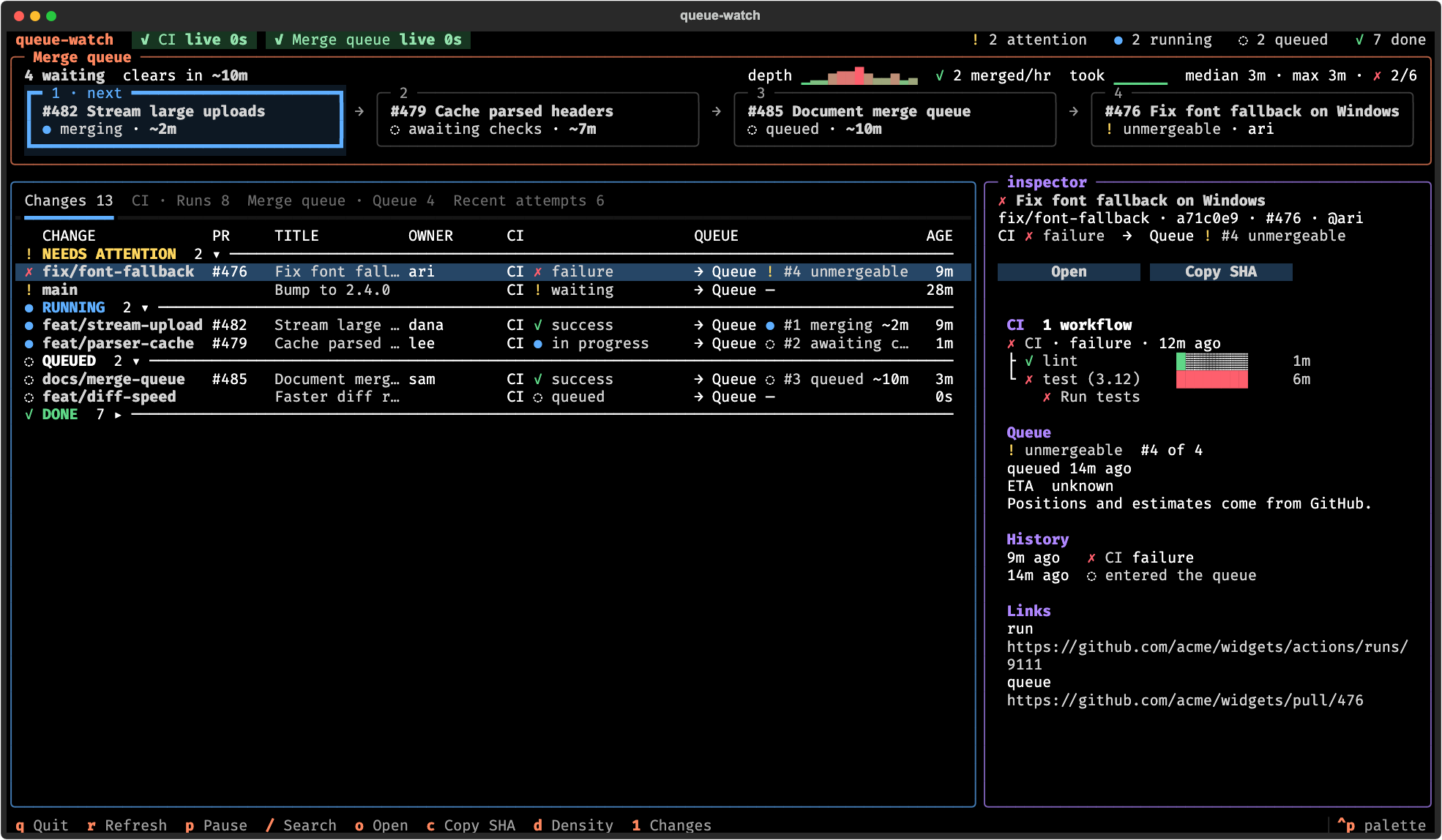
Read-only terminal dashboard for CI runs and merge queues. It joins records from every source into one row per change, so a branch's CI runs and its merge-queue entry read together, and draws each merge queue as a chain of chips in queue order. queue-watch never reruns, cancels, merges or takes a lock.
Install
uv tool install queue-watch     # or: pipx install queue-watch
uvx queue-watch                 # run once without installing
Requires Python 3.11+. The GitHub adapters use an authenticated GitHub CLI (gh auth login).
Use
queue-watch                              # inside a GitHub checkout
queue-watch --repo owner/repo            # Actions plus the merge queue, if any
queue-watch --profile work               # ~/.config/queue-watch/work.toml
queue-watch --config sources.toml        # any combination of sources
queue-watch --repo owner/repo --once     # one JSON snapshot, no TUI
queue-watch --theme nord --ascii         # any Textual theme; ASCII glyphs only
queue-watch --density comfortable        # title, owner and PR on a second line
With no flags, queue-watch looks for a .queue-watch.toml at the root of the current Git checkout. Without one, it watches the checkout's GitHub repository: Actions runs, plus the merge queue when the default branch has one. --profile NAME reads $XDG_CONFIG_HOME/queue-watch/NAME.toml (default ~/.config).
The Changes tab groups changes into Needs attention, Running, Queued and Done; every view a source reports also gets its own tab. Done starts folded while any other group has changes; press enter on a group row, or click it, to fold or unfold it. Select a change or a queue chip to see its CI checks, the jobs of the most notable one, its queue position and ETA, and recent history in the inspector.
Each merge queue gets a strip above the tabs: its entries in merge order, when it should clear, merges in the last hour, and how long recent attempts took. Queue depth over the session appears as a sparkline once two fetches have answered; sources report only the current queue, so the history starts when queue-watch does. On terminals under 30 rows the entries shrink to one line each.
Keyboard: arrows to move, 1 to 9 for tabs, / to search (esc to clear), o to open the selection in a browser, c to copy its SHA, d to switch row density, r to refresh, p to pause, q to quit. The mouse works too: click tabs, rows, chips and the inspector buttons, and scroll with the wheel. When a source fails, its last good data stays on screen and its status pill turns stale.
Repository configs need trust
A config can run commands and open SSH connections, so a .queue-watch.toml that arrives with a clone does nothing until you review it and run:
queue-watch trust
Trust covers the file's exact bytes (SHA-256, stored in $XDG_STATE_HOME/queue-watch/trusted.json). After any edit, queue-watch refuses the file and names the command to run again. Files passed with --config or --profile are yours and load without this step.
Sources
A config file lists sources as [[source]] tables. id and adapter are required; label and interval (seconds) are optional; every other key is an adapter option.
[[source]]
id = "ci"
adapter = "github-actions"
repo = "owner/repo"

[[source]]
id = "merge-queue"
adapter = "github-merge-queue"
repo = "owner/repo"
branch = "main"                          # optional; default branch otherwise

[[source]]
id = "deploys"
adapter = "command"
command = ["./bin/deploy-status", "--json"]
timeout = 20                             # optional seconds, default 25

[[source]]
id = "merges"
adapter = "flock-queue"
host = "build-host"                      # optional SSH destination
root = "~/src/project"                   # Git checkout that defines {git_dir}
lock = "{git_dir}/merge.lock"
tickets = "{git_dir}/merge.queue/*.ticket"
process = "merge.py"
owner_flag = "--owner"
history = "{git_dir}/merge-history.jsonl"
history_columns = [{ key = "fields.duration_seconds", label = "Took", format = "seconds" }]
| Adapter | Watches | Options |
|---|---|---|
github-actions |
Workflow runs, with jobs and steps in the inspector | repo |
github-merge-queue |
GitHub's native merge queue: position, state, author and GitHub's merge estimate per pull request | repo, branch |
command |
Anything else: a program that prints one snapshot | command, host, cwd, timeout |
flock-queue |
A Linux FIFO of flock-held ticket files guarding one merge lock, plus an optional JSON Lines attempt log | lock, tickets, process, root, host, interpreters, owner_flag, history, history_limit, history_columns |
Merge queue states map as QUEUED and MERGEABLE to queued, AWAITING_CHECKS and LOCKED to running, and UNMERGEABLE to blocked. A branch without a queue shows a warning instead of an error.
flock-queue reads lock holders from /proc/locks rather than acquiring them. With host set, the probe goes to python3 - over SSH on stdin and nothing is installed on the host.
Command sources
Use the command adapter for GitLab, Buildkite, Jenkins, Bors or an in-house queue. command is an argument list run without a shell. Locally it runs in cwd, which defaults to the config file's directory; relative paths resolve against that directory too. With host set, it runs over SSH (BatchMode, every argument quoted for the remote shell), in cwd on the host when given.
The program must exit zero and print one snapshot (below) on stdout within timeout seconds. Anything else, including a snapshot that breaks the contract, shows as a source error while the last good data stays on screen. examples/ has a working script and config.
Snapshot contract
Every adapter emits the same versioned snapshot (queue-watch.snapshot/1): a list of records with id, kind, state and title, plus optional ref, sha, owner, position, timestamps, url, fields and children. state is one of queued, running, blocked, success, failure, cancelled, neutral or unknown; the adapter's own term is kept in raw_state. Records that share a ref or sha describe the same change across sources. model.py defines and validates the contract, and --once prints it.
Development
uv sync
uv run pytest -q                        # includes SVG snapshot tests
uv run pytest -q --snapshot-update      # after an intended layout change
docs/screenshot.png is the wide layout snapshot rendered in a browser. To release, bump __version__ in src/queue_watch/__init__.py, merge, and push a matching vX.Y.Z tag; the release workflow tests, builds, publishes to PyPI with trusted publishing, and creates the GitHub release.
License
MIT
1 maintainer

Metadata
1 maintainer
Release files for queue-watch 0.1.0
For a detailed explanation of source distributions (sdists) and built distributions (wheels), please see the package formats documentation.
Source distribution (sdist)
| File | Size | Uploaded | Provenance | Actions |
|---|---|---|---|---|
| queue_watch-0.1.0.tar.gz | 83.2 kB | Without provenance | Details for queue_watch-0.1.0.tar.gz |
Built distribution (wheel)
| File | Interpreter | ABI | Platform | Actions Reset |
|---|---|---|---|---|
| queue_watch-0.1.0-py3-none-any.whl | Python 3 | none | any | Details for queue_watch-0.1.0-py3-none-any.whl |
Total release size: 129.6 kB
Release files / queue_watch-0.1.0.tar.gz
| Download URL | queue_watch-0.1.0.tar.gz |
|---|---|
| Size | 83.2 kB |
| Tags | Source |
|
SHA-256 checksum How to use checksums |
d415f0a974ee14b87aca052b1a6bbc5491865f139c7698b95188568ab06e6ae4
|
|
BLAKE2b-256 checksum How to use checksums |
5e01e32c051de5bb37494ca27aefc0d27f6ee14dc2d102cc77ab995a3bd453f8
|
| Upload date | |
|
Uploaded using Trusted Publishing? What is trusted publishing? |
Yes |
| Uploaded via |
uv/0.13.4 {"installer":{"name":"uv","version":"0.13.4","subcommand":["publish"]},"python":null,"implementation":{"name":null,"version":null},"distro":{"name":"Ubuntu","version":"24.04","id":"noble","libc":null},"system":{"name":null,"release":null},"cpu":null,"openssl_version":null,"setuptools_version":null,"rustc_version":null,"ci":true}
|
Release files / queue_watch-0.1.0-py3-none-any.whl
| Download URL | queue_watch-0.1.0-py3-none-any.whl |
|---|---|
| Size | 46.4 kB |
| Tags | Python 3 |
|
SHA-256 checksum How to use checksums |
4bb64ee536f493abbcf7d6a9b3a24b19f65f1de6418c7586f8e8b692afc6049b
|
|
BLAKE2b-256 checksum How to use checksums |
21f5a759d16781f1cb4e237b54276bd11d49841b4415e2bfacd5e160f6233265
|
| Upload date | |
|
Uploaded using Trusted Publishing? What is trusted publishing? |
Yes |
| Uploaded via |
uv/0.13.4 {"installer":{"name":"uv","version":"0.13.4","subcommand":["publish"]},"python":null,"implementation":{"name":null,"version":null},"distro":{"name":"Ubuntu","version":"24.04","id":"noble","libc":null},"system":{"name":null,"release":null},"cpu":null,"openssl_version":null,"setuptools_version":null,"rustc_version":null,"ci":true}
|
Security for queue-watch 0.1.0
Provenance
Provenance describes where a file came from. On PyPI, provenance is shared via attestations, which provide a verifiable record of the build or publishing details. View details, limitations and caveats.
No provenance found
None of the files in this release were uploaded with provenance metadata.
A note on package security
PyPI is a repository for distributing packages, not a service for auditing them. While third-party security researchers and our staff do their best to detect and remove malicious packages, PyPI cannot guarantee the quality, security or suitability of any given package.
To learn more about protecting yourself from malicious actors, visit our package security documentation.














