
quickpaver












🐍 A python package providing a tiling/paving toolbox.
The complete and up to date documentation can be found here: https://quickpaver.readthedocs.io.
🎯 Motivations
Designing paving layouts (aka tiling) often requires repetitive geometric calculations and careful programming to ensure that patterns and dimensions are correct. Keeping track of tiles adjacency is not trivial either and performing these tasks manually can be time-consuming and prone to errors, especially when exploring multiple design configurations or working with complex layouts.
This package aims to simplify and automate the generation of paving layouts by providing a programmatic way to create and manipulate classic paving patterns.
The implementation relies on Shapely for geometric operations and leverages the GEOS engine’s vectorization capabilities. This allows many geometric computations to be performed efficiently, enabling the generation and processing of large numbers of paving elements with good performance. As a result, the package provides both flexibility and speed, making it suitable for practical design tasks as well as research and experimentation.
🚀 Quick start
To install quickpaver, the easiest way is through pip. To run the examples you might need additional dependencies such as nested_grid_plotter for the plots.
pip install quickpaver[examples]Or alternatively using conda
conda install quickpaver[examples]You might also clone the repository and install from source
pip install -e .[examples]Once the installation is done, quickpaver is straighforward to use and proposes. In this tutorial, we will see how to generate tiling using rectangles, triangles and hexagons. We will also play with anisotropy and angles.
Start by importing the required modules
from typing import Union

import matplotlib.pyplot as plt
import nested_grid_plotter as ngp
import quickpaver
import shapely
from shapely.plotting import plot_polygon
There is a choice between three shapes: triangle, rectangle, and hexagon. By default, the shapes are regular: the triangle is equilateral, the rectangle is a square, and the hexagon is not distorted. The anisotropy allows the shape to be stretched or shortened along the y-axis.
def make_polygons():
    plotter = ngp.Plotter(
        plt.figure(figsize=(8, 8), constrained_layout=True),
        builder=ngp.SubplotsMosaicBuilder(
            mosaic=[[f"ax{i}-{j}" for j in range(3)] for i in range(3)],
            sharex=True,
            sharey=True,
        ),
    )

    for i, poly_type in enumerate(quickpaver.PolygonType.to_list()):
        for j, anisotropy_ratio in enumerate([1.0, 2.0, 0.5]):
            ax = plotter.ax_dict[f"ax{i}-{j}"]
            plot_polygon(
                quickpaver.gen_polygon(
                    poly_type.value, edge_length=30.0, anisotropy_ratio=anisotropy_ratio
                ),
                ax=ax,
            )
            ngp.hide_axis_spine(ax, loc="all")
            ax.set_aspect("equal")
            ngp.hide_axis_ticklabels(ax)
            ax.set_title(f"Anisotropy\nratio = {anisotropy_ratio:.1f}")
    return plotter.fig

make_polygons()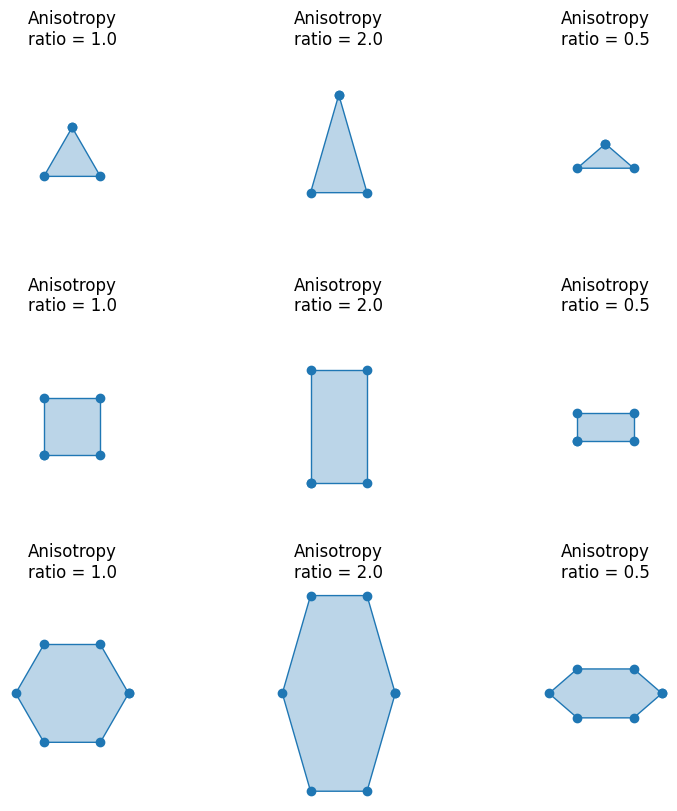
Now let’s take an example and load a simplified outline of France and Corsica.
corsica = quickpaver.load_corsica_contour()
france = quickpaver.load_france_contour()
france_and_corsica = quickpaver.load_france_and_corsica_contour()
france_and_corsica
Define a helper function to plot the results
def plot_helper(
    grid: shapely.MultiPolygon,
    surface_to_cover: Union[shapely.Polygon, shapely.MultiPolygon],
):
    plotter = ngp.Plotter()
    ax = plotter.axes[0]
    plot_polygon(surface_to_cover, ax=ax, add_points=False, color="r")
    plot_polygon(
        grid,
        ax=ax,
        add_points=False,
    )
    ax.set_aspect("equal")
    plotter.close()
    return plotter.fig
Start with a square tiling, without rotation and no anisotropy. We can see that only the meshes intersecting the surface to be covered are retained.
grid_squares_corsica_no_rot_no_ani, _adj = quickpaver.gen_polygonal_tiling(
    corsica,
    poly_type=quickpaver.PolygonType.RECTANGLE,
    edge_length=100.0,
    anisotropy_ratio=1.0,
    rot_deg=0.0,
)
plot_helper(grid_squares_corsica_no_rot_no_ani, corsica)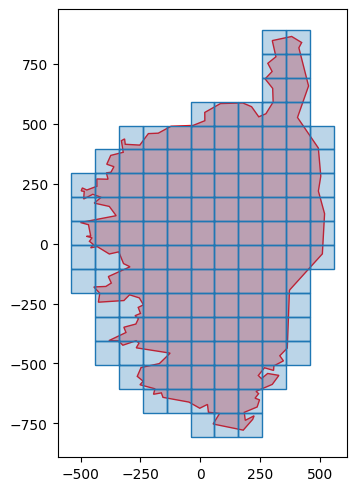
To obtain extended coverage, you simply need to modify the working domain. For example, you can choose the minimum bounding ball:
grid_squares_corsica_circle, _adj = quickpaver.gen_polygonal_tiling(
    shapely.minimum_bounding_circle(corsica).buffer(50.0),
    poly_type=quickpaver.PolygonType.RECTANGLE,
    edge_length=100.0,
    anisotropy_ratio=1.0,
    rot_deg=0.0,
)
plot_helper(grid_squares_corsica_circle, corsica)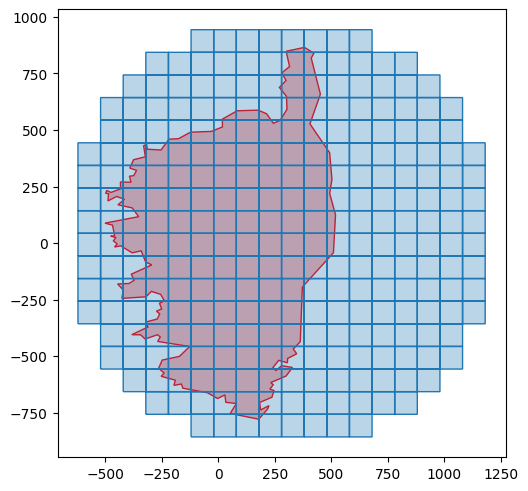
Or using the bounding box
grid_squares_corsica_rectangle, _adj = quickpaver.gen_polygonal_tiling(
    shapely.box(*corsica.bounds),
    poly_type=quickpaver.PolygonType.RECTANGLE,
    edge_length=100.0,
    anisotropy_ratio=1.0,
    rot_deg=0.0,
)
plot_helper(grid_squares_corsica_rectangle, corsica)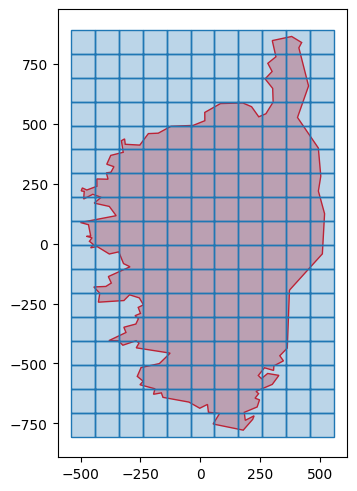
Now, let’s try with anisotropy and rotation (it goes clockwise)
grid_squares_corsica_rot_ani, _adj = quickpaver.gen_polygonal_tiling(
    corsica,
    poly_type=quickpaver.PolygonType.RECTANGLE,
    edge_length=100.0,
    anisotropy_ratio=2.0,
    rot_deg=30.0,
)
plot_helper(grid_squares_corsica_rot_ani, corsica)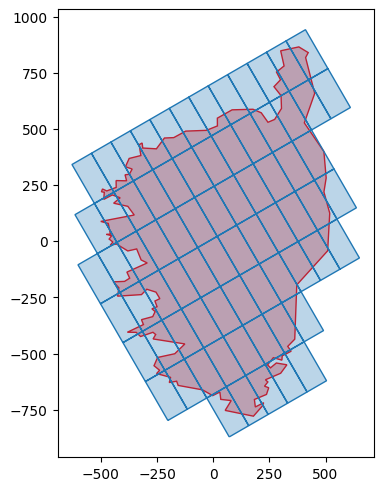
Let’s try again with different parameters
grid_squares_corsica_rot_ani2, _adj = quickpaver.gen_polygonal_tiling(
    corsica,
    poly_type=quickpaver.PolygonType.RECTANGLE,
    edge_length=100.0,
    anisotropy_ratio=0.5,
    rot_deg=-30.0,
)
plot_helper(grid_squares_corsica_rot_ani2, corsica)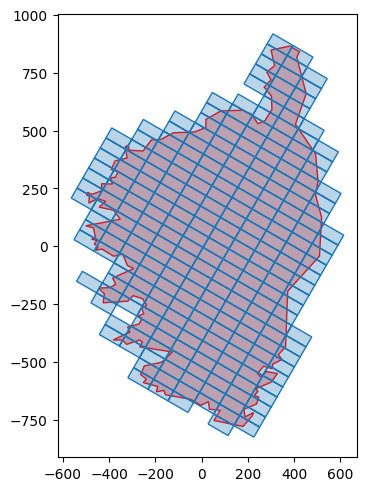
As previously introduced, hexagonal grids are also supported. Let’s now play with France outline:
grid_hexagons_france_no_rot_no_ani, _adj = quickpaver.gen_polygonal_tiling(
    france,
    poly_type=quickpaver.PolygonType.HEXAGON,
    edge_length=100.0,
    anisotropy_ratio=1.0,
    rot_deg=0.0,
)
plot_helper(grid_hexagons_france_no_rot_no_ani, france)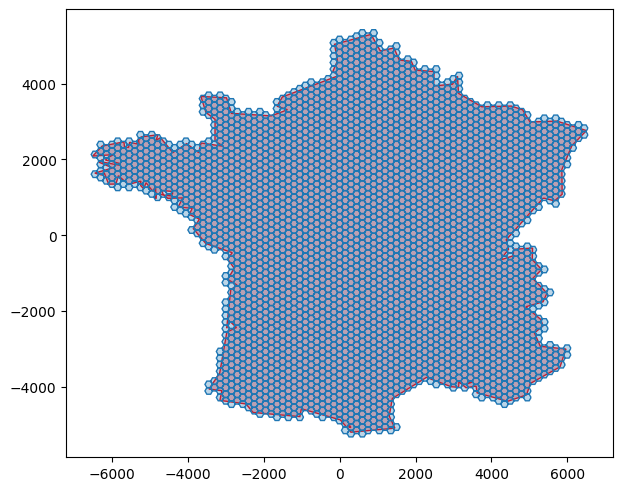
By default the hexagons are “flat-top” oriented, but it is very easily changed:
grid_hexagons_france_rot, _adj = quickpaver.gen_polygonal_tiling(
    france,
    poly_type=quickpaver.PolygonType.HEXAGON,
    edge_length=500.0,
    anisotropy_ratio=1.0,
    rot_deg=30.0,
)
plot_helper(grid_hexagons_france_rot, france)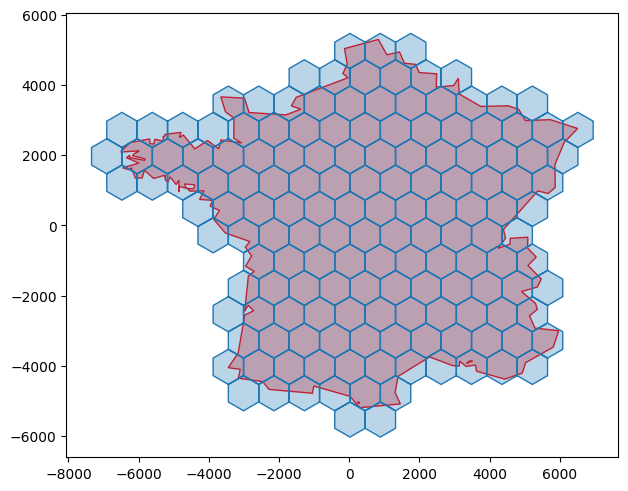
Now let’s try with triangles
grid_triangles_rot_no_ani, _adj = quickpaver.gen_polygonal_tiling(
    france_and_corsica,
    poly_type=quickpaver.PolygonType.TRIANGLE,
    edge_length=550.0,
    anisotropy_ratio=1.0,
    rot_deg=-30.0,
)
plot_helper(grid_triangles_rot_no_ani, france_and_corsica)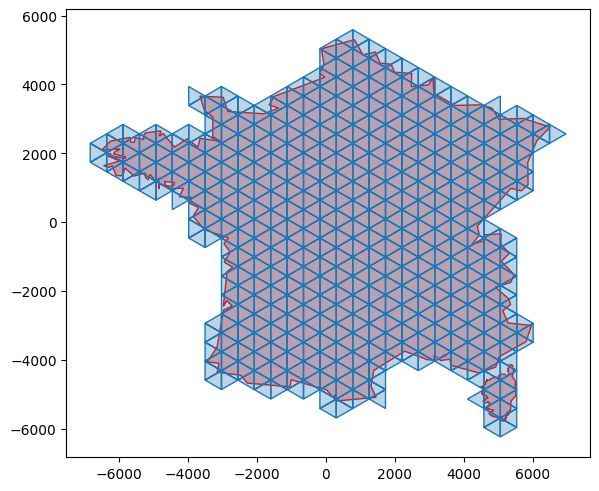
Same with anisotropy:
grid_triangles_no_rot_ani, _adj = quickpaver.gen_polygonal_tiling(
    france_and_corsica,
    poly_type=quickpaver.PolygonType.TRIANGLE,
    edge_length=500.0,
    anisotropy_ratio=3.0,
    rot_deg=0.0,
)
plot_helper(grid_triangles_no_rot_ani, france_and_corsica)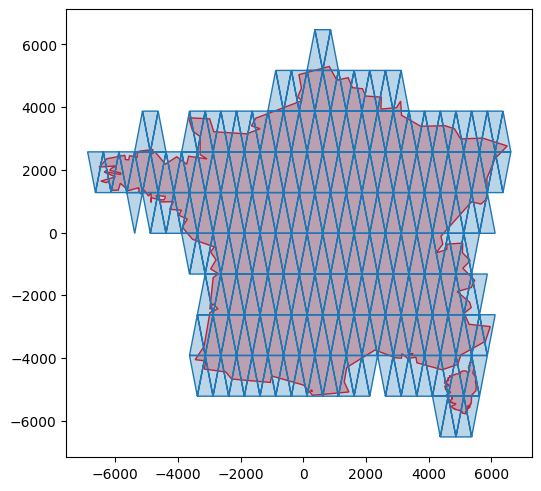
grid_triangles_no_rot_ani, _adj = quickpaver.gen_polygonal_tiling(
    france_and_corsica,
    poly_type=quickpaver.PolygonType.TRIANGLE,
    edge_length=500.0,
    anisotropy_ratio=3.0,
    rot_deg=0.0,
)
plot_helper(grid_triangles_no_rot_ani, france_and_corsica)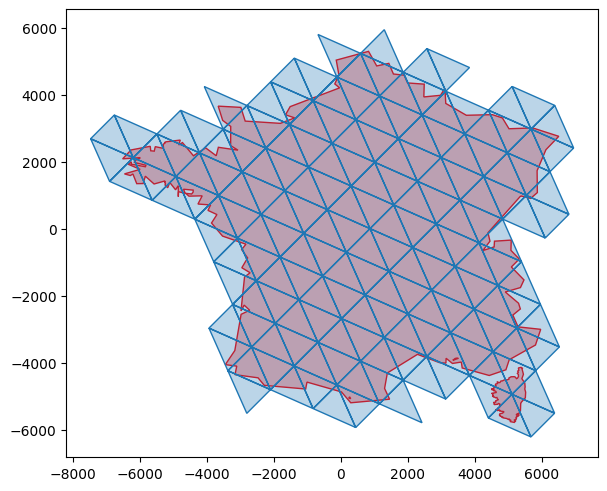
grid_triangles_rot_ani, _adj = quickpaver.gen_polygonal_tiling(
    france_and_corsica,
    poly_type=quickpaver.PolygonType.TRIANGLE,
    edge_length=1000.0,
    anisotropy_ratio=1.5,
    rot_deg=45.0,
)
plot_helper(grid_triangles_rot_ani, france_and_corsica)
It is also possible to extract both centers and vertices (the adjacency between the vertices and the centers is also provided)
centers = quickpaver.extract_tiling_centers(grid_hexagons_france_rot.geoms)
vertices, v_c_adj, clusters_2 = quickpaver.extract_tiling_vertices(
    grid_hexagons_france_rot.geoms
)

plotter2 = plot_helper(grid_hexagons_france_rot, france)
plotter2.axes[0].scatter(centers[:, 0], centers[:, 1], color="b", label="centers")
plotter2.axes[0].scatter(
    vertices[:, 0], vertices[:, 1], color="g", label="vertices"
)
plotter2.axes[0].legend()
plotter2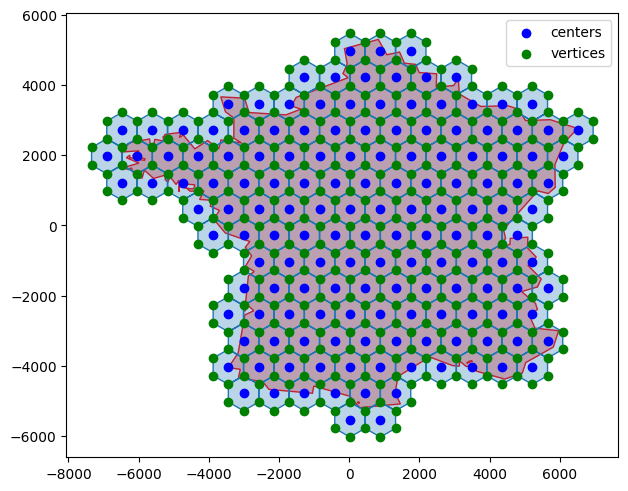
centers2 = quickpaver.extract_tiling_centers(grid_triangles_rot_ani.geoms)
vertices2, v_c_adj2, clusters_3 = quickpaver.extract_tiling_vertices(
    grid_triangles_rot_ani.geoms
)

plotter3 = plot_helper(grid_triangles_rot_ani, france_and_corsica)
plotter3.axes[0].scatter(centers2[:, 0], centers2[:, 1], color="b", label="centers")
plotter3.axes[0].scatter(
    vertices2[:, 0], vertices2[:, 1], color="g", label="vertices"
)
plotter3.axes[0].legend()
plotter3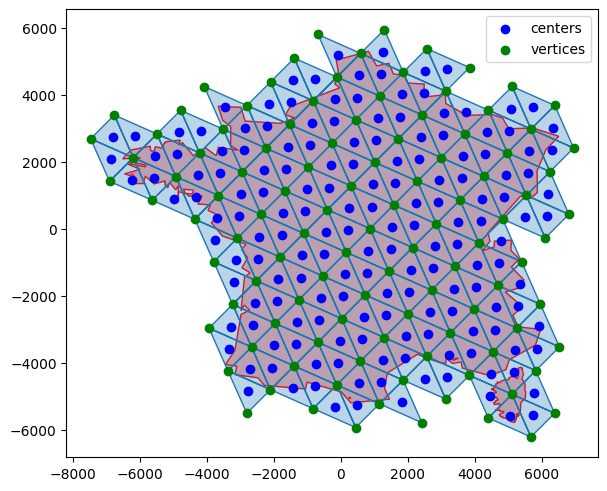
Of course, it works with holes
donut = shapely.Point((0.0, 0.0)).buffer(200.0) - shapely.Point((0.0, 0.0)).buffer(
    100.0
)

grid_hex_donut, _adj = quickpaver.gen_polygonal_tiling(
    donut,
    poly_type=quickpaver.PolygonType.HEXAGON,
    edge_length=10.0,
    anisotropy_ratio=1.0,
    rot_deg=0.0,
)
plot_helper(grid_hex_donut, donut)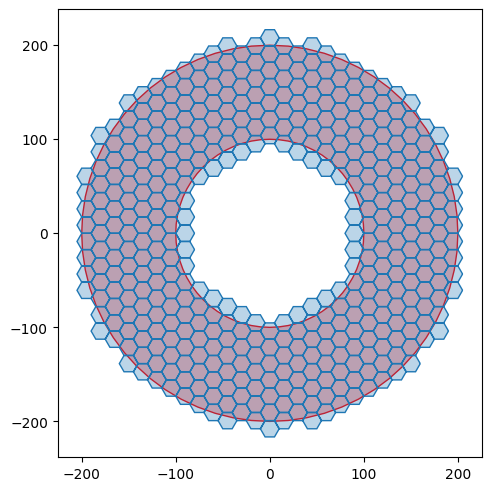
🔑 License
This project is released under the BSD 3-Clause License.
Copyright (c) 2026, Antoine COLLET. All rights reserved.
For more details, see the LICENSE file included in this repository.
⚠️ Disclaimer
This software is provided “as is”, without warranty of any kind, express or implied, including but not limited to the warranties of merchantability, fitness for a particular purpose, or non-infringement. In no event shall the authors or copyright holders be liable for any claim, damages, or other liability, whether in an action of contract, tort, or otherwise, arising from, out of, or in connection with the software or the use or other dealings in the software.
By using this software, you agree to accept full responsibility for any consequences, and you waive any claims against the authors or contributors.
📧 Contact
For questions, suggestions, or contributions, you can reach out via:
We welcome contributions!
📚 References
TODO
Free software: SPDX-License-Identifier: BSD-3-Clause
1 maintainer

Metadata
1 maintainer
Release files for quickpaver 0.6.0
For a detailed explanation of source distributions (sdists) and built distributions (wheels), please see the package formats documentation.
Source distribution (sdist)
| File | Size | Uploaded | |
|---|---|---|---|
| quickpaver-0.6.0.tar.gz | 150.0 kB | Details |
Built distribution (wheel)
| File | Interpreter | ABI | Platform | Reset |
|---|---|---|---|---|
| quickpaver-0.6.0-py3-none-any.whl | Python 3 | none | any | Details |
Total release size: 241.5 kB
Release files / quickpaver-0.6.0.tar.gz
| Download URL | quickpaver-0.6.0.tar.gz |
|---|---|
| Size | 150.0 kB |
| Tags | Source |
|
SHA-256 checksum How to use checksums |
33e8664a4e077b117af348c27fca49e4c683cb791f2ca83e50b12c93fb4eee0c
|
|
BLAKE2b-256 checksum How to use checksums |
9e3aed4aff9e38dcf1231d5bda60ea782d02963d13e39a21041737277a14835d
|
| Upload date | |
|
Uploaded using Trusted Publishing? What is trusted publishing? |
No |
| Uploaded via |
twine/6.2.0 CPython/3.14.4
|
Release files / quickpaver-0.6.0-py3-none-any.whl
| Download URL | quickpaver-0.6.0-py3-none-any.whl |
|---|---|
| Size | 91.5 kB |
| Tags | Python 3 |
|
SHA-256 checksum How to use checksums |
3cf72f5f2fbcbae2578328c806a554db3f45875082d01025e7ac7bfef8b3e197
|
|
BLAKE2b-256 checksum How to use checksums |
a4334191484cc722510d778e81ea8f6a34009296bc2d3ec66824b66bfaf55e00
|
| Upload date | |
|
Uploaded using Trusted Publishing? What is trusted publishing? |
No |
| Uploaded via |
twine/6.2.0 CPython/3.14.4
|














