
A macOS overlay for AI web applications, providing a floating window with a web view and hotkey support.

Project description
Quiper
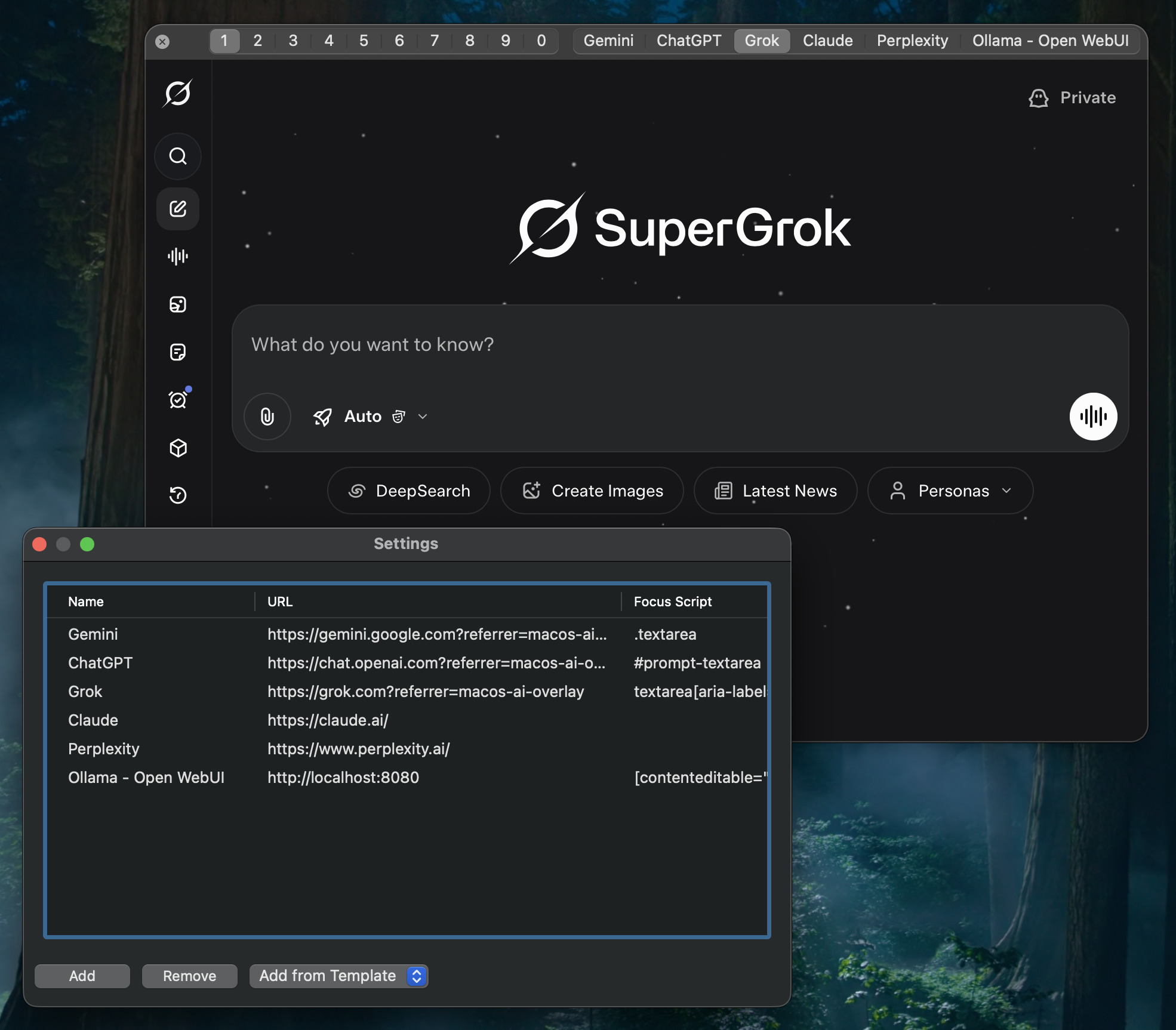
A versatile macOS application that provides a system-wide overlay for multiple AI services, including Grok, Gemini ChatGPT and everything other engine that provides a web application. This tool allows you to quickly access your favorite AI assistants with a global hotkey, quickly switch between engines and manage multiple chat instances for each service.
Features
- Multi-Service Support: Seamlessly switch between Grok and Gemini.
- Multi-Instance Chats: Manage up to 10 simultaneous chat sessions for each service.
- Global Hotkeys:
Option+Space(customizable) to show/hide the application window.Command+Control+<digit-n>to switch to nth engine.Cmd+0throughCmd+9to switch between chat instances.
- Customizable:
- Easily change the global hotkey to your preferred combination.
- Adjust the window size and position to fit your workflow. It will remember the last position and size.
- Add, remove, or reorder the AI services in the settings (
Cmd+,). - Set css selectors for auto-focusing the input box of the chatbot.
Installation
Easiest way to install and run the application is downloading it from the Latest Release and put it in your Applications folder. macOS will nag you about it being from an unidentified developer, but you can bypass that by right-clicking the app and selecting "Open".
You can also install the application using pip:
python3 -m pip install quiper
Or you can clone the repository and run it directly:
git clone https://github.com/sassanh/quiper.git
cd quiper
uv run quiper
To build the application into a standalone macOS app, run:
uv run poe build-app
The dmg file will be created in the dist directory. You can then drag the app to your Applications folder.
To have the application launch automatically at login, run:
/Applications/quiper.app/Contents/MacOS/quiper --install
How It Works
This application is built with PyObjC, which allows Python to interact with Apple's native Objective-C frameworks. It creates a borderless, always-on-top window that contains a WKWebView for each chat instance. The global hotkeys are registered using the quickmachotkey library, and the application state is managed in the AppController class.
Contributing
This is an open-source project, and contributions are welcome. If you have ideas for new features or improvements, please open an issue or submit a pull request on the GitHub repository.
License
This project is licensed under the MIT License. See the LICENSE file for details.
Credits
It is greatly inspired by the macos-grok-overlay project by tchlux, which was originally designed for the Grok AI service. The base of this codebase is mostly copied from that project, mostly the boilerplate code for setting up the macOS application.
Most of the code has been written with gemini-cli and grok. That's why it is so unorganized and messy :D If people find it useful, I will refactor it and make it cleaner, maybe even rewrite it in Swift.
Release history Release notifications | RSS feed


Download files
Download the file for your platform. If you're not sure which to choose, learn more about installing packages.
Source Distribution
Built Distribution
Filter files by name, interpreter, ABI, and platform.
If you're not sure about the file name format, learn more about wheel file names.
Copy a direct link to the current filters
File details
Details for the file quiper-0.1.2.tar.gz.
File metadata
- Download URL: quiper-0.1.2.tar.gz
- Upload date:
- Size: 160.2 kB
- Tags: Source
- Uploaded using Trusted Publishing? Yes
- Uploaded via: twine/6.1.0 CPython/3.13.7
File hashes
| Algorithm | Hash digest | |
|---|---|---|
| SHA256 |
8c263ef039c5101cd1036a8dfffb9dc0315562fb8c020555505efa8d370808bc
|
|
| MD5 |
e460f920dcc74b19ba84e0cea459b3f0
|
|
| BLAKE2b-256 |
2be116b488fdaf38bcf5cd0a96bc86fc71929ef7cea6c4ffb6ec4859e3ea6488
|
Provenance
The following attestation bundles were made for quiper-0.1.2.tar.gz:
Publisher:
integration_delivery.yml on sassanh/quiper
-
Statement:
-
Statement type:
https://in-toto.io/Statement/v1 -
Predicate type:
https://docs.pypi.org/attestations/publish/v1 -
Subject name:
quiper-0.1.2.tar.gz -
Subject digest:
8c263ef039c5101cd1036a8dfffb9dc0315562fb8c020555505efa8d370808bc - Sigstore transparency entry: 484301934
- Sigstore integration time:
-
Permalink:
sassanh/quiper@71a028e57e3ed40cb615533ed1a0a9b41d02fbeb -
Branch / Tag:
refs/tags/v0.1.2 - Owner: https://github.com/sassanh
-
Access:
public
-
Token Issuer:
https://token.actions.githubusercontent.com -
Runner Environment:
github-hosted -
Publication workflow:
integration_delivery.yml@71a028e57e3ed40cb615533ed1a0a9b41d02fbeb -
Trigger Event:
push
-
Statement type:
File details
Details for the file quiper-0.1.2-py3-none-any.whl.
File metadata
- Download URL: quiper-0.1.2-py3-none-any.whl
- Upload date:
- Size: 161.1 kB
- Tags: Python 3
- Uploaded using Trusted Publishing? Yes
- Uploaded via: twine/6.1.0 CPython/3.13.7
File hashes
| Algorithm | Hash digest | |
|---|---|---|
| SHA256 |
84ec12d1e65a21cef5c2e27785a28e748eec5e05c15b826bb8c3d21477176ada
|
|
| MD5 |
d2163e4235715d338c1be906f212139b
|
|
| BLAKE2b-256 |
7a6f088784150bfeff3bbc34daa451316e633702d262ac9ce7f00976ec685c16
|
Provenance
The following attestation bundles were made for quiper-0.1.2-py3-none-any.whl:
Publisher:
integration_delivery.yml on sassanh/quiper
-
Statement:
-
Statement type:
https://in-toto.io/Statement/v1 -
Predicate type:
https://docs.pypi.org/attestations/publish/v1 -
Subject name:
quiper-0.1.2-py3-none-any.whl -
Subject digest:
84ec12d1e65a21cef5c2e27785a28e748eec5e05c15b826bb8c3d21477176ada - Sigstore transparency entry: 484301936
- Sigstore integration time:
-
Permalink:
sassanh/quiper@71a028e57e3ed40cb615533ed1a0a9b41d02fbeb -
Branch / Tag:
refs/tags/v0.1.2 - Owner: https://github.com/sassanh
-
Access:
public
-
Token Issuer:
https://token.actions.githubusercontent.com -
Runner Environment:
github-hosted -
Publication workflow:
integration_delivery.yml@71a028e57e3ed40cb615533ed1a0a9b41d02fbeb -
Trigger Event:
push
-
Statement type:






