





QU.I.R.K. — v5.27.0
Quantum Infrastructure Readiness Kit is a consulting-grade cryptographic inventory and quantum-readiness assessment tool.
QU.I.R.K. is an agentless scanner that finds the cryptography running in an environment: TLS and SSH services, identity infrastructure (SAML, Kerberos, AD CS, JWT/OIDC), mail and message brokers, container images, source code, databases, cloud key management (AWS, Azure, GCP, HashiCorp Vault, Kubernetes), and network and OT/ICS hardware. QU.I.R.K. is dashboard-first and CLI-complete. Run a scan, review the results and download the deliverable in the browser, or script the same scans from the command line for automation, scheduling, sensors and repeat engagements.
It produces three things:
- a Cryptography Bill of Materials (CBOM) in CycloneDX JSON and XML;
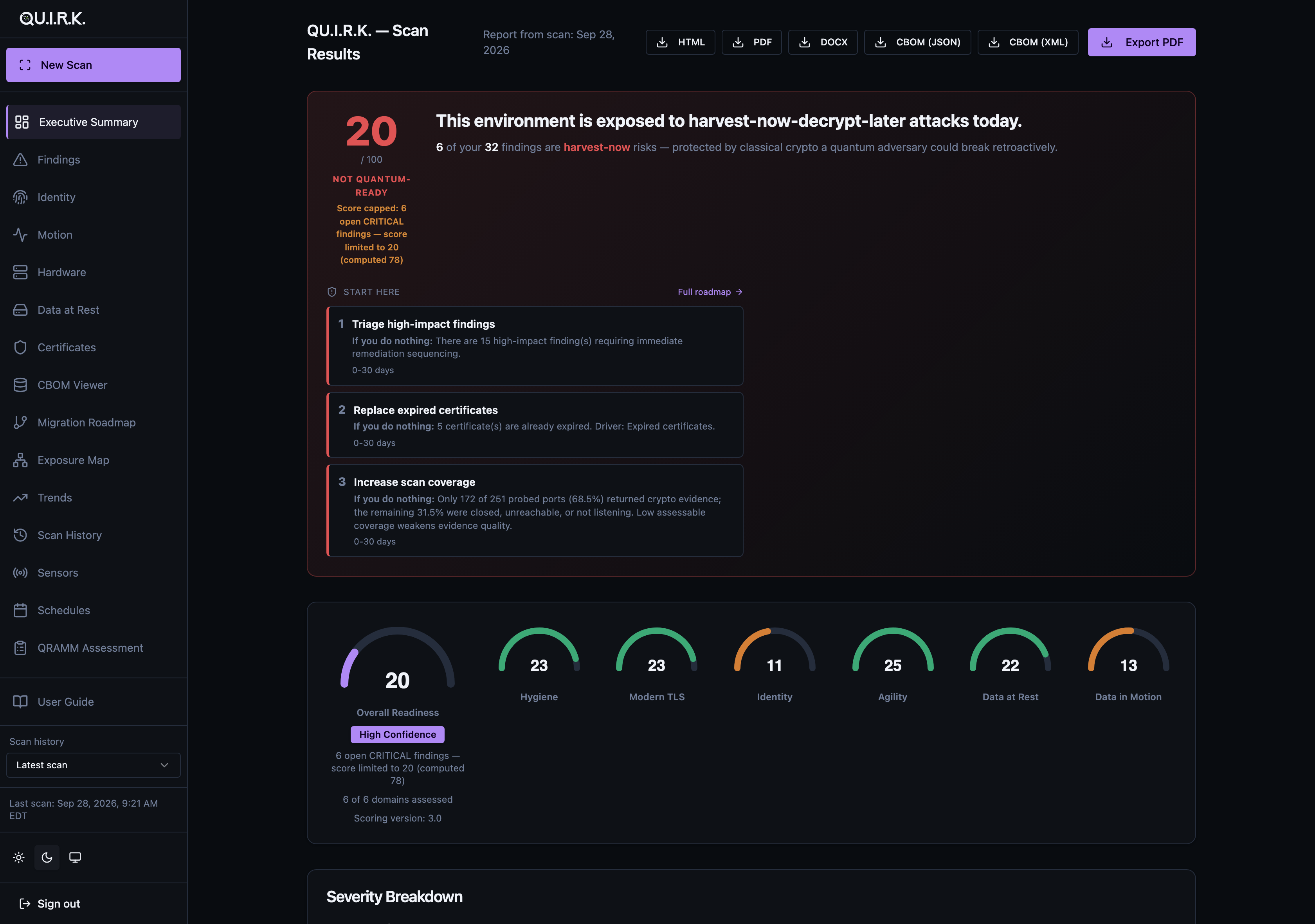
- a 0–100 quantum-readiness score with six subscores;
- a prioritized migration roadmap, in client-ready PDF, DOCX and HTML reports.
For your role
For the security consultant. QU.I.R.K. produces the deliverable:
- a CycloneDX CBOM;
- a 0–100 quantum-readiness score with six subscores (Hygiene, Modern TLS, Identity, Agility, Data at Rest, Data in Motion);
- a written executive narrative;
- a prioritized remediation roadmap, in PDF, DOCX and HTML.
Nothing is installed on the systems being scanned.
For the IT generalist. Start with the simple question: what crypto do we even have running? QU.I.R.K. lists the TLS endpoints, SSH hosts, certificates, container images and cloud KMS keys it finds, and marks the quantum-vulnerable algorithms among them. Browse the results in the dashboard before committing to any remediation work.
For the compliance officer. QU.I.R.K. assigns network hardware a CNSA 2.0 remediation tier, maps its findings to FIPS 140-3 / CMVP, PCI-DSS 4.0.1, HIPAA, ISO 27001:2022 and SOC2 CC (the Trust Services Criteria), and tracks the US federal PQC transition deadlines (EO 14412). Each mapping is dated and re-verified on a CI-enforced review cadence. The output (CBOM JSON/XML, PDF reports) can be attached to an audit response.
Quick Start
Install into a virtual environment. This is recommended on every platform and required on Debian 12, Kali and other distributions that mark their system Python as externally managed (see the note below).
python3 -m venv .venv && source .venv/bin/activate
pip install 'quirk-scanner[all]'
quirk serve                    # opens the dashboard at http://127.0.0.1:8512
Then click New Scan in the sidebar, enter your targets and start the scan. Results appear in the dashboard when it finishes.
Prefer a script? Every scan also runs from the command line:
quirk init                     # writes a starter config.yaml — edit the targets
quirk --config config.yaml     # run the scan
Use a venv. Debian 12, Kali and other distributions that mark their system Python as "externally managed" (PEP 668) reject a bare
pip installinto the system Python witherror: externally-managed-environment. Keep the quotes around'quirk-scanner[all]': zsh, the default shell on macOS 10.15 and later and on Kali's desktop images, otherwise treats[all]as a glob and fails withno matches found. Full walkthrough: Installation → Parrot OS / Kali / Debian.
The dashboard has no login by default and is meant for local use. To require one, run quirk token generate --config config.yaml, then start quirk serve from the same directory; see Configuration → dashboard authentication. For a walkthrough of each step, follow the Getting Started guide.
What QU.I.R.K. Scans
Always on. Every scan does these against its targets:
- TLS / HTTPS: certificate metadata and chain, cipher suites, protocol versions, and PQC-hybrid key exchange detection (X25519MLKEM768; needs a host
opensslwith ML-KEM). - SSH: host key, key exchange, MAC and cipher algorithms, read by the
ssh-auditbinary. ssh-audit is not installed with QU.I.R.K.; without it onPATH, the scan records only each SSH server's banner. - Hardware fingerprinting: for each SSH host, vendor, model and CNSA 2.0 remediation tier, from its SSH banner, its HTTP management page and, when neither identifies the vendor, an SNMP v2c
publicquery (sent without--enable-snmpwhen the[hw]extra is installed). Firmware CVEs and end-of-life dates are matched against built-in offline tables.
On by default in the standard and deep scan profiles (the default profile is standard; quick leaves them off, and enable_email: false or enable_broker: false turns them off):
- Email: TLS / STARTTLS on the SMTP, submission, IMAP and POP3 ports of each host the TLS phase scanned. The dashboard flags STARTTLS-stripping risk on SMTP port 25.
- Message brokers: Kafka, RabbitMQ (AMQPS and management API) and Redis TLS on the same hosts and any
broker_targets, plus the Azure Service Bus namespaces and AWS SQS regions you list.
Opt-in. Each of these is enabled with a config key or flag:
| Area | What it inspects | Needs |
|---|---|---|
| JWT / OIDC APIs | JWKS keys and signing algorithms, following OIDC discovery | enable_jwt |
| OpenAPI specs | Declared security schemes, plaintext servers, unauthenticated endpoints | --openapi-spec |
| REST crypto fuzzing | Active probing of an API's crypto posture, with an optional JWT algorithm-confusion probe (--fuzz-jwt-alg-confusion); asks for interactive confirmation and does not run without a terminal |
--fuzz with a local --openapi-spec file, [api] extra |
| SAML / OIDC identity providers | IdP metadata signing and encryption certificates and algorithms | enable_saml |
| Kerberos | KDC encryption types, from an unauthenticated AS-REQ | enable_kerberos, [identity] extra |
| AD CS | CA certificates and templates, read over LDAP; checks templates for ESC1–ESC8 misconfigurations (ESC4/5/7/8 recorded as coverage gaps), which feed the score and the CBOM | enable_adcs |
| S/MIME | S/MIME certificates discovered via LDAP (reads no mail) | enable_smime |
| Code signing | Code-signing certificates from LDAP userCertificate |
--inventory-code-signing |
| DNSSEC | DNSKEY / DS algorithms | enable_dnssec |
| Container images | Crypto libraries found in the image SBOM | enable_container, syft |
| Source code | Cryptographic API usage (Semgrep p/cryptography) |
enable_source, semgrep |
| Databases | PostgreSQL / MySQL TLS enforcement | enable_db |
| AWS | ACM, KMS, CloudFront, ELB listeners, RDS and S3 encryption (EKS is under Kubernetes) | enable_aws / enable_s3 |
| Azure | Application Gateway TLS policy and Blob encryption. Key Vault key scanning has a known defect and currently records no keys | enable_azure / enable_blob |
| GCP | Cloud KMS (including PQC algorithms), Cloud SQL TLS, GCS encryption | enable_gcp |
| HashiCorp Vault | Transit key types (including ML-DSA / SLH-DSA), PKI mounts, auth methods | enable_vault |
| Kubernetes | EKS / GKE / AKS secrets-encryption configuration; lists secret types but never reads secret data | enable_k8s with k8s_provider (eks, gke or aks) |
| SNMP | A sweep of the targets for device identity via SNMP v2c / v3 (auth + priv) | --enable-snmp, [hw] extra |
| Modbus/TCP | One read-only device-identification request | --enable-modbus, [hw] extra |
| BACnet/IP | Who-Is, then model name and firmware revision | --enable-bacnet, [hw] extra |
[all] covers the cloud, database, broker, email, AD CS, report and dashboard dependencies. It deliberately leaves out [hw] (SNMP, Modbus, BACnet), [api] (REST fuzzing) and [identity] (Kerberos). Install those explicitly, e.g. pip install 'quirk-scanner[all,hw]'. The Configuration Reference documents every key.
Output
- Quantum-readiness score (0–100) with six subscores: Hygiene, Modern TLS, Identity, Agility, Data at Rest, Data in Motion. The headline score (in the report and on the dashboard's Executive page) is capped while CRITICAL findings remain open; trend and sensor-merge scores do not apply that cap. No score reaches 100 unless a hybrid post-quantum key exchange is observed.
- CBOM in CycloneDX JSON and XML. Hardware is modelled as DEVICE components with FIRMWARE children.
- Reports in PDF, DOCX and HTML, plus CLI markdown. The HTML report (which the PDF prints), the DOCX report and the CLI executive summary take their executive content from one shared content model, and each carries a written executive narrative and a NOW / NEXT / LATER migration roadmap. The CLI also writes the roadmap on its own as
roadmap-*.md. The PDF needs Playwright and its Chromium browser; without them the scan skips the PDF and still writes the HTML report. - Web dashboard (
quirk serve) with these views: executive summary, findings with a per-finding storyline, identity, data in motion, data at rest, certificates, hardware inventory, CBOM viewer, migration roadmap, quantum exposure map (endpoints linked by a shared key or a shared issuing CA), trends, scan history, scan comparison, schedules, sensors and QRAMM assessment, plus a New Scan page that starts a scan from the browser. Light and dark themes are included. - Distributed mode: on-prem sensors scan isolated network segments and push their results to a central console.
quirk sensor mergebuilds one CBOM and score from them, but it currently keeps only one endpoint per sensor (a known defect). A Windows sensor build ships as a GitHub Release asset. - Integrations: notifications for scheduled scans and hardware lifecycle changes, SIEM CEF export, and Jira / ServiceNow ticket creation.
Four sample CBOMs live in examples/cbom/: TLS-only, identity, data at rest and data in motion. They are built from synthesized chaos-lab endpoints, not from a live scan.
Documentation
| Guide | Description |
|---|---|
| Getting Started | From install to first scan in three steps, using the dashboard |
| Installation | System requirements and install steps for macOS, Linux and Windows WSL |
| Configuration Reference | Every config.yaml option and every flag in quirk --help |
| Operator's Guide | Running engagements: scope, allowlists, scheduling, sensors |
| Connector Guides | Setup for AWS, Azure, GCP, Kubernetes, HashiCorp Vault, databases, Docker and Git |
| Cloud Console Deployment | Running the console on a cloud VM with internal sensors pushing to it |
| Report Interpretation | What the score, subscores and common findings mean, with Client Conversation notes |
| CBOM Guide | What a CBOM is and how to cite it as compliance evidence |
| Chaos Lab Guide | A Docker lab of deliberately weak crypto services to scan. Its compose file publishes almost every service port on all host interfaces, so we recommend running it on an isolated host that untrusted networks cannot reach |
| Intelligence Schema | The intelligence-*.json output format |
| Upgrade Guide | Cross-version upgrades with quirk db migrate |
| Release Process | Publishing, and Sigstore attestation verification |
What's New in v5.27
v5.27.0 is the first release since v5.25.0, so it carries both the v5.26 accessibility work and the v5.27 launch-readiness work. There are no score-model changes (SCORING_VERSION stays 3.0), so v5.27 scores are comparable with v5.25 scores.
- Score gauges no longer draw mirrored. A score of 20 out of 100 used to draw an arc that looked about 90% full.
- Accessibility. More dashboard badges meet WCAG AA contrast, and a dashboard table too wide or too tall for its space is a single Tab stop that the keyboard can scroll.
- A brand identity. The logo appears in this README, the report colophon, the PDF footer, the favicon and the dashboard sidebar, and the dashboard accent is now Ink-violet.
- Every user-facing doc was reviewed claim by claim, and the README hero image was retaken.
- Security hardening of configuration loading, URL fetching and sensor enrollment.
- Upgrade notes.
quirk serveexits with an error when its config file exists but cannot be read, and protected API routes answer 503 in that state.quirk sensor enrollandquirk sensor pushrequire anhttps://console URL for non-loopback hosts unless--allow-insecure-consoleis given, so re-enroll existing sensors that use anhttp://console.
The full per-release history is in CHANGELOG.md.
Install
- PyPI:
pip install 'quirk-scanner[all]'(see Quick Start). Releases are published through PyPI Trusted Publishers with Sigstore attestations; verify them as described in Release Process. - Windows sensor: a zip with the frozen
quirk.exeand PowerShell install and uninstall scripts is attached to each GitHub Release from v5.12.0 onward. The installer registers a daily Scheduled Task.
No
curl | bashinstaller. This is deliberate. Piping HTTP into a shell bypasses the integrity guarantees of Sigstore attestations and Trusted Publishers. Seedocs/release-process.md.
Develop from source
git clone https://github.com/0xD1g5/QU.I.R.K
cd QU.I.R.K
python3 -m venv .venv && source .venv/bin/activate
pip install -e '.[dashboard]'
playwright install chromium
quirk --help
The editable install is for contributors. End users should install from PyPI.
License
MIT. See LICENSE.
1 maintainer

Metadata
1 maintainer
Release files for quirk-scanner 5.27.0
For a detailed explanation of source distributions (sdists) and built distributions (wheels), please see the package formats documentation.
Source distribution (sdist)
| File | Size | Uploaded | |
|---|---|---|---|
| quirk_scanner-5.27.0.tar.gz | 3.0 MB | Details |
Built distribution (wheel)
| File | Interpreter | ABI | Platform | Reset |
|---|---|---|---|---|
| quirk_scanner-5.27.0-py3-none-any.whl | Python 3 | none | any | Details |
Total release size: 4.7 MB
Release files / quirk_scanner-5.27.0.tar.gz
| Download URL | quirk_scanner-5.27.0.tar.gz |
|---|---|
| Size | 3.0 MB |
| Tags | Source |
|
SHA-256 checksum How to use checksums |
62c814a291379829e5e14f8aaa1ae0d903d2af8e3f4818a05d7346ffb8a65500
|
|
BLAKE2b-256 checksum How to use checksums |
0fdc0d4a299fb2bdb1e9131e5086233394eef11afa80b1cbb860ecee2cff649e
|
| Upload date | |
|
Uploaded using Trusted Publishing? What is trusted publishing? |
Yes |
| Uploaded via |
twine/6.1.0 CPython/3.13.13
|
Provenance
Provenance describes where a file came from. On PyPI, provenance is shared via attestations, which provide a verifiable record of the build or publishing details. View details, limitations and caveats.


PyPI Publish Attestation
PyPI verified that this artifact, at this checksum, originated from the publisher listed below.
Signed by GitHub Actions, verified by PyPI on Oct 15, 2026.
Transparency logRelease files / quirk_scanner-5.27.0-py3-none-any.whl
| Download URL | quirk_scanner-5.27.0-py3-none-any.whl |
|---|---|
| Size | 1.7 MB |
| Tags | Python 3 |
|
SHA-256 checksum How to use checksums |
2f62fe40bd787947ef12e01fa9d1320c72ff31e39941b9dff9955401f749b07f
|
|
BLAKE2b-256 checksum How to use checksums |
57fcb6d0dce44014555ee21a58c3ac9e5bd9dafc2c87e52051243d2df41bbaa6
|
| Upload date | |
|
Uploaded using Trusted Publishing? What is trusted publishing? |
Yes |
| Uploaded via |
twine/6.1.0 CPython/3.13.13
|
Provenance
Provenance describes where a file came from. On PyPI, provenance is shared via attestations, which provide a verifiable record of the build or publishing details. View details, limitations and caveats.
PyPI Publish Attestation
PyPI verified that this artifact, at this checksum, originated from the publisher listed below.
Signed by GitHub Actions, verified by PyPI on Oct 15, 2026.
Transparency log













