
Fork of the Directory-Tree Package that displays out the Tree Structure of a Particular Directory with the added functionality to export to a Directory_Tree text file.

Project description
Quirky_Director Package



About
Want to Save your Project / Current Working Directory as a Neat Tree to a Text file? No Worries!
Quirky_Director is a Fork of the Directory-Tree Package that displays
out the Tree Structure of a Particular Directory with the added functionality to export to a Directory_Tree text file.
Currently Available for All Platforms.
Installation
Run the Following Command on your Terminal to Install quirky_director:
1 . Installing the Package using pip:
pip install quirky_director
OR
pip3 install quirky_director
2 . Cloning the Repository:
git clone https://github.com/SahilDave04/Quirky_Director/
cd Quirky_Director
pip install -e .
You can use either of the above methods to install quirky_director.
Usage
Function Signature
DisplayTree(
    dirPath: str='',
    stringRep: bool=False,
    header: bool=False,
    maxDepth: float=float('inf'),
    showHidden: bool=False,
    ignoreList: List[str]=None,
    onlyFiles: bool=False,
    onlyDirs: bool=False,
    sortBy: int=0,
    exportTxt: bool=False
) -> Union[str, None]:
Arguments Description
| Parameters | CLI Parameters | Description |
|---|---|---|
| dirPath | directory |
Root Path of Operation. By Default, Refers to the Current Working Directory. |
| stringRep | N/A | Boolean Flag for Direct Console Output or a String Return of the Same. By Default, It Gives out Console Output. |
| header | --header |
Boolean Flag for Displaying [OS & Directory Path] Info in the Console. Not Applicable if stringRep=True. |
| maxDepth | -L, --max-depth |
Max Depth of the Directory Tree. By Default, It goes upto the Deepest Directory/File. |
| showHidden | -a, --show-hidden |
Boolean Flag for Returning/Displaying Hidden Files/Directories if Value Set to True. |
| ignoreList | -I, --ignore-list |
List of File and Directory Names or Patterns to Ignore. |
| onlyFiles | -f, --only-files |
Boolean Flag to Display Only Files |
| onlyDirs | -d, --only-dirs |
Boolean Flag to Display Only Directories |
| sortBy | --sort-by |
Sorting order. Possible Options: 0 - Default, 1 - Files First, 2 - Directories First |
| raiseException | --raise-exception |
Boolean Flag to Raise Exception. By Default, It Doesn't Raise Exception |
| printErrorTraceback | --print-error-traceback |
Boolean Flag to Print Error Traceback. By Default, It Doesn't Print Error Traceback |
| exportTxt | -o, --exportTxt |
Boolean Flag to Export Directory Tree to TXT File |
Command Line
- Treating the Cloned Directory as Executable -
(Works if you've cloning privileges but not of installation. You can clone the repo, go to its root and run the below)
python quirky_director
OR
python -m quirky_director
Use the inline help for command-line options:
python quirky_director --help
- Treating the Package as Module -
(You would need to install (pip) the Python Package in your system for the below to work)
quirky_director
Use the inline help for command-line options:
quirky_director --help
In Code
Example Script to Print out the Tree Structure of a User-Defined Directory directoryPath!
# Importing Libraries
from quirky_director import DisplayTree

# Main Method
if __name__ == '__main__':
    DisplayTree(directoryPath)
- Here by default, the
directoryPathis the current working directory (CWD) unless specified by the user.
Output Examples
Sample Directory Tree -
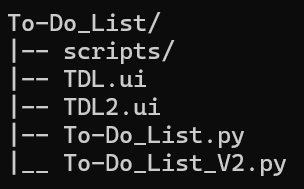
- For Current Working Directory with Argument [Header Info =
False]
from quirky_director import DisplayTree

DisplayTree()
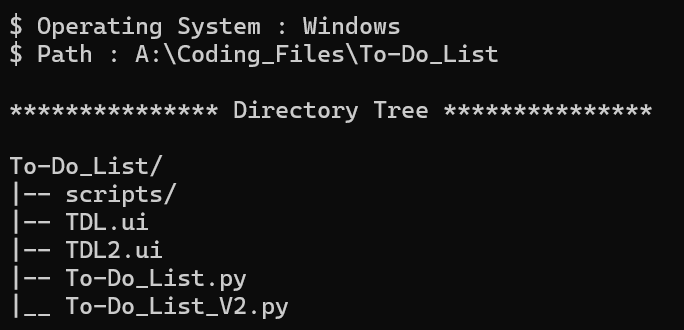
- For User Specified Directory with Arguments [String Representation =
True, Show Hidden Entities =True]
from quirky_director import DisplayTree

customPath: str = 'A://Coding_Files//To-Do_List'
stringRepresentation: str = DisplayTree(customPath, stringRep=True)
print(stringRepresentation)
Security & Probable Bugs
Quirky_Directoruses recursion. It will raise aRecursionErroron really deep directory trees.- As the tree is lazily evaluated, it should behave well on really wide directory trees. Immediate children of a given directory are not lazily evaluated, though. It would be prompted to the last.
- If you're a Windows user, it is always advised to use
\\instead of\in the address as using\might catchup escape sequences and corrupt the address string.
Contact Author
Name : Sahil Dave
Forked From : rahulbordoloi/Directory-Tree
Made with ♥ in Python!
Release history Release notifications | RSS feed

Download files
Download the file for your platform. If you're not sure which to choose, learn more about installing packages.
Source Distribution
Built Distribution
Filter files by name, interpreter, ABI, and platform.
If you're not sure about the file name format, learn more about wheel file names.
Copy a direct link to the current filters
File details
Details for the file quirky_director-1.0.0.tar.gz.
File metadata
- Download URL: quirky_director-1.0.0.tar.gz
- Upload date:
- Size: 28.3 kB
- Tags: Source
- Uploaded using Trusted Publishing? No
- Uploaded via: twine/6.2.0 CPython/3.12.0
File hashes
| Algorithm | Hash digest | |
|---|---|---|
| SHA256 |
a514037967ff2b5d5435ff8741d581e2a96e3074c180f414d05a05e1e11d54c7
|
|
| MD5 |
b56c3eec5706f544fd159cbad95bb566
|
|
| BLAKE2b-256 |
d6d32de9f393d9a19817b82139441d6017afddd194c5121bceae441eaad7d238
|
File details
Details for the file quirky_director-1.0.0-py3-none-any.whl.
File metadata
- Download URL: quirky_director-1.0.0-py3-none-any.whl
- Upload date:
- Size: 24.6 kB
- Tags: Python 3
- Uploaded using Trusted Publishing? No
- Uploaded via: twine/6.2.0 CPython/3.12.0
File hashes
| Algorithm | Hash digest | |
|---|---|---|
| SHA256 |
65601021e7d3b7c862694b2dfc30c823632ea5bcd86f33ede1035218e382edb4
|
|
| MD5 |
72be3b4e032147a8c39fde6252b76e4b
|
|
| BLAKE2b-256 |
9fad0f4e482097f1c2ea65329f04ff9d7a1f89371d490956c33098ea5ce2be21
|






