
A tool to create and edit quizzes, for LabQuiz and more

Project description



Visual editor for creating, managing, and exporting LabQuiz question banks.
quiz_editor is a Streamlit-based application designed to help instructors build structured quiz databases for use with LabQuiz — without manually editing YAML files. quiz_editor can also be useful outside of LabQuiz as a general quiz-editor with export capabilities.
It supports question authoring, template variable simulation, encryption, tagging, and export to multiple formats.
Why quiz_editor?
While LabQuiz uses YAML files for defining quizzes, editing them manually can become tedious for large question banks.
quiz_editor provides:
- A visual interface for question creation
- Support for multiple question types
- Built-in encryption & encoding
- Export to multiple formats (subset of questions, HTML, AMC-$\LaTeX$)
- Tagging, Categories and filtering system
- Template variable simulators
Installation
From PyPI
pip install quiz-editor
From source
pip install git+https://github.com/jfbercher/labquiz.git#subdirectory=quiz_editor
Launch
An entry-point is provided that allows to simply use
quiz_editor
Or use the hosted version:
👉 https://jfb-quizeditor.streamlit.app/
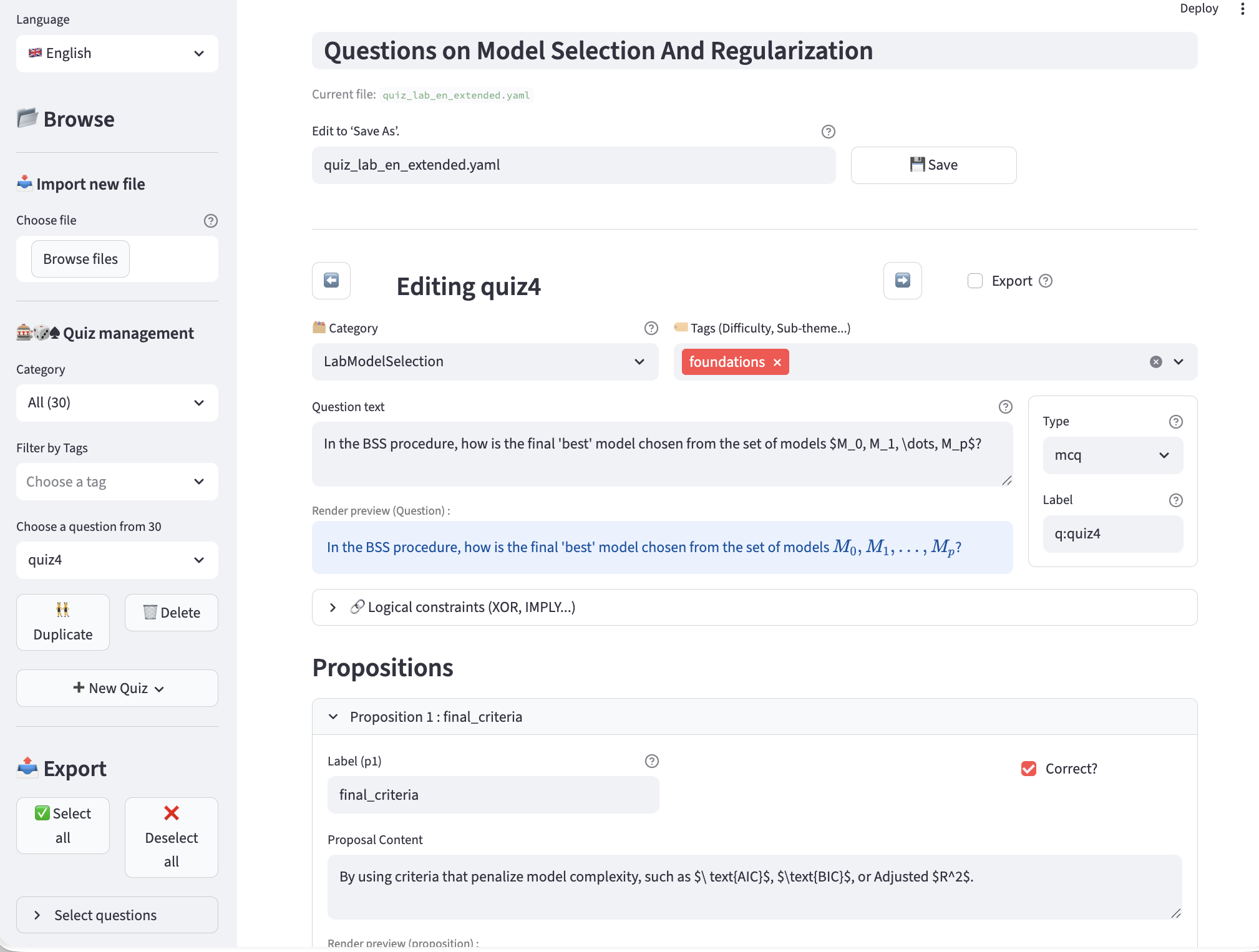
quiz_editor -- editing a question, with category, tags, choice of question type (multiple choice, numeric, etc.)
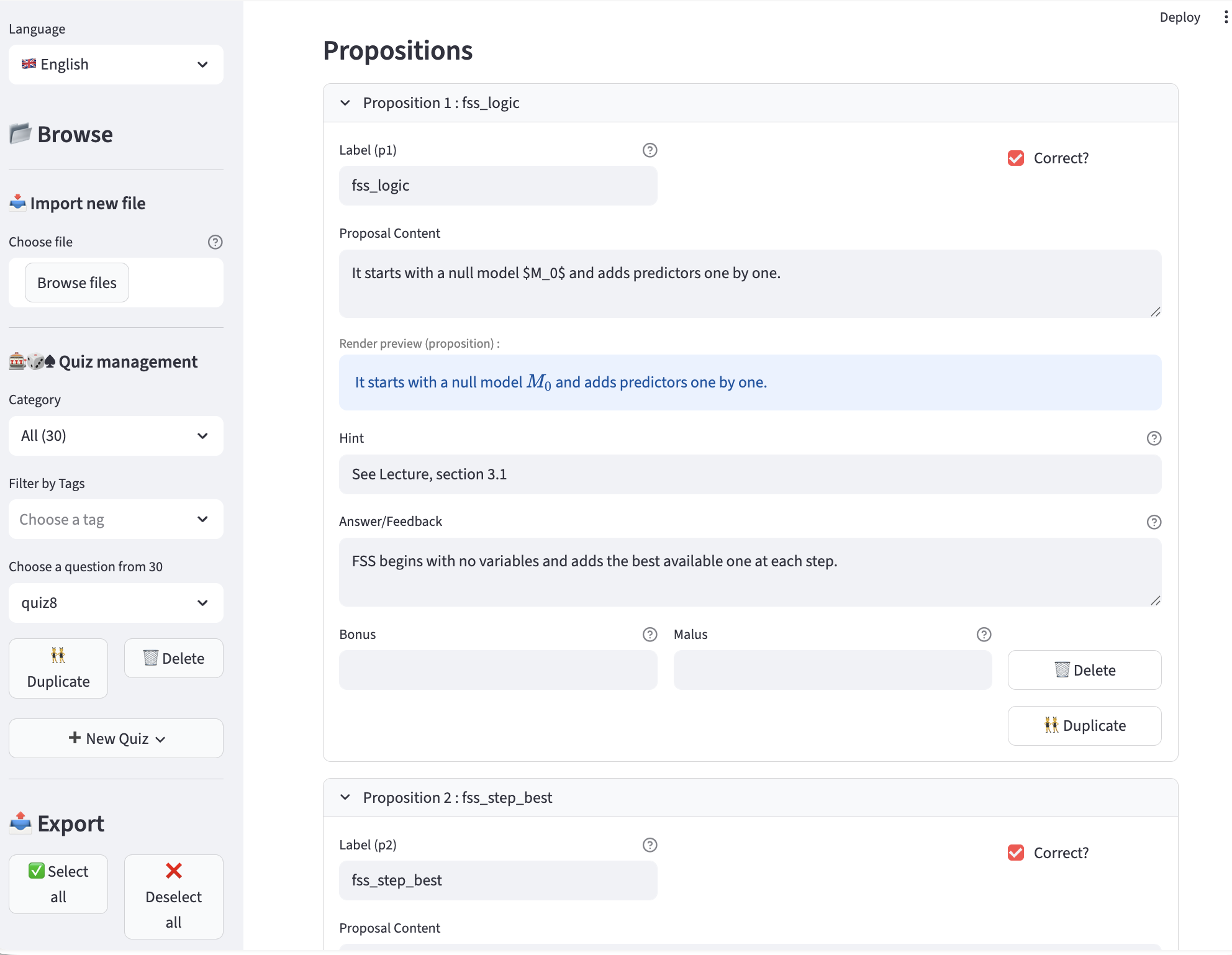
quiz_editor -- editing a proposition -- correct or incorrect, hint (tip), answer (displayed during correction), bonus, penalty, etc.
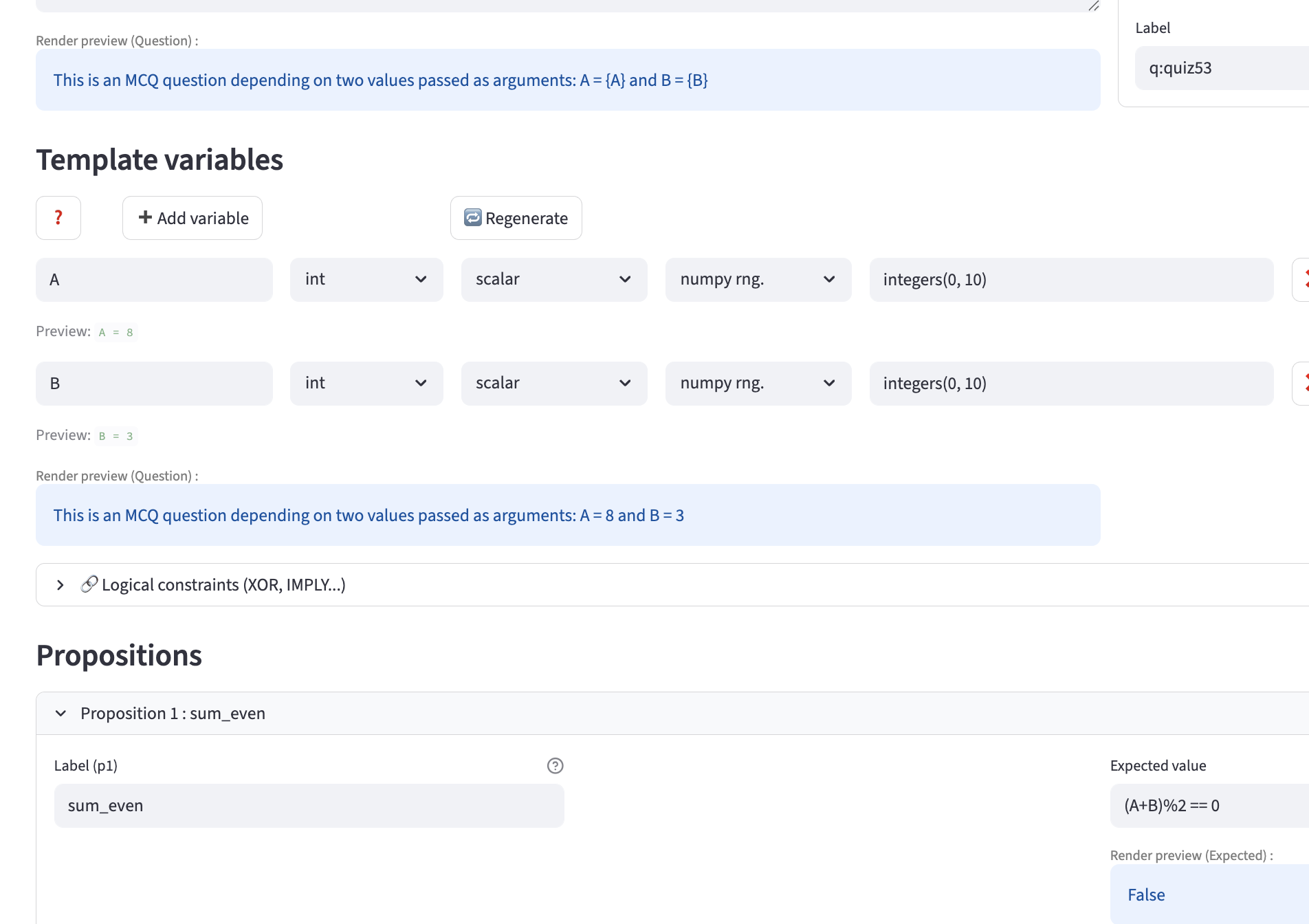
quiz_editor -- example of template usage with potentially external variables, including an editor preview based on automatically generated variables.
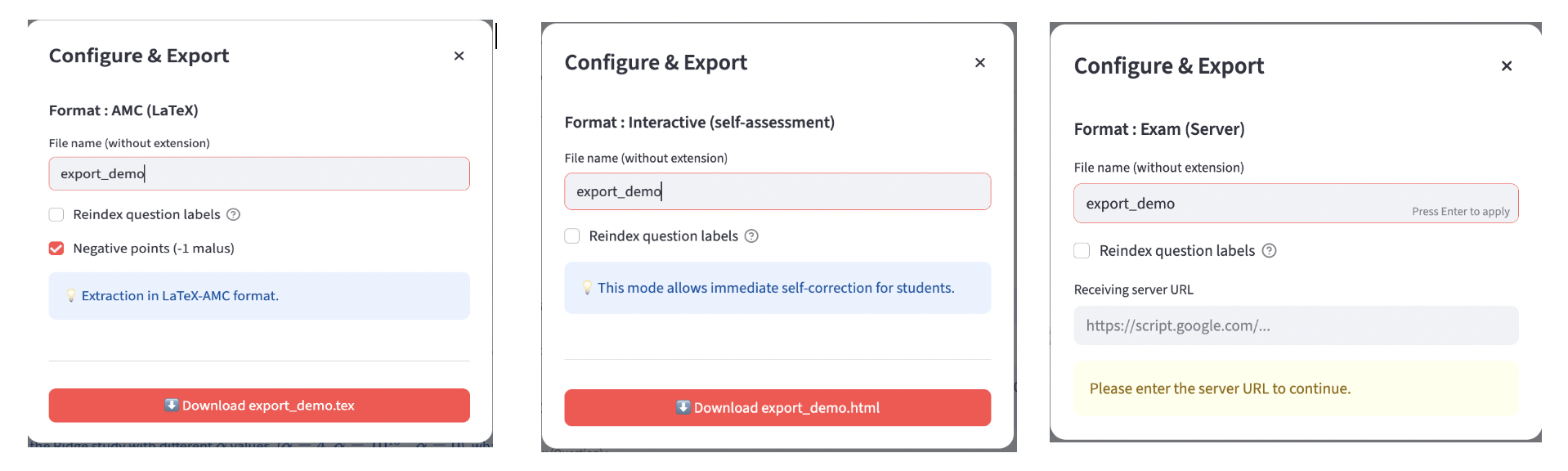
quiz_editor -- Export examples (AMC-$\LaTeX$, interactive HTML, HTML-exam)
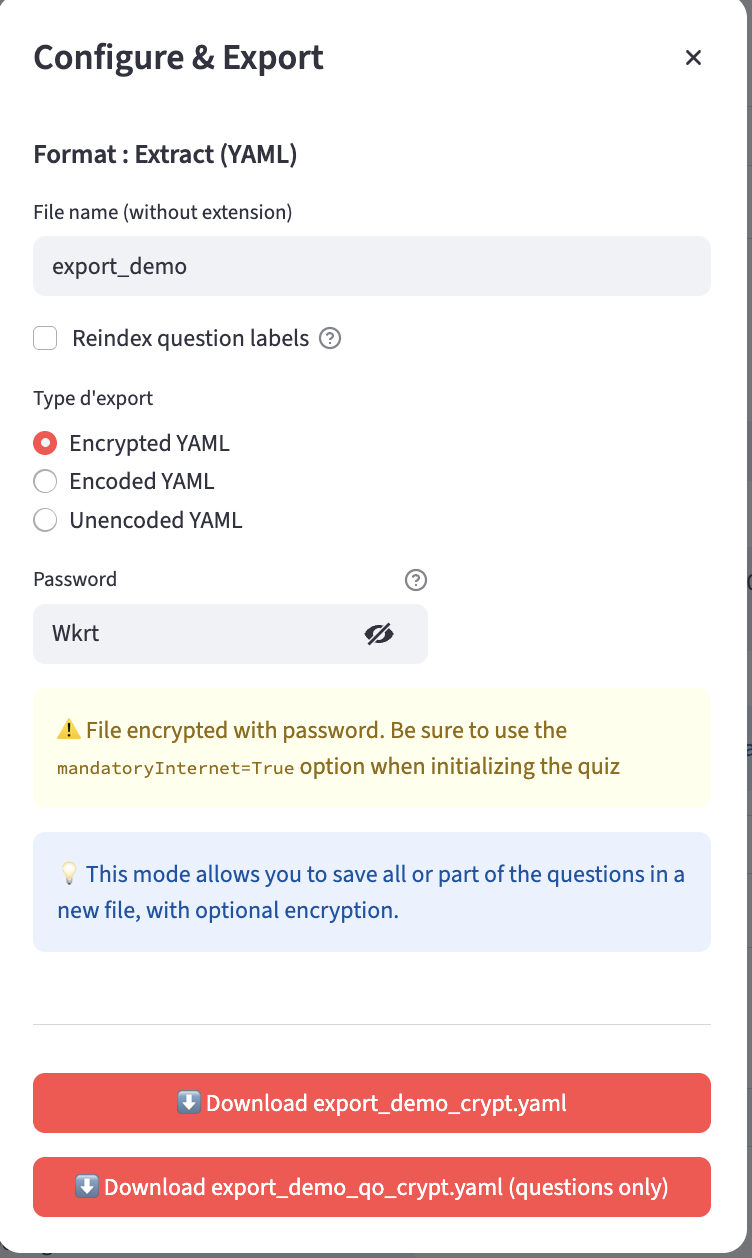
quiz_editor -- YAML Export with normal/encoded/encrypted options and question-only file
Supported Question Types
mcq— Multiple choicenumeric— Numerical with tolerancemcq-template— Parameterized MCQnumeric-template— Parameterized numeric
Template Variable Simulation
For template questions, quiz_editor allows you to define variable generators (“simulators”) directly in the interface.
Each variable can specify:
type(int, float, etc.)structure(scalar, vector, …)engine(e.g., NumPy RNG)call(generation function, e.g.integers(0,10,size=1))
This enables:
- Dynamic generation of values
- Testing template behavior before export
- Automatic inclusion of variable definitions in the YAML file
- Consistent export to LabQuiz, HTML, or AMC formats
These simulators make template questions robust and reusable across sessions.
Features
Question Management
- Create / edit / delete questions
- Add categories and tags
- Define logical constraints (XOR, IMPLY, SAME, IMPLYFALSE)
- Configure bonuses and penalties
- Define tolerances for numerical answers
- Template variables simulation: define variable generators directly in the interface, which enable dynamic generation of values in LabQuiz and in HTML, or AMC exports.
Export Options
quiz_editor can export to:
- ✅ YAML (LabQuiz format)
- 🔐 Encrypted version
- 🔎 Base64-encoded version
- 🌍 Interactive HTML (training mode)
- 📝 HTML exam version (Google Sheet connected)
- 📄 AMC–LaTeX format (for paper exams)
This allows reuse of the same question bank across:
- Notebook-based quizzes
- Web-based self-assessment
- Secure online exams
- Paper multiple-choice exams
Integration with LabQuiz
Typical workflow:
- Create questions in
quiz_editor - Export encrypted YAML
- Use file in:
from labquiz import QuizLab
quiz = QuizLab(URL, "questions.yaml")
Part of the LabQuiz ``Ecosystem''
labquiz— Notebook quiz enginequiz_editor— Question bank editorquiz_dash— Monitoring & correction dashboard
📜 License
GNU GPL-3.0 license
Release history Release notifications | RSS feed


Download files
Download the file for your platform. If you're not sure which to choose, learn more about installing packages.
Source Distribution
Built Distribution
Filter files by name, interpreter, ABI, and platform.
If you're not sure about the file name format, learn more about wheel file names.
Copy a direct link to the current filters
File details
Details for the file quiz_editor-1.1.0.tar.gz.
File metadata
- Download URL: quiz_editor-1.1.0.tar.gz
- Upload date:
- Size: 112.4 kB
- Tags: Source
- Uploaded using Trusted Publishing? No
- Uploaded via: twine/6.2.0 CPython/3.9.23
File hashes
| Algorithm | Hash digest | |
|---|---|---|
| SHA256 |
1d94d55bc99adbeb465e017f31626351b3700458d644eddf8b94cf15317c1769
|
|
| MD5 |
5a88e54f60befae2e8c6b4df487563b5
|
|
| BLAKE2b-256 |
003fe1d06e643021a1fb5e736799cfedd40369899c1c59af0597c9fbefe0297e
|
File details
Details for the file quiz_editor-1.1.0-py3-none-any.whl.
File metadata
- Download URL: quiz_editor-1.1.0-py3-none-any.whl
- Upload date:
- Size: 143.4 kB
- Tags: Python 3
- Uploaded using Trusted Publishing? No
- Uploaded via: twine/6.2.0 CPython/3.9.23
File hashes
| Algorithm | Hash digest | |
|---|---|---|
| SHA256 |
c71d5360471f779df9f86438e59fca38e99805b38a2e7c50a209c56d10d25352
|
|
| MD5 |
7943ad6a7d52dfbea4f462783fb5bf3d
|
|
| BLAKE2b-256 |
6c9c00c0643e7bbab68b22bdf3f90fae41e9ef6b77f573e91e6cee01cabd763b
|






