
quoptuna is a proposed open-source project that combines quantum computing with Optuna's hyperparameter optimization framework.

Project description
QuOptuna

QuOptuna
Bridging quantum computing and hyperparameter optimization for next-generation machine learning




📚 Table of Contents
- About
- Key Features
- Installation
- Quick Start
- Documentation
- Development
- Contributing
- License
- Acknowledgments
🌟 About
QuOptuna seamlessly integrates quantum computing capabilities with the powerful Optuna hyperparameter optimization framework. By leveraging quantum algorithms, QuOptuna enables researchers and practitioners to explore optimization landscapes more efficiently, pushing the boundaries of what's possible in machine learning and computational research.
Whether you're working with quantum machine learning models or classical algorithms, QuOptuna provides the tools you need to find optimal hyperparameters faster and more effectively.
✨ Key Features
- 🔬 Quantum-Enhanced Optimization: Specialized hyperparameter tuning algorithms designed specifically for quantum machine learning workflows
- 🎯 Hybrid Model Support: Seamlessly optimize both quantum and classical models
- Quantum Models: Circuit-Centric Classifier, Data Reuploading Classifier, Quantum Kitchen Sinks, and more
- Classical Models: SVC, MLP Classifier, Perceptron, and other scikit-learn compatible models
- 📊 Interactive Dashboard: Real-time visualization of optimization progress through an intuitive Streamlit interface
- 🔍 Explainable AI: Built-in interpretability tools to understand model decisions and optimization trajectories
- 🔌 Extensible Architecture: Plugin-friendly design for easy integration with custom models and optimization strategies
📦 Installation
QuOptuna requires Python 3.8 or higher. Install using your preferred package manager:
Using UV (Recommended)
uv pip install quoptuna
Using pip
pip install quoptuna
Development Installation
For contributors and developers:
git clone https://github.com/Qentora/quoptuna.git
cd quoptuna
uv pip install -e ".[dev]"
🚀 Quick Start
Get up and running in minutes with this simple example:
import quoptuna as qo

# Define your objective function
def objective(trial):
    """
    Example: Minimize a simple quadratic function
    """
    x = trial.suggest_float('x', -10, 10)
    return x ** 2

# Create and run optimization study
study = qo.create_study(direction='minimize')
study.optimize(objective, n_trials=100)

# Display results
print(f"Best value: {study.best_value}")
print(f"Best parameters: {study.best_params}")
📈 Launch Interactive Dashboard
Monitor your optimization progress in real-time:
quoptuna --start
This launches a Streamlit dashboard where you can visualize optimization history, parameter importance, and convergence patterns.
📖 Documentation
Comprehensive documentation, tutorials, and API references are available at:
https://Qentora.github.io/quoptuna
Topics covered include:
- Detailed installation guides
- Quantum algorithm integration
- Advanced optimization techniques
- Custom sampler implementation
- API reference
🛠️ Development
We welcome contributions from the community! Here's how to set up your development environment:
Prerequisites
- Python 3.8 or higher
- UV package manager (recommended) or pip
- Git
Setup Development Environment
# Clone the repository
git clone https://github.com/Qentora/quoptuna.git
cd quoptuna

# Install development dependencies
uv pip install -e ".[dev]"
Running Tests
# Run all tests
uv run pytest

# Run with coverage report
uv run pytest --cov=quoptuna

# Generate HTML coverage report
uv run pytest --cov=quoptuna --cov-report=html
Code Quality
Maintain code quality with our linting and type-checking tools:
# Run linter
uv run ruff check .

# Auto-fix linting issues
uv run ruff check . --fix

# Type checking
uv run mypy .
🤝 Contributing
We're excited to have you contribute to QuOptuna! Here's how you can help:
- Fork the repository on GitHub
- Create a feature branch:
git checkout -b feature/amazing-feature - Make your changes and write tests
- Commit your changes:
git commit -m 'Add amazing feature' - Push to the branch:
git push origin feature/amazing-feature - Open a Pull Request
Please ensure your code:
- Passes all tests (
pytest) - Follows our style guide (
ruff check) - Includes appropriate documentation
- Has type hints where applicable
For detailed guidelines, see our Contributing Guidelines.
📄 License
This project is licensed under the Apache 2.0 License. See the LICENSE file for full details.
🙏 Acknowledgments
This project builds on the excellent work of:
- Wolt Python Package Cookiecutter - Project template and structure
- XanaduAI's qml-benchmarks - Quantum machine learning benchmarking tools (Apache License 2.0)
- Optuna - The hyperparameter optimization framework that powers QuOptuna
Special thanks to all our contributors who help make QuOptuna better!
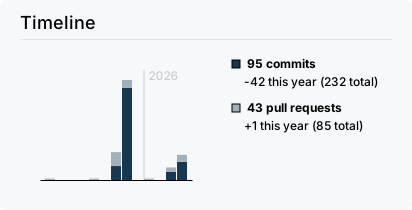
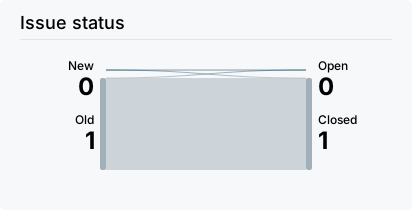
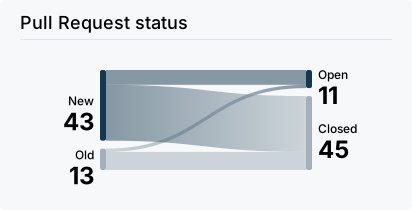
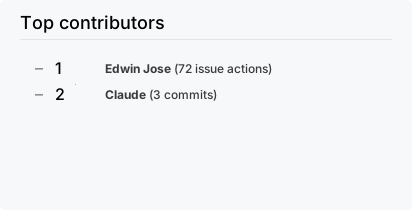
📊 Project Activity

Documentation • Report Bug • Request Feature
Made with ❤️ by the Qentora team
Release history Release notifications | RSS feed


Download files
Download the file for your platform. If you're not sure which to choose, learn more about installing packages.
Source Distribution
Built Distribution
Filter files by name, interpreter, ABI, and platform.
If you're not sure about the file name format, learn more about wheel file names.
Copy a direct link to the current filters
File details
Details for the file quoptuna-0.0.4rc2.tar.gz.
File metadata
- Download URL: quoptuna-0.0.4rc2.tar.gz
- Upload date:
- Size: 78.2 kB
- Tags: Source
- Uploaded using Trusted Publishing? No
- Uploaded via: uv/0.11.6 {"installer":{"name":"uv","version":"0.11.6","subcommand":["publish"]},"python":null,"implementation":{"name":null,"version":null},"distro":{"name":"Ubuntu","version":"24.04","id":"noble","libc":null},"system":{"name":null,"release":null},"cpu":null,"openssl_version":null,"setuptools_version":null,"rustc_version":null,"ci":true}
File hashes
| Algorithm | Hash digest | |
|---|---|---|
| SHA256 |
65f337c90c536606c04565f9c5fe20b243c6874333ef9d732b05f8cdb4ff876d
|
|
| MD5 |
cf79e434984c9895c792a4dcc5fb2fcb
|
|
| BLAKE2b-256 |
78528285fd6fad275faaa109ccb8519b13758a6f5322733fa1babff17c944057
|
File details
Details for the file quoptuna-0.0.4rc2-py3-none-any.whl.
File metadata
- Download URL: quoptuna-0.0.4rc2-py3-none-any.whl
- Upload date:
- Size: 118.7 kB
- Tags: Python 3
- Uploaded using Trusted Publishing? No
- Uploaded via: uv/0.11.6 {"installer":{"name":"uv","version":"0.11.6","subcommand":["publish"]},"python":null,"implementation":{"name":null,"version":null},"distro":{"name":"Ubuntu","version":"24.04","id":"noble","libc":null},"system":{"name":null,"release":null},"cpu":null,"openssl_version":null,"setuptools_version":null,"rustc_version":null,"ci":true}
File hashes
| Algorithm | Hash digest | |
|---|---|---|
| SHA256 |
fec5cb47b16daea61448bdf14487ce8cb95009e649744aa31f2e28718feb03db
|
|
| MD5 |
e1b1f0b01347daf2591ea5a68c196d48
|
|
| BLAKE2b-256 |
8f5e8597eacb015f74c9db645150796b5857bfb5470a3737ba686ce6ee6e6956
|






