
QuotaBubble






Your AI usage limits, always in sight.
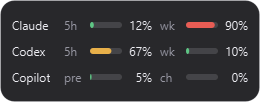
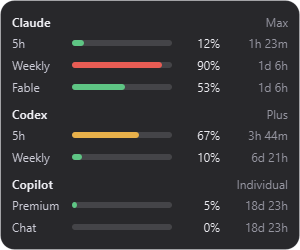
QuotaBubble is a small, frameless desktop widget that keeps the usage limits for your AI coding tools visible without opening a dashboard, terminal, or browser. It floats above your windows, fades to almost nothing when idle, and expands into a compact detail panel when you click it.
Features
- Frameless floating bubble — translucent, rounded, always on top, and it never steals keyboard focus.
- Fades away when idle — a configurable low opacity keeps it unobtrusive; hover to bring it back.
- Click to expand — see each usage window, the percentage used, and a live reset countdown.
- Drag anywhere — move it across monitors; the position is remembered.
- Tray icon — show/hide, settings, open logs, and quit.
- Resilient — refreshes every 5 minutes, caches the last good values, and keeps showing them (dimmed) through transient network or rate-limit errors.
- Local only — it reuses the credentials your tools already store and talks straight to the providers. No telemetry, no QuotaBubble server.
Supported providers
| Provider | Authentication |
|---|---|
| Claude Code | macOS Keychain or ~/.claude/.credentials.json |
| Codex | ~/.codex/auth.json |
| Google Antigravity | Windows Credential Manager or macOS Keychain |
| GitHub Copilot | Windows Credential Manager or macOS Keychain |
| Cursor | Cursor IDE state.vscdb / auth.json (CURSOR_SESSION_TOKEN override) |
| OpenCode | ~/.local/share/opencode/auth.json / opencode.jsonc (OPENCODE_API_KEY override) or API key |
| DeepSeek | API key |
| OpenRouter | API key |
Providers are detected automatically. Enable or disable them in Settings; API keys are entered there and validated inline with a Test button. Antigravity and Copilot reuse their existing Windows Credential Manager or macOS Keychain sign-ins. Cursor reuses the IDE session token from state.vscdb or auth.json (or CURSOR_SESSION_TOKEN).
Install
Windows
With winget:
winget install Izzet.QuotaBubble
Or with Chocolatey:
choco install quotabubble
Or download the latest QuotaBubble-windows-x64.zip from the Releases page, unzip it, and run QuotaBubble.exe.
The binary is not code-signed yet, so Windows SmartScreen may warn you. Choose More info → Run anyway.
macOS
Download the matching disk image from the Releases page:
QuotaBubble-macos-arm64.dmgfor Apple Silicon Macs.QuotaBubble-macos-x64.dmgfor Intel Macs.
Install or upgrade with Homebrew after adding the first-party tap:
brew install --cask izzet/tap/quotabubble
Open the disk image and drag QuotaBubble to Applications. The initial macOS builds are not yet Developer ID signed or notarized; Control-click the app, choose Open, then confirm the first-launch dialog. Signing and notarization will be added in a later release.
From source (Python 3.11+)
git clone https://github.com/izzet/quotabubble.git
cd quotabubble
uv tool install --editable .
quotabubble
You can also install it as a standalone command with pipx: pipx install quotabubble.
Usage
- Idle — a faint bubble; hover to make it fully visible.
- Click — expand the detail panel; click again to collapse.
- Drag — grab and move it anywhere, including across monitors.
- Right-click / tray — Settings, Open logs, Show/Hide, Quit.
- Launch at login — enable it in Settings.
Settings
Idle opacity, fade delay, refresh interval (default 5 minutes), show percentage used vs. remaining, launch at login, and which providers are visible.
Where things live
On Windows:
| Path | Purpose |
|---|---|
%LOCALAPPDATA%\quotabubble\settings.json |
Settings |
%LOCALAPPDATA%\quotabubble\Cache\last_good.json |
Last-good snapshots |
%LOCALAPPDATA%\quotabubble\Logs\quotabubble.log |
Rotating log |
On macOS and Linux these map to the standard platform directories.
Development
uv sync
uv run ruff check src tests
uv run pytest -q
uv run pytest -q --cov=src/quotabubble --cov-report=term-missing  # with coverage
CI gates on coverage (currently 78% minimum, see [tool.coverage.report] in pyproject.toml) and uploads results to Codecov.
See AGENTS.md for architecture and contribution conventions. The provider layer (src/quotabubble/providers/) is pure Python behind a Provider protocol, and platform specifics live in src/quotabubble/platform/.
Status
Windows and macOS have native release artifacts. Claude, Codex, Cursor, OpenCode, DeepSeek, and OpenRouter work anywhere. Antigravity and Copilot support Windows Credential Manager and macOS Keychain; Linux credential support is still to come. API keys entered in Settings are stored in the OS credential store (Windows Credential Manager, macOS Keychain, Linux Secret Service) via keyring; if no OS keyring backend is available, they fall back to the local settings file.
License
1 maintainer

Release files for quotabubble 0.2.4
For a detailed explanation of source distributions (sdists) and built distributions (wheels), please see the package formats documentation.
Source distribution (sdist)
| File | Size | Uploaded | |
|---|---|---|---|
| quotabubble-0.2.4.tar.gz | 578.5 kB | Details |
Built distribution (wheel)
| File | Interpreter | ABI | Platform | Reset |
|---|---|---|---|---|
| quotabubble-0.2.4-py3-none-any.whl | Python 3 | none | any | Details |
Total release size: 636.8 kB
Release files / quotabubble-0.2.4.tar.gz
| Download URL | quotabubble-0.2.4.tar.gz |
|---|---|
| Size | 578.5 kB |
| Tags | Source |
|
SHA-256 checksum How to use checksums |
81a317d9ce6a7395418ba2bb29522109646a993b83837f6b7048dbe0c41ec0e6
|
|
BLAKE2b-256 checksum How to use checksums |
af9bf05c68624de854ddcee65084b267cd4af8b17c1ac92d397e53b4a4712034
|
| Upload date | |
|
Uploaded using Trusted Publishing? What is trusted publishing? |
Yes |
| Uploaded via |
uv/0.12.17 {"installer":{"name":"uv","version":"0.12.17","subcommand":["publish"]},"python":null,"implementation":{"name":null,"version":null},"distro":{"name":"Ubuntu","version":"24.04","id":"noble","libc":null},"system":{"name":null,"release":null},"cpu":null,"openssl_version":null,"setuptools_version":null,"rustc_version":null,"ci":true}
|
Release files / quotabubble-0.2.4-py3-none-any.whl
| Download URL | quotabubble-0.2.4-py3-none-any.whl |
|---|---|
| Size | 58.3 kB |
| Tags | Python 3 |
|
SHA-256 checksum How to use checksums |
902b113264d8e1dcabed4c08de4eb908b2569e029a5863ef8463751e240f21c9
|
|
BLAKE2b-256 checksum How to use checksums |
fe28c187d07c0ca03ce755ca62eb926a45b93ef1289155c4af7bf7d4106e7821
|
| Upload date | |
|
Uploaded using Trusted Publishing? What is trusted publishing? |
Yes |
| Uploaded via |
uv/0.12.17 {"installer":{"name":"uv","version":"0.12.17","subcommand":["publish"]},"python":null,"implementation":{"name":null,"version":null},"distro":{"name":"Ubuntu","version":"24.04","id":"noble","libc":null},"system":{"name":null,"release":null},"cpu":null,"openssl_version":null,"setuptools_version":null,"rustc_version":null,"ci":true}
|














