
Qwen3-ASR (DGX Spark fork — qwen-asr-dgxspark)
Fork notice. This is a downstream fork of the original QwenLM/Qwen3-ASR, repackaged and patched so it runs on NVIDIA DGX Spark (Grace–Blackwell,
aarch64, CUDA 13) under modern pins:torch>=2.11,transformers>=5.4,<6,vllm>=0.20. The Python import name is unchanged (qwen_asr); only the PyPI distribution name is new:qwen-asr-dgxspark.See Changes in this fork below for the full diff vs. upstream.

🤗 Hugging Face | 🤖 ModelScope | 📑 Blog | 📑 Paper
🖥️ Hugging Face Demo | 🖥️ ModelScope Demo | 💬 WeChat (微信) | 🫨 Discord | 📑 API
We release Qwen3-ASR, a family that includes two powerful all-in-one speech recognition models that support language identification and ASR for 52 languages and dialects, as well as a novel non-autoregressive speech forced-alignment model that can align text–speech pairs in 11 languages.
News
- 2026.1.29: 🎉🎉🎉 We have released the Qwen3-ASR series (0.6B/1.7B) and the Qwen3-ForcedAligner-0.6B model. Please check out our blog!
Contents
- Overview
- Quickstart
- Launch Local Web UI Demo
- Deployment with vLLM
- Fine Tuning
- Docker
- Evaluation
- Citation
Overview
Introduction
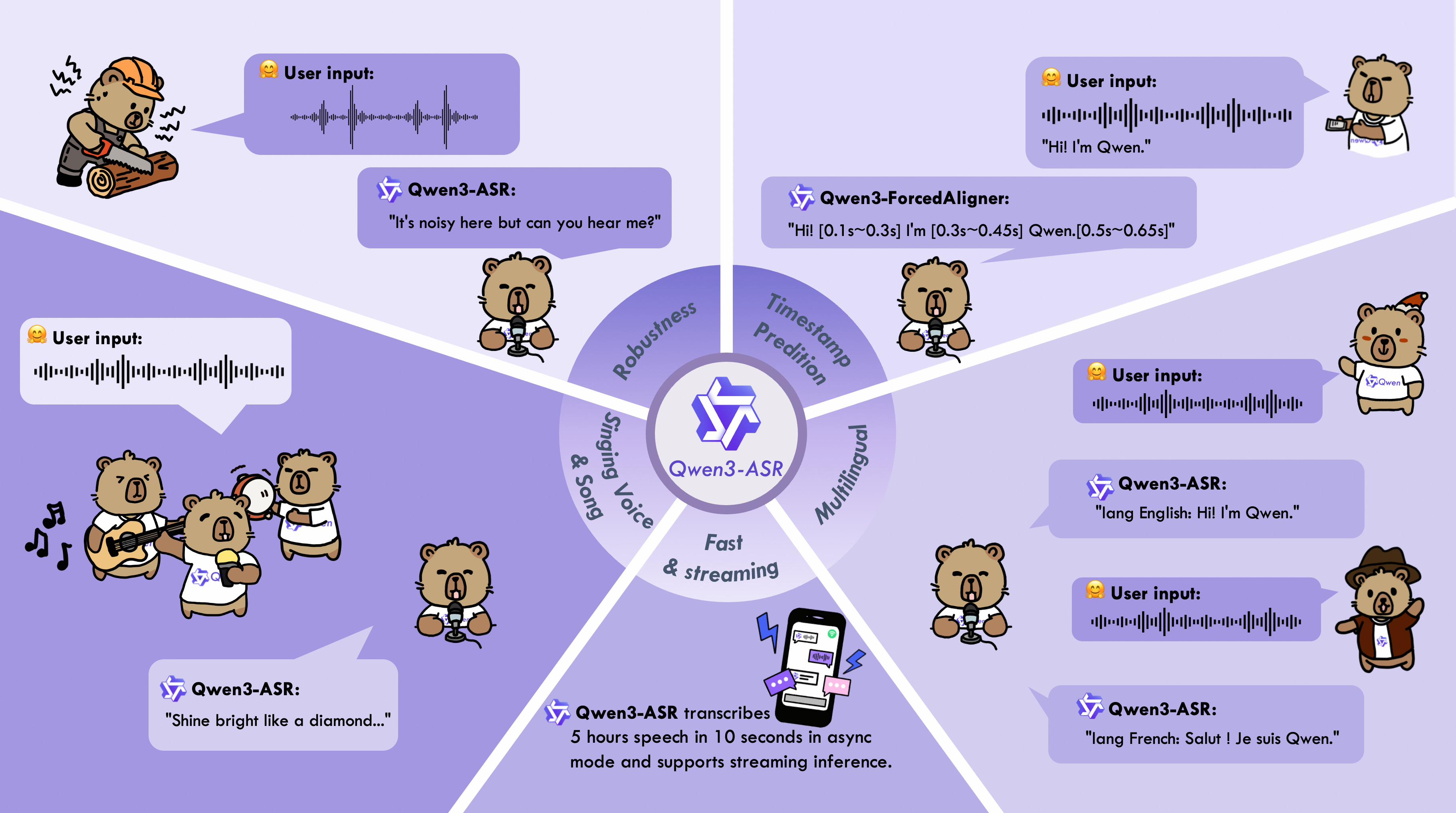
The Qwen3-ASR family includes Qwen3-ASR-1.7B and Qwen3-ASR-0.6B, which support language identification and ASR for 52 languages and dialects. Both leverage large-scale speech training data and the strong audio understanding capability of their foundation model, Qwen3-Omni. Experiments show that the 1.7B version achieves state-of-the-art performance among open-source ASR models and is competitive with the strongest proprietary commercial APIs. Here are the main features:
-
All-in-one: Qwen3-ASR-1.7B and Qwen3-ASR-0.6B support language identification and speech recognition for 30 languages and 22 Chinese dialects, so as to English accents from multiple countries and regions.
-
Excellent and Fast: The Qwen3-ASR family ASR models maintains high-quality and robust recognition under complex acoustic environments and challenging text patterns. Qwen3-ASR-1.7B achieves strong performance on both open-sourced and internal benchmarks. While the 0.6B version achieves accuracy-efficient trade-off, it reaches 2000 times throughput at a concurrency of 128. They both achieve streaming / offline unified inference with single model and support transcribe long audio.
-
Novel and strong forced alignment Solution: We introduce Qwen3-ForcedAligner-0.6B, which supports timestamp prediction for arbitrary units within up to 5 minutes of speech in 11 languages. Evaluations show its timestamp accuracy surpasses E2E based forced-alignment models.
-
Comprehensive inference toolkit: In addition to open-sourcing the architectures and weights of the Qwen3-ASR series, we also release a powerful, full-featured inference framework that supports vLLM-based batch inference, asynchronous serving, streaming inference, timestamp prediction, and more.
Model Architecture
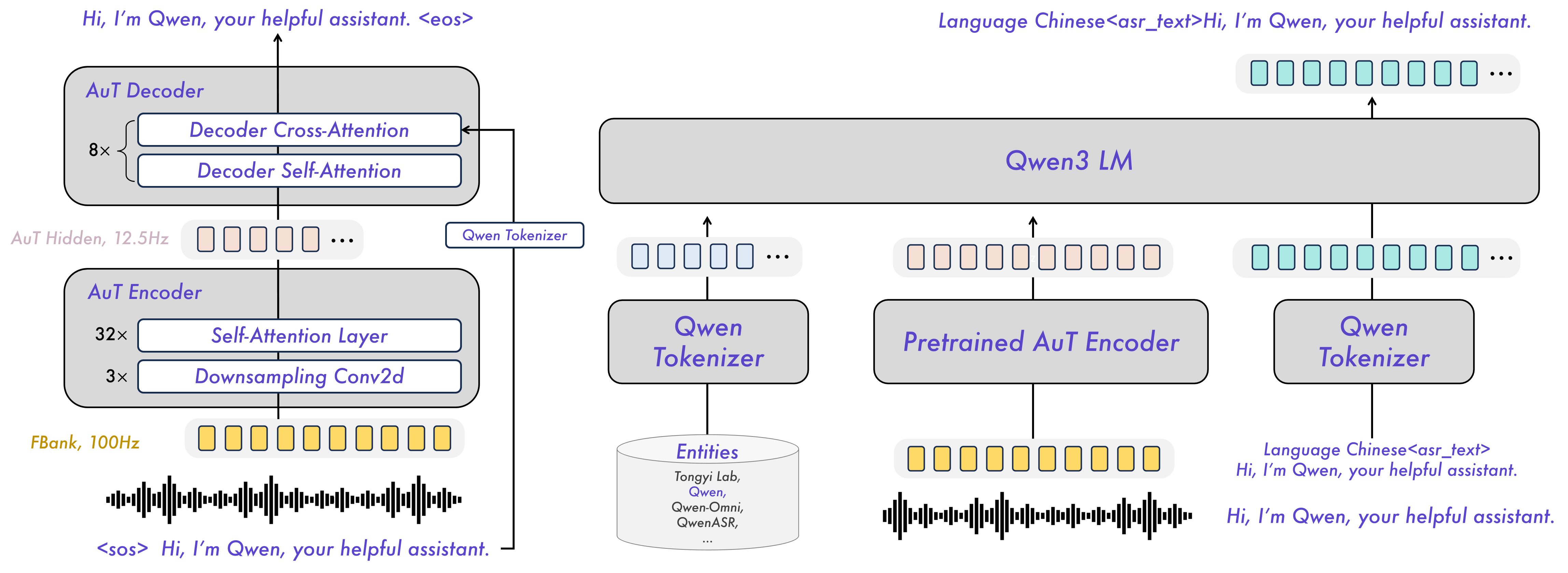
Released Models Description and Download
Below is an introduction and download information for the Qwen3-ASR models. Please select and download the model that fits your needs.
| Model | Supported Languages | Supported Dialects | Inference Mode | Audio Types |
|---|---|---|---|---|
| Qwen3-ASR-1.7B & Qwen3-ASR-0.6B | Chinese (zh), English (en), Cantonese (yue), Arabic (ar), German (de), French (fr), Spanish (es), Portuguese (pt), Indonesian (id), Italian (it), Korean (ko), Russian (ru), Thai (th), Vietnamese (vi), Japanese (ja), Turkish (tr), Hindi (hi), Malay (ms), Dutch (nl), Swedish (sv), Danish (da), Finnish (fi), Polish (pl), Czech (cs), Filipino (fil), Persian (fa), Greek (el), Hungarian (hu), Macedonian (mk), Romanian (ro) | Anhui, Dongbei, Fujian, Gansu, Guizhou, Hebei, Henan, Hubei, Hunan, Jiangxi, Ningxia, Shandong, Shaanxi, Shanxi, Sichuan, Tianjin, Yunnan, Zhejiang, Cantonese (Hong Kong accent), Cantonese (Guangdong accent), Wu language, Minnan language. | Offline / Streaming | Speech, Singing Voice, Songs with BGM |
| Qwen3-ForcedAligner-0.6B | Chinese, English, Cantonese, French, German, Italian, Japanese, Korean, Portuguese, Russian, Spanish | -- | NAR | Speech |
During model loading in the qwen-asr package or vLLM, model weights will be downloaded automatically based on the model name. However, if your runtime environment does not allow downloading weights during execution, you can use the following commands to manually download the model weights to a local directory:
# Download through ModelScope (recommended for users in Mainland China)
pip install -U modelscope
modelscope download --model Qwen/Qwen3-ASR-1.7B  --local_dir ./Qwen3-ASR-1.7B
modelscope download --model Qwen/Qwen3-ASR-0.6B --local_dir ./Qwen3-ASR-0.6B
modelscope download --model Qwen/Qwen3-ForcedAligner-0.6B --local_dir ./Qwen3-ForcedAligner-0.6B
# Download through Hugging Face
pip install -U "huggingface_hub[cli]"
huggingface-cli download Qwen/Qwen3-ASR-1.7B --local-dir ./Qwen3-ASR-1.7B
huggingface-cli download Qwen/Qwen3-ASR-0.6B --local-dir ./Qwen3-ASR-0.6B
huggingface-cli download Qwen/Qwen3-ForcedAligner-0.6B --local-dir ./Qwen3-ForcedAligner-0.6B
Quickstart
Environment Setup
The easiest way to use Qwen3-ASR is to install the qwen-asr Python package from PyPI. This will pull in the required runtime dependencies and allow you to load any released Qwen3-ASR model. If you’d like to simplify environment setup further, you can also use our official Docker image. The qwen-asr package provides two backends: the transformers backend and the vLLM backend. For usage instructions for different backends, please refer to Python Package Usage. We recommend using a fresh, isolated environment to avoid dependency conflicts with existing packages. You can create a clean Python 3.12 environment like this:
conda create -n qwen3-asr python=3.12 -y
conda activate qwen3-asr
Run the following command to get the minimal installation with transformers-backend support:
pip install -U qwen-asr
To enable the vLLM backend for faster inference and streaming support, run:
pip install -U qwen-asr[vllm]
If you want to develop or modify the code locally, install from source in editable mode:
git clone https://github.com/QwenLM/Qwen3-ASR.git
cd Qwen3-ASR
pip install -e .
# support vLLM backend
# pip install -e ".[vllm]"
Additionally, we recommend using FlashAttention 2 to reduce GPU memory usage and accelerate inference speed, especially for long inputs and large batch sizes.
pip install -U flash-attn --no-build-isolation
If your machine has less than 96GB of RAM and lots of CPU cores, run:
MAX_JOBS=4 pip install -U flash-attn --no-build-isolation
Also, you should have hardware that is compatible with FlashAttention 2. Read more about it in the official documentation of the FlashAttention repository. FlashAttention 2 can only be used when a model is loaded in torch.float16 or torch.bfloat16.
Python Package Usage
Quick Inference
The qwen-asr package provides two backends: transformers backend and vLLM backend. You can pass audio inputs as a local path, a URL, base64 data, or a (np.ndarray, sr) tuple, and run batch inference. To quickly try Qwen3-ASR, you can use Qwen3ASRModel.from_pretrained(...) for the transformers backend with the following code:
import torch
from qwen_asr import Qwen3ASRModel

model = Qwen3ASRModel.from_pretrained(
    "Qwen/Qwen3-ASR-1.7B",
    dtype=torch.bfloat16,
    device_map="cuda:0",
    # attn_implementation="flash_attention_2",
    max_inference_batch_size=32, # Batch size limit for inference. -1 means unlimited. Smaller values can help avoid OOM.
    max_new_tokens=256, # Maximum number of tokens to generate. Set a larger value for long audio input.
)

results = model.transcribe(
    audio="https://qianwen-res.oss-cn-beijing.aliyuncs.com/Qwen3-ASR-Repo/asr_en.wav",
    language=None, # set "English" to force the language
)

print(results[0].language)
print(results[0].text)
If you want to return timestamps, pass forced_aligner and its init kwargs. Here is an example of batch inference with timestamps output:
import torch
from qwen_asr import Qwen3ASRModel

model = Qwen3ASRModel.from_pretrained(
    "Qwen/Qwen3-ASR-1.7B",
    dtype=torch.bfloat16,
    device_map="cuda:0",
    # attn_implementation="flash_attention_2",
    max_inference_batch_size=32, # Batch size limit for inference. -1 means unlimited. Smaller values can help avoid OOM.
    max_new_tokens=256, # Maximum number of tokens to generate. Set a larger value for long audio input.
    forced_aligner="Qwen/Qwen3-ForcedAligner-0.6B",
    forced_aligner_kwargs=dict(
        dtype=torch.bfloat16,
        device_map="cuda:0",
        # attn_implementation="flash_attention_2",
    ),
)

results = model.transcribe(
    audio=[
      "https://qianwen-res.oss-cn-beijing.aliyuncs.com/Qwen3-ASR-Repo/asr_zh.wav",
      "https://qianwen-res.oss-cn-beijing.aliyuncs.com/Qwen3-ASR-Repo/asr_en.wav",
    ],
    language=["Chinese", "English"], # can also be set to None for automatic language detection
    return_time_stamps=True,
)

for r in results:
    print(r.language, r.text, r.time_stamps[0])
For more detailed usage examples, please refer to the example code for the transformers backend.
vLLM Backend
If you want the fastest inference speed with Qwen3-ASR, we strongly recommend using the vLLM backend by initializing the model with Qwen3ASRModel.LLM(...). Example code is provided below. Note that you must install it via pip install -U qwen-asr[vllm]. If you want the model to output timestamps, it’s best to install FlashAttention via pip install -U flash-attn --no-build-isolation to speed up inference for the forced aligner model. Remember to wrap your code under if __name__ == '__main__': to avoid the spawn error described in vLLM Troubleshooting.
import torch
from qwen_asr import Qwen3ASRModel

if __name__ == '__main__':
    model = Qwen3ASRModel.LLM(
        model="Qwen/Qwen3-ASR-1.7B",
        gpu_memory_utilization=0.7,
        max_inference_batch_size=128, # Batch size limit for inference. -1 means unlimited. Smaller values can help avoid OOM.
        max_new_tokens=4096, # Maximum number of tokens to generate. Set a larger value for long audio input.
        forced_aligner="Qwen/Qwen3-ForcedAligner-0.6B",
        forced_aligner_kwargs=dict(
            dtype=torch.bfloat16,
            device_map="cuda:0",
            # attn_implementation="flash_attention_2",
        ),
    )

    results = model.transcribe(
        audio=[
        "https://qianwen-res.oss-cn-beijing.aliyuncs.com/Qwen3-ASR-Repo/asr_zh.wav",
        "https://qianwen-res.oss-cn-beijing.aliyuncs.com/Qwen3-ASR-Repo/asr_en.wav",
        ],
        language=["Chinese", "English"], # can also be set to None for automatic language detection
        return_time_stamps=True,
    )

    for r in results:
        print(r.language, r.text, r.time_stamps[0])
For more detailed usage examples, please refer to the example code for the vLLM backend. In addition, you can start a vLLM server via the qwen-asr-serve command, which is a wrapper around vllm serve. You can pass any arguments supported by vllm serve, for example:
qwen-asr-serve Qwen/Qwen3-ASR-1.7B --gpu-memory-utilization 0.8 --host 0.0.0.0 --port 8000
And send requests to the server via:
import requests

url = "http://localhost:8000/v1/chat/completions"
headers = {"Content-Type": "application/json"}

data = {
    "messages": [
        {
            "role": "user",
            "content": [
                {
                    "type": "audio_url",
                    "audio_url": {
                        "url": "https://qianwen-res.oss-cn-beijing.aliyuncs.com/Qwen3-ASR-Repo/asr_en.wav"
                    },
                }
            ],
        }
    ]
}

response = requests.post(url, headers=headers, json=data, timeout=300)
response.raise_for_status()
content = response.json()['choices'][0]['message']['content']
print(content)

# parse ASR output if you want
from qwen_asr import parse_asr_output
language, text = parse_asr_output(content)
print(language)
print(text)
Streaming Inference
Qwen3-ASR fully supports streaming inference. Currently, streaming inference is only available with the vLLM backend. Note that streaming inference does not support batch inference or returning timestamps. Please refer to the example code for details. You can also launch a streaming web demo through the guide to experience Qwen3-ASR’s streaming transcription capabilities.
ForcedAligner Usage
Qwen3-ForcedAligner-0.6B can align text–speech pairs and return word or character level timestamps. Here is an example of using the forced aligner directly:
import torch
from qwen_asr import Qwen3ForcedAligner

model = Qwen3ForcedAligner.from_pretrained(
    "Qwen/Qwen3-ForcedAligner-0.6B",
    dtype=torch.bfloat16,
    device_map="cuda:0",
    # attn_implementation="flash_attention_2",
)

results = model.align(
    audio="https://qianwen-res.oss-cn-beijing.aliyuncs.com/Qwen3-ASR-Repo/asr_zh.wav",
    text="甚至出现交易几乎停滞的情况。",
    language="Chinese",
)

print(results[0])
print(results[0][0].text, results[0][0].start_time, results[0][0].end_time)
In addition, the forced aligner supports local paths / URLs / base64 data / (np.ndarray, sr) inputs and batch inference. Please refer to the example code for details.
DashScope API Usage
To further explore Qwen3-ASR, we encourage you to try our DashScope API for a faster and more efficient experience. For detailed API information and documentation, please refer to the following:
| API Description | API Documentation (Mainland China) | API Documentation (International) |
|---|---|---|
| Real-time API for Qwen3-ASR. | https://help.aliyun.com/zh/model-studio/qwen-real-time-speech-recognition | https://www.alibabacloud.com/help/en/model-studio/qwen-real-time-speech-recognition |
| FileTrans API for Qwen3-ASR. | https://help.aliyun.com/zh/model-studio/qwen-speech-recognition | https://www.alibabacloud.com/help/en/model-studio/qwen-speech-recognition |
Launch Local Web UI Demo
Gradio Demo
To launch the Qwen3-ASR web UI gradio demo, install the qwen-asr package and run qwen-asr-demo. Use the command below for help:
qwen-asr-demo --help
To launch the demo, you can use the following commands:
# Transformers backend
qwen-asr-demo \
  --asr-checkpoint Qwen/Qwen3-ASR-1.7B \
  --backend transformers \
  --cuda-visible-devices 0 \
  --ip 0.0.0.0 --port 8000

# Transformers backend + Forced Aligner (enable timestamps)
qwen-asr-demo \
  --asr-checkpoint Qwen/Qwen3-ASR-1.7B \
  --aligner-checkpoint Qwen/Qwen3-ForcedAligner-0.6B \
  --backend transformers \
  --cuda-visible-devices 0 \
  --backend-kwargs '{"device_map":"cuda:0","dtype":"bfloat16","max_inference_batch_size":8,"max_new_tokens":256}' \
  --aligner-kwargs '{"device_map":"cuda:0","dtype":"bfloat16"}' \
  --ip 0.0.0.0 --port 8000

# vLLM backend + Forced Aligner (enable timestamps)
qwen-asr-demo \
  --asr-checkpoint Qwen/Qwen3-ASR-1.7B \
  --aligner-checkpoint Qwen/Qwen3-ForcedAligner-0.6B \
  --backend vllm \
  --cuda-visible-devices 0 \
  --backend-kwargs '{"gpu_memory_utilization":0.7,"max_inference_batch_size":8,"max_new_tokens":2048}' \
  --aligner-kwargs '{"device_map":"cuda:0","dtype":"bfloat16"}' \
  --ip 0.0.0.0 --port 8000
Then open http://<your-ip>:8000, or access it via port forwarding in tools like VS Code.
Backend Notes
This demo supports two backends: transformers and vLLM. All backend-specific initialization parameters should be passed via --backend-kwargs as a JSON dict. If not provided, the demo will use sensible defaults.
# Example: override transformers init args with flash attention
--backend-kwargs '{"device_map":"cuda:0","dtype":"bfloat16","attn_implementation":"flash_attention_2"}'

# Example: override vLLM init args with 65% GPU memory
--backend-kwargs '{"gpu_memory_utilization":0.65}'
CUDA Device Notes
Because vLLM does not follow cuda:0 style device selection, this demo selects GPUs by setting CUDA_VISIBLE_DEVICES via --cuda-visible-devices.
# Use GPU 0
--cuda-visible-devices 0

# Use GPU 1
--cuda-visible-devices 1
Timestamps Notes
Timestamps are only available when --aligner-checkpoint is provided. If you launch the demo without a forced aligner, the timestamps UI will be hidden automatically.
# No forced aligner
qwen-asr-demo --asr-checkpoint Qwen/Qwen3-ASR-1.7B

# With forced aligner
qwen-asr-demo \
  --asr-checkpoint Qwen/Qwen3-ASR-1.7B \
  --aligner-checkpoint Qwen/Qwen3-ForcedAligner-0.6B
HTTPS Notes
To avoid browser microphone permission issues after deploying the server, it is recommended/required to run the gradio service over HTTPS (especially when accessed remotely or behind modern browsers/gateways). Use --ssl-certfile and --ssl-keyfile to enable HTTPS. First, generate a private key and a self-signed certificate (valid for 365 days):
openssl req -x509 -newkey rsa:2048 \
  -keyout key.pem -out cert.pem \
  -days 365 -nodes \
  -subj "/CN=localhost"
Then run the demo with HTTPS:
qwen-asr-demo \
  --asr-checkpoint Qwen/Qwen3-ASR-1.7B \
  --backend transformers \
  --cuda-visible-devices 0 \
  --ip 0.0.0.0 --port 8000 \
  --ssl-certfile cert.pem \
  --ssl-keyfile key.pem \
  --no-ssl-verify
Then open https://<your-ip>:8000 to use it. If your browser shows a warning, that’s expected for self-signed certificates. For production, use a real certificate.
Streaming Demo
To experience Qwen3-ASR’s streaming transcription capability in a web UI, we provide a minimal Flask-based streaming demo. The demo captures microphone audio in the browser, resamples it to 16,000 Hz, and continuously pushes PCM chunks to the model. Run the demo with the following command:
qwen-asr-demo-streaming \
  --asr-model-path Qwen/Qwen3-ASR-1.7B \
  --gpu-memory-utilization 0.9 \
  --host 0.0.0.0 \
  --port 8000
Then open http://<your-ip>:8000, or access it via port forwarding in tools like VS Code.
Deployment with vLLM
vLLM officially provides day-0 model support for Qwen3-ASR for efficient inference.
Installation
You can run Qwen3-ASR with vLLM nightly wheel or docker image. To install the nightly version of vLLM, we recommend using uv as the environment manager
uv venv
source .venv/bin/activate
uv pip install -U vllm --pre \
    --extra-index-url https://wheels.vllm.ai/nightly/cu129 \
    --extra-index-url https://download.pytorch.org/whl/cu129 \
    --index-strategy unsafe-best-match
uv pip install "vllm[audio]" # For additional audio dependencies
Online Serving
You can easily deploy Qwen3-ASR with vLLM by running the following command
vllm serve Qwen/Qwen3-ASR-1.7B
After the model server is successfully deployed, you can interact with it in multiple ways.
Using OpenAI SDK
import base64
import httpx
from openai import OpenAI

# Initialize client
client = OpenAI(
    base_url="http://localhost:8000/v1",
    api_key="EMPTY"
)

# Create multimodal chat completion request
response = client.chat.completions.create(
    model="Qwen/Qwen3-ASR-1.7B",
    messages=[
        {
            "role": "user",
            "content": [
                {
                    "type": "audio_url",
                    "audio_url": {
                        {"url": "https://qianwen-res.oss-cn-beijing.aliyuncs.com/Qwen3-ASR-Repo/asr_en.wav"}
                    }
                }
            ]
        }
    ],
)

print(response.choices[0].message.content)
This model is also supported on vLLM with OpenAI transcription API.
import httpx
from openai import OpenAI

# Initialize client
client = OpenAI(
    base_url="http://localhost:8000/v1",
    api_key="EMPTY"
)
audio_url = "https://qianwen-res.oss-cn-beijing.aliyuncs.com/Qwen3-ASR-Repo/asr_en.wav"
audio_file = httpx.get(audio_url).content

transcription = client.audio.transcriptions.create(
    model="Qwen/Qwen3-ASR-1.7B",
    file=audio_file,
)

print(transcription.text)
Using cURL
curl http://localhost:8000/v1/chat/completions \
    -H "Content-Type: application/json" \
    -d '{
    "messages": [
    {"role": "user", "content": [
        {"type": "audio_url", "audio_url": {"url": "https://qianwen-res.oss-cn-beijing.aliyuncs.com/Qwen3-ASR-Repo/asr_en.wav"}}
    ]}
    ]
    }'
Offline Inference
See the following example on using vLLM to run offline inference with Qwen3-ASR
from vllm import LLM, SamplingParams
from vllm.assets.audio import AudioAsset
import base64
import requests

# Initialize the LLM
llm = LLM(
    model="Qwen/Qwen3-ASR-1.7B"
)

# Load audio
audio_asset = AudioAsset("winning_call")

# Create conversation with audio content
conversation = [
    {
        "role": "user",
        "content": [
            {
                "type": "audio_url",
                "audio_url": {"url": audio_asset.url}
            }
        ]
    }
]

sampling_params = SamplingParams(temperature=0.01, max_tokens=256)

# Run inference using .chat()
outputs = llm.chat(conversation, sampling_params=sampling_params)
print(outputs[0].outputs[0].text)
Fine Tuning
Please refer to Qwen3-ASR-Finetuning for detailed instructions on fine-tuning Qwen3-ASR.
Docker
To make it easier to use our qwen-asr Python package, we provide a pre-built Docker image: qwenllm/qwen3-asr. You only need to install the GPU driver and download the model files to run the code. Please follow the NVIDIA Container Toolkit installation guide to ensure Docker can access your GPU. If you are in Mainland China and have trouble reaching Docker Hub, you may use a registry mirror to accelerate image pulls.
First, pull the image and start a container:
LOCAL_WORKDIR=/path/to/your/workspace
HOST_PORT=8000
CONTAINER_PORT=80
docker run --gpus all --name qwen3-asr \
    -v /var/run/docker.sock:/var/run/docker.sock -p $HOST_PORT:$CONTAINER_PORT \
    --mount type=bind,source=$LOCAL_WORKDIR,target=/data/shared/Qwen3-ASR \
    --shm-size=4gb \
    -it qwenllm/qwen3-asr:latest
After running the command, you will enter the container’s bash shell. Your local workspace (replace /path/to/your/workspace with the actual path) will be mounted inside the container at /data/shared/Qwen3-ASR. Port 8000 on the host is mapped to port 80 in the container, so you can access services running in the container via http://<host-ip>:8000. Note that services inside the container must bind to 0.0.0.0 (not 127.0.0.1) for port forwarding to work.
If you exit the container, you can start it again and re-enter it with:
docker start qwen3-asr
docker exec -it qwen3-asr bash
To remove the container completely, run:
docker rm -f qwen3-asr
Evaluation
During evaluation, we ran inference for all models with dtype=torch.bfloat16 and set max_new_tokens=1024 using vLLM. Greedy search was used for all decoding, and none of the tests specified a language parameter. The detailed evaluation results are shown below.
ASR Benchmarks on Public Datasets (WER ↓)
| GPT-4o -Transcribe |
Gemini-2.5 -Pro |
Doubao-ASR | Whisper -large-v3 |
Fun-ASR -MLT-Nano |
Qwen3-ASR -0.6B |
Qwen3-ASR -1.7B |
||
|---|---|---|---|---|---|---|---|---|
| English (en) | ||||||||
| Librispeech clean | other |
1.39 | 3.75 | 2.89 | 3.56 | 2.78 | 5.70 | 1.51 | 3.97 | 1.68 | 4.03 | 2.11 | 4.55 | 1.63 | 3.38 | |
| GigaSpeech | 25.50 | 9.37 | 9.55 | 9.76 | - | 8.88 | 8.45 | |
| CV-en | 9.08 | 14.49 | 13.78 | 9.90 | 9.90 | 9.92 | 7.39 | |
| Fleurs-en | 2.40 | 2.94 | 6.31 | 4.08 | 5.49 | 4.39 | 3.35 | |
| MLS-en | 5.12 | 3.68 | 7.09 | 4.87 | - | 6.00 | 4.58 | |
| Tedlium | 7.69 | 6.15 | 4.91 | 6.84 | - | 3.85 | 4.50 | |
| VoxPopuli | 10.29 | 11.36 | 12.12 | 12.05 | - | 9.96 | 9.15 | |
| Chinese (zh) | ||||||||
| WenetSpeech net | meeting |
15.30 | 32.27 | 14.43 | 13.47 | N/A | 9.86 | 19.11 | 6.35 | - | 5.97 | 6.88 | 4.97 | 5.88 | |
| AISHELL-2-test | 4.24 | 11.62 | 2.85 | 5.06 | - | 3.15 | 2.71 | |
| SpeechIO | 12.86 | 5.30 | 2.93 | 7.56 | - | 3.44 | 2.88 | |
| Fleurs-zh | 2.44 | 2.71 | 2.69 | 4.09 | 3.51 | 2.88 | 2.41 | |
| CV-zh | 6.32 | 7.70 | 5.95 | 12.91 | 6.20 | 6.89 | 5.35 | |
| Chinese Dialect | ||||||||
| KeSpeech | 26.87 | 24.71 | 5.27 | 28.79 | - | 7.08 | 5.10 | |
| Fleurs-yue | 4.98 | 9.43 | 4.98 | 9.18 | - | 5.79 | 3.98 | |
| CV-yue | 11.36 | 18.76 | 13.20 | 16.23 | - | 9.50 | 7.57 | |
| CV-zh-tw | 6.32 | 7.31 | 4.06 | 7.84 | - | 5.59 | 3.77 | |
| WenetSpeech-Yue short | long |
15.62 | 25.29 | 25.19 | 11.23 | 9.74 | 11.40 | 32.26 | 46.64 | - | - | 7.54 | 9.92 | 5.82 | 8.85 | |
| WenetSpeech-Chuan easy | hard |
34.81 | 53.98 | 43.79 | 67.30 | 11.40 | 20.20 | 14.35 | 26.80 | - | - | 13.92 | 24.45 | 11.99 | 21.63 | |
ASR Benchmarks on Internal Datasets (WER ↓)
| GPT-4o -Transcribe |
Gemini-2.5 -Pro |
Doubao-ASR | Whisper -large-v3 |
Fun-ASR -MLT-Nano |
Qwen3-ASR -0.6B |
Qwen3-ASR -1.7B |
|
|---|---|---|---|---|---|---|---|
| Accented English | |||||||
| Dialog-Accented English | 28.56 | 23.85 | 20.41 | 21.30 | 19.96 | 16.62 | 16.07 |
| Chinese Mandarin | |||||||
| Elders&Kids | 14.27 | 36.93 | 4.17 | 10.61 | 4.54 | 4.48 | 3.81 |
| ExtremeNoise | 36.11 | 29.06 | 17.04 | 63.17 | 36.55 | 17.88 | 16.17 |
| TongueTwister | 20.87 | 4.97 | 3.47 | 16.63 | 9.02 | 4.06 | 2.44 |
| Dialog-Mandarin | 20.73 | 12.50 | 6.61 | 14.01 | 7.32 | 7.06 | 6.54 |
| Chinese Dialect | |||||||
| Dialog-Cantonese | 16.05 | 14.98 | 7.56 | 31.04 | 5.85 | 4.80 | 4.12 |
| Dialog-Chinese Dialects | 45.37 | 47.70 | 19.85 | 44.55 | 19.41 | 18.24 | 15.94 |
Dialect coverage: Results for Dialog-Accented English are averaged over 16 accents, and results for Dialog-Chinese Dialects are averaged over 22 Chinese dialects.
Multilingual ASR Benchmarks (WER ↓)
| GLM-ASR -Nano-2512 |
Whisper -large-v3 |
Fun-ASR -MLT-Nano |
Qwen3-ASR -0.6B |
Qwen3-ASR -1.7B |
|
|---|---|---|---|---|---|
| Open-sourced Benchmarks | |||||
| MLS | 13.32 | 8.62 | 28.70 | 13.19 | 8.55 |
| CommonVoice | 19.40 | 10.77 | 17.25 | 12.75 | 9.18 |
| MLC-SLM | 34.93 | 15.68 | 29.94 | 15.84 | 12.74 |
| Fleurs | 16.08 | 5.27 | 10.03 | 7.57 | 4.90 |
| Fleurs† | 20.05 | 6.85 | 31.89 | 10.37 | 6.62 |
| Fleurs†† | 24.83 | 8.16 | 47.84 | 21.80 | 12.60 |
| Qwen-ASR Internal Benchmarks | |||||
| News-Multilingual | 49.40 | 14.80 | 65.07 | 17.39 | 12.80 |
Language coverage: MLS includes 8 languages: {da, de, en, es, fr, it, pl, pt}.
CommonVoice includes 13 languages: {en, zh, yue, zh_TW, ar, de, es, fr, it, ja, ko, pt, ru}.
MLC-SLM includes 11 languages: {en, fr, de, it, pt, es, ja, ko, ru, th, vi}.
Fleurs includes 12 languages: {en, zh, yue, ar, de, es, fr, it, ja, ko, pt, ru }.
Fleurs† includes 8 additional languages beyond Fleurs: {hi, id, ms, nl, pl, th, tr, vi}.
Fleurs†† includes 10 additional languages beyond Fleurs†: {cs, da, el, fa, fi, fil, hu, mk, ro, sv}.
News-Multilingual includes 15 languages: {ar, de, es, fr, hi, id, it, ja, ko, nl, pl, pt, ru, th, vi}.
Language Identification Accuracy (%) ↑
| Whisper-large-v3 | Qwen3-ASR-0.6B | Qwen3-ASR-1.7B | |
|---|---|---|---|
| MLS | 99.9 | 99.3 | 99.9 |
| CommonVoice | 92.7 | 98.2 | 98.7 |
| MLC-SLM | 89.2 | 92.7 | 94.1 |
| Fleurs | 94.6 | 97.1 | 98.7 |
| Avg. | 94.1 | 96.8 | 97.9 |
Language coverage: The language sets follow Multilingual ASR Benchmarks. Here, Fleurs corresponds to Fleurs†† in Multilingual ASR Benchmarks and covers 30 languages.
Singing Voice & Song Transcription (WER ↓)
| GPT-4o -Transcribe |
Gemini-2.5 -Pro |
Doubao-ASR -1.0 |
Whisper -large-v3 |
Fun-ASR-MLT -Nano |
Qwen3-ASR -1.7B |
|
|---|---|---|---|---|---|---|
| Singing | ||||||
| M4Singer | 16.77 | 20.88 | 7.88 | 13.58 | 7.29 | 5.98 |
| MIR-1k-vocal | 11.87 | 9.85 | 6.56 | 11.71 | 8.17 | 6.25 |
| Opencpop | 7.93 | 6.49 | 3.80 | 9.52 | 2.98 | 3.08 |
| Popcs | 32.84 | 15.13 | 8.97 | 13.77 | 9.42 | 8.52 |
| Songs with BGM | ||||||
| EntireSongs-en | 30.71 | 12.18 | 33.51 | N/A | N/A | 14.60 |
| EntireSongs-zh | 34.86 | 18.68 | 23.99 | N/A | N/A | 13.91 |
ASR Inference Mode Performance (WER ↓)
| Model | Infer. Mode | Librispeech | Fleurs-en | Fleurs-zh | Avg. |
|---|---|---|---|---|---|
| Qwen3-ASR-1.7B | Offline | 1.63 | 3.38 | 3.35 | 2.41 | 2.69 |
| Streaming | 1.95 | 4.51 | 4.02 | 2.84 | 3.33 | |
| Qwen3-ASR-0.6B | Offline | 2.11 | 4.55 | 4.39 | 2.88 | 3.48 |
| Streaming | 2.54 | 6.27 | 5.38 | 3.40 | 4.40 |
Forced Alignment Benchmarks (AAS ms ↓)
| Monotonic-Aligner | NFA | WhisperX | Qwen3-ForcedAligner-0.6B | |
|---|---|---|---|---|
| MFA-Labeled Raw | ||||
| Chinese | 161.1 | 109.8 | - | 33.1 |
| English | - | 107.5 | 92.1 | 37.5 |
| French | - | 100.7 | 145.3 | 41.7 |
| German | - | 122.7 | 165.1 | 46.5 |
| Italian | - | 142.7 | 155.5 | 75.5 |
| Japanese | - | - | - | 42.2 |
| Korean | - | - | - | 37.2 |
| Portuguese | - | - | - | 38.4 |
| Russian | - | 200.7 | - | 40.2 |
| Spanish | - | 124.7 | 108.0 | 36.8 |
| Avg. | 161.1 | 129.8 | 133.2 | 42.9 |
| MFA-Labeled Concat-300s | ||||
| Chinese | 1742.4 | 235.0 | - | 36.5 |
| English | - | 226.7 | 227.2 | 58.6 |
| French | - | 230.6 | 2052.2 | 53.4 |
| German | - | 220.3 | 993.4 | 62.4 |
| Italian | - | 290.5 | 5719.4 | 81.6 |
| Japanese | - | - | - | 81.3 |
| Korean | - | - | - | 42.2 |
| Portuguese | - | - | - | 50.0 |
| Russian | - | 283.3 | - | 43.0 |
| Spanish | - | 240.2 | 4549.9 | 39.6 |
| Cross-lingual | - | - | - | 34.2 |
| Avg. | 1742.4 | 246.7 | 2708.4 | 52.9 |
| Human-Labeled | ||||
| Raw | 49.9 | 88.6 | - | 27.8 |
| Raw-Noisy | 53.3 | 89.5 | - | 41.8 |
| Concat-60s | 51.1 | 86.7 | - | 25.3 |
| Concat-300s | 410.8 | 140.0 | - | 24.8 |
| Concat-Cross-lingual | - | - | - | 42.5 |
| Avg. | 141.3 | 101.2 | - | 32.4 |
Citation
If you find our paper and code useful in your research, please consider giving a star :star: and citation :pencil: :)
@article{Qwen3-ASR,
  title={Qwen3-ASR Technical Report},
  author={Xian Shi, Xiong Wang, Zhifang Guo, Yongqi Wang, Pei Zhang, Xinyu Zhang, Zishan Guo, Hongkun Hao, Yu Xi, Baosong Yang, Jin Xu, Jingren Zhou, Junyang Lin},
  journal={arXiv preprint arXiv:2601.21337},
  year={2026}
}
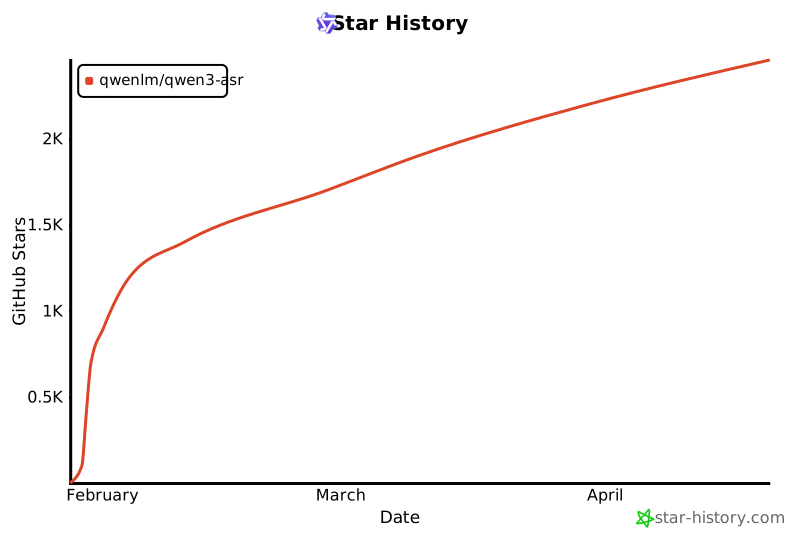
Star History
Changes in this fork
This fork (qwen-asr-dgxspark) is licensed under the same terms as upstream
(Apache License 2.0). Per Apache 2.0 §4(b), the following list documents the
modifications made relative to upstream Qwen3-ASR.
Goal
Run quick_inference.py (and the rest of the qwen_asr Python API) on NVIDIA
DGX Spark hardware (Grace-Blackwell, aarch64, CUDA 13) under modern dependency
pins: torch>=2.11, transformers>=5.4,<6, vllm>=0.20. Upstream targets
transformers (v4) and vllm<0.15, which do not install on this platform.
Code modifications
All changes live under qwen_asr/core/transformers_backend/ and
qwen_asr/inference/. The Python import surface (from qwen_asr import …) is
unchanged.
-
modeling_qwen3_asr.py—@check_model_inputs()→@merge_with_config_defaultsIn transformers v5,check_model_inputsis no longer a decorator factory; it forwards to the renamedmerge_with_config_defaults. The original@check_model_inputs()call form raisedTypeError. -
modeling_qwen3_asr.py—Qwen3ASRThinkerTextRotaryEmbeddingReworked to follow the v5 RoPE pattern used byQwen2_5_VLRotaryEmbedding: readsconfig.rope_parameters(notconfig.rope_scaling), and provides a localcompute_default_rope_parametersstatic method because v5 dropped the'default'entry fromROPE_INIT_FUNCTIONS. The interleaved MRoPE forward pass is preserved unchanged. -
modeling_qwen3_asr.py—pad_token_idlookup hardened Replacedself.config.pad_token_idwithgetattr(..., None)because v5 configs no longer returnNoneby attribute fall-through; missing attributes now raiseAttributeError. -
modeling_qwen3_asr.py—prepare_inputs_for_generationrewrite Upstream relied oncache_position[0] != 0to decide whether the current step is a decode (and thus must not re-feedinput_features). In v5,cache_positionis computed insideTextModel.forward, so the override sawNone, keptinput_featurespopulated on decode, and the audio embeddings were merged a second time — producing the KV cache length mismatch(q=215, kv=429)reported by SDPA. The override now computescache_positionfrompast_key_values.get_seq_length()itself, and clears bothinput_featuresandfeature_attention_maskon decode steps. -
modeling_qwen3_asr.py— docstring Added acache_positiondescription toQwen3ASRThinkerTextModel.forwardandQwen3ASRThinkerForConditionalGeneration.forwardto satisfy v5's@auto_docstringvalidator. -
configuration_qwen3_asr.py— init orderingQwen3ASRConfig.__init__now setsself.thinker_configbefore callingsuper().__init__(**kwargs), because v5's base validator invokesself.get_text_config()from withinsuper().__init__, which previously tripped over a not-yet-setthinker_config. -
configuration_qwen3_asr.py— RoPE validator quiet list Addedignore_keys_at_rope_validation = {"mrope_section", "mrope_interleaved", "interleaved"}toQwen3ASRTextConfigso v5 no longer warns about Qwen-ASR-specific RoPE keys that are consumed byQwen3ASRThinkerTextRotaryEmbeddinginstead of the built-in RoPE init functions. -
processing_qwen3_asr.py— drop deprecatedfeature_extractor_classThe audio feature extractor type is recorded inpreprocessor_config.jsonand resolved viaAutoFeatureExtractor. Setting the class attribute is deprecated in v5. -
inference/qwen3_asr.py/inference/qwen3_forced_aligner.py— sampling-flag cleanup Added_strip_unused_sampling_flags()and_suppress_invalid_generation_flag_warning(). Qwen3-ASR's HF checkpoints ship ageneration_config.jsonwithtemperature/top_p/top_kset even thoughdo_sample=False, which makes v5 log a one-shot "generation flags are not valid" warning on every load. We null those keys after load, and filter the load-time log so startup is quiet. -
cli/serve.py/inference/qwen3_asr.py/inference/qwen3_forced_aligner.py—exist_ok=Trueauto-class registration (v0.1.1) transformers v5.13.0 added a nativeqwen3_asrmodel, so re-registering the vendoredQwen3ASRConfig/ model / processor under the same name raisedValueError: 'qwen3_asr' is already used. All threeAutoConfig/AutoModel/AutoProcessor.register(...)calls now passexist_ok=True, which keeps the vendored classes authoritative on every transformers version. -
modeling_qwen3_asr.py—create_causal_maskkeyword call (v0.1.1) transformers renamed theinput_embedsparameter toinputs_embeds(v5.2.0) and droppedcache_position(optional since v5.4.0, removed in v5.9.0). The call inQwen3ASRThinkerTextModel.forwardnow uses the new keyword form withoutcache_position, which sets this fork's effective floor attransformers>=5.4. -
inference/qwen3_asr.py/inference/qwen3_forced_aligner.py—_normalize_audio_mask_key()shim (v0.1.1) On transformers >=5.13,AutoProcessor.from_pretrainedresolves the checkpoint'sprocessor_classname against transformers' own modules before consulting the registered mapping, so the native processor wins — and it emits the audio mask asinput_features_mask, while the vendored model forward expectsfeature_attention_mask. Both the transcribe and forced-align paths now rename the key right after the processor call (a no-op on <5.13).
Compatibility
The transformers>=5.4,<6 pin is empirically verified: every minor release
from 5.4 through 5.14 (latest patch of each) was tested with a real-model
GPU smoke test (Qwen3-ASR-0.6B transcribe + Qwen3-ForcedAligner-0.6B
timestamps) on DGX Spark. 5.3.x and older fail (fix_mistral_regex /
create_causal_mask API differences); 5.4.0–5.14.1 all pass.
Packaging
-
pyproject.toml— repackaged as a distinct distribution:field upstream qwen-asr0.0.6this fork qwen-asr-dgxspark0.1.1distribution name qwen-asrqwen-asr-dgxsparkimport name qwen_asrqwen_asr(unchanged)python >=3.9>=3.10transformersunbounded >=5.4,<6torchunspecified >=2.11,<3vllm(extras)vllm<0.15.0vllm>=0.20,<1gradio/flaskcore deps optional extra [demo]
Out-of-scope
No upstream functionality was removed. The model checkpoints, the public
Qwen3ASRModel / Qwen3ForcedAligner API, the streaming loop, the vLLM
backend, and the example scripts are intentionally untouched, so this fork
remains drop-in compatible with upstream usage.
License & Attribution
Both upstream and this fork are distributed under the Apache License 2.0
(see LICENSE). Per Apache 2.0 §4(a)–(c):
- The original work is © Alibaba Qwen Team — https://github.com/QwenLM/Qwen3-ASR.
- Modifications in this fork are © 2026 AllenChou. The list of changes is reproduced in Changes in this fork above and serves as the "prominent notices" required by §4(b).
- This fork carries forward the original
LICENSEfile unchanged. - Files modified in this fork retain the upstream SPDX header
(
SPDX-License-Identifier: Apache-2.0).
The name "Qwen" and the Qwen logo are trademarks of Alibaba Cloud, used here solely to identify the upstream model family. This fork is not endorsed by or affiliated with Alibaba Cloud.
1 maintainer

Metadata
1 maintainer
Release files for qwen-asr-dgxspark 0.1.1
For a detailed explanation of source distributions (sdists) and built distributions (wheels), please see the package formats documentation.
Source distribution (sdist)
| File | Size | Uploaded | |
|---|---|---|---|
| qwen_asr_dgxspark-0.1.1.tar.gz | 156.0 kB | Details |
Built distribution (wheel)
| File | Interpreter | ABI | Platform | Reset |
|---|---|---|---|---|
| qwen_asr_dgxspark-0.1.1-py3-none-any.whl | Python 3 | none | any | Details |
Total release size: 303.6 kB
Release files / qwen_asr_dgxspark-0.1.1.tar.gz
| Download URL | qwen_asr_dgxspark-0.1.1.tar.gz |
|---|---|
| Size | 156.0 kB |
| Tags | Source |
|
SHA-256 checksum How to use checksums |
f91fe239a09cc7ad65a922d863610630a10178336d2077eda0aff3808b2c3a61
|
|
BLAKE2b-256 checksum How to use checksums |
34fb9a6a2629346f3b21a4dd1304b5e766e4b7e28702d5b6ae7b93ba82917da5
|
| Upload date | |
|
Uploaded using Trusted Publishing? What is trusted publishing? |
No |
| Uploaded via |
poetry/2.4.1 CPython/3.12.12 Linux/6.14.0-1015-nvidia
|
Release files / qwen_asr_dgxspark-0.1.1-py3-none-any.whl
| Download URL | qwen_asr_dgxspark-0.1.1-py3-none-any.whl |
|---|---|
| Size | 147.6 kB |
| Tags | Python 3 |
|
SHA-256 checksum How to use checksums |
2ec3e482bd806203da4e799fe2cf246a26877e948381c9097b6aff455ddd7dc3
|
|
BLAKE2b-256 checksum How to use checksums |
4e43265efd3c33d9b7baa1ef136d936c07f6c6dae165b59537bc55df0910a161
|
| Upload date | |
|
Uploaded using Trusted Publishing? What is trusted publishing? |
No |
| Uploaded via |
poetry/2.4.1 CPython/3.12.12 Linux/6.14.0-1015-nvidia
|















