
Generate images with Qwen-Image on Apple Silicon (MPS) and other devices
Verified details
These details have been verified by PyPIProject links
GitHub Statistics
Maintainers

Project description
Qwen Image (MPS/CUDA/CPU)
Generate and edit images from text prompts using the Hugging Face Diffusers pipeline for Qwen/Qwen-Image, with automatic device selection for Apple Silicon (MPS), NVIDIA CUDA, or CPU fallback.
Features
- Auto device selection: prefers MPS (Apple Silicon), then CUDA, else CPU
- Simple CLI: provide a prompt and number of steps
- Image generation: create new images from text prompts
- Image editing: modify existing images using text instructions
- Fast editing: 8-step and 4-step editing using Lightning LoRA
- Timestamped outputs: avoids overwriting previous generations
- Fast mode: 8-step generation using Lightning LoRA (auto-downloads if needed)
- Ultra-fast mode: 4-step generation using Lightning LoRA (auto-downloads if needed)
- Multi-image generation: generate multiple images in one run with
--num-images - Batman mode: Add a LEGO Batman minifigure photobombing your images with
--batman🦇
Examples
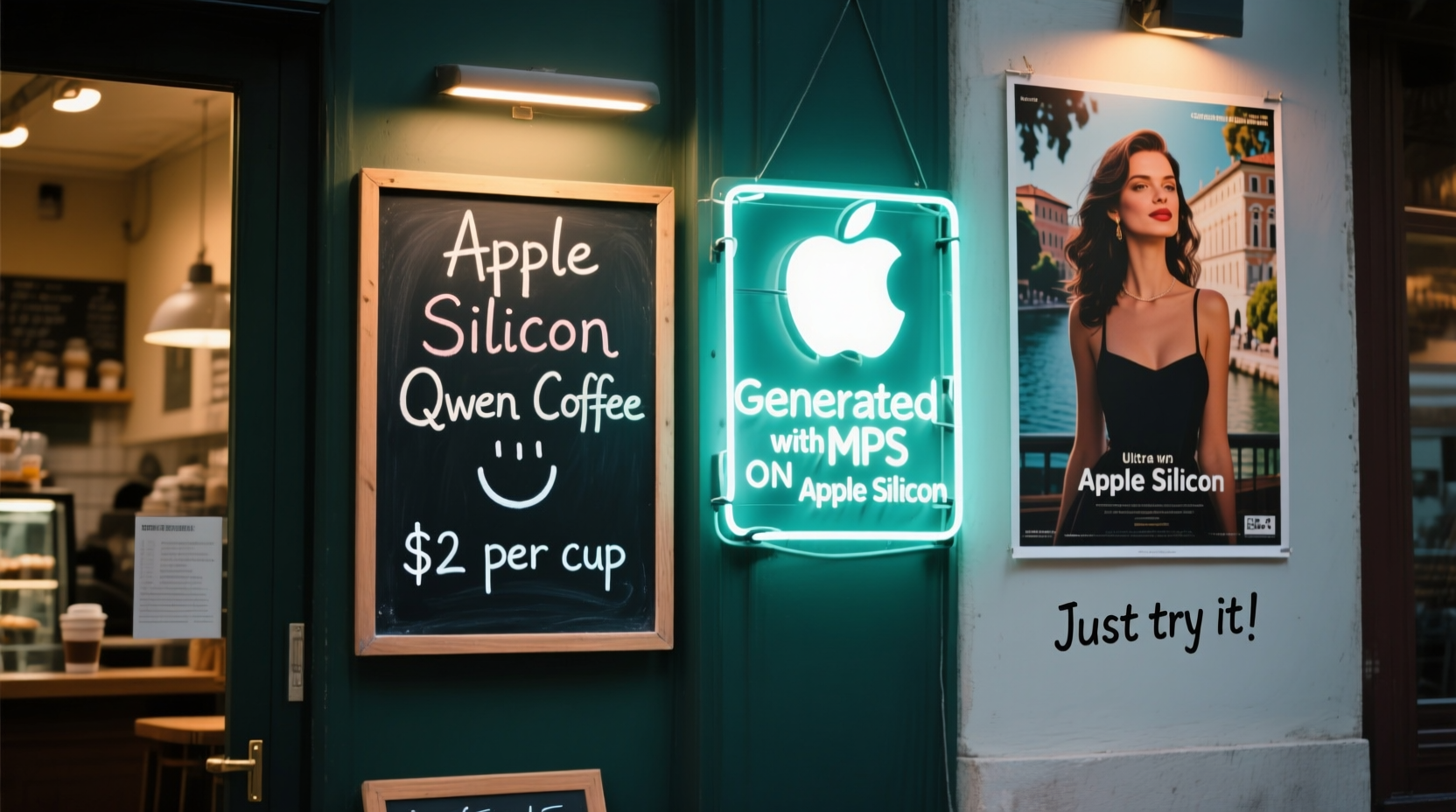
Example generation result:
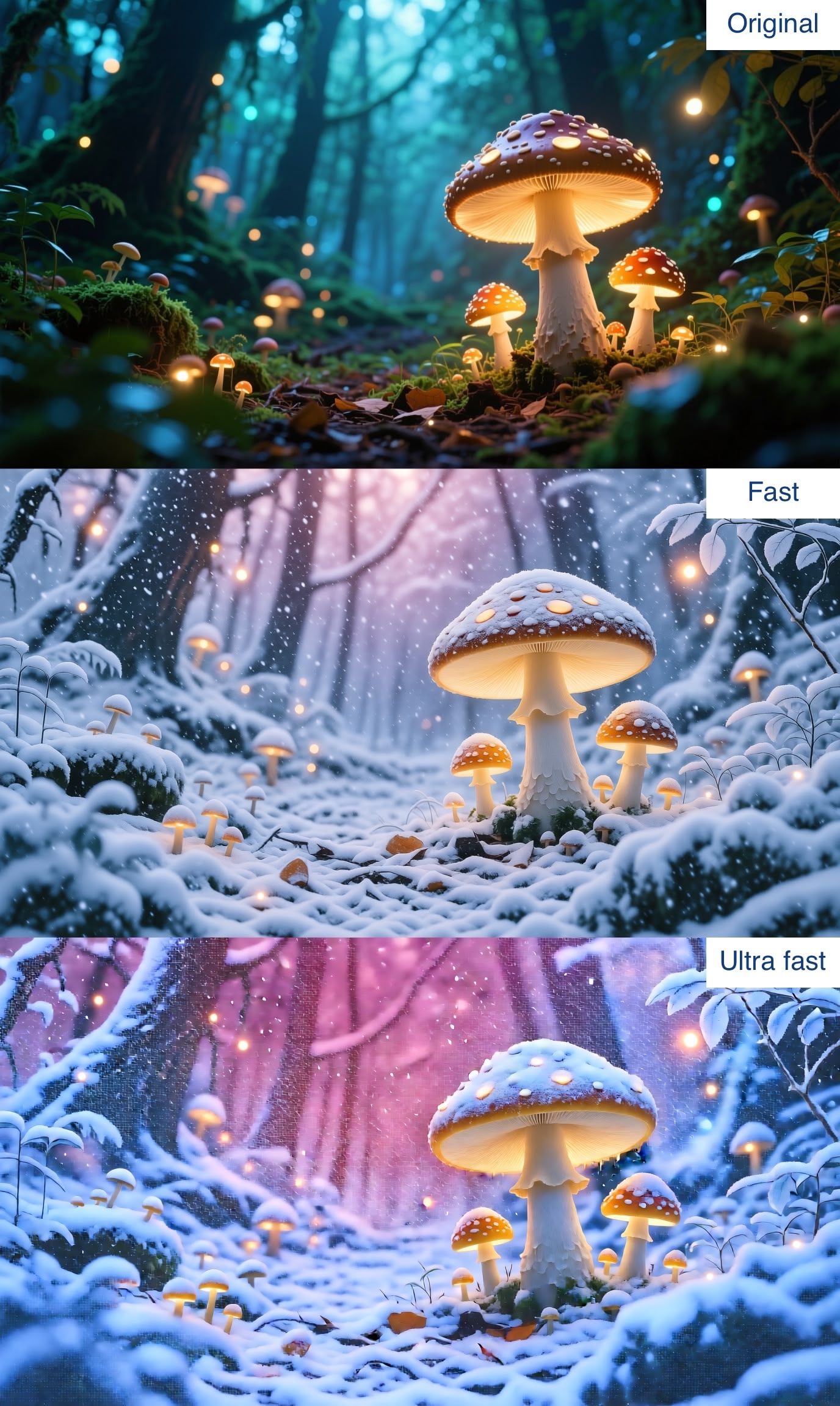
Example edit results showing winter transformation:
Installation
Option 1: Install from PyPI (Recommended)
Install the package using pip:
pip install qwen-image-mps
Then run it directly from the command line:
qwen-image-mps --help
qwen-image-mps --version        # Show version
qwen-image-mps generate --help  # For image generation
qwen-image-mps edit --help      # For image editing
Option 2: Direct script execution with uv
You can run this script directly using uv run without installation - it will install all dependencies automatically in an isolated environment:
uv run https://raw.githubusercontent.com/ivanfioravanti/qwen-image-mps/refs/heads/main/qwen-image-mps.py --help
Or download the file first:
curl -O https://raw.githubusercontent.com/ivanfioravanti/qwen-image-mps/refs/heads/main/qwen-image-mps.py
uv run qwen-image-mps.py --help
Option 3: Install from source
Clone the repository and install in development mode:
git clone https://github.com/ivanfioravanti/qwen-image-mps.git
cd qwen-image-mps
pip install -e .
Note: The first time you run the tool, it will download the 57.7GB model from Hugging Face and store it in your ~/.cache/huggingface/hub/models--Qwen--Qwen-Image directory.
Usage
After installation, use the qwen-image-mps command with either generate or edit subcommands:
qwen-image-mps --help
qwen-image-mps --version        # Show version
qwen-image-mps generate --help  # For image generation
qwen-image-mps edit --help      # For image editing
Image Generation Examples:
# Default prompt and steps
qwen-image-mps generate

# Custom prompt and fewer steps
qwen-image-mps generate -p "A serene alpine lake at sunrise, ultra detailed, cinematic" -s 30

# Fast mode with Lightning LoRA (8 steps)
qwen-image-mps generate -f -p "A magical forest with glowing mushrooms"

# Ultra-fast mode with Lightning LoRA (4 steps)
qwen-image-mps generate --ultra-fast -p "A magical forest with glowing mushrooms"
# Or use the short form
qwen-image-mps generate -uf -p "A magical forest with glowing mushrooms"


# Custom seed for reproducible generation
qwen-image-mps generate --seed 42 -p "A vintage coffee shop"

# Generate multiple images (incrementing seed per image when seed is provided)
qwen-image-mps generate -p "Retro sci-fi city skyline at night" --num-images 3 --seed 100

# Generate multiple images with a fresh random seed for each image (omit --seed)
qwen-image-mps generate -p "Retro sci-fi city skyline at night" --num-images 3

# Generate with a custom LoRA for anime style
qwen-image-mps generate -p "A magical forest" --lora flymy-ai/qwen-image-anime-irl-lora

# Generate with custom LoRA and fast mode combined
qwen-image-mps generate -p "A futuristic city" --lora your-username/your-lora-model --fast

# Batman mode: LEGO Batman photobombs your image!
qwen-image-mps generate -p "A magical forest with elves" --batman

# Combine Batman mode with ultra-fast generation
qwen-image-mps generate -p "A serene mountain lake" --batman --ultra-fast
Image Editing Examples:
# Basic image editing
qwen-image-mps edit -i input.jpg -p "Change the sky to sunset colors"

# Fast mode with Lightning LoRA (8 steps)
qwen-image-mps edit -i photo.png -p "Add snow to the mountains" --fast

# Ultra-fast mode with Lightning LoRA (4 steps)
qwen-image-mps edit -i landscape.jpg -p "Make it autumn colors" --ultra-fast
# Or use the short form
qwen-image-mps edit -i landscape.jpg -p "Make it autumn colors" -uf

# Edit with custom output filename
qwen-image-mps edit -i portrait.jpg -p "Change hair color to blonde" -o blonde_portrait.png

# Edit with custom seed and steps
qwen-image-mps edit -i scene.jpg -p "Add dramatic lighting" --seed 123 -s 30

# Edit with a custom LoRA for specific style
qwen-image-mps edit -i photo.jpg -p "Make it anime style" --lora flymy-ai/qwen-image-anime-irl-lora

# Edit with custom LoRA and ultra-fast mode combined
qwen-image-mps edit -i landscape.jpg -p "Add cyberpunk elements" --lora your-username/your-lora-model --ultra-fast

# Batman mode for editing: LEGO Batman photobombs your edited image!
qwen-image-mps edit -i photo.jpg -p "Change to sunset lighting" --batman

# Combine Batman mode with fast editing
qwen-image-mps edit -i portrait.jpg -p "Add dramatic shadows" --batman --fast
If using the direct script with uv, replace qwen-image-mps with uv run qwen-image-mps.py in the examples above.
Command Arguments
Generate Command Arguments
-p, --prompt(str): Prompt text for image generation.-s, --steps(int): Number of inference steps (default: 50).-f, --fast: Enable fast mode using Lightning LoRA for 8-step generation.-uf, --ultra-fast: Enable ultra-fast mode using Lightning LoRA v1.0 for 4-step generation.--seed(int): Random seed for reproducible generation (default: 42). If not explicitly provided and generating multiple images, a new random seed is used for each image.--num-images(int): Number of images to generate (default: 1).--lora(str): Hugging Face model URL or repo ID for additional LoRA to load (e.g., 'flymy-ai/qwen-image-anime-irl-lora' or full HF URL).--batman: Add a LEGO Batman minifigure photobombing your image in unexpected ways!
Edit Command Arguments
-i, --input(str): Path to the input image to edit (required).-p, --prompt(str): Editing instructions (required).-s, --steps(int): Number of inference steps for normal editing (default: 50).-f, --fast: Enable fast mode using Lightning LoRA v1.1 for 8-step editing.-uf, --ultra-fast: Enable ultra-fast mode using Lightning LoRA v1.0 for 4-step editing.--seed(int): Random seed for reproducible generation (default: 42).-o, --output(str): Output filename (default: edited-.png).--lora(str): Hugging Face model URL or repo ID for additional LoRA to load (e.g., 'flymy-ai/qwen-image-anime-irl-lora' or full HF URL).--batman: Add a LEGO Batman minifigure photobombing your edited image!
What the script does
Image Generation
- Loads
Qwen/Qwen-Imageviadiffusers.DiffusionPipeline - Selects device and dtype:
- MPS:
bfloat16 - CUDA:
bfloat16 - CPU:
float32
- MPS:
- Uses a light positive conditioning suffix for quality
- Generates at a 16:9 resolution (default
1664x928) - Saves the output as
image-YYYYMMDD-HHMMSS.pngfor a single image, orimage-YYYYMMDD-HHMMSS-1.png,image-YYYYMMDD-HHMMSS-2.png, ... when using--num-images - Prints the full path of the saved image
Image Editing
- Loads
Qwen/Qwen-Image-EditviaQwenImageEditPipelinefor image editing - Takes an existing image and editing instructions as input
- Applies transformations while preserving the original structure
- Saves the edited image as
edited-YYYYMMDD-HHMMSS.pngor custom filename - Prints the full path of the edited image
Fast Mode & Ultra-Fast Mode (Lightning LoRA)
Fast Mode (-f/--fast)
When using the -f/--fast flag, the tool:
- Automatically downloads the Lightning LoRA v1.1 from Hugging Face (cached in
~/.cache/huggingface/hub/) - Merges the LoRA weights into the model for accelerated generation
- Uses fixed 8 inference steps with CFG scale 1.0
- Provides ~6x speedup compared to the default 50 steps
Ultra-Fast Mode (-uf/--ultra-fast)
When using the -uf/--ultra-fast flag, the tool:
- Automatically downloads the Lightning LoRA v1.0 from Hugging Face (cached in
~/.cache/huggingface/hub/) - Merges the LoRA weights into the model for maximum speed generation
- Uses fixed 4 inference steps with CFG scale 1.0
- Provides ~12x speedup compared to the default 50 steps
- Ideal for rapid prototyping and iteration
The fast implementation is based on Qwen-Image-Lightning. The Lightning LoRA models are available on HuggingFace at lightx2v/Qwen-Image-Lightning.
Both generation and editing now support Lightning LoRA for accelerated processing!
Batman Mode 🦇
The --batman flag adds a fun twist to your image generation and editing by having a LEGO Batman minifigure photobomb your images! This feature works with both generate and edit commands.
When enabled, the tool randomly selects from various photobombing styles:
- LEGO Batman doing dramatic cape poses
- Sneaking into frame from the sides
- Peeking from behind objects
- Hanging upside down from the top
- Doing the Batusi dance
- Striking heroic poses
- Shouting his famous catchphrases
This feature adds a playful element to your images while keeping the main subject intact. The LEGO Batman appears small but noticeable, creating unexpected and humorous compositions.
Loading Additional LoRAs
Command Line Usage
The --lora argument allows you to load custom LoRA models from Hugging Face Hub:
# Using a repo ID
qwen-image-mps generate -p "Your prompt" --lora flymy-ai/qwen-image-anime-irl-lora

# Using a full Hugging Face URL
qwen-image-mps generate -p "Your prompt" --lora https://huggingface.co/flymy-ai/qwen-image-anime-irl-lora

# Combine with Lightning LoRA for both speed and style
qwen-image-mps generate -p "Your prompt" --lora your-username/style-lora --fast
The tool will automatically:
- Download the LoRA from Hugging Face Hub (cached locally)
- Find the appropriate safetensors file in the repository
- Merge the LoRA weights into the model
- Apply any Lightning LoRA if
--fastor--ultra-fastis also specified
Notes and tweaks
- Aspect ratio / resolution: The script currently uses the
16:9entry from anaspect_ratiosmap. You can change the selection in the code wherewidth, heightis set. - Determinism: Use the
--seedparameter to control the random generator for reproducible results. On MPS, the random generator runs on CPU for improved stability. - Performance: If you hit memory or speed issues, try reducing
--steps.
Troubleshooting
- If you see "Using CPU" in the console on Apple Silicon, ensure your PyTorch build includes MPS and you are running on Apple Silicon Python (not under Rosetta).
- If model download fails or is unauthorized, log in with
huggingface-cli loginor accept the model terms on the Hugging Face model page.
Development
To contribute or modify the tool:
- Clone the repository:
git clone https://github.com/ivanfioravanti/qwen-image-mps.git
cd qwen-image-mps
- Install in development mode with dev dependencies:
pip install -e ".[dev]"
- Install pre-commit hooks:
pre-commit install
The project uses:
blackfor code formattingisortfor import sortingrufffor linting- Pre-commit hooks for code quality
Repository contents
src/qwen_image_mps/: Main package source codeqwen-image-mps.py: Script wrapper for direct URL executionpyproject.toml: Package configuration and dependenciesuv.lock: Locked dependencies for reproducible builds.github/workflows/: CI/CD pipelines for testing and publishingexample.png: Sample generated image
Project details
Verified details
These details have been verified by PyPIProject links
GitHub Statistics
Maintainers
Release history Release notifications | RSS feed


Download files
Download the file for your platform. If you're not sure which to choose, learn more about installing packages.
Source Distribution
Built Distribution
Filter files by name, interpreter, ABI, and platform.
If you're not sure about the file name format, learn more about wheel file names.
Copy a direct link to the current filters
File details
Details for the file qwen_image_mps-0.4.2.tar.gz.
File metadata
- Download URL: qwen_image_mps-0.4.2.tar.gz
- Upload date:
- Size: 2.1 MB
- Tags: Source
- Uploaded using Trusted Publishing? Yes
- Uploaded via: twine/6.1.0 CPython/3.12.9
File hashes
| Algorithm | Hash digest | |
|---|---|---|
| SHA256 |
9ed13b15c3f98be4f9338af4c21456b050c578a60777c603db86b5f9d5e86691
|
|
| MD5 |
4a9765c5633f95df12f857248df57298
|
|
| BLAKE2b-256 |
e3166ff76f188b872e3019e52a133b035873db298f56dcbe3b1ec2ef65e02848
|
Provenance
The following attestation bundles were made for qwen_image_mps-0.4.2.tar.gz:
Publisher:
publish.yml on ivanfioravanti/qwen-image-mps
-
Statement:
-
Statement type:
https://in-toto.io/Statement/v1 -
Predicate type:
https://docs.pypi.org/attestations/publish/v1 -
Subject name:
qwen_image_mps-0.4.2.tar.gz -
Subject digest:
9ed13b15c3f98be4f9338af4c21456b050c578a60777c603db86b5f9d5e86691 - Sigstore transparency entry: 421783083
- Sigstore integration time:
-
Permalink:
ivanfioravanti/qwen-image-mps@a630ab5cfc3f0b52550c8bad8db3ec9a02014110 -
Branch / Tag:
- Owner: https://github.com/ivanfioravanti
-
Access:
public
-
Token Issuer:
https://token.actions.githubusercontent.com -
Runner Environment:
github-hosted -
Publication workflow:
publish.yml@a630ab5cfc3f0b52550c8bad8db3ec9a02014110 -
Trigger Event:
release
-
Statement type:
File details
Details for the file qwen_image_mps-0.4.2-py3-none-any.whl.
File metadata
- Download URL: qwen_image_mps-0.4.2-py3-none-any.whl
- Upload date:
- Size: 13.7 kB
- Tags: Python 3
- Uploaded using Trusted Publishing? Yes
- Uploaded via: twine/6.1.0 CPython/3.12.9
File hashes
| Algorithm | Hash digest | |
|---|---|---|
| SHA256 |
bca4708488e909282cd382ff5050c069c353e6e1d68a9470dcd70259fb5adfe4
|
|
| MD5 |
aab019fcb191f009ca31cea0ebc6e718
|
|
| BLAKE2b-256 |
5dd18614f4595a10f122381e96f1a2c836dd641af605a7489d169cdf06c5c6b0
|
Provenance
The following attestation bundles were made for qwen_image_mps-0.4.2-py3-none-any.whl:
Publisher:
publish.yml on ivanfioravanti/qwen-image-mps
-
Statement:
-
Statement type:
https://in-toto.io/Statement/v1 -
Predicate type:
https://docs.pypi.org/attestations/publish/v1 -
Subject name:
qwen_image_mps-0.4.2-py3-none-any.whl -
Subject digest:
bca4708488e909282cd382ff5050c069c353e6e1d68a9470dcd70259fb5adfe4 - Sigstore transparency entry: 421783110
- Sigstore integration time:
-
Permalink:
ivanfioravanti/qwen-image-mps@a630ab5cfc3f0b52550c8bad8db3ec9a02014110 -
Branch / Tag:
- Owner: https://github.com/ivanfioravanti
-
Access:
public
-
Token Issuer:
https://token.actions.githubusercontent.com -
Runner Environment:
github-hosted -
Publication workflow:
publish.yml@a630ab5cfc3f0b52550c8bad8db3ec9a02014110 -
Trigger Event:
release
-
Statement type:






