
QwSTPad Python Library



Generated from the Pimoroni Python Boilerplate.
The QwSTPad is a small 10-button I2C gamepad.
Installing
We'd recommend using this library with Raspberry Pi OS Bookworm or later. It requires Python ≥3.7.
Full install (recommended):
We've created an easy installation script that will install all pre-requisites and get you up and running with minimal efforts. To run it, fire up Terminal which you'll find in Menu -> Accessories -> Terminal on your Raspberry Pi desktop, as illustrated below:
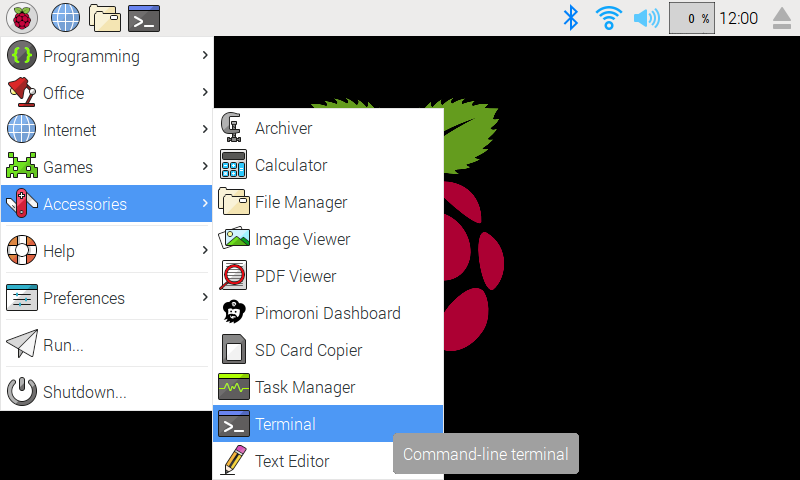
In the new terminal window type the commands exactly as it appears below (check for typos) and follow the on-screen instructions:
git clone https://github.com/pimoroni/qwstpad-python
cd qwstpad-python
./install.sh
Note Libraries will be installed in the "pimoroni" virtual environment, you will need to activate it to run examples:
source ~/.virtualenvs/pimoroni/bin/activate
Development:
If you want to contribute, or like living on the edge of your seat by having the latest code, you can install the development version like so:
git clone https://github.com/pimoroni/qwstpad-python
cd qwstpad-python
./install.sh --unstable
Install stable library from PyPi and configure manually
- Set up a virtual environment:
python3 -m venv --system-site-packages $HOME/.virtualenvs/pimoroni - Switch to the virtual environment:
source ~/.virtualenvs/pimoroni/bin/activate - Install the library:
pip install qwstpad
In some cases you may need to us sudo or install pip with: sudo apt install python3-pip.
This will not make any configuration changes, so you may also need to enable:
- i2c:
sudo raspi-config nonint do_i2c 0
You can optionally run sudo raspi-config or the graphical Raspberry Pi Configuration UI to enable interfaces.
Changelog
0.0.1
- Initial Release
1 maintainer

Release files for qwstpad 0.0.1
For a detailed explanation of source distributions (sdists) and built distributions (wheels), please see the package formats documentation.
Source distribution (sdist)
| File | Size | Uploaded | |
|---|---|---|---|
| qwstpad-0.0.1.tar.gz | 16.6 kB | Details |
Built distribution (wheel)
| File | Interpreter | ABI | Platform | Reset |
|---|---|---|---|---|
| qwstpad-0.0.1-py3-none-any.whl | Python 3 | none | any | Details |
Total release size: 24.2 kB
Release files / qwstpad-0.0.1.tar.gz
| Download URL | qwstpad-0.0.1.tar.gz |
|---|---|
| Size | 16.6 kB |
| Tags | Source |
|
SHA-256 checksum How to use checksums |
c07bcf7e79b8af4df14e46c74699491e34b9949a08fa4e61f6d89e3e33fa46e4
|
|
BLAKE2b-256 checksum How to use checksums |
acd264327ec0fd4dcf702e389ec6bcb7ba797138f962c0f42f1be8157cf4b338
|
| Upload date | |
|
Uploaded using Trusted Publishing? What is trusted publishing? |
No |
| Uploaded via |
twine/5.1.1 CPython/3.12.3
|
Release files / qwstpad-0.0.1-py3-none-any.whl
| Download URL | qwstpad-0.0.1-py3-none-any.whl |
|---|---|
| Size | 7.6 kB |
| Tags | Python 3 |
|
SHA-256 checksum How to use checksums |
76a7cc3c21d05ab4534d78704a16710c9c28c840e21d7dc5232ae68e5783f610
|
|
BLAKE2b-256 checksum How to use checksums |
7cdee45538658f568c843c72ea5398d8fa719b9fe9eecafb2abf7973369bc7b7
|
| Upload date | |
|
Uploaded using Trusted Publishing? What is trusted publishing? |
No |
| Uploaded via |
twine/5.1.1 CPython/3.12.3
|













