
QZS L6 Tool: quasi-zenith satellite L6-band tool, ver.0.1.11
Summary
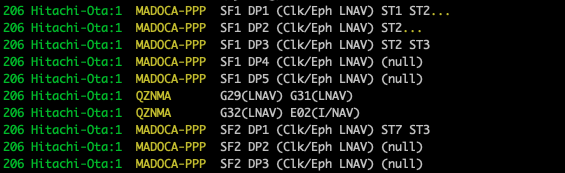
- This set of tools displays GNSS (Global Navigation Satellite System) messages and extracts specific formatted data from the raw data of GNSS receivers, for example, RTCM format and Michibiki L6 format.
- The suite consists of Python code that receives the messages via standard input, and the conversion results are sequentially outputted to the standard output. The use of standard error output is also possible as needed.
- It is designed to be used in conjunction with tools such as
ncof netcat, andstr2strof RTKLIB. - Initially, it aimed to display the content of augmentation messages broadcasted by the quasi-zenith satellite Michibiki (QZS) in the L6 frequency band, including CLAS and MADO. However, it is now also capable of displaying Galileo HAS messages.
- Semantic versioning has been applied since 2024-08-11.
- Release note
Operating Environment
Prerequisites
You can run these tools in either of the following environments:
- Directly on Linux or macOS: Python 3.10 or later and pip are required. Run the tools from the command line.
- With Docker: A Docker environment capable of running Linux containers, such as Docker Desktop, is required. You can use the tools on Windows, macOS, Linux, and Raspberry Pi OS. The Docker image includes the Python runtime,
nc, andstr2strfrom RTKLIB 2.4.3 b34, so you do not need to install them on the host.
Setup
Installing from PyPI
To run the tools directly on Linux or macOS, install them with:
python3 -m pip install qzsl6tool
The required Python dependencies, including bitstring, galois, and numpy, are installed automatically. Install external command-line tools such as nc and RTKLIB's str2str separately as needed.
Cloning the repository (required for Docker builds or sample data)
Clone the repository with Git if you want to build the Docker image or use the included samples and tests. If you already have a clone, change to its root directory.
If you use the Windows Git CLI, apply the following setting before cloning to prevent CR characters from being added to Python line endings:
git config --global core.autocrlf input
git clone https://github.com/yoronneko/qzsl6tool.git
cd qzsl6tool
Setting up Docker
Build the Docker image from the root of the repository:
docker build -t qzsl6tool .
The image contains only the runtime and application code. It does not include Git, build tools, tests, or samples. To use the samples or tests, mount the host repository into the container as shown below.
Usage Examples
Running tools installed from PyPI
To display the included L6 sample, run the following command from the root of the repository:
qzsl6read.py < sample/2022001A.l6
If you have installed RTKLIB's str2str, you can display RTCM messages received via NTRIP:
str2str -in ntrip://ntrip.rnav.info.hiroshima-cu.ac.jp:80/OEM7 2>/dev/null | rtcmread.py
Running tools with Docker
To display the included L6 sample, run the following command from the root of the repository. The -v .:/mnt option mounts the host's current directory at /mnt inside the container.
docker run -it --rm -v .:/mnt qzsl6tool "qzsl6read.py < /mnt/sample/2022001A.l6"
To display RTCM messages received via NTRIP, run:
docker run -it --rm qzsl6tool "str2str -in ntrip://ntrip.rnav.info.hiroshima-cu.ac.jp:80/OEM7 2>/dev/null | rtcmread.py"
To display your own L6 data, run the following command from the directory containing the file. Replace my_l6_data.l6 with the actual filename.
docker run -it --rm -v .:/mnt qzsl6tool "qzsl6read.py < /mnt/my_l6_data.l6"
When handling GNSS binary data on Windows, keep input acquisition and the processing pipeline inside the container, as shown above. Do not pass binary data through cmd.exe or PowerShell pipes.
Testing the code inside the Docker image
Run the following command from the root of the repository to test the Python code inside the image using the tests and samples on the host:
docker run -it --rm -v .:/mnt -e CODEDIR=/root/qzsl6tool/python/ qzsl6tool "cd /mnt/test && bash do_test.sh"
Satellite Signal Display
| display | code |
|---|---|
| RTCM | rtcmread.py |
| QZSS L6 | qzsl6read.py |
| QZSS L1S | qzsl1sread.py |
| Galileo I/NAV | galinavread.py |
| Galileo HAS | gale6read.py |
| BeiDou PPP-B2b | bdsb2read.py |
RTCM Format Conversion
| conversion | code |
|---|---|
| QZS L6 → RTCM message type 4050 | l6rtcm4050.py |
GNSS Receiver Data Conversion
| GNSS receiver | code | QZS L6 | SBAS / QZS L1S | Galileo HAS | Galileo I/NAV | BeiDou B2b | GLONASS L1OF | BeiDou B1I |
|---|---|---|---|---|---|---|---|---|
| Allystar HD9310 option C | alstread.py | -l option |
||||||
| Pocket SDR | psdrread.py | -l option |
-e option |
-i option |
-b option |
|||
| NovAtel OEM729 | novread.py | -e option |
||||||
| Septentrio mosaic-X5 | septread.py | -e option |
-b option |
|||||
| Septentrio mosaic-CLAS | septread.py | -l option |
||||||
| u-blox ZED-F9P | ubxread.py | --l1s option |
-i option |
--l1of option |
--b1i option |
Time & Coordinate Conversion
| conversion | code |
|---|---|
| GPS time, GST, BST → UTC time | gps2utc.py |
| UTC time → GPS time, GST, BST | utc2gps.py |
| LLH → ECEF | llh2ecef.py |
| ECEF → LLH | ecef2llh.py |
Directory Structure
├── c/               (contributed C source code)
├── dist/            (PyPI build artifacts; generated, not tracked by git)
├── docs/            (documentation directory)
├── python/          (Python source code directory)
├── sample/          (sample data directory)
├── test/            (test tool directory)
├── typings/         (local type stubs for pyright/Pylance)
├── CLAUDE.md        (documentation for Claude)
├── Dockerfile       (Docker image production procedure)
├── license.txt      (license description)
├── pyproject.toml   (configuration for PyPI)
├── readme-en.md     (this file, English document)
├── readme.md        (Japanese document)
├── release_note.md  (release note)
├── requirements.txt (declaration of Python package dependencies)
└── SECURITY.md      (description of reporting security vulnerabilities responsibly)
License
This project is licensed under the BSD 2-clause license.
Users are permitted to use this program for commercial and non-commercial purposes, with or without modification, but this copyright notice is required. The function rtk_crc24q() in librtcm.py utilizes the achievements of RTKLIB ver.2.4.3b34.
Copyright (c) 2022-2026 by Satoshi Takahashi
Copyright (c) 2007-2020 by Tomoji TAKASU
1 maintainer

Metadata
1 maintainer
Release files for qzsl6tool 0.1.11
For a detailed explanation of source distributions (sdists) and built distributions (wheels), please see the package formats documentation.
Source distribution (sdist)
| File | Size | Uploaded | |
|---|---|---|---|
| qzsl6tool-0.1.11.tar.gz | 114.6 kB | Details |
Built distribution (wheel)
| File | Interpreter | ABI | Platform | Reset |
|---|---|---|---|---|
| qzsl6tool-0.1.11-py3-none-any.whl | Python 3 | none | any | Details |
Total release size: 307.7 kB
Release files / qzsl6tool-0.1.11.tar.gz
| Download URL | qzsl6tool-0.1.11.tar.gz |
|---|---|
| Size | 114.6 kB |
| Tags | Source |
|
SHA-256 checksum How to use checksums |
60884fe90fa59ca76c1f601b51b6276aa19f88d2ac40c2ff1fd52d2bb156a2ad
|
|
BLAKE2b-256 checksum How to use checksums |
d09ce753c029363624e3cbafb9773e63a16b5ea837c4fcba742c35066fa923c4
|
| Upload date | |
|
Uploaded using Trusted Publishing? What is trusted publishing? |
No |
| Uploaded via |
twine/7.0.0 CPython/3.10.10
|
Release files / qzsl6tool-0.1.11-py3-none-any.whl
| Download URL | qzsl6tool-0.1.11-py3-none-any.whl |
|---|---|
| Size | 193.1 kB |
| Tags | Python 3 |
|
SHA-256 checksum How to use checksums |
e4148b60e4f2410284d91b36b8c2d0ce45117ae66815f7300680cd1f7c2c675b
|
|
BLAKE2b-256 checksum How to use checksums |
b873cfd6e435516479db4a81f0c52075edaf9fd1101b59d573d68fa0d55d0509
|
| Upload date | |
|
Uploaded using Trusted Publishing? What is trusted publishing? |
No |
| Uploaded via |
twine/7.0.0 CPython/3.10.10
|














