
Riksarkivet first MCPs to expose APIs in dataplattformen and htrflow

Project description

ra-mcp (WIP)



MCPs for Riksarkivet
A MCP server and command-line tools for searching and browsing transcribed historical documents from the Swedish National Archives (Riksarkivet).
Features
- Full-text search across millions of transcribed historical documents
- Complete page transcriptions with accurate text extraction from historical manuscripts
- Reference-based document browsing using official archive reference codes
- Contextual search highlighting to identify relevant content quickly
- High-resolution image access to original document scans via IIIF
Getting Started
MCP
Adding ra-mcp with streamable http for ChatGPT or Claude:
url: https://riksarkivet-ra-mcp.hf.space/mcp
Claude Code
claude mcp add --transport http ra-mcp https://riksarkivet-ra-mcp.hf.space/mcp
IDEs
cat > mcp.json <<'EOF'
{
  "mcpServers": {
    "ra-mcp": {
      "type": "streamable-http",
      "url": "https://riksarkivet-ra-mcp.hf.space/mcp",
      "note": "ra-mcp server (FastMCP) - via Streamable HTTP"
    }
  }
}
EOF
CLI
Install cli
uv pip install ra-mcp
# or
uv add ra-mcp
How to Use
1. Search for Keywords
Find documents containing specific words or phrases:
# Basic search
uv run ra search "Stockholm"

# Search with full page transcriptions
uv run ra search "trolldom" --browse --max-pages 5

# Wildcard search - single character (?)
uv run ra search "St?ckholm"  # Matches "Stockholm", "Stäckholm", etc.

# Wildcard search - multiple characters (*)
uv run ra search "Stock*"     # Matches "Stockholm", "Stocksund", "Stocken", etc.
uv run ra search "St*holm"    # Matches "Stockholm", "Strömholm", etc.
uv run ra search "*holm"      # Matches "Stockholm", "Söderholm", etc.

# Fuzzy search - find similar words
uv run ra search "Stockholm~"   # Matches "Stockholm", "Stokholm", "Stokholms", etc.
uv run ra search "Stockholm~1"  # Matches "Stockholm", "Stokholm" (max edit distance: 1)

# Proximity search - find words within distance
uv run ra search '"Stockholm trolldom"~10'  # "Stockholm" and "trolldom" within 10 words

# Boosting terms - increase relevance of specific terms
uv run ra search "Stockholm^4 trol*"  # Boost "Stockholm" relevance with wildcard
uv run ra search '("Stockholm dom*"^4 Reg*)'  # Boost entire phrase with wildcard

# Boolean operators - combine search terms
uv run ra search "(Stockholm AND trolldom)"  # Both terms required
uv run ra search "(Stockholm OR Göteborg)"  # Either term (or both)
uv run ra search "(Stockholm NOT trolldom)"  # Stockholm but not trolldom
uv run ra search "+Stockholm -trolldom"  # Require Stockholm, exclude trolldom

# Grouping - create complex queries with sub-queries
uv run ra search "((Stockholm OR Göteborg) AND troll*)"  # Either city + häxprocess
uv run ra search "((troll* OR häx*) AND (Stockholm OR Göteborg))"  # Complex grouping
Search Options:
--browse- Show full page transcriptions--max N- Maximum search results (default: 50)--max-display N- Maximum results to display (default: 20)--max-pages N- Maximum pages to load context for (default: 10)--max-hits-per-vol N- Maximum hits to return per volume (default: 3)
Search Types:
| Type | Syntax | Example | Description |
|---|---|---|---|
| Exact | "word" |
"Stockholm" |
Find exact matches |
| Wildcard (single) | ? |
"St?ckholm" |
Matches any single character |
| Wildcard (multiple) | * |
"Stock*" |
Matches zero or more characters |
| Fuzzy | ~ |
"Stockholm~" |
Finds similar terms based on edit distance (default: 2) |
| Fuzzy (custom) | ~N |
"Stockholm~1" |
Finds similar terms with max edit distance N (0-2) |
| Proximity | "word1 word2"~N |
"Stockholm trolldom"~10 |
Finds terms within N words of each other |
| Boosting | ^N |
"Stockholm^4 trol*" |
Increases relevance of boosted term (default: 1) |
| Boolean AND | AND or && |
(Stockholm AND trolldom) |
Both terms must be present |
| Boolean OR | OR or || |
(Stockholm OR Göteborg) |
Either term (or both) must be present |
| Boolean NOT | NOT or ! |
(Stockholm NOT trolldom) |
First term without second term |
| Required/Exclude | + / - |
+Stockholm -trolldom |
Require term (+) or exclude term (-) |
| Grouping | (...) |
((Stockholm OR Göteborg) AND troll*) |
Group clauses to form sub-queries |
2. Browse Specific Documents
When you find interesting documents, browse them directly:
# View single page
uv run ra browse "SE/RA/123" --page 5

# View page range
uv run ra browse "SE/RA/123" --pages "1-10"

# View specific pages with search highlighting
uv run ra browse "SE/RA/123" --page "5,7,9" --search-term "Stockholm"
Options:
--pageor--pages- Page numbers (e.g., "5", "1-10", "5,7,9")--search-term- Highlight this term in the text--max-display N- Maximum pages to display (default: 20)
3. Search with Full Context
The --browse flag shows complete page transcriptions instead of just snippets:
# Search with full page transcriptions
uv run ra search "Stockholm" --browse --max-pages 5
Output Features
🔍 Search Results
When you run a search, results are presented with:
- Document grouping - Related pages grouped together for context
- Institution & dates - Archive location and document dates
- Page numbers - Specific pages containing your search terms
- Highlighted snippets - Preview text with keywords emphasized
- Browse commands - Ready-to-run commands for deeper exploration
Example output:
Document: SE/RA/310187/1 - Kommissorialrätt i Stockholm ang. trolldom
Institution: Riksarkivet i Stockholm/Täby | Date: 1676 - 1677
├─ Page 2: "... **trolldom** ..."
├─ Page 7: "... **Trolldoms** ..."
├─ Page 8: "... **Trolldoms**..."

Browse commands:
  uv run ra browse "SE/RA/310187/1" --page 7 --search-term "trolldom"
  uv run ra browse "SE/RA/310187/1" --pages "2,7,8,52,72" --search-term "trolldom"
📄 Full Page Display
With the --browse flag, you get complete page transcriptions featuring:
- Full text transcriptions - Complete page content from ALTO XML
- Keyword highlighting - Your search terms highlighted in yellow
- Rich metadata - Document titles, dates, and archive hierarchy
- Direct access links - Quick links to images, XML, and interactive viewer
Example output:
═══ SE/RA/310187/1 - Page 7 ═══
Title: Kommissorialrätt i Stockholm ang. trolldom
Date: 1676-1677 | Institution: Riksarkivet i Stockholm/Täby

....

Links:
📄 ALTO XML: https://sok.riksarkivet.se/dokument/alto/SE_RA_310187_1_007.xml
🖼️  Image: https://lbiiif.riksarkivet.se/arkiv/SE_RA_310187_1_007.jpg
🔍 Bildvisning: https://sok.riksarkivet.se/bildvisning/SE_RA_310187_1#007
🔗 Available Resources
Each result provides direct access to:
| Resource | Description | Use Case |
|---|---|---|
| ALTO XML | Structured transcription data with precise positioning | Text analysis, data extraction |
| IIIF Images | High-resolution document scans with zoom/crop support | Visual inspection, citations |
| Bildvisning | Interactive web viewer with search highlighting | Online browsing, sharing |
| Collections | IIIF metadata for document series | Understanding document context |
Examples
Basic Workflow
-
Search for a keyword:
uv run ra search "Stockholm"
-
Get full context for interesting hits:
uv run ra search "Stockholm" --browse --max-pages 3
-
Browse specific documents:
uv run ra browse "SE/RA/123456" --page "10-15" --search-term "Stockholm"
Advanced Usage
# Comprehensive search with full page content
uv run ra search "trolldom" --browse --max-pages 8

# Targeted document browsing
uv run ra browse "SE/RA/760264" --pages "1,5,10-12" --search-term "trolldom"

# Large search with selective display
uv run ra search "trolldom" --max 100 --max-display 30
Technical Details
Riksarkivet APIs & Data Sources
This tool integrates with multiple Riksarkivet APIs to provide comprehensive access to historical documents:
Current Integrations
- Search API - Primary endpoint for full-text search across transcribed materials (Documentation)
- IIIF Collections - Access to digitized document collections via IIIF standard (Documentation)
- ALTO XML - Structured text transcriptions with precise positioning data
- IIIF Images - High-resolution document images with zoom and cropping capabilities
- Bildvisning - Interactive document viewer with search highlighting
- OAI-PMH - Metadata harvesting for archive records and references (Documentation)
Additional Resources
The Riksarkivet Data Platform Wiki provides comprehensive documentation for building additional MCP integrations.
Experimental Features
- Förvaltningshistorik - Semantic search interface (under evaluation)
- AI-Riksarkivet HTRflow - Handwritten text recognition pipeline (PyPI package)
Troubleshooting
Common Issues
- No results found: Try broader search terms or check spelling
- Page not loading: Some pages may not have transcriptions available
- Network timeouts: Tool includes retry logic, but very slow connections may time out
Getting Help
uv run ra --help
uv run ra search --help
uv run ra browse --help
uv run ra serve --help
MCP Server Development
# clone repo
git clone https://github.com/AI-Riksarkivet/ra-mcp.git
Running the MCP Server
# Install dependencies
uv sync && uv pip install -e .

# Run the main MCP server (stdio)
cd src/ra_mcp && uv run ra serve

# Run with SSE/HTTP transport on port 8000
cd src/ra_mcp && uv run ra serve --http
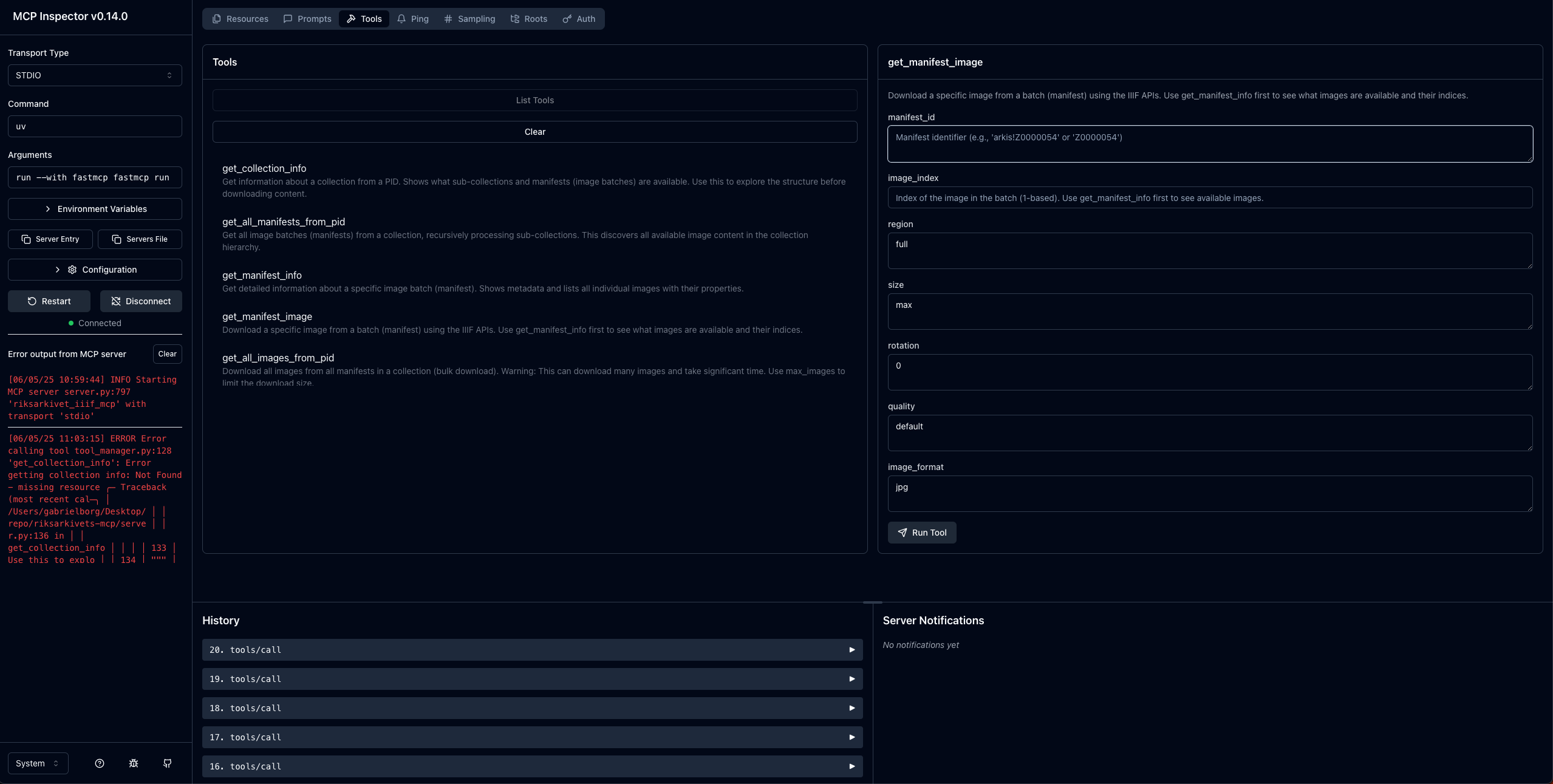
Testing with MCP Inspector
Use the MCP Inspector to test and debug the MCP server:
# Test the server interactively
npx @modelcontextprotocol/inspector uv run ra serve --http
The MCP Inspector provides a web interface to test server tools, resources, and prompts during development.
Building and Publishing with Dagger
The project uses Dagger for containerized builds and publishing to Docker registries. Pre-built images are available on Docker Hub.
Prerequisites
- Dagger CLI installed
- Docker registry credentials (for publishing)
Available Commands
Build locally:
dagger call build
Run tests:
dagger call test
Build and publish to Docker registry:
# Set environment variables

export DOCKER_PASSWORD="your-password"

# Build and publish
dagger call publish \
  --docker-username="username" \
  --docker-password=env:DOCKER_PASSWORD \
  --image-repository="riksarkivet/ra-mcp" \
  --tag="latest" \
  --source=.
Available Dagger Functions
build: Creates a production-ready container image using the Dockerfiletest: Runs the test suite using pytest with coverage reportingpublish: Builds and publishes container image to registry with authenticationbuild-local: Build with custom environment variables and registry settings
The Dagger configuration is located in .dagger/main.go and provides a complete CI/CD pipeline for the project.
Current MCP Server Implementation
The MCP server provides access to transcribed historical documents from the Swedish National Archives (Riksarkivet) through three primary tools and two resources:
🔧 Available Tools
1. search_transcribed
Search for keywords in transcribed materials with pagination support.
search_transcribed(
    keyword="trolldom",          # Search term
    offset=0,                    # Pagination offset (required)
    show_context=False,          # Full page text (default: False for more results)
    max_results=10,              # Maximum results to return
    max_hits_per_document=3      # Max hits per document
)
2. browse_document
Browse specific pages of a document by reference code.
browse_document(
    reference_code="SE/RA/310187/1",  # Document reference
    pages="7,8,52",                   # Page numbers or ranges
    highlight_term="trolldom",        # Optional keyword highlighting
    max_pages=20                       # Maximum pages to display
)
3. get_document_structure
Get document structure and metadata without fetching content.
get_document_structure(
    reference_code="SE/RA/310187/1",  # Document reference (or use pid)
    include_manifest_info=True         # Include IIIF manifest details
)
📚 Available Resources
- riksarkivet://contents/table_of_contents - Complete guide index (Innehållsförteckning)
- riksarkivet://guide/{filename} - Specific guide sections (e.g., '01_Domstolar.md', '02_Fangelse.md')
🔄 Typical Workflow
- Search →
search_transcribed("trolldom", offset=0)to find relevant documents - Paginate → Continue with
offset=50, 100, 150...for comprehensive discovery - Browse → Use
browse_document()to view specific pages with full transcriptions - Structure → Use
get_document_structure()to understand document organization
💡 Search Strategy Tips
- Start with
show_context=Falseto maximize hit coverage - Use pagination (increasing offsets) to find all matches
- Enable
show_context=Trueonly when you need full page text for specific hits - Browse specific pages for detailed examination with keyword highlighting
Release history Release notifications | RSS feed

Download files
Download the file for your platform. If you're not sure which to choose, learn more about installing packages.
Source Distribution
Built Distribution
Filter files by name, interpreter, ABI, and platform.
If you're not sure about the file name format, learn more about wheel file names.
Copy a direct link to the current filters
File details
Details for the file ra_mcp-0.1.0.tar.gz.
File metadata
- Download URL: ra_mcp-0.1.0.tar.gz
- Upload date:
- Size: 41.8 kB
- Tags: Source
- Uploaded using Trusted Publishing? No
- Uploaded via: uv/0.9.1
File hashes
| Algorithm | Hash digest | |
|---|---|---|
| SHA256 |
e3dfb0a1010bdf7dbc9805f2547ffe7d606f5779a1a5cf2ec9a3764afc00c3e1
|
|
| MD5 |
ced2d5588842a16e82a5a6ec88ae8de2
|
|
| BLAKE2b-256 |
faac0512ad6772ca72ead2550a594a85959e5a566b41e6b261f513c5d4392e5a
|
File details
Details for the file ra_mcp-0.1.0-py3-none-any.whl.
File metadata
- Download URL: ra_mcp-0.1.0-py3-none-any.whl
- Upload date:
- Size: 53.4 kB
- Tags: Python 3
- Uploaded using Trusted Publishing? No
- Uploaded via: uv/0.9.1
File hashes
| Algorithm | Hash digest | |
|---|---|---|
| SHA256 |
031e4d10f21d225348532b6653d443f6405ce68b7a515f570d190e37ab571f6d
|
|
| MD5 |
31d449af042624af23c4b4bd9f6a9bb4
|
|
| BLAKE2b-256 |
3ee5ba235da4996aeb800916ca60606a7d0960087db92b7017ba48c119a41057
|






