
RABIES: Rodent Automated Bold Improvement of EPI Sequences.
RABIES is an open source image processing pipeline for rodent fMRI. It conducts state-of-the-art preprocessing and confound correction, and supplies standard resting-state functional connectivity analyses. Visit our documentation at https://rabies.readthedocs.io/en/latest/.
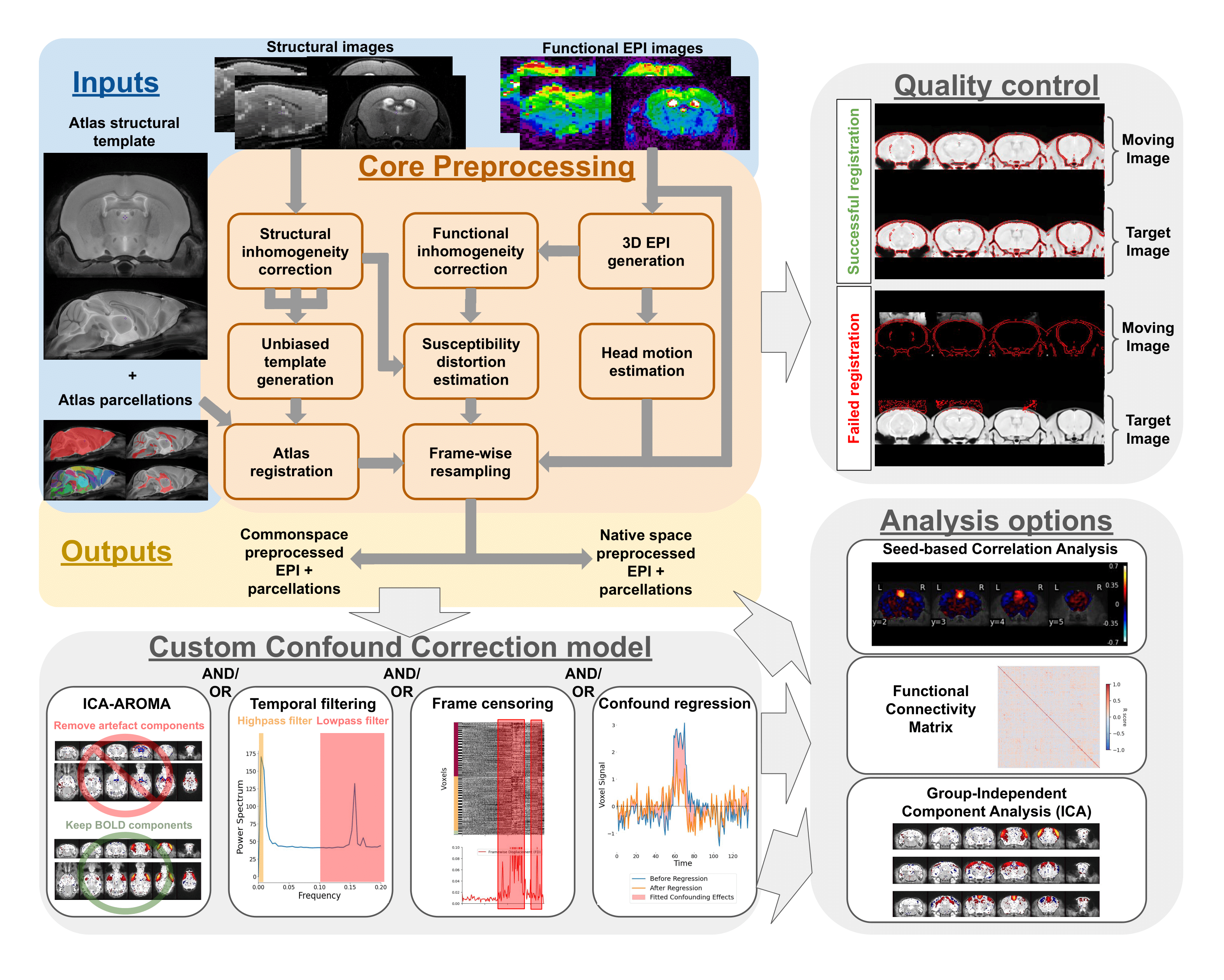
What you can do with RABIES
The primary purpose of RABIES is to provide rodent fMRI research with a standard, flexible, and reliable image processing platform. The package is complemented with informative data diagnostic features for confound characterization and encourages best practices for quality control and reproducibility. The RABIES software is structured into three main processing stages: preprocessing, confound correction and analysis.
Preprocessing
The preprocessing workflow regroups essential fMRI preprocessing steps prior to analysis. It includes a robust registration workflow with automatically-adapting parameters allowing to succesfully process diverse acquisition types (i.e. rodent species, scan field strength, coil type, ...), and can conduct the following preprocessing steps:
- head motion correction
- susceptibility distortion correction
- resampling to native or common space
- slice timing correction (optional)
- despiking (optional)
- visual assessment of registration for quality control
Confound correction
Following preprocessing, RABIES provides a highly-customizable confound correction pipeline regrouping several common strategies:
- frame censoring (or scrubbing)
- confound regression (with several options for nuisance regressors)
- frequency filtering (highpass, lowpass, bandpass)
- ICA-AROMA
- spatial smoothing
Analysis
Simple resting-state connectivity analyses are made available after preprocessing and confound correction:
- seed-based functional connectivity
- whole-brain connectivity matrix
- group-ICA
- dual regression
Importantly, the analysis stage is also complemented by a data quality assessment report (executed with --data_diagnosis), which generates several indices of data quality and potential confounds, with the aim of improving preprocessing strategies, data interpretation and scientific transparency.
Notes on software design
Nipype workflows: The image processing pipelines are structured using the Nipype library, which allows to build dynamic workflows in the form of a computational graph. Each node in the graph consists of a processing step, and the required inputs/outputs define the links between nodes. In addition to supporting code organization, Nipype workflows also handle several plugin architectures for parallel execution as well as memory management. The computational time to run the entire RABIES pipeline will vary substantially depending on data size, but for most uses, it will range from a few hours to a day when using proper computational resources and parallel execution.
Reproducible and transparent research: RABIES aims to follow best practices for reproducible and transparent research, including the following:
- open source code https://github.com/CoBrALab/RABIES
- standardized input data format with BIDS
- easily shared, automatically-generated visual outputs for quality control
- containerized distribution of the software through Docker/Apptainer, and conveniently installed from our Github or Docker Hub servers.
Citation
Citing RABIES: Please cite the official publication Desrosiers-Grégoire, et al. Nat Commun 15, 6708 (2024). when referencing the software.
Boilerplate: a boilerplate summarizing the preprocessing and confound correction operations is automatically generated in the output folder. You can use the boilerplate to help describe your methods in a paper.
License
The RABIES license allows for uses in academic and educational environments only. Commercial use requires a commercial license from CoBrALab contact@cobralab.ca, http://cobralab.ca
Acknowledgements
This software was developed by the CoBrALab, located at the Cerebral Imaging Center of the Douglas Mental Health University Institute, Montreal, Canada, in affiliation with McGill University, Montreal, Canada. This work was supported by funding from Healthy Brains, Healthy Lives (HBHL), the Fonds de recherche du Québec - Santé (FRQS) and - Nature et technologies (FRQNT), and the Natural Sciences and Engineering Research Council (NSERC) of Canada. fMRIPrep was an important inspirational source for this project, in particular with regards to best practices for software reproducibility and code design using Nipype. We also thank the organizers of BrainHack School Montreal, which guided the initial steps of this project in 2018.
Ask for help
If you need support in using the software or experience issues that are not documented, we'll provide support on the Github discussion.


Release files for rabies 0.6.4
For a detailed explanation of source distributions (sdists) and built distributions (wheels), please see the package formats documentation.
Source distribution (sdist)
| File | Size | Uploaded | Provenance | Actions |
|---|---|---|---|---|
| rabies-0.6.4.tar.gz | 212.1 kB | Without provenance | Details for rabies-0.6.4.tar.gz |
Built distribution (wheel)
| File | Interpreter | ABI | Platform | Actions Reset |
|---|---|---|---|---|
| rabies-0.6.4-py2.py3-none-any.whl | Python 3, Python 2 | none | any | Details for rabies-0.6.4-py2.py3-none-any.whl |
Total release size: 464.1 kB
Release files / rabies-0.6.4.tar.gz
| Download URL | rabies-0.6.4.tar.gz |
|---|---|
| Size | 212.1 kB |
| Tags | Source |
|
SHA-256 checksum How to use checksums |
1c9075c93b538b04b248cfc17fccf461e08e53e031a9c528d193e67e711a32b0
|
|
BLAKE2b-256 checksum How to use checksums |
db29b8ab96c7b4c3488525a948213ce1998c30e45b167a339f56ee1e9b139776
|
| Upload date | |
|
Uploaded using Trusted Publishing? What is trusted publishing? |
No |
| Uploaded via |
twine/6.2.0 CPython/3.11.15
|
Release files / rabies-0.6.4-py2.py3-none-any.whl
| Download URL | rabies-0.6.4-py2.py3-none-any.whl |
|---|---|
| Size | 252.1 kB |
| Tags | Python 2 Python 3 |
|
SHA-256 checksum How to use checksums |
e2334682061153e3b680a25a4777f6e8b4325b3e5af343b6d830b2940f53f55f
|
|
BLAKE2b-256 checksum How to use checksums |
e93c975bf2f506985fb1dc6ca1258052129fd88808c7a8f17fa367363e66b72e
|
| Upload date | |
|
Uploaded using Trusted Publishing? What is trusted publishing? |
No |
| Uploaded via |
twine/6.2.0 CPython/3.11.15
|
Security for rabies 0.6.4
Provenance
Provenance describes where a file came from. On PyPI, provenance is shared via attestations, which provide a verifiable record of the build or publishing details. View details, limitations and caveats.
No provenance found
None of the files in this release were uploaded with provenance metadata.
A note on package security
PyPI is a repository for distributing packages, not a service for auditing them. While third-party security researchers and our staff do their best to detect and remove malicious packages, PyPI cannot guarantee the quality, security or suitability of any given package.
To learn more about protecting yourself from malicious actors, visit our package security documentation.














