
Radar Data

Project description
Radar Data
This is a collection of radar data readers, a CF-Radial radar data writer, and charting routines.
Supported input formats:
- WDSS-II
- CF-Radial 1.3 / CF-1.6
- CF-Radial 1.4 / CF-1.6
- CF-Radial 1.4 / CF-1.7
- CF-Radial 2.0 (draft)
- NEXRAD Level II
Supported output format:
- CF-Radial 1.4
Installation
pip install radar-data
Examples
import radar

# Get the absolute path of the .nc file, reader automatically gets -V, -W, etc.
file = os.path.expanduser("~/Downloads/data/PX-20240529-150246-E4.0-Z.nc")
sweep = radar.read(file)

# It also works with providing the original .tar.xz or .txz archive
file = os.path.expanduser("~/Downloads/data/PX-20240529-150246-E4.0.txz")
sweep = radar.read(file)

# NEXRAD LDM data feed, simply supply any of the files, the reader reads sweep_index=0 by default
file = os.path.expanduser("~/Downloads/data/KTLX/861/KTLX-20250503-122438-861-1-S")
sweep = radar.read(file)

# The reader finds others in ~/Downloads/data/KTLX/861/ to get to sweep_index=1
file = os.path.expanduser("~/Downloads/data/KTLX/861/KTLX-20250503-122438-861-7-I")
sweep = radar.read(file, sweep_index=1)

# NEXRAD complete volume
file = os.path.expanduser("~/Downloads/data/KTLX/20250503/KTLX20250503_122438_V06")
sweep = radar.read(file, sweep_index=1)

# Writing a CF-Radial file
radar.write("output-file.nc", sweep)
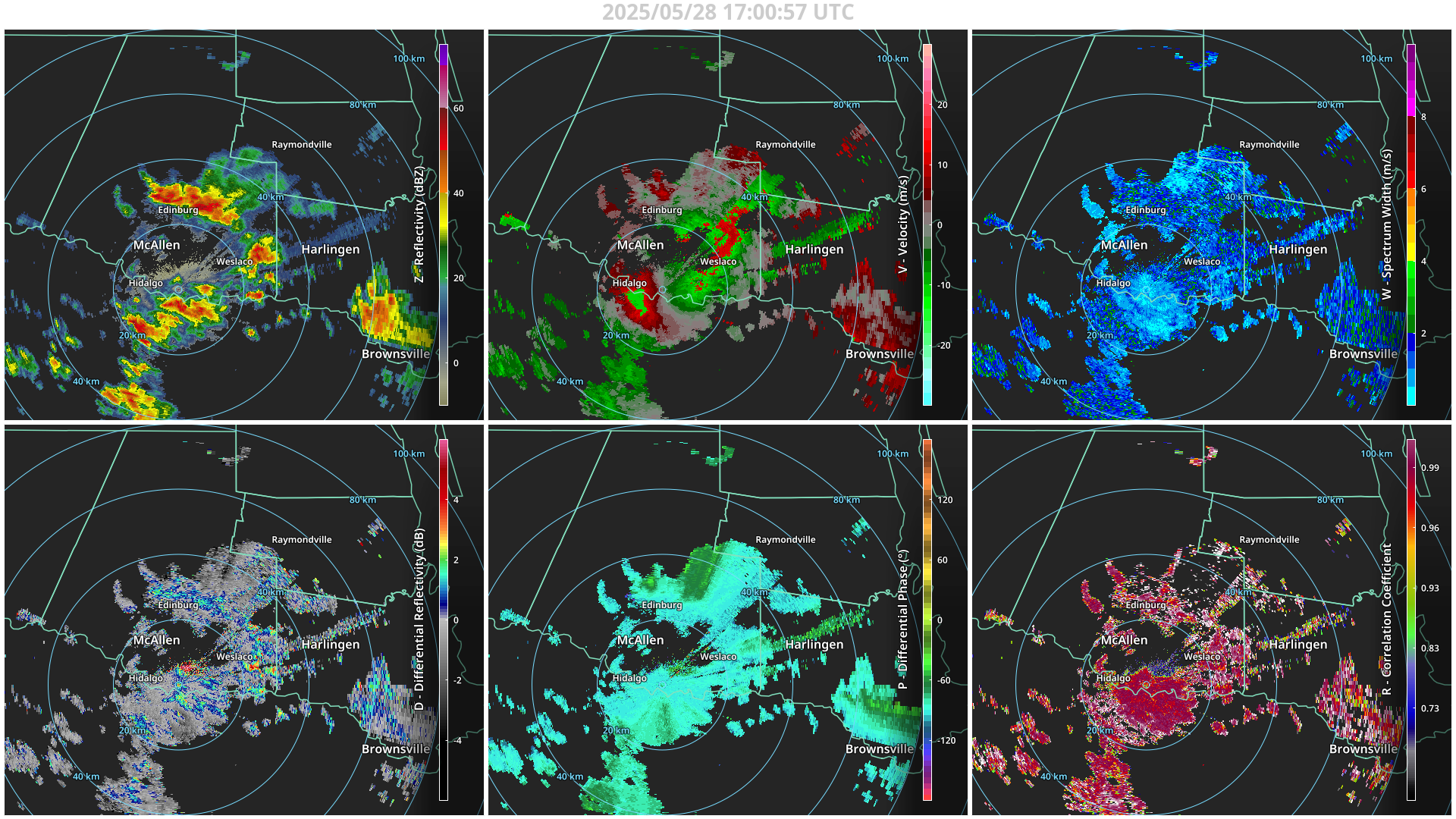
To draw a chart:
import radar
import radar.chart

# Read a sweep as before
sweep = radar.read(file)

# You can initialize a chart without data
chart = radar.chart.ChartPPI()

# You can also pass it the sweep
chart = radar.chart.ChartPPI(sweep)

# You can replace the content of the chart
chart.set_data(sweep)

# Some customizations:
chart.set_data(sweep, rmax=60, xoff=-10, yoff=-10)

# If, for some reasons, the chart does not show up, the figure is
chart.fig

# You can save the figure as an image using the matplotlib figure.savefig
chart.fig.savefir(FILENAME)
DataShop
A data server for multi-threaded reading. An example use case would be to abstract the file reading backend to this service so that multiple requests can be pipelined.
usage: datashop [-h] [-c COUNT] [-d DIR] [-H HOST] [-p PORT] [-t TEST] [-v] [--delay] [--version] [source ...]

Datashop

Examples:
    datashop -v settings.yaml
    datashop -v -H 10.197.14.52 -p 50001 -c 4 -t /mnt/data/PX1000/2024/20241219/_original

positional arguments:
  source                configuration

options:
  -h, --help            show this help message and exit
  -c COUNT, --count COUNT
                        count
  -d DIR, --dir DIR     directory
  -H HOST, --host HOST  host
  -p PORT, --port PORT  port
  -t TEST, --test TEST  test using directory
  -v                    increases verbosity
  --delay               simulate request delays
  --version             show program's version number and exit
Unit Tests
To run a set of reading tests through pytest:
pytest -s
Release history Release notifications | RSS feed


Download files
Download the file for your platform. If you're not sure which to choose, learn more about installing packages.
Source Distribution
radar_data-1.5.tar.gz
(3.5 MB
view details)
File details
Details for the file radar_data-1.5.tar.gz.
File metadata
- Download URL: radar_data-1.5.tar.gz
- Upload date:
- Size: 3.5 MB
- Tags: Source
- Uploaded using Trusted Publishing? No
- Uploaded via: twine/6.1.0 CPython/3.12.10
File hashes
| Algorithm | Hash digest | |
|---|---|---|
| SHA256 |
816d5656be9edc7ca2943ac6aea4d7d3f2d7e660f4f2dafecef5e044870f465a
|
|
| MD5 |
8d5ccc1b108900822e039111aebb432f
|
|
| BLAKE2b-256 |
c9be22c9d63d9f4e95f9e77f64de21a7b66112d1741b3529334292ea66609dda
|






