
RadexReader
The RadexReader is an user-space driver for the RADEX RD1212 v1/v2 and the RADEX ONE Geiger counters. It allow to read and clear stored data via USB. Warning! This tool is completely unrelated with QuartaRad.
This tool was initially developed with RD1212 v2.48.


Screenshots and Usage
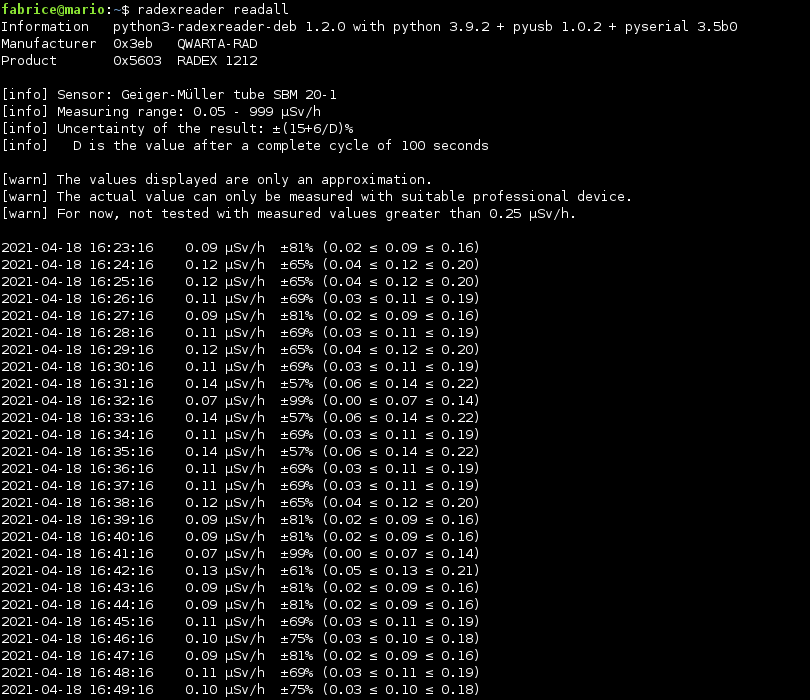
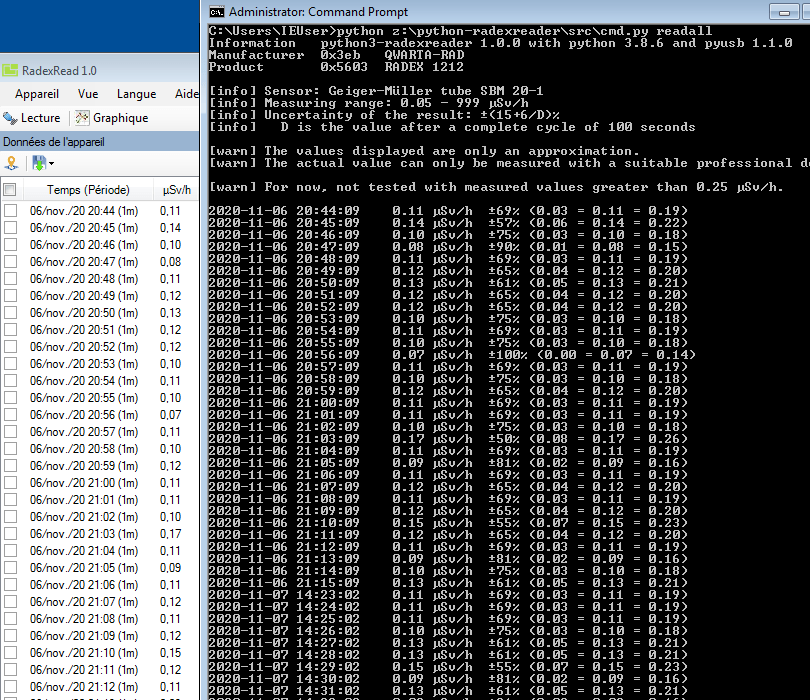
- Read
src/radexreader-cli.pyfor examples. - Run the command
radexreaderavailable with DEB/RPM packages. - Run the command
.../radexreader-cli.pyavailable with PYPI package.
Installation
It require libusb, pyusb and pyserial.
Installation for Debian, Devuan, Ubuntu, Trisquel, Linux Mint, MX Linux
sudo apt install python3-radexreader radexreader
Installation for Fedora
sudo dnf install python3-radexreader
Installation for openSUSE
sudo zypper install python3-radexreader
Installation for Mageia
sudo urpmi python3-radexreader
Installation for OpenMandriva
sudo dnf install python-radexreader
Installation with Docker
sudo docker run --rm --user root -it --privileged -v /dev:/dev python:3.13-alpine /bin/shthen:apk update ; apk add libusb ; python3 -m pip install radexreader
If the Radex ONE doesn't work, read this comment (modprobe & echo).
Installation with PIP or Manual installation
- Linux:
sudo python3 -m pip install radexreader(+ libusb) - Mac:
sudo pip install radexreader(+ libusb) - Windows:
python -m pip install radexreader(+ libusb, put libusb-1.0.dll in system32) - Manual:
git cloneor download archive (+ libusb)
Please note that you must authorise the usage of your device without root privileges. To do that, install python3-radexreader.udev in /usr/lib/udev/rules.d/60-python3-radexreader.rules or /lib/udev/rules.d/60-python3-radexreader.rules.
If you can't/won't, if the Radex ONE doesn't work, read this comment (modprobe & echo).
Alternative installation for Debian, Devuan, Ubuntu, Trisquel, Linux Mint, MX Linux
# PPA: https://launchpad.net/~luigifab/+archive/ubuntu/packages
# with Debian 12+/Bookworm+ you can use mantic+ instead of focal (https://unix.stackexchange.com/a/669008/364800)
# for Debian you can use focal for buster, jammy for bullseye, oracular or noble for bookworm, questing or plucky for trixie
# for Devuan you can use focal for beowulf, jammy for chimaera, oracular or noble for daedalus, questing or plucky for excalibur and ceres
# for Trisquel you can use focal for nabia, jammy for aramo
# for Linux Mint you can use focal for 20.x and 4/debbie, jammy for 21.x and 5/elsie, noble for 22.x and 6/faye, questing or plucky for 7/gigi
# for MX Linux you can use focal for 19.x, jammy for 21.x, oracular or noble for 23.x
# for Kali Linux you can use questing or plucky

sudo add-apt-repository ppa:luigifab/packages
sudo apt update
sudo apt install python3-radexreader radexreader
# or
sudo apt-key adv --keyserver hkp://keyserver.ubuntu.com:80 --recv-keys FFE5BD439356DF7D
echo "deb http://ppa.launchpad.net/luigifab/packages/ubuntu focal main" | sudo tee -a /etc/apt/sources.list
sudo apt update
sudo apt install python3-radexreader radexreader
# or
sudo wget -O /etc/apt/trusted.gpg.d/luigifab.gpg https://www.luigifab.fr/apt.gpg
echo "deb http://ppa.launchpad.net/luigifab/packages/ubuntu focal main" | sudo tee -a /etc/apt/sources.list
sudo apt update
sudo apt install python3-radexreader radexreader
# or
wget -qO - https://www.luigifab.fr/apt.gpg | sudo gpg --dearmor -o /etc/apt/trusted.gpg.d/luigifab.gpg
echo "deb http://ppa.launchpad.net/luigifab/packages/ubuntu focal main" | sudo tee -a /etc/apt/sources.list
sudo apt update
sudo apt install python3-radexreader radexreader

# sha256sum /etc/apt/trusted.gpg.d/luigifab.gpg
578c89a677048e38007462d543686b53587efba9f93814601169253c45ff9213
# apt-key list
/etc/apt/trusted.gpg.d/luigifab.gpg
pub   rsa4096 2020-10-31 [SC]
      458B 0C46 D024 FD8C B8BC  99CD FFE5 BD43 9356 DF7D
Copyright
- Current version: 1.3.0 (08/08/2025)
- Compatibility: Python 3.3 / 3.4 / 3.5 / 3.6 / 3.7 / 3.8 / 3.9 / 3.10 / 3.11 / 3.12 / 3.13 / 3.14
- Links: luigifab.fr - github.com - pypi.org - ppa/dpa
This program is provided under the terms of the GNU GPLv2+ license.
If you like, take some of your time to improve some translations, go to https://bit.ly/2HyCCEc.
Packages in official distros repositories
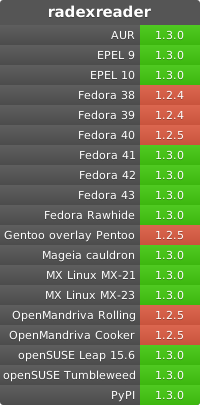
1 maintainer

Release files for radexreader 1.3.0
For a detailed explanation of source distributions (sdists) and built distributions (wheels), please see the package formats documentation.
Source distribution (sdist)
| File | Size | Uploaded | |
|---|---|---|---|
| radexreader-1.3.0.tar.gz | 14.3 kB | Details |
Built distribution (wheel)
| File | Interpreter | ABI | Platform | Reset |
|---|---|---|---|---|
| radexreader-1.3.0-py3-none-any.whl | Python 3 | none | any | Details |
Total release size: 29.3 kB
Release files / radexreader-1.3.0.tar.gz
| Download URL | radexreader-1.3.0.tar.gz |
|---|---|
| Size | 14.3 kB |
| Tags | Source |
|
SHA-256 checksum How to use checksums |
03951b3d5cb6e3569abce0eece32ff91629f8d1d1895151ca093c268ff6cbfce
|
|
BLAKE2b-256 checksum How to use checksums |
4af38ce15fd43786c103e1cfb80ae677dee4f4ded77fe412768f1179e5dab40d
|
| Upload date | |
|
Uploaded using Trusted Publishing? What is trusted publishing? |
No |
| Uploaded via |
twine/6.1.0 CPython/3.13.5
|
Release files / radexreader-1.3.0-py3-none-any.whl
| Download URL | radexreader-1.3.0-py3-none-any.whl |
|---|---|
| Size | 15.0 kB |
| Tags | Python 3 |
|
SHA-256 checksum How to use checksums |
ac98c5feea943539778533c3e32a30d7bc65c01923bec62122ecd104b78315bc
|
|
BLAKE2b-256 checksum How to use checksums |
f1be2e3506197c0024323c7a423a6b25e6a21322211e31e3e6d7b5799dfa94a3
|
| Upload date | |
|
Uploaded using Trusted Publishing? What is trusted publishing? |
No |
| Uploaded via |
twine/6.1.0 CPython/3.13.5
|














