
Play and record any radio stations around the globe right from the terminal

Project description




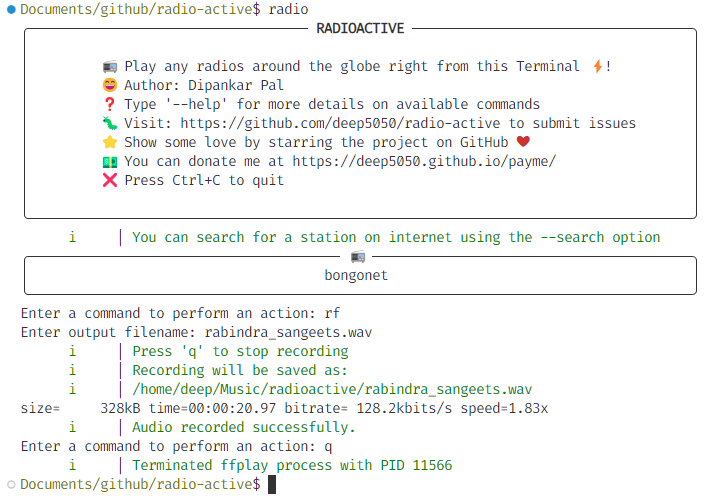






Demo
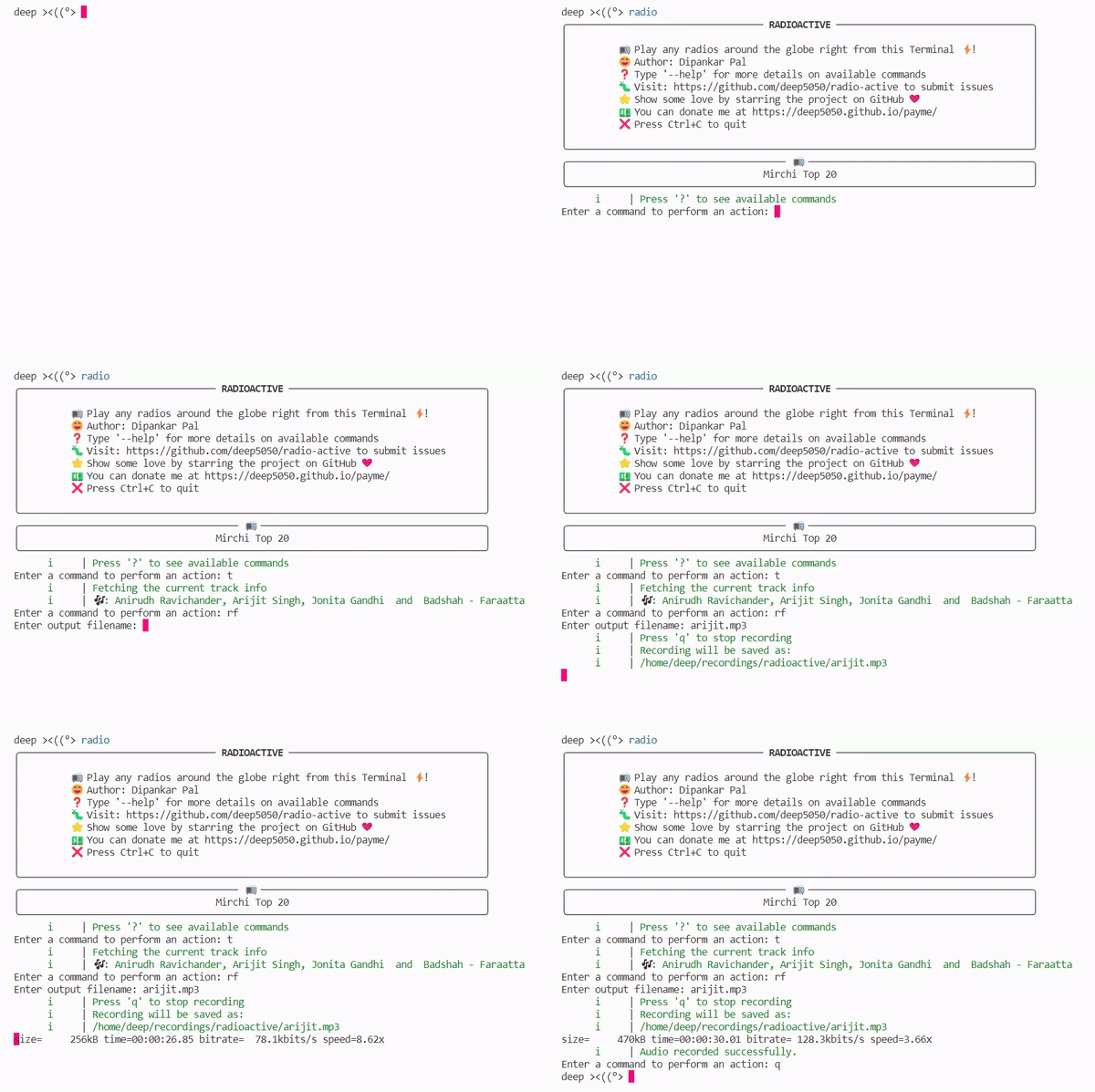
Features
- Supports more than 40K stations !! :radio:
- Record audio from live radio on demand :zap:
- Get song information on run-time 🎶
- Shazam identification of tracks
- Saves last station information
- Favorite stations :heart:
- Selection menu for favorite stations
- Supports user-added stations :wrench:
- Looks minimal and user-friendly
- Runs on Raspberry Pi
- Finds nearby stations
- Discovers stations by genre
- Discovers stations by language
- VLC, MPV player support
- Default config file
- Result limit (default 100)
- Sleep Timer (pomodoro) ⏲️
- History/Recently Played stations
- Scheduled Recording
- I'm feeling lucky! Play Random stations
See my progress ➡️ here
🎊🎊 For developer's guides and detailed architecture refer to this wiki: https://deepwiki.com/deep5050/radio-active

Why radioactive?
While there are various CLI-based radio players like PyRadio and TERA, Radioactive stands out for its simplicity. It's designed to work seamlessly right from the start. You don't need to be a hardcore Linux or Vim expert to enjoy radio stations with Radioactive. The goal of Radioactive is to offer a straightforward user interface that's easy to grasp and comes preconfigured, without unnecessary complexities.
In the Spotlight
The praise from YouTube channels and blogs underscores Radioactive's emergence as a top choice for radio enthusiasts. Its simple yet powerful features, make it a must-try application for radio lovers of all expertise levels. Discover the world of radio with ease – experience Radioactive today.
- See DistroTube YouTube channel talks about my app: https://www.youtube.com/watch?v=H7sf1RDFXpU&pp=ygUYcmFkaW9hY3RpdmUgcGxheWVyIHJhZGlv
- Ubunlog: https://ubunlog.com/en/radio-activate-an-application-to-listen-to-the-radio-from-the-terminal/
- LinuxLinks: https://www.linuxlinks.com/radio-active-listen-radio-terminal/3/
- Official entry in the RadioBrowser API: https://www.radio-browser.info/users
- ThingsAndStuff: https://wiki.thingsandstuff.org/Streaming#:~:text=com/billniakas/bash_radio_gr-,radio%2Dactive,-https%3A//github.com
- Awesome-stars: https://arbal.github.io/awesome-stars/#:~:text=deep5050/radio%2Dactive%20%2D%20Play%20any%20radios%20around%20the%20globe%20right%20from%20the%20terminal%20%3Azap%3A
- OpenSourceAgenda: https://www.opensourceagenda.com/projects/my-awesome-stars#:~:text=deep5050/radio%2Dactive%20%2D%20Play%20any%20radios%20around%20the%20globe%20right%20from%20the%20terminal%20%3Azap%3A
Install
Simply run: pip3 install --upgrade radio-active
I recommend installing it using pipx install radio-active
TODO:
- Create deb, rpm and exe packages
- Add it to various Linux distribution package repositories.
- Add to scoop, chocolately
External Dependency
It needs FFmpeg to be installed on your system in order to record the audio
on Ubuntu-based system >= 20.04 Run
sudo apt update
sudo apt install ffmpeg
For other systems including Windows see the above link
Installing FFmpeg
FFmpeg is required for this program to work correctly. Install FFmpeg by following these steps:-
- On Linux - https://www.tecmint.com/install-ffmpeg-in-linux/
- On Windows - https://www.wikihow.com/Install-FFmpeg-on-Windows
Run
Search a station with radio --search [STATION_NAME] or simply radio :zap: to select from the favorite menu.
Tips
- Use a modern terminal emulator, otherwise the UI might break! (gets too ugly sometimes)
- On Windows, instead of the default Command Prompt, use the new Windows Terminal or web-based emulators like Hyper, Cmdr, Terminus, etc. for better UI
- Let the app run for at least 5 seconds (not a serious issue though, for better performance)
Demo
Scheduled Recording
To schedule a recording:
radio --record-at "18:30" --uuid "96444e20-0601-11e8-ae97-52543be04c81" --filename "evening_jazz" --duration 30
This will countdown until 18:30, then record the station for 30 minutes, and exit.
Demo
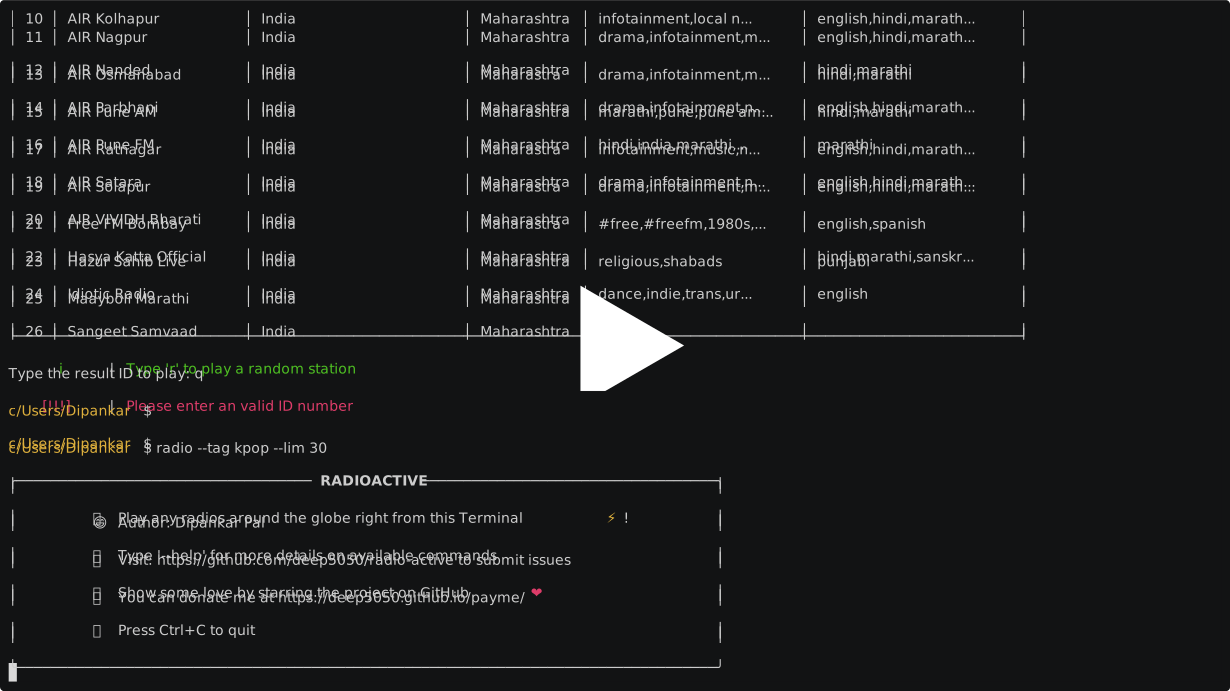
Options
| Options | Note | Description | Default | Values |
|---|---|---|---|---|
| (No Option) | Optional | Select a station from menu to play | False | |
--search, -S |
Optional | Station name | None | |
--play, -P |
Optional | A station from fav list or url for direct play | None | |
--country, -C |
Optional | Discover stations by country code | False | |
--state |
Optional | Discover stations by country state | False | |
--language |
optional | Discover stations by | False | |
--tag |
Optional | Discover stations by tags/genre | False | |
--uuid, -U |
Optional | ID of the station | None | |
--record , -R |
Optional | Record a station and save to file | False | |
--record-at |
Optional | Start recording at a specific time (HH:MM) | None | HH:MM (24h) |
--duration |
Optional | Duration of recording in minutes | None | Minutes |
--filename, -N |
Optional | Filename to used to save the recorded audio | None | |
--filepath |
Optional | Path to save the recordings | ~/radioactive/recordings |
|
--filetype, -T |
Optional | Format of the recording | mp3 | mp3,auto |
--last |
Optional | Play last played station | False | |
--random |
Optional | Play a random station from favorite list | False | |
--sort |
Optional | Sort the result page | votes | |
--filter |
Optional | Filter search results | None | |
--limit |
Optional | Limit the # of results in the Discover table | 100 | |
--volume , -V |
Optional | Change the volume passed into ffplay | 80 | [0-100] |
--favorite, -F |
Optional | Add current station to fav list | False | |
--add , -A |
Optional | Add an entry to fav list | False | |
--list, -W |
Optional | Show fav list | False | |
--remove |
Optional | Remove entries from favorite list | False | |
--flush |
Optional | Remove all the entries from fav list | False | |
--history |
Optional | Show recently played stations | False | |
--kill , -K |
Optional | Kill background radios. | False | |
--loglevel |
Optional | Log level of the program | Info | info, warning, error, debug |
--player |
Optional | Media player to use | ffplay | vlc, mpv, ffplay |
[!NOTE] Once you save/play at least one station, invoking
radiowithout any options will show a selection menu
--search,-S: Search for a station online.
--play,-P: You can pass an exact name from your favorite stations or alternatively pass any direct stream URL. This would bypass any user selection menu (useful when running from another script)
--uuid,-U: When station names are too long or confusing (or multiple results for the same name) use the station's uuid to play. --uuid gets the greater priority than--search. Example: 96444e20-0601-11e8-ae97-52543be04c81. typeuon the runtime command to get the UUID of a station.
--loglevel,: Don't need to specify unless you are developing it.info,warning,error,debug
-F: Add the current station to your favorite list. Example:-F my_fav_1
-A: Add any stations to your list. You can add stations that are not currently available on our API. When adding a new station enter a name and direct URL to the audio stream.
--limit: Specify how many search results should be displayed.
--filetype: Specify the extension of the final recording file. default ismp3. you can provide-T autoto autodetect the codec and set file extension accordingly (in original form).
--record-at: Schedule a recording to start at a specific local time (HH:MM 24-hour format). Requires--uuid,--filename, and--durationto be specified.
--duration: Specify the recording duration in minutes. Required for scheduled recording.
Runtime Commands
Radioactive features a modern, Vim-style command bar at the bottom of the screen. Instead of the old prompt, you now see a subtle : where you can type commands and search for stations.
Available Commands:
| Shortcut | Full Command | Description |
|---|---|---|
p |
play/pause |
Toggle current station playback |
t |
track |
Show current track info |
i |
info |
Show station details |
r |
record |
Start/Stop recording |
rf |
recordfile |
Record with a specific filename |
f |
fav |
Add current station to favorites |
l |
list |
Open favorite station selection menu |
s |
search |
Search for a new station online |
n |
next |
Play next station (from search/favs) |
timer |
sleep |
Set a sleep timer |
v |
volume |
Set volume (e.g., v 50) |
sz |
shazam |
Identify current song using Shazam |
b |
background |
Run radioactive in the background |
q |
quit |
Exit Radioactive |
Power Features:
- Tab Completion: Type a few letters and press
TaborRight Arrowto auto-complete commands and station names. - Instant Suggestions: As you type, the bar shows descriptive hints (e.g., typing
pshows(play/pause)). - Universal Fuzzy Search: If your input doesn't match a command, Radioactive instantly searches your Favorites and History. Just type the name of a station and press
Enterto play it immediately!
Sort Parameters
you can sort the result page with these parameters:
name(default)votes(based on user votes)codecbitratelastcheckok(active stations)lastchecktime(recent active)clickcount(total play count)clicktrend(currently trending stations)random
Filter Parameters
Filter search results with --filter. Some possible expressions are
--filter "name=shows"--filter "name=shows,talks,tv"--filter "name!=news,shows"--filter "country=in"--filter "language=bengali,nepali"--filter "bitrate>64"--filter "votes<500"--filter "codec=mp3"--filter "tags!=rock,pop"
Allowed operators are:
=,!=><&
Allowed keys are: name, country (countrycode as value), language, bitrate, votes, codec, tags
Provide multiple filters at one go, use &
A complex filter example: --filter "country!=CA&tags!=islamic,classical&votes>500"
[!NOTE] set
--limitto a higher value while filtering results
Default Configs
Default configuration file is added into your home directory as .radio-active-configs.ini
[AppConfig]
loglevel = info
limit = 100
sort = votes
filter = none
volume = 80
filepath = /home/{user}/radioactive/recordings/
filetype = mp3
player = ffplay
Feature Configuration
You can enable or disable specific features by editing ~/radioactive/features.conf.
If the file does not exist, it will be automatically created on the first run.
MINIMAL_FEATURE=false
RECORDING_FEATURE=true
TRACK_FEATURE=true
SEARCH_FEATURE=true
CYCLE_FEATURE=true
INFO_FEATURE=true
TIMER_FEATURE=true
HISTORY_FEATURE=true
Setting
MINIMAL_FEATURE=truewill override and disable all other optional features.
Configuration Paths
All the data files are stored in a folder called radioactive under your user home directory.
- Configuration:
~/radioactive/config.ini - Features:
~/radioactive/features.conf - Favorites:
~/radioactive/alias_map - Last Station:
~/radioactive/last_station - Recordings:
~/radioactive/recordings
Legacy configuration files are automatically migrated to this new location on the first run.
[!WARNING] Do NOT modify the keys, only change the values.
Bonus Tips
-
when using
rf: you can force the recording to be in mp3 format by adding an extension to the file name. Example "talk-show.mp3". If you don't specify any extension it should auto-detect. Example "new_show" -
You don't have to pass the exact option name, a portion of it will also work. for example
--seafor--search,--counfor--country,--limfor--limit -
It's better to leave the
--filetypeas mp3 when you need to record something quickly. The autocodec takes a few milliseconds extra to determine the codec.
Changes
see CHANGELOG
Community
Share you favorite list with our community 🌐 ➡️ Here
Your favorite list
alias_mapis under~/radioactive/directory.
Support
Visit my contribution page for more payment options.

Acknowledgements

Happy Listening
Contributors ✨
Thanks goes to these wonderful people (emoji key):
 Joe Smith ⚠️ 💻 🤔 |
 salehjafarli 💻 |
 marvoh 💻 🐛 |
This project follows the all-contributors specification. Contributions of any kind welcome!

Release history Release notifications | RSS feed


Download files
Download the file for your platform. If you're not sure which to choose, learn more about installing packages.
Source Distribution
Built Distribution
Filter files by name, interpreter, ABI, and platform.
If you're not sure about the file name format, learn more about wheel file names.
Copy a direct link to the current filters
File details
Details for the file radio_active-4.0.0.tar.gz.
File metadata
- Download URL: radio_active-4.0.0.tar.gz
- Upload date:
- Size: 49.7 kB
- Tags: Source
- Uploaded using Trusted Publishing? No
- Uploaded via: twine/4.0.0 CPython/3.10.12
File hashes
| Algorithm | Hash digest | |
|---|---|---|
| SHA256 |
e2fc06f2aca3051bfb6441575e9fe80b181f6c215fd4213068a01fcd824401cc
|
|
| MD5 |
5794c5337a9d804579022559194600fb
|
|
| BLAKE2b-256 |
d1fcfa24ed4fe658433fbae1d3acc422d4ed314e2e14612dfbfacbaaf5a95e18
|
File details
Details for the file radio_active-4.0.0-py3-none-any.whl.
File metadata
- Download URL: radio_active-4.0.0-py3-none-any.whl
- Upload date:
- Size: 53.6 kB
- Tags: Python 3
- Uploaded using Trusted Publishing? No
- Uploaded via: twine/4.0.0 CPython/3.10.12
File hashes
| Algorithm | Hash digest | |
|---|---|---|
| SHA256 |
30b5d28780b15a68cce688b1538608e2a92fdf8b63993ed62971438801fb6455
|
|
| MD5 |
e73b6f53c3de2748a8fbc0b56022be73
|
|
| BLAKE2b-256 |
952515a2a54d3debed5fe9a557e481d1ba0c8974e68a9b051295b2710a43c268
|






