
RAG Document Viewer 

RAG Document Viewer is an open-source library that generates high-fidelity file previews for seamless integration into your applications. It provides desktop-level file viewing capabilities for a wide range of document formats, including:
- PDF documents
- Microsoft Office files (Word, PowerPoint, Excel)
- OpenOffice documents (ODS, ODT, ODP)
The library converts these files into interactive HTML-based previews that can be easily embedded into web applications, desktop applications, or any system that supports HTML rendering.
Developed by Preprocess Team
How it works
- Pass in a file and specify the destination path.
- An HTML bundle is created.
- You can now embed the viewer in your application with just an
<iframe>.
Viewer capabilities:
- High-Fidelity Rendering: Preserve the exact look-and-feel of PDFs, DOCX, PPTX & XLSX documents.
- Embed in Seconds: Generate a self-contained HTML bundle and drop it into an
<iframe>. - Precise Highlights: Pass bounding-box coordinates from your RAG chunks; the viewer auto-scrolls and spotlights them.
- Lightweight & Secure - Runs 100 % in-browser. Files are served directly from your backend under your auth logic, no external servers.
Viewer features:
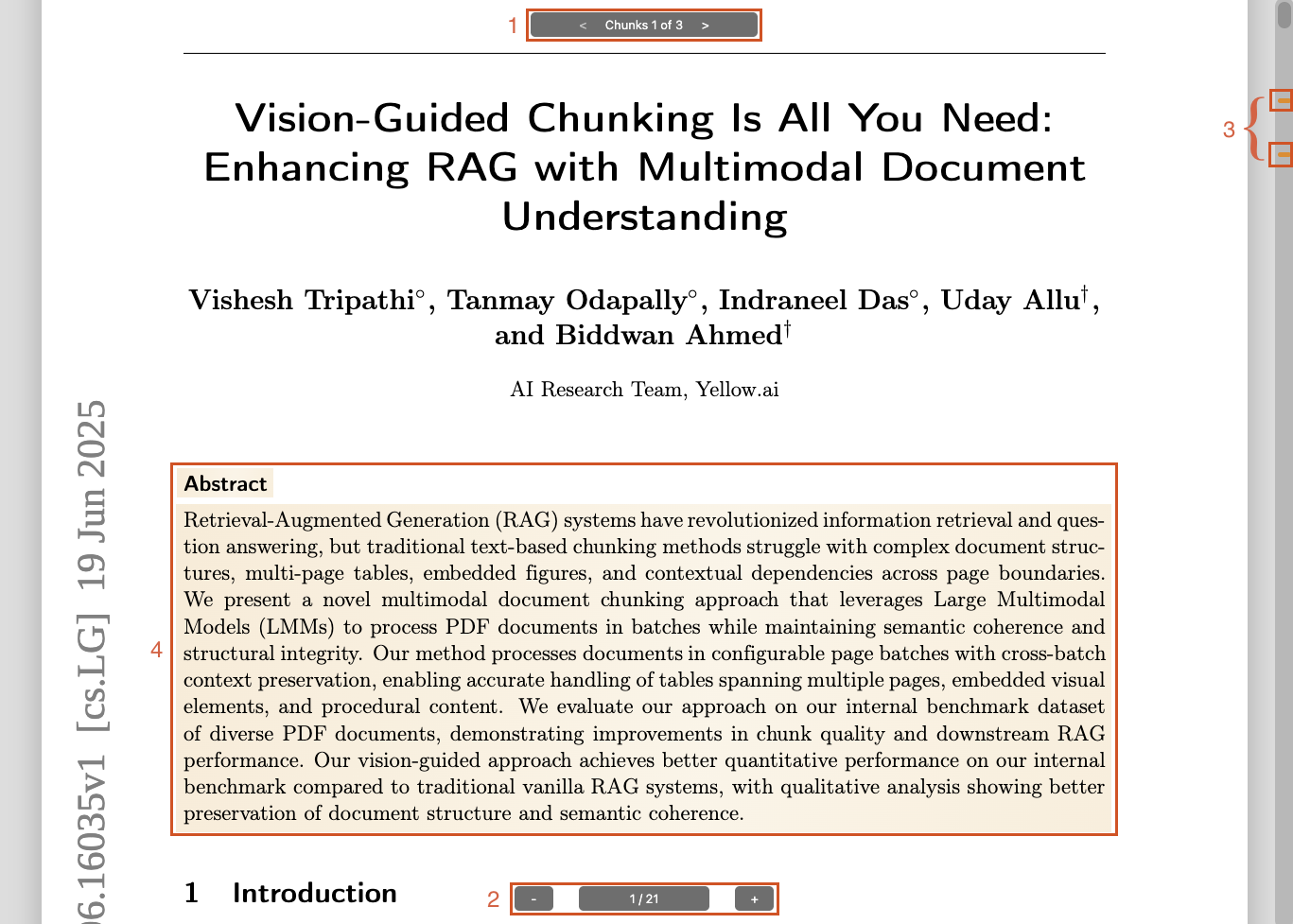
- Chunk Navigator: Navigate between highlighted chunks with next/previous controls.
- Zoom Controls: Renders the document at the optimal zoom level, and users can zoom in/out as needed.
- Scrollbar Navigator: Visual indicators on the scrollbar show highlighted chunk positions; click to jump to a specific chunk.
- Chunks Highlighting - Visual emphasis of the important content part you select.
Demo:
We've created a demo on Hugging Face that lets you see the results you can achieve with your documents.
The demo doesn't have chunk highlighting functionality. For that feature, you'll need to use a supported provider like preprocess.co for document chunking.
🚀 Quick Start
1. Install Dependencies
wget "https://raw.githubusercontent.com/preprocess-co/rag-document-viewer/refs/heads/main/install.sh"
chmod +x install.sh && ./install.sh
2. Install the Library
pip install rag-document-viewer
3. Create the bundle
from rag_document_viewer import RAG_DV

# Generate an HTML viewer
RAG_DV("document.pdf", "/static/viewers/document")
4. Serve in your application
<iframe
  src="/static/viewers/document/"
  width="100%"
  height="800"
  style="border:0"
></iframe>
Prerequisites
TL;DR – You only need system tools when building viewers on your server. Pre-built viewers are pure HTML/JS and have no dependencies.
Before you start, make sure the required system dependencies are installed. An install.sh convenience script is included for Ubuntu; support for additional operating systems is coming soon.
1. System Dependencies
For macOS, Windows, and other OSes, please refer to this guide.
Install the required libraries:
wget "https://raw.githubusercontent.com/preprocess-co/rag-document-viewer/refs/heads/main/install.sh"
chmod +x install.sh && ./install.sh
2. Python Library
Install the package from PyPI:
pip install rag-document-viewer
# or with Poetry:
# poetry add rag-document-viewer
3. Verify Installations
Confirm both system tools are properly installed:
libreoffice --version
# Expected output:
# LibreOffice 24.2.7.2 420(Build:2)

pdf2htmlEX --version
# Expected output:
# pdf2htmlEX version 0.18.8.rc1
# ...
Usage
Generate a standard viewer
from rag_document_viewer import RAG_DV

# Generate an HTML viewer
RAG_DV(file_path="document.pdf", store_path="/path/to/viewers/doc1")
Note: We suggest setting
store_pathto a non-public, internal path and serving the content through a dedicated view. This way, you remain in full control of the authentication logic. See Handling Authentication for more details.
Generate a viewer with chunk highlighting
You can get chunk coordinates from chunking providers like Preprocess.co (which supports paragraphs, layout items, multi-column layouts, slides, and more) or Unstructured.io (which offers PDF-only item-level support).
Note: Chunks' coordinates should be stored in a list. When storing and then accessing a chunk, you should use the list index to reference the correct chunk.
With the Preprocess SDK
from pypreprocess import Preprocess
from rag_document_viewer import RAG_DV

# Preprocess a file
preprocess = Preprocess(api_key=YOUR_API_KEY, filepath="path/to/file", boundary_boxes=True)
preprocess.chunk()
preprocess.wait()

result = preprocess.result()
# result is a PreprocessResponse object

# Generate an HTML viewer with highlighting capabilities
RAG_DV(
    file_path="path/to/file",
    store_path="/path/to/viewers/doc1",
    chunks=result.data['boundary_boxes']["boxes"]
)
With other providers
from rag_document_viewer import RAG_DV

# Define boxes for highlighting specific content areas.
# Each chunk is a list of one or more boxes.
# Each box has coordinates relative to the page dimensions (0.0 to 1.0).
# page: is a 0 based index for identifying the document page.
# top: position of the chunk between 0 and 1 relative to the page height
# left: position of the chunk between 0 and 1 relative to the page width
# height: vertical length of the chunk between 0 and 1 relative to the page height
# width: horizontal length of the chunk between 0 and 1 relative to the page width

boxes = [
    [ # First chunk
        {"page": 1, "top": 0.02, "left": 0.1, "height": 0.1, "width": 0.5},
        # A chunk can be composed of multiple boxes (e.g., for multi-column text)
    ],
    [ # Second chunk
        {"page": 2, "top": 0.5, "left": 0.2, "height": 0.2, "width": 0.6},
    ],
    # ... more chunks
]

# Generate an HTML viewer with highlighting capabilities
RAG_DV(
    file_path="path/to/file",
    store_path="/path/to/viewers/doc1",
    chunks=boxes
)
Important: If no chunk information is provided when generating the viewer, the following features will be disabled:
- Chunk highlighting and navigation
- Scrollbar chunk indicators
- The
goto_chunkURL parameterEnsure you include chunk coordinates if you plan to use these interactive features.
Tip: Page Highlighting If you prefer to highlight entire pages instead of precise portions, create a chunk that covers the full page:
[{"page": 3, "top": 0, "left": 0, "height": 1, "width": 1}]
Viewer Options
Customize the viewer's appearance and behavior with these parameters during generation:
| Parameter | Type | Default | Description |
|---|---|---|---|
chunks |
list |
[] |
List of box coordinates for content chunks to highlight. |
page_number |
bool |
True |
Display page numbers at the bottom. |
chunks_navigator |
bool |
True |
Show chunk navigation controls (requires chunks). |
scrollbar_navigator |
bool |
True |
Display chunk indicators on the scrollbar (requires chunks). |
show_chunks_if_single |
bool |
False |
Show chunks navigator even with only one chunk (requires chunks). |
chunk_navigator_text |
str |
"Chunk %d of %d" |
Text template for chunk counter (use %d placeholders, requires chunks). |
Example
from rag_document_viewer import RAG_DV

# `boxes` defined earlier in the code
RAG_DV(
    file_path="path/to/file",
    store_path="/path/to/viewer",
    chunks=boxes,
    chunk_navigator_text="Suggestion %d of %d",
    scrollbar_navigator=False
)
Color Customization
Customize the viewer's colors to match your branding.
If
main_colorandbackground_colorare set, all other colors are automatically derived. You can still override any specific color individually.
| Parameter | Type | Default | Description |
|---|---|---|---|
main_color |
str |
#ff8000 |
Primary color for interactive elements |
background_color |
str |
#dddddd |
Viewer background color |
page_shadow |
str |
None |
CSS box-shadow for pages (auto-calculated if not set) |
text_selection_color |
str |
None |
Browser text selection color for the viewer (auto-calculated if not set) |
controls_text_color |
str |
None |
Text color of viewer controls, like zoom and page number (auto-calculated if not set) |
controls_bg_color |
str |
None |
Background color of viewer controls, like zoom and page number (auto-calculated if not set) |
scrollbar_color |
str |
None |
Scrollbar background color (auto-calculated if not set) |
scroller_color |
str |
None |
Scrollbar thumb color (auto-calculated if not set) |
bookmark_color |
str |
None |
Color for relevant chunk indicators in the scrollbar (defaults to main_color) |
highlight_chunk_color |
str |
None |
CSS background-image for chunk highlight (auto-calculated if not set) |
highlight_page_color |
str |
None |
CSS background-image for page highlight (auto-calculated if not set) |
highlight_page_outline |
str |
None |
Page border color for highlighted pages (auto-calculated if not set) |
Example
from rag_document_viewer import RAG_DV

RAG_DV(
    file_path="path/to/file",
    store_path="/path/to/viewer",
    main_color="#0969da",
    background_color="#f6f8fa"
)
Displaying the Viewer
Add an <iframe> to your application to show the document.
⚠️ Important: The content must be served via HTTP/S. Opening the
index.htmldirectly from the local filesystem (file://) is not fully supported and may cause issues.
<iframe
  src="/path/to/viewers/my_document"
  width="100%"
  height="800"
  style="border:0"
></iframe>
Note: Please see the Handling Authentication section for best practices on securely integrating the viewer.
Viewer Display Parameters
Control the viewer's initial state by passing parameters in the <iframe> URL:
| Parameter | Type | Default | Description |
|---|---|---|---|
chunks |
string |
[] |
An ordered JSON array of chunk indices to highlight and navigate. |
goto_chunk |
int |
None |
Automatically scroll to this chunk index on load. |
goto_page |
int |
None |
Automatically scroll to this page number on load. |
Note: The
chunksandgoto_chunkparameters only work if chunk data was provided when the viewer was generated. The order of indices in thechunksURL parameter determines the "Next/Previous" navigation order. chunks and pages are 0-based inndexes
Behavior Priority: The viewer determines the initial scroll position based on the following priority:
- If
goto_chunkis set, it scrolls to that chunk. - Else, if
chunksis set, it scrolls to the first chunk in the list. - Else, if
goto_pageis set, it scrolls to that page. - Otherwise, it defaults to the beginning of the document.
Examples:
Highlight chunks 0, 2, and 3, and jump directly to chunk 2 on load. Navigation will follow the [0, 2, 3] order.
<iframe src="/viewer/doc1?chunks=[0,2,3]&goto_chunk=2"></iframe>
Highlight chunks 2, 0, and 3. The "Next/Previous" buttons will navigate in this specific order (2 -> 0 -> 3). The view will initially scroll to chunk 2.
<iframe src="/viewer/doc1?chunks=[2,0,3]"></iframe>
Go to a specific page on load.
<iframe src="/viewer/doc1?goto_page=4"></iframe>
Handling Authentication
We strongly recommend storing viewer bundles in a non-public path. Here is a guide on how to manage authentication to prevent unwanted access to your documents.
When generating a viewer, you should store the resulting bundle in a directory that is not publicly accessible via HTTP. You can use your web server (Apache, Nginx, etc.) to block direct access to this folder. When a user requests to see a document, your application backend should first verify their permissions and then serve the viewer bundle from the disk.
Depending on your stack, this can be implemented in many ways. Using a route handler is a common approach.
Flask Example This example shows how to serve a viewer only after checking user permissions.
from flask import Flask, send_from_directory, abort
from pathlib import Path

# Path where viewer bundles are stored securely, outside the public web root
BASE_DIR = Path("/var/secure_viewers").resolve()

@app.route("/view/<doc_id>/")
@app.route("/view/<doc_id>/<path:asset>")
def serve_my_document(doc_id, asset="index.html"):
    # 1. Add your authentication and authorization logic here
    # Example: check_user_can_view(current_user, doc_id)
    if not user_is_allowed:
        abort(403) # Forbidden

    # 2. Securely resolve the path to the viewer
    viewer_dir = (BASE_DIR / doc_id).resolve()

    # Security check: ensure the resolved path is still within the base directory
    # This prevents path traversal attacks (e.g., doc_id = "../../../etc/passwd")
    if viewer_dir.parent != BASE_DIR:
        abort(404) # Not Found

    # 3. Serve the requested asset (index.html, CSS, JS, etc.)
    return send_from_directory(viewer_dir, asset)
Note: Remember to include a wildcard in your route (e.g.
<path:asset>) to handle requests for all assets inside the bundle (CSS, JS, fonts, images), otherwise the viewer will not render correctly.
Support
Contact the Preprocess team at support@preprocess.co or join our Discord channel.
License
This project is licensed under the MIT License.
Credits
RAG Document Viewer would not be possible without the following open-source projects:
| Project | License |
|---|---|
| LibreOffice https://www.libreoffice.org/ | MPL 2.0 / LGPL v3 |
| pdf2htmlEX https://github.com/pdf2htmlEX/pdf2htmlEX | GPL v3 |
These tools are not bundled with the rag-document-viewer package; they must be installed on the host system where viewers are generated. Please consult the upstream repositories for full license texts and source code.
1 maintainer

Metadata
1 maintainer
Release files for rag-document-viewer 1.1.2
For a detailed explanation of source distributions (sdists) and built distributions (wheels), please see the package formats documentation.
Source distribution (sdist)
| File | Size | Uploaded | |
|---|---|---|---|
| rag_document_viewer-1.1.2.tar.gz | 510.6 kB | Details |
Built distribution (wheel)
| File | Interpreter | ABI | Platform | Reset |
|---|---|---|---|---|
| rag_document_viewer-1.1.2-py3-none-any.whl | Python 3 | none | any | Details |
Total release size: 535.4 kB
Release files / rag_document_viewer-1.1.2.tar.gz
| Download URL | rag_document_viewer-1.1.2.tar.gz |
|---|---|
| Size | 510.6 kB |
| Tags | Source |
|
SHA-256 checksum How to use checksums |
28eea1e1a303a10fd98a9b335fb7c488e0cf1af649bb38fe6a76a5094fd7a830
|
|
BLAKE2b-256 checksum How to use checksums |
96266f1dd926541cea1216aee395b5b2fefed9dd6a194687a593b969cc9e4647
|
| Upload date | |
|
Uploaded using Trusted Publishing? What is trusted publishing? |
No |
| Uploaded via |
twine/5.1.1 CPython/3.12.10
|
Release files / rag_document_viewer-1.1.2-py3-none-any.whl
| Download URL | rag_document_viewer-1.1.2-py3-none-any.whl |
|---|---|
| Size | 24.8 kB |
| Tags | Python 3 |
|
SHA-256 checksum How to use checksums |
e6c8055cf6bc019051f55090e2901ec3e5cf48fdb840bdca7599730d9235d8d6
|
|
BLAKE2b-256 checksum How to use checksums |
d4ce1ec3cd86619c73115b99c9ce2644dc9152381f7fb10f7d9574c529994c3a
|
| Upload date | |
|
Uploaded using Trusted Publishing? What is trusted publishing? |
No |
| Uploaded via |
twine/5.1.1 CPython/3.12.10
|














