
llama index based library for building multimodal RAG systems

Project description
Raggify

Raggify is a llama-index based Python library for building multimodal RAG(Retrieval-Augmented Generation) systems that run locally or as a service. It now ships with an asynchronous ingest pipeline for files, web pages, and URL lists, normalizes metadata, persists cache fingerprints to avoid redundant upserts, and keeps a document store in sync for BM25 / Vector hybrid retrieval.
Raggify is designed with the goal of natively handling multimodal data—including images, audio, video, and other unknown future modalities— from the outset, rather than repeatedly modifying systems based on text modality. It also serves to absorb various specification changes in the embedded models and client APIs provided by each AI provider.
🔎 Overview
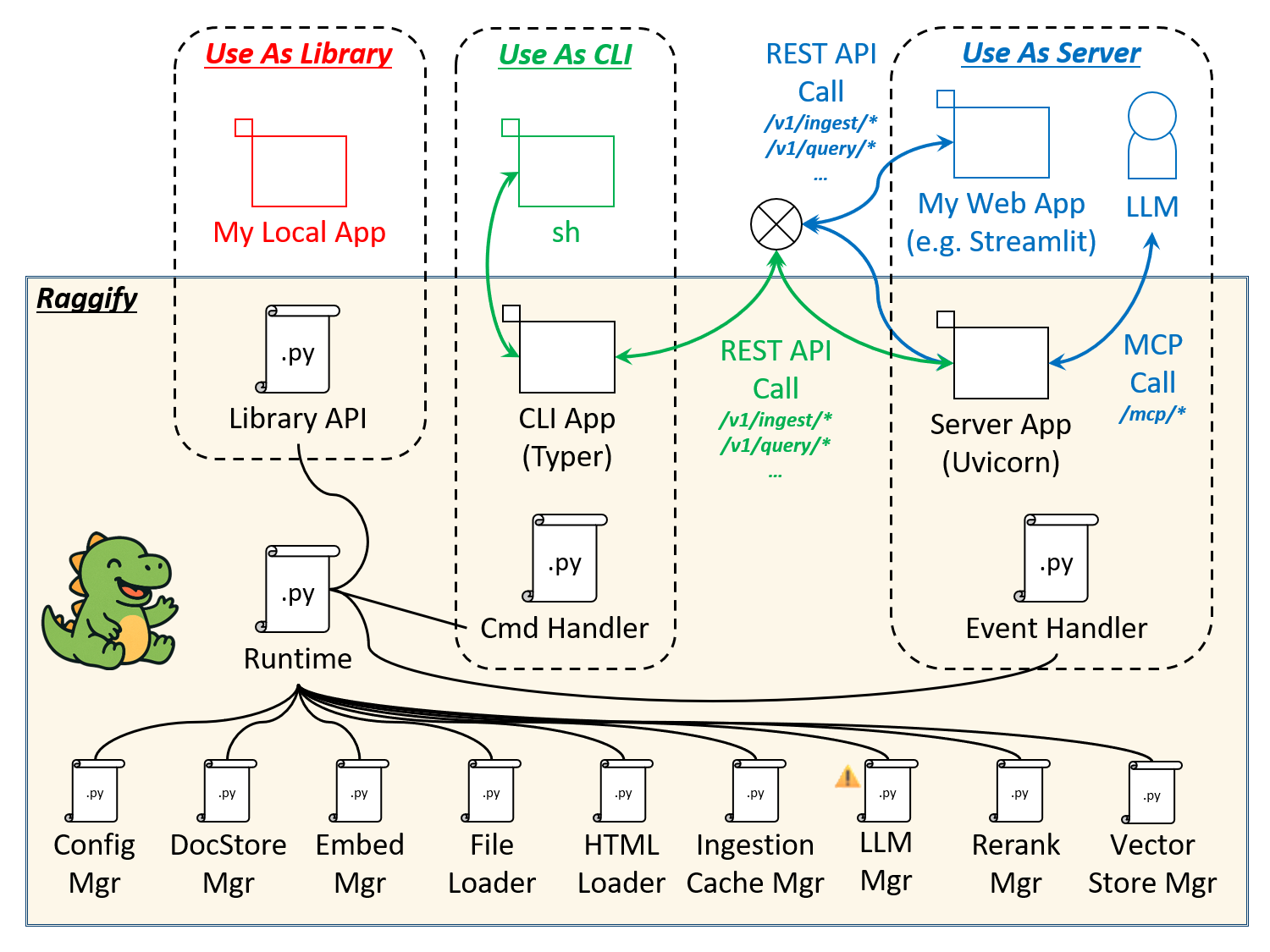
Raggify can be used in three ways: as a library, a CLI, and a server. Common to each usage scenario, the Runtime module acts as an intermediary between the various management modules and the configuration values in /etc/raggify/config.yaml (detail is at the end).
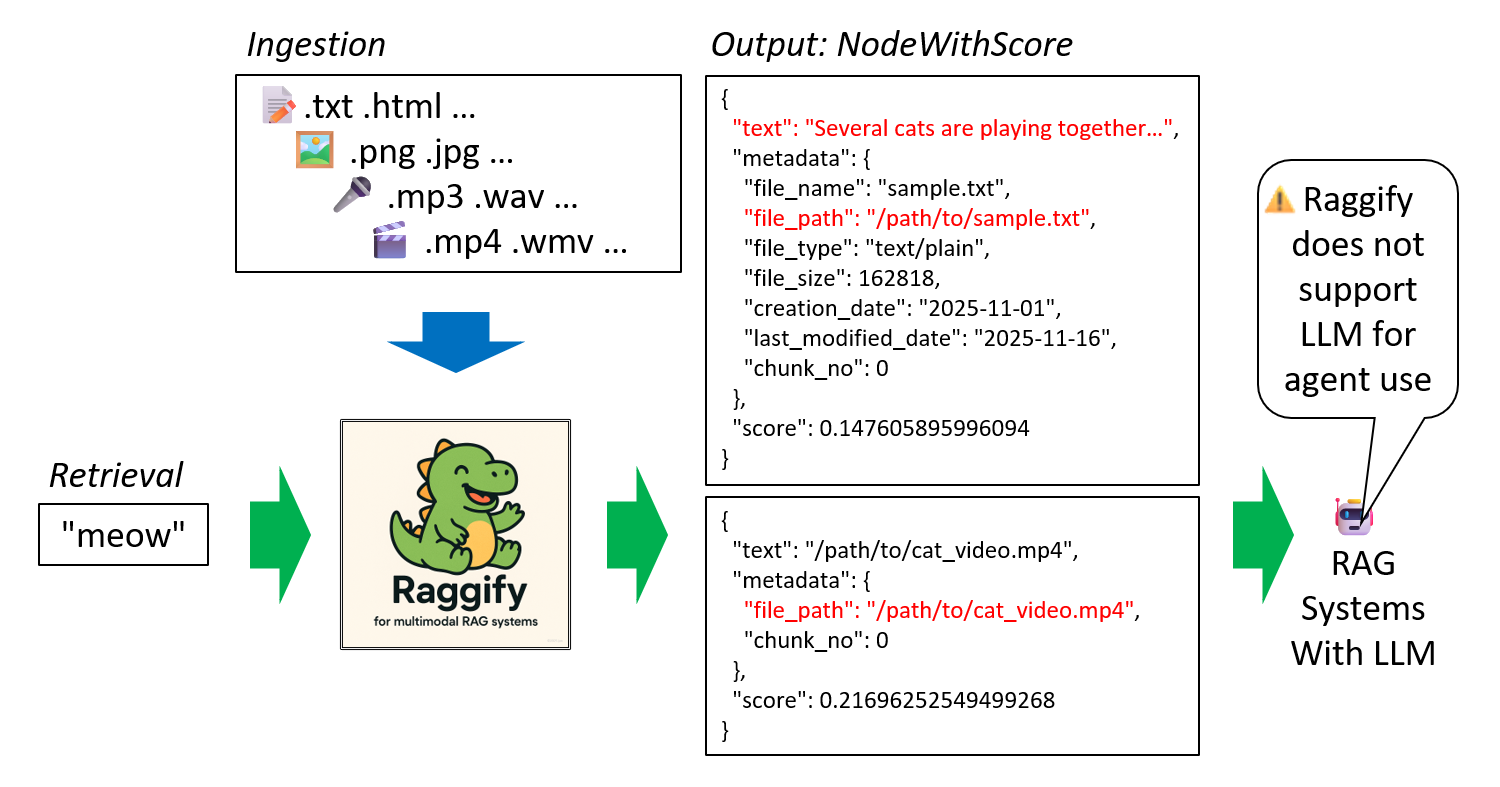
Ingestion Phase: Raggify ingests inputs from various modalities and file formats, accumulating them as a knowledge base.
Retrieval Phase: Searches documents across modalities (e.g., searching videos using audio) and returns results in NodeWithScore format (llama_index.core.schema).
Raggify is a tool for building multimodal RAG systems, but it does not directly support LLMs or agents. Instead, it focuses solely on the upstream processes of document ingestion and retrieval.
🚀 How to Install
To install minimal, run:
pip install raggify
If you also use examples, run:
pip install 'raggify[exam]'
Then, put your required API-KEYs and credentials in .env file.
OPENAI_API_KEY="your-api-key"
COHERE_API_KEY="your-api-key"
VOYAGE_API_KEY="your-api-key"

AWS_ACCESS_KEY_ID="your-id"
AWS_SECRET_ACCESS_KEY="your-key"
AWS_REGION="us-east-1" # (default)
# AWS_PROFILE="your-profile" # (optional)
# AWS_SESSION_TOKEN = "your-token" # (optional)
Default providers (configured at /etc/raggify/config.yaml) are:
raggify config | grep provider
"vector_store_provider": "chroma",
"document_store_provider": "local",
"ingest_cache_provider": "local",
"text_embed_provider": "openai",
"image_embed_provider": "cohere",
"audio_embed_provider": "bedrock",
"video_embed_provider": "bedrock",
"rerank_provider": "cohere",
To use the following features, additional installation from the Git repository is required.
🖼️ local CLIP
pip install clip@git+https://github.com/openai/CLIP.git
🎤 local CLAP
pip install openai-whisper@git+https://github.com/openai/whisper.git
📚 Use As Library
📝 examples/ex01.py
Let's ingest and retrieve
Ingest from some web sites, then, search text documents by text query. For a list of interfaces available as library APIs, see main-modules.
import json

from raggify.ingest import ingest_url_list
from raggify.retrieve import query_text_text

urls = [
    "https://en.wikipedia.org/wiki/Harry_Potter_(film_series)",
    "https://en.wikipedia.org/wiki/Star_Wars_(film)",
    "https://en.wikipedia.org/wiki/Forrest_Gump",
]

ingest_url_list(urls)

nodes = query_text_text("Half-Blood Prince")

for node in nodes:
    print(
        json.dumps(
            obj={"text": node.text, "metadata": node.metadata, "score": node.score},
            indent=2,
        )
    )
🖼️ examples/ex02.py
Image features
Ingest from llamaindex wiki, then, search image documents by text query.
from raggify.ingest import ingest_url
from raggify.retrieve import query_text_image

url = "https://developers.llamaindex.ai/python/examples/multi_modal/multi_modal_retrieval/"

ingest_url(url)

nodes = query_text_image("what is the main character in Batman")
To use local CLIP
need to install clip
pip install clip@git+https://github.com/openai/CLIP.git
and set image_embed_provider /etc/raggify/config.yaml:
image_embed_provider: CLIP
🎤 examples/ex03.py
Audio Features
Ingest from some local files, then, search audio documents by text query.
from raggify.ingest import ingest_path_list
from raggify.retrieve import query_text_audio

paths = [
    "/path/to/sound.mp3",
    "/path/to/sound.wav",
    "/path/to/sound.ogg",
]

ingest_path_list(paths)

nodes = query_text_audio("phone call")
To use local CLAP
need to install openai-whisper
pip install openai-whisper@git+https://github.com/openai/whisper.git
and set audio_embed_provider /etc/raggify/config.yaml:
audio_embed_provider: CLAP
🎬 examples/ex04.py
Video Features
from raggify.ingest import ingest_path
from raggify.retrieve import query_image_video

knowledge_path = "/path/to/videos"

ingest_path(knowledge_path)

query_path = "/path/to/similar/image.png"

nodes = query_image_video(query_path)
To use video features
Currently, bedrock is the only provider that allows direct video embedding.
video_embed_provider: bedrock
When using the video modality, please enter the following credentials in the .env file.
AWS_ACCESS_KEY_ID="your-id"
AWS_SECRET_ACCESS_KEY="your-key"
AWS_REGION="us-east-1" # (default)
# AWS_PROFILE="your-profile" # (optional)
# AWS_SESSION_TOKEN = "your-token" # (optional)
⚠️ bedrock/nova-2-multimodal-embeddings-v1:0 Usage Restrictions
- The video must be less than 30 seconds in length.
- The request body (video binary + JSON) must not exceed 100 MB.
use_modality_fallback option in config.yaml
You can use video_embed_provider: null and use_modality_fallback: true to ingest videos as images + audio.
Please note that using this fallback will result in, for example, hundreds frames of a single video being stored in the image modality store. use_modality_fallback is false in default.
🔄 examples/ex05.py
Hot-reload Config
After initial startup according to the /etc/raggify/config.yaml, hot-reload the config values.
from raggify.config.embed_config import EmbedProvider
from raggify.config.vector_store_config import VectorStoreProvider
from raggify.ingest import ingest_url
from raggify.logger import configure_logging
from raggify.runtime import get_runtime

configure_logging()

rt = get_runtime()
rt.cfg.general.vector_store_provider = VectorStoreProvider.PGVECTOR
rt.cfg.general.audio_embed_provider = EmbedProvider.CLAP
rt.cfg.ingest.chunk_size = 300
rt.cfg.ingest.same_origin = False
rt.rebuild()

ingest_url("http://some.site.com")
To use pgvector, See also persisted data management.
💻 Use As REST API Server
✅ Up Server
Before using almost functions of the CLI, please start the server as follows:
raggify server
Now raggify server is online.

Accepted some commands via REST API.

Ctrl + c to shutdown.

📚 Sample Client App
Sample RAG system is examples/rag. which uses raggify server as backend.
cd examples/rag
./run.sh
If you haven't installed the dependency packages yet, please run the following.
pip install 'raggify[exam]'
Main menu
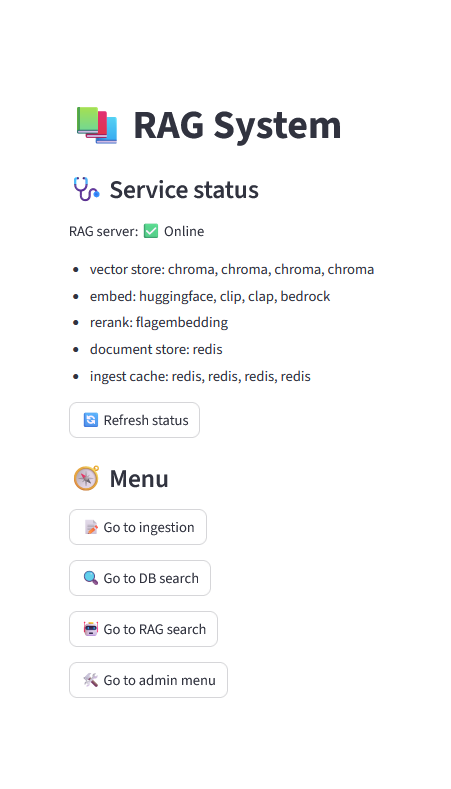
The server's startup status and various menus are displayed. Vector store, embed, and ingest caches are initialized for each modalities.
Knowledge Ingestion
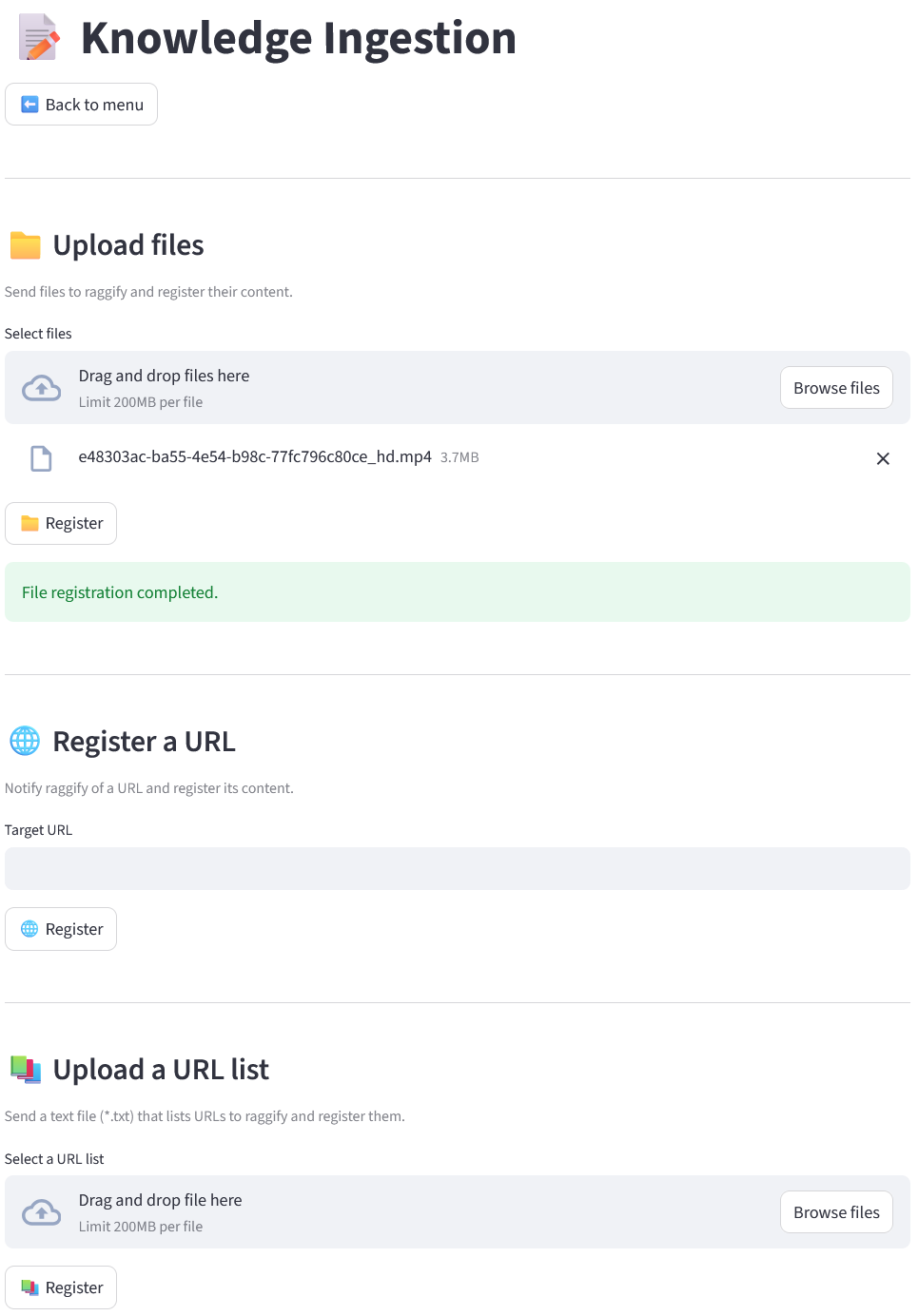
You can
- Upload files
- Register a URL
- Upload a URL list
in this menu.
A URL list follows the format below. Blank lines or comment lines starting with '#' are skipped.
http://some.site.com
http://hoge.site.com
# http://fuga.site.com

http://piyo.site.com/sitemap.xml
Sitemaps with the .xml extension are parsed by a dedicated parser, which recursively reads multiple URLs within the tree.
Search
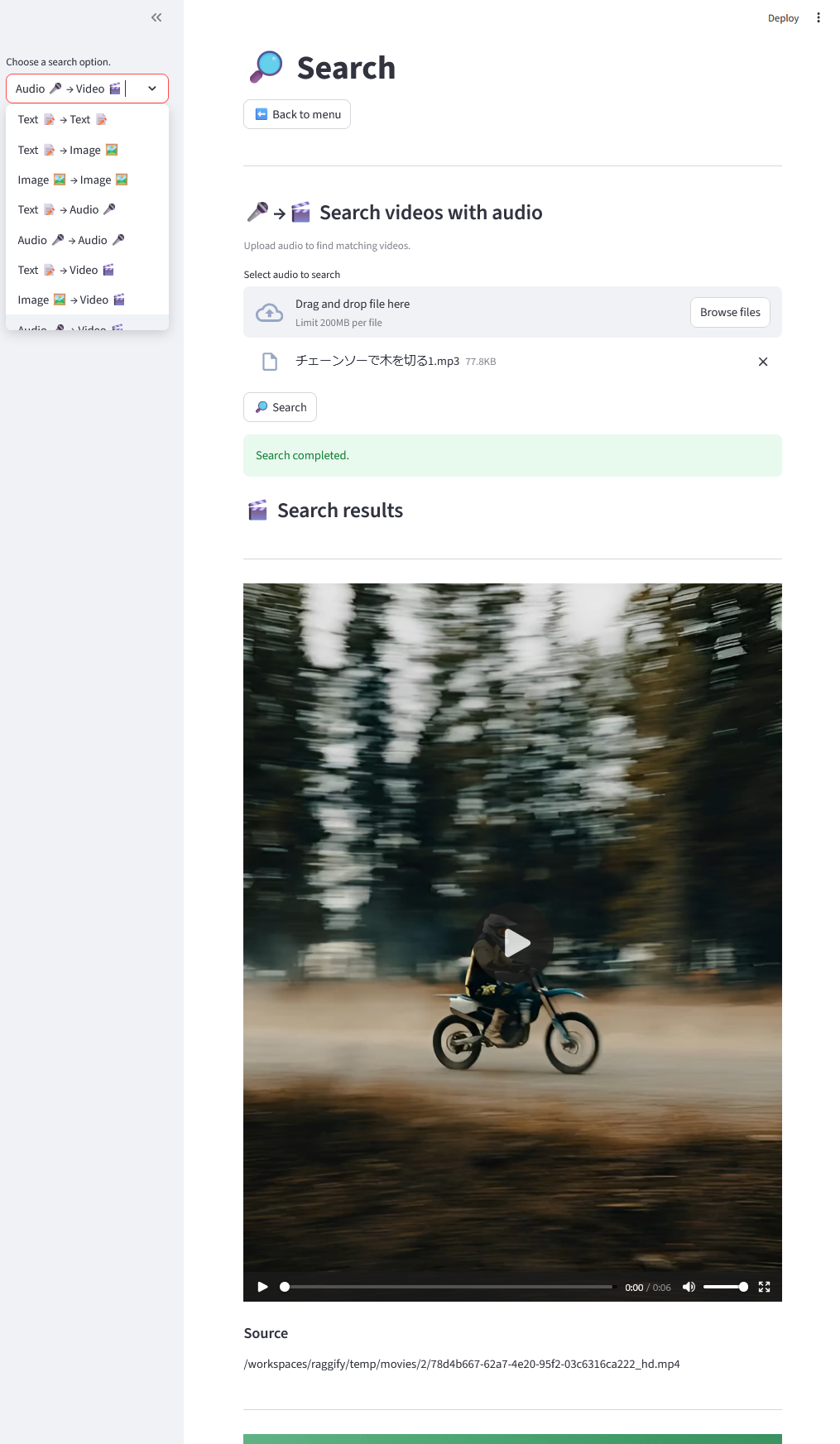
You can search for source information (file paths or URLs) across modalities. The image shows an example where an mp3 file containing the sound of a chainsaw cutting wood is used to search for footage of a motorcycle driving. (A buzzing sound can be heard in the video.)
RAG Search
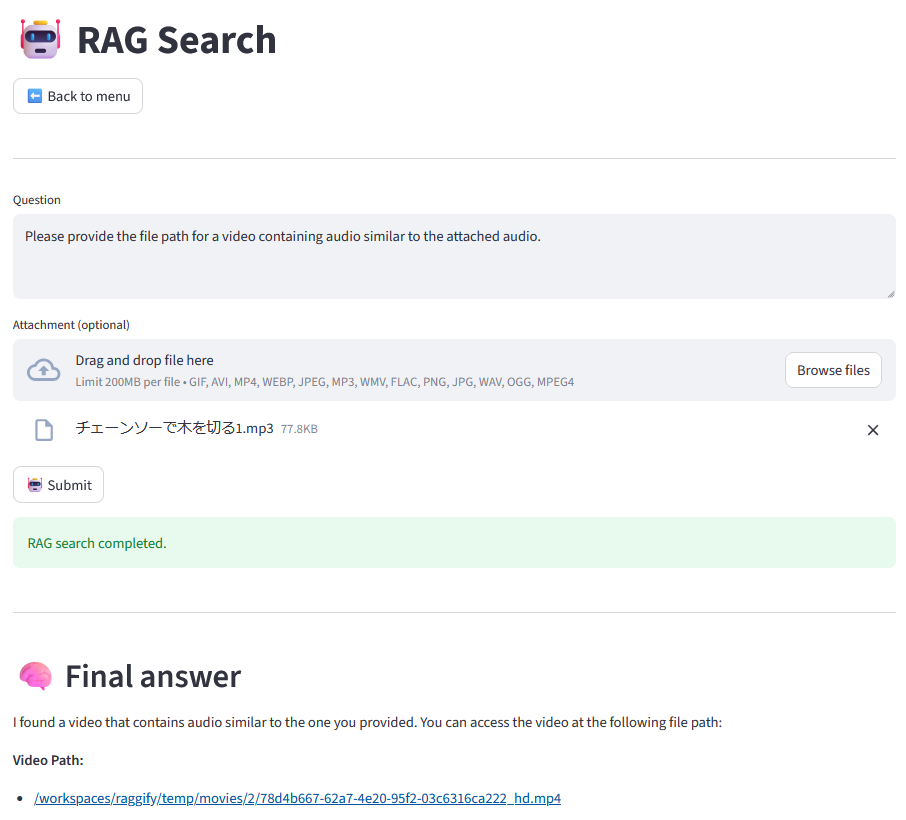
By feeding the previous search results to an LLM, you can complete this RAG search system.
⌨️ Use As CLI
raggify --help
At first, run:
raggify --help
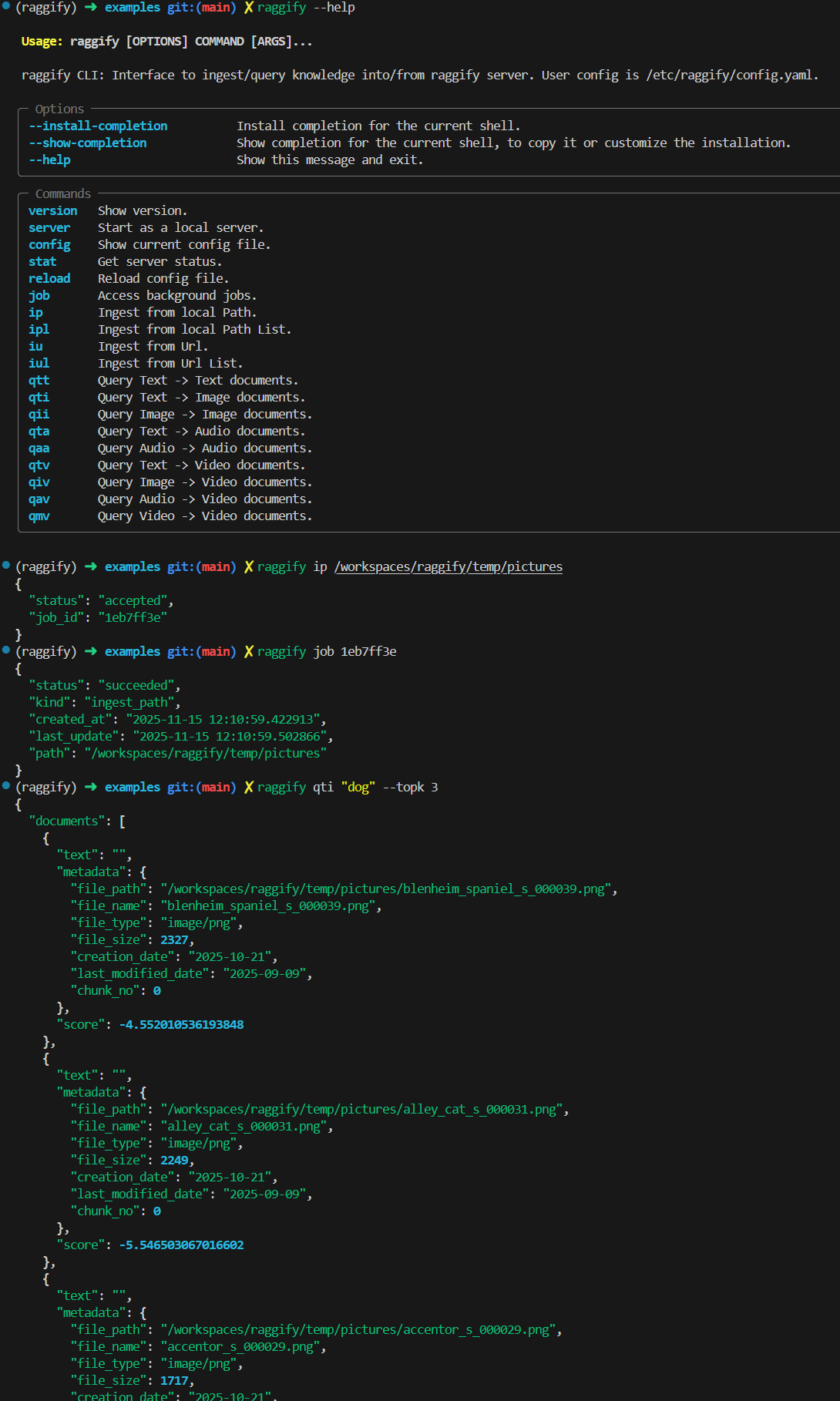
Some subcommands can be run independently, but all Ingest and Query subcommands require the Raggify server to be running. Therefore, you must first execute raggify server to start it.
raggify config
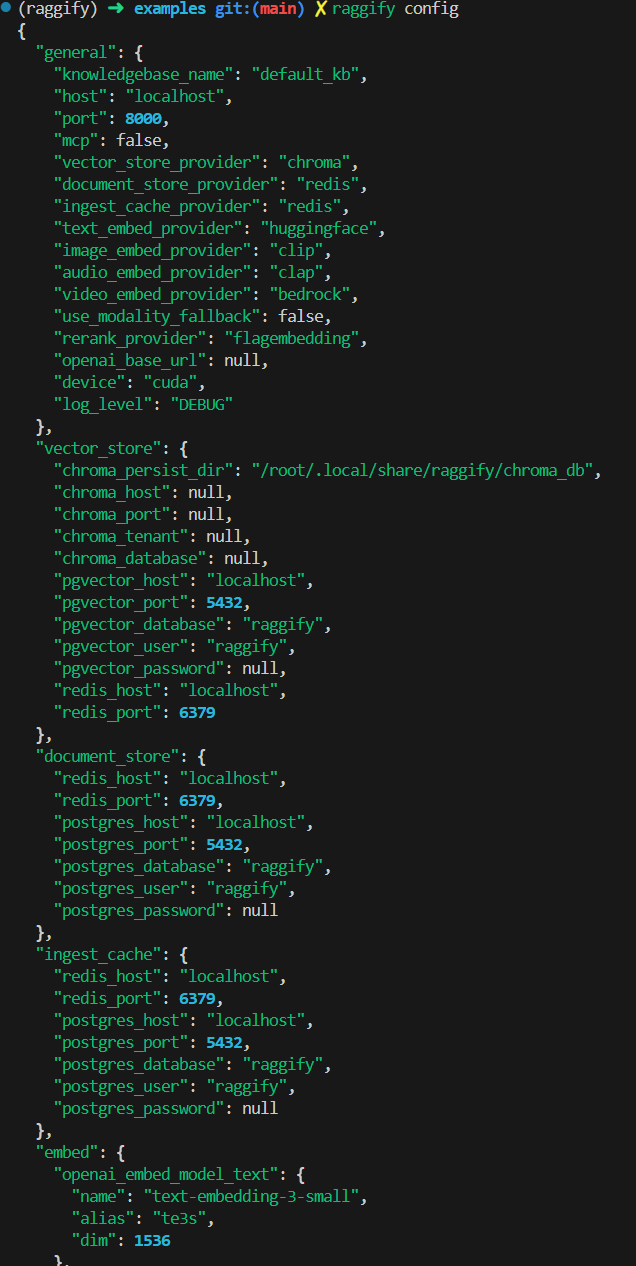
You can edit /etc/raggify/config.yaml to set default values, used by raggify runtime.
Note that if you run raggify config with the config.yaml file deleted, it will regenerate the files using the default settings.
🤖️ Use As MCP Server
raggify server --mcp
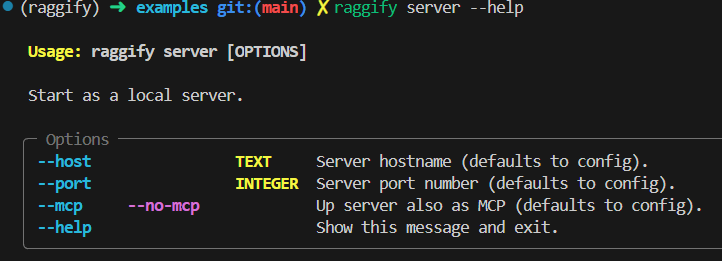
You can also specify --mcp option when you up server,
raggify server --mcp
or edit config.yaml.
mcp: true
LM Studio
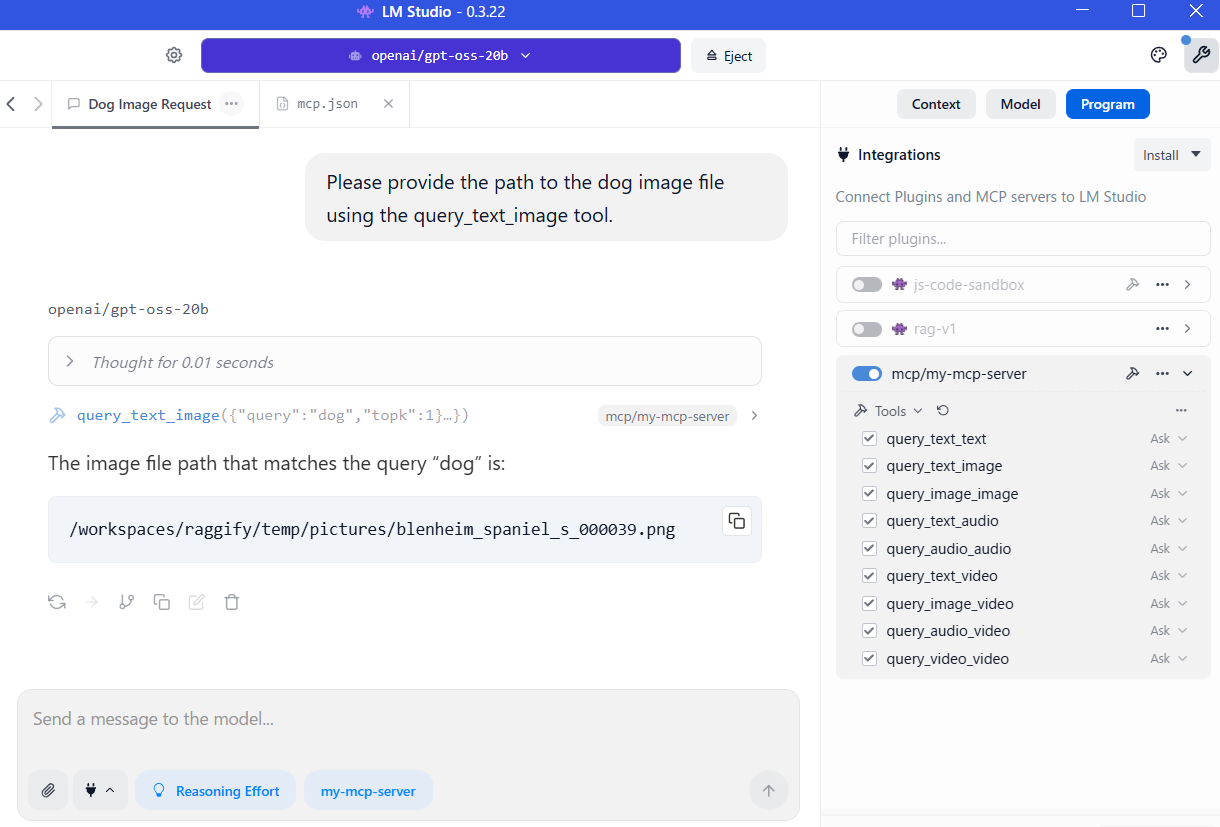
For example, LM Studio mcp.json:
{
  "mcpServers": {
    "my_mcp_server": {
      "url": "http://localhost:8000/mcp"
    }
  }
}
We were able to have the LLM use the tool as an MCP server.
💾 Persisted Data Management
Chroma / Local Persisted Directory
When using the following settings, ~/.local/share/raggify is used as the default persistent directory.
vector_store_provider: chroma
document_store_provider: local
ingest_cache_provider: local
ℹ️ To delete all data, using rm -rf ~/.local/share/raggify.
You can also edit persistent directory.
chroma_persist_dir: /root/.local/share/raggify/chroma_db
upload_dir: /root/.local/share/raggify/upload
pipe_persist_dir: /root/.local/share/raggify/default_kb
Databases
Pgvector / Postgres
When using the following settings, it is convenient to use a dedicated script init_pgdb.sh.
vector_store_provider: pgvector # Note: pgvector (not postgres)
document_store_provider: postgres
ingest_cache_provider: postgres
- start postgresql server
- exec examples/init_pgdb.sh
- for the first time:
./init_pgdb.sh- If you use native postgresql (not use docker), you also need to exec at first:
sudo -u postgres psql -c "ALTER USER postgres WITH PASSWORD 'raggify';"
- If you use native postgresql (not use docker), you also need to exec at first:
- If you want to reset db (drop all tables):
./init_pgdb.sh --reset. Or manually execute DELETE queries against the database.
- for the first time:
- set
pgvector_passwordat /etc/raggify/config.yaml- init_pgdb.sh set
raggifyas default password, so write it.
- init_pgdb.sh set
vector_store:
  pgvector_host: localhost,
  pgvector_port: 5432,
  pgvector_database: raggify,
  pgvector_user: raggify,
  pgvector_password: raggify # default is null
document_store:
  postgres_host: localhost,
  postgres_port: 5432,
  postgres_database: raggify,
  postgres_user: raggify,
  postgres_password: raggify # default is null
ingest_cache:
  # as above
Using Docker containers is easy.
docker run --name pgvector \
  -e POSTGRES_USER=postgres \
  -e POSTGRES_PASSWORD=raggify \
  -e POSTGRES_DB=raggify \
  -p 5432:5432 \
  -d pgvector/pgvector:pg17
Redis
When using the following settings, it is convenient to use a dedicated script init_redis.sh.
vector_store_provider: redis
document_store_provider: redis
ingest_cache_provider: redis
- start redis server
- exec examples/init_redis.sh
- for the first time:
./init_redis.sh- Only connection check. Optional.
- If you want to reset db (drop all tables):
./init_redis.sh --reset. Or manually execute DELETE queries against the database.
- for the first time:
- set
redis_passwordat /etc/raggify/config.yaml- init_redis.sh set
raggifyas default password, so write it.
- init_redis.sh set
vector_store:
  redis_host: localhost
  redis_port: 6379
document_store:
ingest_cache:
  # as above
Using Docker containers is easy.
docker run --rm -p 6379:6379 --name redis-stack redis/redis-stack-server:latest
Note
We also provide Runtime.delete_all_persisted_data() to delete all data. However, unexpected omissions may occur due to document ID inconsistencies or other issues, so we recommend using the rm -rf ~/.local/share/raggify or ./init_*.sh --reset introduced in each chapter.
🛠️ Configure / Specs
/etc/raggify/config.yaml
Generally, edit /etc/raggify/config.yaml before starting the server. You can also access the runtime to hot-reload configuration values, but this process is resource-intensive.
General
| Parameter | Description | Default | Allowed values / examples |
|---|---|---|---|
knowledgebase_name |
Identifier for the knowledge base. | default_kb |
Any string (e.g., project_a). |
host |
Hostname the FastAPI server binds to. | localhost |
Any hostname/IP (e.g., 0.0.0.0). |
port |
Port number for the FastAPI server. | 8000 |
Any integer port. |
mcp |
Enable MCP server alongside FastAPI. | false |
true / false. |
vector_store_provider |
Vector store backend. | chroma |
chroma, pgvector, redis. |
document_store_provider |
Document store backend. | local |
local, redis, postgres. |
ingest_cache_provider |
Ingest cache backend. | local |
local, redis, postgres. |
text_embed_provider |
Provider for text embeddings. | openai |
openai, cohere, clip(⚠️), huggingface, voyage, bedrock, or null. |
image_embed_provider |
Provider for image embeddings. | cohere |
cohere, clip(⚠️), huggingface, voyage, bedrock, or null. |
audio_embed_provider |
Provider for audio embeddings. | bedrock |
clap(⚠️), bedrock, or null. |
video_embed_provider |
Provider for video embeddings. | bedrock |
bedrock or null. |
use_modality_fallback |
Decompose unsupported media into lower modalities. | false |
true / false. |
rerank_provider |
Provider for reranking. | cohere |
flagembedding, cohere, voyage, or null. |
openai_base_url |
Custom OpenAI-compatible endpoint. | null |
Any URL string or null. |
device |
Target device for embedding models. | cpu |
cpu, cuda, mps. |
log_level |
Logging verbosity. | DEBUG |
DEBUG, INFO, WARNING, ERROR, CRITICAL. |
⚠️ Local CLIP / CLAP usage still needs the extra git-based pip installs listed in the install section above.
Vector store
| Parameter | Description | Default | Allowed values / examples |
|---|---|---|---|
chroma_persist_dir |
Chroma persistence directory. | ~/.local/share/raggify/chroma_db |
Any filesystem path. |
chroma_host |
External Chroma hostname. | null |
Any hostname or null. |
chroma_port |
External Chroma port. | null |
Any integer port or null. |
chroma_tenant |
Chroma tenant name. | null |
Any string or null. |
chroma_database |
Chroma database name. | null |
Any string or null. |
pgvector_host |
PGVector hostname. | localhost |
Any hostname. |
pgvector_port |
PGVector port. | 5432 |
Any integer port. |
pgvector_database |
PGVector database name. | raggify |
Any string. |
pgvector_user |
PGVector user. | raggify |
Any string. |
pgvector_password |
PGVector password. | null |
Any string (required when pgvector is selected). |
redis_host |
Redis host for vector search. | localhost |
Any hostname. |
redis_port |
Redis port for vector search. | 6379 |
Any integer port. |
Document store
| Parameter | Description | Default | Allowed values / examples |
|---|---|---|---|
redis_host |
Redis host for docstore. | localhost |
Any hostname. |
redis_port |
Redis port for docstore. | 6379 |
Any integer port. |
postgres_host |
Postgres host for docstore. | localhost |
Any hostname. |
postgres_port |
Postgres port for docstore. | 5432 |
Any integer port. |
postgres_database |
Postgres database name. | raggify |
Any string. |
postgres_user |
Postgres user. | raggify |
Any string. |
postgres_password |
Postgres password. | null |
Any string or null. |
Ingest cache
| Parameter | Description | Default | Allowed values / examples |
|---|---|---|---|
redis_host |
Redis host for ingest cache. | localhost |
Any hostname. |
redis_port |
Redis port for ingest cache. | 6379 |
Any integer port. |
postgres_host |
Postgres host for ingest cache. | localhost |
Any hostname. |
postgres_port |
Postgres port for ingest cache. | 5432 |
Any integer port. |
postgres_database |
Postgres database name. | raggify |
Any string. |
postgres_user |
Postgres user. | raggify |
Any string. |
postgres_password |
Postgres password. | null |
Any string or null. |
Embed
| Parameter | Description | Default | Allowed values / examples |
|---|---|---|---|
openai_embed_model_text.name |
OpenAI text embed model. | text-embedding-3-small |
Fixed model name. |
openai_embed_model_text.alias |
Alias for OpenAI text embed model. | te3s |
Any string. |
openai_embed_model_text.dim |
Dimension of OpenAI text embeddings. | 1536 |
Fixed value. |
cohere_embed_model_text.name |
Cohere text embed model. | embed-v4.0 |
Fixed model name. |
cohere_embed_model_text.alias |
Alias for Cohere text embed model. | emv4 |
Any string. |
cohere_embed_model_text.dim |
Dimension of Cohere text embeddings. | 1536 |
Fixed value. |
clip_embed_model_text.name |
CLIP text embed model. | ViT-B/32 |
Fixed model name. |
clip_embed_model_text.alias |
Alias for CLIP text embed model. | vi32 |
Any string. |
clip_embed_model_text.dim |
Dimension of CLIP text embeddings. | 512 |
Fixed value. |
huggingface_embed_model_text.name |
Hugging Face text embed model. | intfloat/multilingual-e5-base |
Fixed model name. |
huggingface_embed_model_text.alias |
Alias for Hugging Face text embed model. | imeb |
Any string. |
huggingface_embed_model_text.dim |
Dimension of Hugging Face text embeddings. | 768 |
Fixed value. |
voyage_embed_model_text.name |
Voyage text embed model. | voyage-3.5 |
Fixed model name. |
voyage_embed_model_text.alias |
Alias for Voyage text embed model. | vo35 |
Any string. |
voyage_embed_model_text.dim |
Dimension of Voyage text embeddings. | 2048 |
Fixed value. |
bedrock_embed_model_text.name |
Bedrock text embed model. | amazon.nova-2-multimodal-embeddings-v1:0 |
Fixed model name. |
bedrock_embed_model_text.alias |
Alias for Bedrock text embed model. | n2v1 |
Any string. |
bedrock_embed_model_text.dim |
Dimension of Bedrock text embeddings. | 1024 |
Fixed value. |
cohere_embed_model_image.name |
Cohere image embed model. | embed-v4.0 |
Fixed model name. |
cohere_embed_model_image.alias |
Alias for Cohere image embed model. | emv4 |
Any string. |
cohere_embed_model_image.dim |
Dimension of Cohere image embeddings. | 1536 |
Fixed value. |
clip_embed_model_image.name |
CLIP image embed model. | ViT-B/32 |
Fixed model name. |
clip_embed_model_image.alias |
Alias for CLIP image embed model. | vi32 |
Any string. |
clip_embed_model_image.dim |
Dimension of CLIP image embeddings. | 512 |
Fixed value. |
huggingface_embed_model_image.name |
Hugging Face image embed model. | llamaindex/vdr-2b-multi-v1 |
Fixed model name. |
huggingface_embed_model_image.alias |
Alias for Hugging Face image embed model. | v2m1 |
Any string. |
huggingface_embed_model_image.dim |
Dimension of Hugging Face image embeddings. | 1536 |
Fixed value. |
voyage_embed_model_image.name |
Voyage image embed model. | voyage-multimodal-3 |
Fixed model name. |
voyage_embed_model_image.alias |
Alias for Voyage image embed model. | vom3 |
Any string. |
voyage_embed_model_image.dim |
Dimension of Voyage image embeddings. | 1024 |
Fixed value. |
bedrock_embed_model_image.name |
Bedrock image embed model. | amazon.nova-2-multimodal-embeddings-v1:0 |
Fixed model name. |
bedrock_embed_model_image.alias |
Alias for Bedrock image embed model. | n2v1 |
Any string. |
bedrock_embed_model_image.dim |
Dimension of Bedrock image embeddings. | 1024 |
Fixed value. |
clap_embed_model_audio.name |
CLAP audio embed model. | effect_varlen |
effect_short, effect_varlen, music, speech, general |
clap_embed_model_audio.alias |
Alias for CLAP audio embed model. | efvl |
Any string. |
clap_embed_model_audio.dim |
Dimension of CLAP audio embeddings. | 512 |
Fixed value. |
bedrock_embed_model_audio.name |
Bedrock audio embed model. | amazon.nova-2-multimodal-embeddings-v1:0 |
Fixed model name. |
bedrock_embed_model_audio.alias |
Alias for Bedrock audio embed model. | n2v1 |
Any string. |
bedrock_embed_model_audio.dim |
Dimension of Bedrock audio embeddings. | 1024 |
Fixed value. |
bedrock_embed_model_video.name |
Bedrock video embed model. | amazon.nova-2-multimodal-embeddings-v1:0 |
Fixed model name. |
bedrock_embed_model_video.alias |
Alias for Bedrock video embed model. | n2v1 |
Any string. |
bedrock_embed_model_video.dim |
Dimension of Bedrock video embeddings. | 1024 |
Fixed value. |
Ingest
| Parameter | Description | Default | Allowed values / examples |
|---|---|---|---|
chunk_size |
Chunk size for text splitting. | 500 |
Any integer (e.g., 500, 1024). |
chunk_overlap |
Overlap between adjacent chunks. | 50 |
Any integer. |
upload_dir |
Directory for uploaded files. | ~/.local/share/raggify/upload |
Any filesystem path. |
pipe_persist_dir |
Pipeline persistence root per KB. | ~/.local/share/raggify/default_kb |
Any filesystem path. |
batch_size |
Number of nodes processed per async batch. | 100 |
Any positive integer. |
audio_chunk_seconds |
Chunk length for audio splitting (seconds). | 25 |
Positive integer, or null to disable splitting. |
video_chunk_seconds |
Chunk length for video splitting (seconds). | 25 |
Positive integer, or null to disable splitting. |
additional_exts |
Extra whitelist extensions for local ingest. | [".c", ".py", ".rst"] |
List of dot-prefixed extensions. |
user_agent |
User-Agent header for web ingestion. | raggify |
Any string. |
load_asset |
Download linked assets during web ingestion. | true |
true / false. |
req_per_sec |
Request rate limit for web ingestion. | 2 |
Any integer. |
timeout_sec |
Timeout for web ingestion (seconds). | 30 |
Any integer. |
same_origin |
Restrict crawling to same origin. | true |
true / false. |
Rerank
| Parameter | Description | Default | Allowed values / examples |
|---|---|---|---|
flagembedding_rerank_model |
FlagEmbedding reranker model name. | BAAI/bge-reranker-v2-m3 |
Fixed model name. |
cohere_rerank_model |
Cohere reranker model name. | rerank-multilingual-v3.0 |
Fixed model name. |
voyage_rerank_model |
Voyage reranker model name. | rerank-2.5 |
Fixed model name. |
topk |
Number of candidates considered for reranking. | 20 |
Any integer (e.g., 10, 20). |
Retrieve
| Parameter | Description | Default | Allowed values / examples |
|---|---|---|---|
mode |
Retrieval strategy. | fusion |
vector_only, bm25_only, fusion. |
bm25_topk |
Number of docstore hits when using BM25. | 10 |
Any integer. |
fusion_lambda_vector |
Weight for vector retriever in QueryFusion. | 0.5 |
Float 0–1. |
fusion_lambda_bm25 |
Weight for BM25 retriever in QueryFusion. | 0.5 |
Float 0–1. |
Setting samples
Full Local
vector_store_provider: chroma
document_store_provider: local
ingest_cache_provider: local
text_embed_provider: huggingface
image_embed_provider: clip
audio_embed_provider: clap
video_embed_provider: null
rerank_provider: flagembedding
use_modality_fallback: true
device: cuda
Native video embedding is not supported yet in local (please tell us when a local model becomes available!).
You can use video_embed_provider: null and use_modality_fallback: true to ingest videos as images + audio.
Due to the heavy processing load, we recommend using a GPU (device: cuda).
Variety
vector_store_provider: chroma
document_store_provider: redis
ingest_cache_provider: redis
text_embed_provider: openai
image_embed_provider: voyage
audio_embed_provider: clap
video_embed_provider: bedrock
rerank_provider: cohere
device: cuda
Adjust Web Scraping
user_agent: "Mozilla/5.0 (Windows NT 10.0; Win64; x64) AppleWebKit/537.36 (KHTML, like Gecko) Chrome/126.0.0.0 Safari/537.36"
same_origin: false
Reduce logging
log_level: warning
Main Modules
# For reference
# Retrievers return this structure
from llama_index.core.schema import NodeWithScore

# For REST API Call to the server
from raggify.client import RestAPIClient
from raggify.config import (
    DocumentStoreProvider,
    EmbedModel,
    EmbedProvider,
    IngestCacheProvider,
    RerankProvider,
    RetrieveMode,
    VectorStoreProvider,
)

# For ingestion
from raggify.ingest import (
    aingest_path,
    aingest_path_list,
    aingest_url,
    aingest_url_list,
    ingest_path,
    ingest_path_list,
    ingest_url,
    ingest_url_list,
)

# For logging
from raggify.logger import configure_logging, logger

# For retrieval
from raggify.retrieve import (
    aquery_audio_audio,
    aquery_audio_video,
    aquery_image_image,
    aquery_image_video,
    aquery_text_audio,
    aquery_text_image,
    aquery_text_text,
    aquery_text_video,
    aquery_video_video,
    query_audio_audio,
    query_audio_video,
    query_image_image,
    query_image_video,
    query_text_audio,
    query_text_image,
    query_text_text,
    query_text_video,
    query_video_video,
)

# For hot reloading config
from raggify.runtime import get_runtime
Supported file extensions
- Image:
.png,.jpg,.jpeg,.gif,.webp - Audio:
.mp3,.wav,.ogg - Video:
.mp4,.mov,.mkv,.webm,.flv,.mpeg,.mpg,.wmv,.3gp, - Text:
.txt,.text,.md,.json,.html,.tex
Additionally, any extensions added via the additional_exts configuration parameter are also supported.
See Also
Home Pages
- https://pypi.org/project/raggify/
- マルチモーダルでローカルな RAG 基盤ライブラリを作ってみた
- The predecessor of Raggify: マルチモーダルでローカルな RAG 基盤サーバを作ってみた
Logo and Branding
The Raggify logo © 2025 Jun.
You may use it to refer to the Raggify open-source project,
but commercial or misleading usage is not allowed.
Release history Release notifications | RSS feed


Download files
Download the file for your platform. If you're not sure which to choose, learn more about installing packages.
Source Distribution
Built Distribution
Filter files by name, interpreter, ABI, and platform.
If you're not sure about the file name format, learn more about wheel file names.
Copy a direct link to the current filters
File details
Details for the file raggify-0.1.4.tar.gz.
File metadata
- Download URL: raggify-0.1.4.tar.gz
- Upload date:
- Size: 70.5 kB
- Tags: Source
- Uploaded using Trusted Publishing? No
- Uploaded via: uv/0.9.7
File hashes
| Algorithm | Hash digest | |
|---|---|---|
| SHA256 |
0d875407dd1c1c0f5237cc03e8cf8405743bcbecec8ea15f3fb32567609b4a98
|
|
| MD5 |
f4040b6f067d1daab59d099a63163563
|
|
| BLAKE2b-256 |
65d927f0b5204204ced2dfbaf807ab23fcb49563c3c31ab7cab4911c3c228b2f
|
File details
Details for the file raggify-0.1.4-py3-none-any.whl.
File metadata
- Download URL: raggify-0.1.4-py3-none-any.whl
- Upload date:
- Size: 87.9 kB
- Tags: Python 3
- Uploaded using Trusted Publishing? No
- Uploaded via: uv/0.9.7
File hashes
| Algorithm | Hash digest | |
|---|---|---|
| SHA256 |
583313e254a0d388d3fe6bff6b59faa6d4679765926b576a96600b9ce62fcf54
|
|
| MD5 |
72ff947c27cdf66fe78e8d89cbc68d5b
|
|
| BLAKE2b-256 |
263ad7c95e74e3dfe8d53660b121bf8a6999c02a93a963cd429e6429cf113c80
|






