
Ragmint







Ragmint (Retrieval-Augmented Generation Model Inspection & Tuning) is a modular, developer-friendly Python library for evaluating, optimizing, and tuning RAG (Retrieval-Augmented Generation) pipelines.
It provides a complete toolkit for retriever selection, embedding model tuning, automated RAG evaluation, and config-driven prebuilding of pipelines with support for Optuna-based Bayesian optimization, Auto-RAG tuning, chunking, and explainability through Gemini or Claude.
✨ Features
- ✅ Automated hyperparameter optimization (Grid, Random, Bayesian via Optuna).
- 🤖 Auto-RAG Tuner — dynamically recommends retriever–embedding pairs based on corpus size and document statistics, suggests multiple chunk sizes with overlaps, and can test configurations to identify the best-performing RAG setup.
- 🧮 Validation QA Generator — automatically creates QA datasets from a corpus for evaluating and tuning RAG pipelines when no labeled data is available.
- 🧠 Explainability Layer — interprets RAG performance via Gemini or Claude APIs.
- 🏆 Leaderboard Tracking — stores and ranks experiment runs via JSON or external DB.
- 🔍 Built-in RAG evaluation metrics — faithfulness, recall, BLEU, ROUGE, latency.
- 📦 Chunking system — automatic or configurable
chunk_sizeandoverlapfor documents with multiple suggested pairs. - ⚙️ Retrievers — FAISS, Chroma, scikit-learn.
- 🧩 Embeddings — Hugging Face.
- 💾 Caching, experiment tracking, and reproducibility out of the box.
- 🧰 Clean modular structure for easy integration in research and production setups.
- 🏗️ Langchain Prebuilder — prepares pipelines, applies chunking, embeddings, and vector store creation automatically.
- ⚙️ Config Adapter (LangchainConfigAdapter) — normalizes configuration, fills defaults, validates retrievers.
🚀 Quick Start
Installation
git clone https://github.com/andyolivers/ragmint.git
cd ragmint
pip install -e .
python -m ragmint.app
The
-eflag installs Ragmint in editable (development) mode.
Requires Python ≥ 3.9.
Installation via PyPI
pip install ragmint
2️⃣ Run a RAG Optimization Experiment
python ragmint/main.py --config configs/default.yaml --search bayesian
Example configs/default.yaml:
retriever: faiss
embedding_model: text-embedding-3-small
chunk_size: 500
overlap: 100
reranker:
  mode: mmr
  lambda_param: 0.5
optimization:
  search_method: bayesian
  n_trials: 20
3️⃣ Manual Pipeline Usage
from ragmint.prebuilder import PreBuilder
from ragmint.tuner import RAGMint

# Prebuild pipeline (chunking, embeddings, vector store)
prebuilder = PreBuilder(
    docs_path="data/docs/",
    config_path="configs/default.yaml"
)
pipeline = prebuilder.build_pipeline()

# Initialize RAGMint with prebuilt components
rag = RAGMint(pipeline=pipeline)

# Run optimization
best, results = rag.optimize(validation_set=None, metric="faithfulness", trials=3)
print("Best configuration:", best)
🧩 Embeddings and Retrievers
Ragmint supports a flexible set of embeddings and retrievers, allowing you to adapt easily to various RAG architectures.
🧩 Chunking System
- Automatically splits documents into chunks with
chunk_sizeandoverlapparameters. - Supports default values if not provided in configuration.
- Optimized for downstream retrieval and embeddings.
- Enables adaptive chunking strategies in future releases.
🧮 Validation QA Generator
The QA Generator module automatically creates question–answer (QA) validation datasets from any corpus of .txt documents.
This dataset can be used to evaluate and tune RAG pipelines inside Ragmint when no labeled data is available.
✨ Key Capabilities
-
🔁 Batch processing — splits large corpora into batches to prevent token overflows and API timeouts.
-
🧠 Topic-aware question estimation — dynamically determines how many questions to generate per document based on:
- Document length (logarithmic scaling)
- Topic diversity (via
SentenceTransformer+KMeansclustering)
-
🤖 LLM-powered QA synthesis — generates factual QA pairs using Gemini or Claude models.
-
💾 Automatic JSON export — saves the generated dataset to
experiments/validation_qa.json(configurable).
⚙️ Usage
You can run the generator directly from the command line:
python -m ragmint.qa_generator --density 0.005
💡 Example: Using in Python
from ragmint.qa_generator import generate_validation_qa

generate_validation_qa(
    docs_path="data/docs",                          # Folder with .txt documents
    output_path="experiments/validation_qa.json",   # Output JSON file
    llm_model="gemini-2.5-flash-lite",              # or "claude-3-opus-20240229"
    batch_size=5,                                   # Number of docs per LLM call
    sleep_between_batches=2,                        # Wait time between calls (seconds)
    min_q=3,                                        # Minimum questions per doc
    max_q=25                                        # Maximum questions per doc
)
✅ The generator supports both Gemini and Claude models.
Set your API key in a .env file or via environment variables:
export GOOGLE_API_KEY="your_gemini_key"
export ANTHROPIC_API_KEY="your_claude_key"
🧩 Langchain Config Adapter
- Ensures consistent configuration across pipeline components.
- Normalizes retriever and embedding names (e.g.,
faiss,sentence-transformers/...). - Adds default chunk parameters when missing.
- Validates retriever backends and raises clear errors for unsupported options.
🧩 Langchain Prebuilder
Automates pipeline preparation:
- Reads documents
- Applies chunking
- Creates embeddings
- Initializes retriever / vector store
- Returns ready-to-use pipeline** for RAGMint or custom usage.
🔤 Available Embeddings (Hugging Face)
You can select from the following models:
sentence-transformers/all-MiniLM-L6-v2— lightweight, general-purposesentence-transformers/all-mpnet-base-v2— higher accuracy, slowerBAAI/bge-base-en-v1.5— multilingual, dense embeddingsintfloat/multilingual-e5-base— ideal for multilingual corpora
Configuration Example
Use the following format in your config file to specify the embedding model:
embedding_model: sentence-transformers/all-MiniLM-L6-v2
🔍 Available Retrievers
Ragmint integrates multiple retrieval backends to suit different needs:
| Retriever | Description |
|---|---|
| FAISS | Fast vector similarity search; efficient for dense embeddings |
| Chroma | Persistent vector DB; works well for incremental updates |
| scikit-learn (NearestNeighbors) | Lightweight, zero-dependency local retriever |
Configuration Example
To specify the retriever in your configuration file, use the following format:
retriever: faiss
🧪 Dataset Options
Ragmint can automatically load evaluation datasets for your RAG pipeline:
| Mode | Example | Description |
|---|---|---|
| 🧱 Default | validation_set=None |
Uses built-in experiments/validation_qa.json |
| 📁 Custom File | validation_set="data/my_eval.json" |
Load your own QA dataset (JSON or CSV) |
| 🌐 Hugging Face Dataset | validation_set="squad" |
Automatically downloads benchmark datasets (requires pip install datasets) |
Example
from ragmint.tuner import RAGMint

ragmint = RAGMint(
    docs_path="data/docs/",
    retrievers=["faiss", "chroma"],
    embeddings=["text-embedding-3-small"],
    rerankers=["mmr"],
)

# Use built-in default
ragmint.optimize(validation_set=None)

# Use Hugging Face benchmark
ragmint.optimize(validation_set="squad")

# Use your own dataset
ragmint.optimize(validation_set="data/custom_qa.json")
🧠 Auto-RAG Tuner
The AutoRAGTuner automatically analyzes your corpus and recommends retriever–embedding combinations based on corpus statistics (size and average document length). It also suggests multiple chunk sizes with overlaps to improve retrieval performance.
Beyond recommendations, it can run full end-to-end testing of the suggested configurations and identify the best-performing RAG setup for your dataset.
from ragmint.autotuner import AutoRAGTuner

# Initialize with your documents
tuner = AutoRAGTuner(docs_path="data/docs/")

# Recommend configurations and suggest chunk sizes
recommendation = tuner.recommend(num_chunk_pairs=5)
print("Initial recommendation:", recommendation)

# Run full auto-tuning on validation set
best_config, results = tuner.auto_tune(validation_set="data/validation.json", trials=5)
print("Best configuration after testing:", best_config)
print("All trial results:", results)
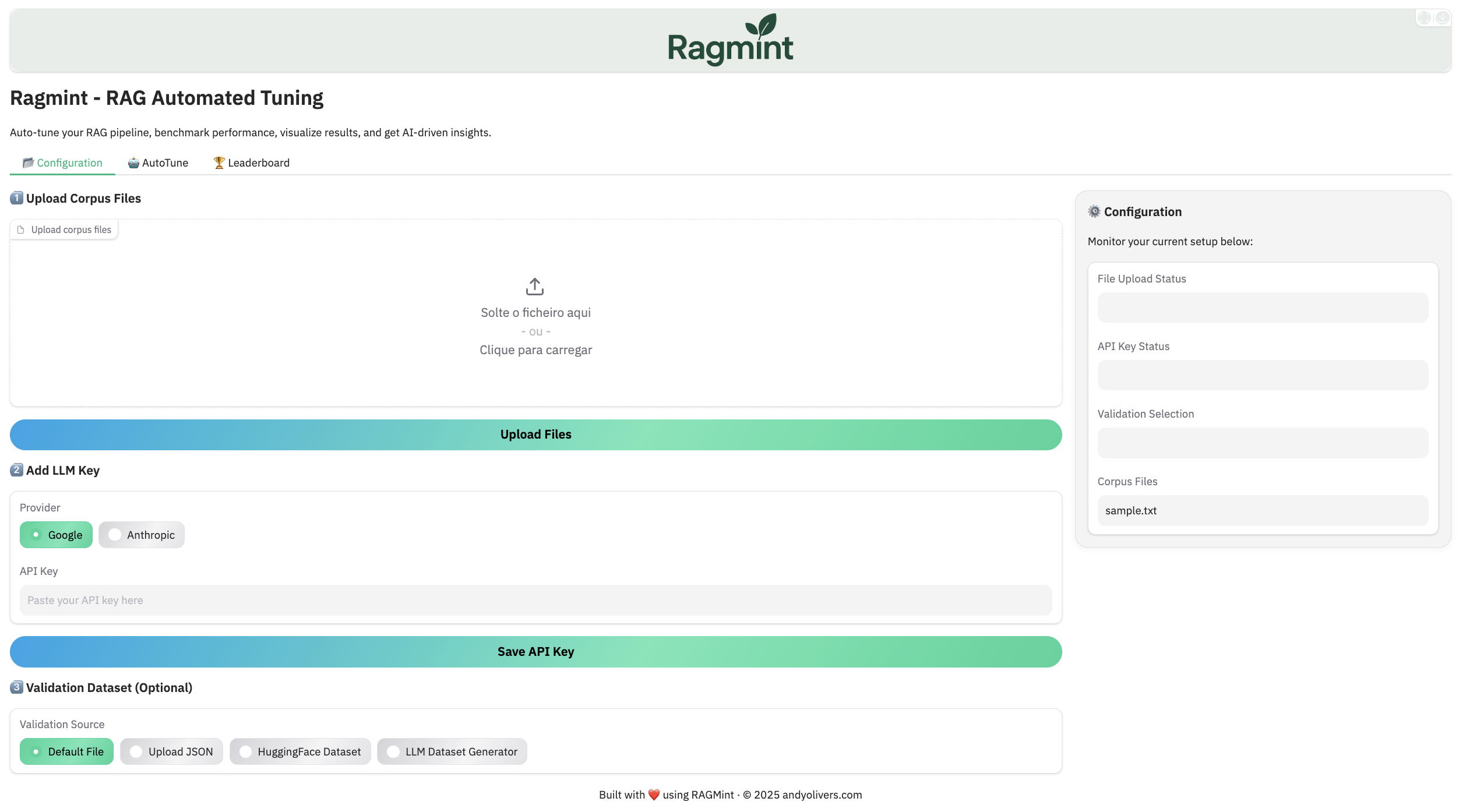
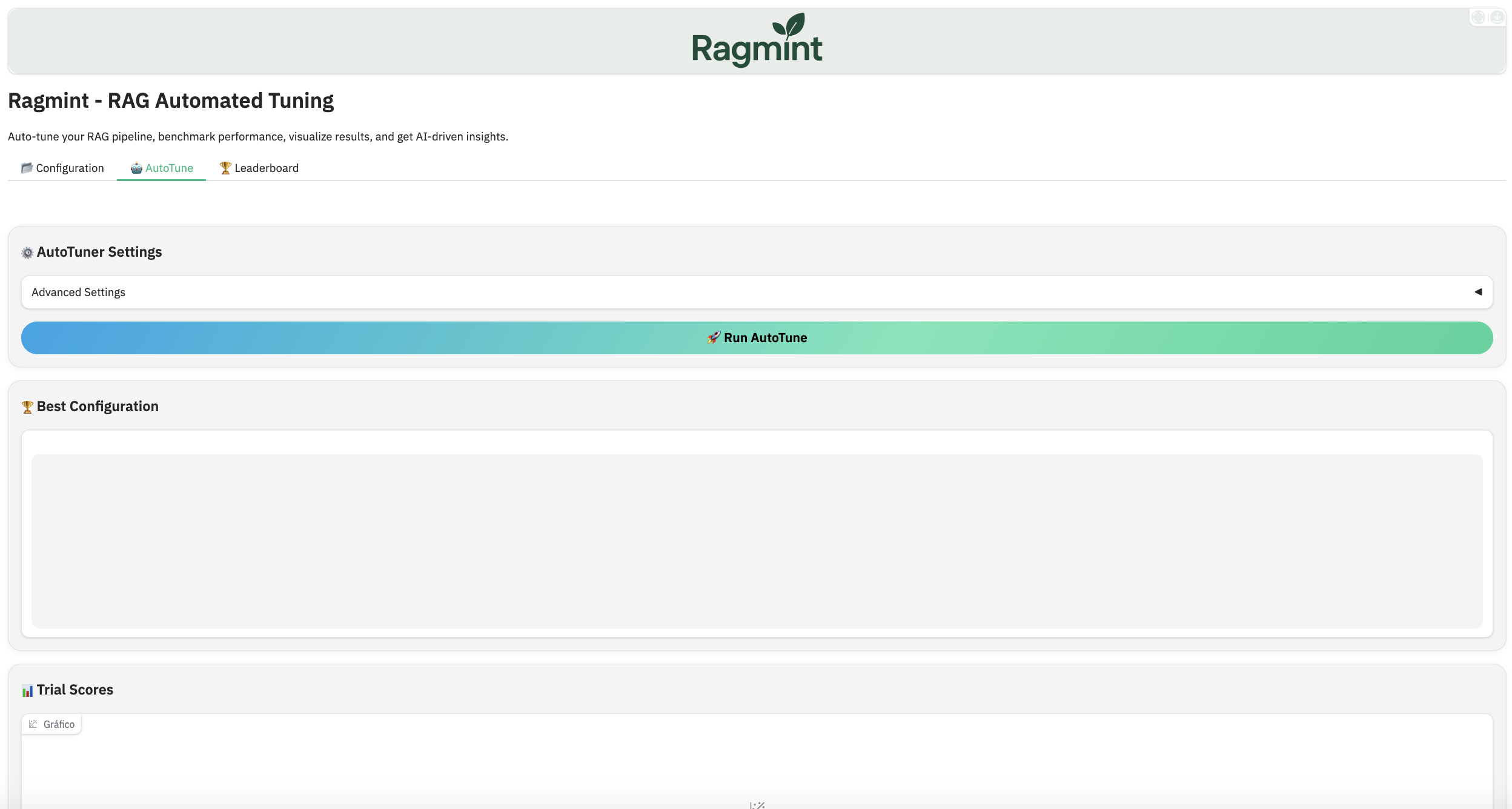
🧠 Gradio Dashboard
Ragmint includes a visual dashboard to AutoTune and analyze RAG pipelines.
🏆 Leaderboard Tracking
Track and visualize your best experiments across runs.
from ragmint.leaderboard import Leaderboard

# Initialize local leaderboard
leaderboard = Leaderboard(storage_path="leaderboard.jsonl")

# Retrieve top 5 runs
print("\n🏅 Top 5 Experiments:")
for result in leaderboard.top_results(limit=5):
    print(f"{result['run_id']} | Score: {result['best_score']:.2f} | Model: {result['model']}")
🧠 Explainability with Gemini / Claude
Compare RAG configurations and receive natural language insights on why one performs better.
from ragmint.autotuner import AutoRAGTuner
from ragmint.explainer import explain_results

tuner = AutoRAGTuner(docs_path="data/docs/")
best, results = tuner.auto_tune(
    validation_set='data/docs/validation_qa.json',
    metric="faithfulness",
    trials=5,
    search_type='bayesian'
)

analysis = explain_results(best, results, corpus_stats=tuner.corpus_stats)
print(analysis)
Set your API keys in a
.envfile or via environment variables:export GEMINI_API_KEY="your_gemini_key" export ANTHROPIC_API_KEY="your_claude_key"
🧩 Folder Structure
ragmint/
├── core/
│   ├── pipeline.py
│   ├── retriever.py
│   ├── reranker.py
│   ├── embeddings.py
│   ├── chunking.py
│   └── evaluation.py
├── integration/
│   ├── config_adapter.py
│   └── langchain_prebuilder.py
├── autotuner.py
├── explainer.py
├── leaderboard.py
├── tuner.py
├── utils/
├── configs/
├── experiments/
├── tests/
└── main.py
🧪 Running Tests
pytest -v
To include integration tests with Gemini or Claude APIs:
pytest -m integration
⚙️ Configuration via pyproject.toml
Your pyproject.toml includes all required dependencies:
[project]
name = "ragmint"
version = "0.1.0"
dependencies = [
  # Core ML + Embeddings
  "numpy<2.0.0",
  "pandas>=2.0",
  "scikit-learn>=1.3",
  "sentence-transformers>=2.2.2",

  # Retrieval backends
  "chromadb>=0.4",
  "faiss-cpu; sys_platform != 'darwin'",       # For Linux/Windows
  "faiss-cpu==1.7.4; sys_platform == 'darwin'", # Optional fix for macOS MPS
  "rank-bm25>=0.2.2",                          # For BM25 retriever

  # Optimization & evaluation
  "optuna>=3.0",
  "tqdm",
  "colorama",

  # RAG evaluation and data utils
  "pyyaml",
  "python-dotenv",

  # Explainability and LLM APIs
  "openai>=1.0.0",
  "google-generativeai>=0.8.0",
  "anthropic>=0.25.0",

  # Integration / storage
  "supabase>=2.4.0",

  # Testing
  "pytest",

  # LangChain integration layer
  "langchain>=0.2.5",
  "langchain-community>=0.2.5",
  "langchain-text-splitters>=0.2.1"
]
📊 Example Experiment Workflow
- Define your retriever, embedding, and reranker setup
- Launch optimization (Grid, Random, Bayesian) or AutoTune
- Compare performance with explainability
- Persist results to leaderboard for later inspection
🧬 Architecture Overview
flowchart TD
    A[Query] --> B[Chunking / Preprocessing]
    B --> C[Embedder]
    C --> D[Retriever]
    D --> E[Reranker]
    E --> F[Generator]
    F --> G[Evaluation]
    G --> H[AutoRAGTuner / Optuna]
    H --> I[Suggested Configs & Chunk Sizes]
    I --> J[Best Configuration]
    J -->|Update Params| C
📘 Example Output
[INFO] Starting Auto-RAG Tuning
[INFO] Suggested retriever=Chroma, embedding_model=sentence-transformers/all-MiniLM-L6-v2
[INFO] Suggested chunk-size candidates: [(380, 80), (420, 100), (350, 70), (400, 90), (360, 75)]
[INFO] Running full evaluation on validation set with 5 trials
[INFO] Trial 1 finished: faithfulness=0.82, latency=0.40s
[INFO] Trial 2 finished: faithfulness=0.85, latency=0.44s
...
[INFO] Best configuration after testing: {'retriever': 'Chroma', 'embedding_model': 'sentence-transformers/all-MiniLM-L6-v2', 'chunk_size': 400, 'overlap': 90, 'strategy': 'sentence'}
🧾 Citation
If you use Ragmint in your research, please cite:
@software{oliveira2025ragmint,
  author = {André Oliveira},
  title = {Ragmint: Retrieval-Augmented Generation Model Inspection & Tuning},
  year = {2025},
  url = {https://github.com/andyolivers/ragmint},
  license = {Apache-2.0}
}
Built with ❤️ by André Oliveira | Apache 2.0 License
1 maintainer

Metadata
1 maintainer
Release files for ragmint 0.4.12
For a detailed explanation of source distributions (sdists) and built distributions (wheels), please see the package formats documentation.
Source distribution (sdist)
| File | Size | Uploaded | |
|---|---|---|---|
| ragmint-0.4.12.tar.gz | 44.4 kB | Details |
Built distribution (wheel)
| File | Interpreter | ABI | Platform | Reset |
|---|---|---|---|---|
| ragmint-0.4.12-py3-none-any.whl | Python 3 | none | any | Details |
Total release size: 100.8 kB
Release files / ragmint-0.4.12.tar.gz
| Download URL | ragmint-0.4.12.tar.gz |
|---|---|
| Size | 44.4 kB |
| Tags | Source |
|
SHA-256 checksum How to use checksums |
aa38f31ded04aaeae7860f4011f7cc3afd1e1711410bbc6e1638516a69ed3fb5
|
|
BLAKE2b-256 checksum How to use checksums |
1187fd5d47988e4fea4b43058477670b08ad64f14a51e3c4595a1101e5183a9a
|
| Upload date | |
|
Uploaded using Trusted Publishing? What is trusted publishing? |
No |
| Uploaded via |
twine/6.2.0 CPython/3.10.18
|
Release files / ragmint-0.4.12-py3-none-any.whl
| Download URL | ragmint-0.4.12-py3-none-any.whl |
|---|---|
| Size | 56.4 kB |
| Tags | Python 3 |
|
SHA-256 checksum How to use checksums |
22d3e20dcc77049e8c3bea82ce3facbaca3cbaa37f2352a24a3b29743e5c2280
|
|
BLAKE2b-256 checksum How to use checksums |
49a00240869753afb250a3c72efd2bfde3dd45e6f60aa31af0e42a7c793b4ea1
|
| Upload date | |
|
Uploaded using Trusted Publishing? What is trusted publishing? |
No |
| Uploaded via |
twine/6.2.0 CPython/3.10.18
|














