
RAGulate
A tool for evaluating RAG pipelines

The Metrics
The RAGulate currently reports 4 relevancy metrics: Answer Correctness, Answer Relevance, Context Relevance, and Groundedness.
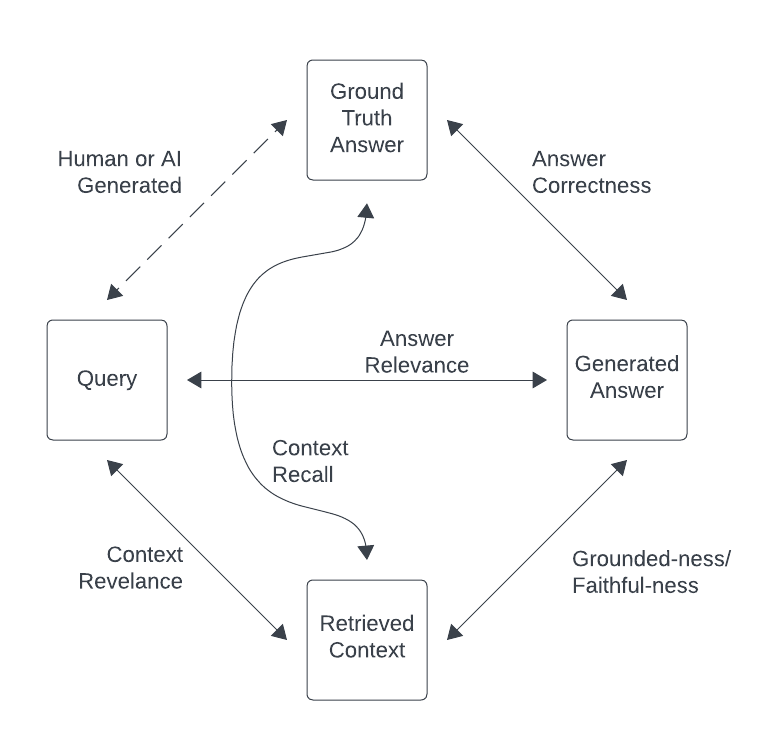
- Answer Correctness
- How well does the generated answer match the ground-truth answer?
- This confirms how well the full system performed.
- Answer Relevance
- Is the generated answer relevant to the query?
- This shows if the LLM is responding in a way that is helpful to answer the query.
- Context Relevance:
- Does the retrieved context contain information to answer the query?
- This shows how well the retrieval part of the process is performing.
- Groundedness:
- Is the generated response supported by the context?
- Low scores here indicate that the LLM is hallucinating.
Example Output
The tool outputs results as images like this:
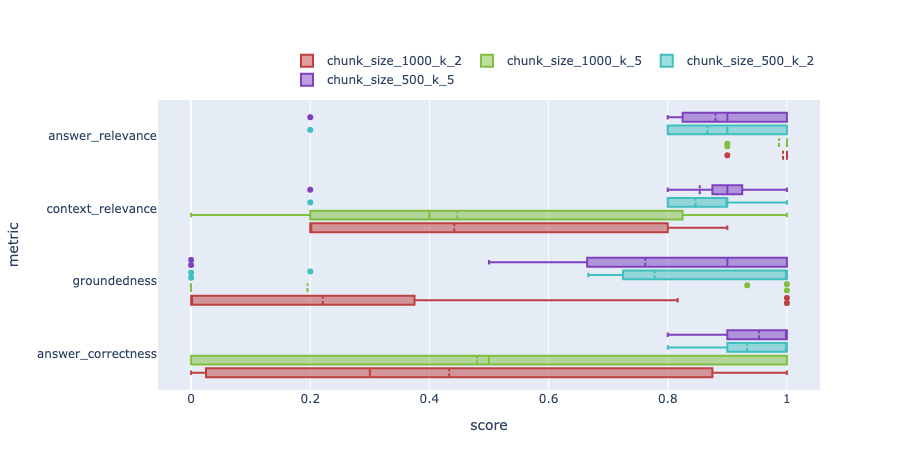
These images show distribution box plots of the metrics for different test runs.
Installation
pip install ragulate
Initial Setup
-
Set your environment variables or create a
.envfile. You will need to setOPENAI_API_KEYand any other environment variables needed by your ingest and query pipelines. -
Wrap your ingest pipeline in a single python method. The method should take a
file_pathparameter and any other variables that you will pass during your experimentation. The method should ingest the passed file into your vector store.See the
ingest()method in open_ai_chunk_size_and_k.py as an example. This method configures an ingest pipeline using the parameterchunk_sizeand ingests the file passed. -
Wrap your query pipeline in a single python method, and return it. The method should have parameters for any variables that you will pass during your experimentation. Currently only LangChain LCEL query pipelines are supported.
See the
query()method in open_ai_chunk_size_and_k.py as an example. This method returns a LangChain LCEL pipeline configured by the parameterschunk_sizeandk.
Note: It is helpful to have a **kwargs param in your pipeline method definitions, so that if extra params
are passed, they can be safely ignored.
Usage
Summary
usage: ragulate [-h] {download,ingest,query,compare} ...

RAGu-late CLI tool.

options:
  -h, --help            show this help message and exit

commands:
    download            Download a dataset
    ingest              Run an ingest pipeline
    query               Run an query pipeline
    compare             Compare results from 2 (or more) recipes
    run                 Run an experiment from a config file
Example
For the examples below, we will use the example experiment open_ai_chunk_size_and_k.py
and see how the RAG metrics change for changes in chunk_size and k (number of documents retrieved).
There are two ways to run Ragulate to run an experiment. Either define an experiment with a config file or execute it manually step by step.
Via Config File
Note: Running via config file is a new feature and it is not as stable as running manually.
-
Create a yaml config file with a similar format to the example config: example_config.yaml. This defines the same test as shown manually below.
-
Execute it with a single command:
ragulate run example_config.yamlThis will:
- Download the test datasets
- Run the ingest pipelines
- Run the query pipelines
- Output an analysis of the results.
Manually
- Download a dataset. See available datasets here: https://llamahub.ai/?tab=llama_datasets
-
If you are unsure where to start, recommended datasets are:
BraintrustCodaHelpDeskBlockchainSolana
Examples:
ragulate download -k llama BraintrustCodaHelpDeskragulate download -k llama BlockchainSolana
-
Ingest the datasets using different methods:
Examples:
- Ingest with
chunk_size=200:ragulate ingest -n chunk_size_200 -s open_ai_chunk_size_and_k.py -m ingest \ --var-name chunk_size --var-value 200 --dataset BraintrustCodaHelpDesk --dataset BlockchainSolana - Ingest with
chunk_size=100:ragulate ingest -n chunk_size_100 -s open_ai_chunk_size_and_k.py -m ingest \ --var-name chunk_size --var-value 100 --dataset BraintrustCodaHelpDesk --dataset BlockchainSolana
- Ingest with
-
Run query and evaluations on the datasets using methods:
Examples:
-
Query with
chunk_size=200andk=2ragulate query -n chunk_size_200_k_2 -s open_ai_chunk_size_and_k.py -m query_pipeline \ --var-name chunk_size --var-value 200 --var-name k --var-value 2 --dataset BraintrustCodaHelpDesk --dataset BlockchainSolana -
Query with
chunk_size=100andk=2ragulate query -n chunk_size_100_k_2 -s open_ai_chunk_size_and_k.py -m query_pipeline \ --var-name chunk_size --var-value 100 --var-name k --var-value 2 --dataset BraintrustCodaHelpDesk --dataset BlockchainSolana -
Query with
chunk_size=200andk=5ragulate query -n chunk_size_200_k_5 -s open_ai_chunk_size_and_k.py -m query_pipeline \ --var-name chunk_size --var-value 200 --var-name k --var-value 5 --dataset BraintrustCodaHelpDesk --dataset BlockchainSolana -
Query with
chunk_size=100andk=5ragulate query -n chunk_size_100_k_5 -s open_ai_chunk_size_and_k.py -m query_pipeline \ --var-name chunk_size --var-value 100 --var-name k --var-value 5 --dataset BraintrustCodaHelpDesk --dataset BlockchainSolana
-
-
Run a compare to get the results:
Example:
ragulate compare -r chunk_size_100_k_2 -r chunk_size_200_k_2 -r chunk_size_100_k_5 -r chunk_size_200_k_5This will output 2 png files. one for each dataset.
Current Limitations
- The evaluation model is locked to OpenAI gpt3.5
- Only LangChain query pipelines are supported
- Only LlamaIndex datasets are supported
- There is no way to specify which metrics to evaluate.
1 maintainer

Metadata
1 maintainer
Release files for ragstack-ai-ragulate 0.0.13
For a detailed explanation of source distributions (sdists) and built distributions (wheels), please see the package formats documentation.
Source distribution (sdist)
| File | Size | Uploaded | Provenance | Actions |
|---|---|---|---|---|
| ragstack_ai_ragulate-0.0.13.tar.gz | 20.1 kB | Without provenance | Details for ragstack_ai_ragulate-0.0.13.tar.gz |
Built distribution (wheel)
| File | Interpreter | ABI | Platform | Actions Reset |
|---|---|---|---|---|
| ragstack_ai_ragulate-0.0.13-py3-none-any.whl | Python 3 | none | any | Details for ragstack_ai_ragulate-0.0.13-py3-none-any.whl |
Total release size: 47.5 kB
Release files / ragstack_ai_ragulate-0.0.13.tar.gz
| Download URL | ragstack_ai_ragulate-0.0.13.tar.gz |
|---|---|
| Size | 20.1 kB |
| Tags | Source |
|
SHA-256 checksum How to use checksums |
084bfbc551c9d86e909bcf4ee62bb0260a59f61fdc2f72993e301fcbc885c223
|
|
BLAKE2b-256 checksum How to use checksums |
03495440c41bf20d8ca6aa4486a46528a3eec5005efe49280579f1417c49297f
|
| Upload date | |
|
Uploaded using Trusted Publishing? What is trusted publishing? |
No |
| Uploaded via |
twine/5.1.0 CPython/3.12.4
|
Release files / ragstack_ai_ragulate-0.0.13-py3-none-any.whl
| Download URL | ragstack_ai_ragulate-0.0.13-py3-none-any.whl |
|---|---|
| Size | 27.5 kB |
| Tags | Python 3 |
|
SHA-256 checksum How to use checksums |
c4a77328e76932abcd11c2ac2c2f09d7dbe3bac397aa64f5281f76e212ff02d3
|
|
BLAKE2b-256 checksum How to use checksums |
6e9985f4eacc1400f442b2cc54333de9847be27171be715a1b56c0ecd5750312
|
| Upload date | |
|
Uploaded using Trusted Publishing? What is trusted publishing? |
No |
| Uploaded via |
twine/5.1.0 CPython/3.12.4
|
Security for ragstack-ai-ragulate 0.0.13
Provenance
Provenance describes where a file came from. On PyPI, provenance is shared via attestations, which provide a verifiable record of the build or publishing details. View details, limitations and caveats.
No provenance found
None of the files in this release were uploaded with provenance metadata.
A note on package security
PyPI is a repository for distributing packages, not a service for auditing them. While third-party security researchers and our staff do their best to detect and remove malicious packages, PyPI cannot guarantee the quality, security or suitability of any given package.
To learn more about protecting yourself from malicious actors, visit our package security documentation.














