
Radar Analysis Graphical Utility (RAGU)


Project description
Radar Analysis Graphical Utility
Authors: Brandon Tober and Michael Christoffersen

What is RAGU?
RAGU is a user-interface radar interpretation software written in Python 3 and released under the GNU General Public License v3. RAGU was originally developed to ingest and interpret NASA Operation IceBridge airborne radar sounding data, but has been expanded for use with other sounder and ground penetrating radar datasets. While RAGU is primarily an interpretation software, minimal radar processing tools are included with the software.
Dataset Capabilities:
RAGU was originally developed to work with NASA's Operation IceBridge Alaska radar sounding data. The dataset capabilities have since been expanded to include the following:
- NASA OIB-AK
- Groundhog (UArizona/UAF)
- CReSIS (Radar Depth Sounder & Snow Radar)
- SHARAD (USRDR, USGEOM, US clutter sims)
- MARSIS (JPL multilook products)
- KAGUYA (SELENE) Lunar Radar Sounder (LRS)
- RIMFAX
- GSSI
- pulseEKKO
Have another radar dataset you'd like to be able to use RAGU to interpret? Please feel free to send the necessary python code to read in the data and we can incorporate an ingester. Or, feel free to collaborate and create an ingester for reading your data type with RAGU. Follow the ingester template: - ingest/ingest_template.py
Package overview
- config.py script used to create the RAGU configuration file
- bin/main.py is run to start the RAGU app
- ui/gui.py handles the graphical user-interface and sets up the app
- ui/impick.py handles profile-view, radargram image picking
- ui/wvpick.py handles waveform-view picking optimization
- ui/basemap.py handles the basemap
- ui/notepad.py handles the notepad
- radar/ contains radar data object information
- radar/processing.py performs simple user-specified radar data processing
- ingest/ hadnles radar data ingest
- nav/navparse.py is used to parse radar gps data into the appropriate format and perform any necessary coordinate transformations
- nav/gps.py is used to read and parse raw gps nmea strings into the appropriate format
- tools/utils.py contains a set of utility functions utilized by the app
- tools/constants.py contains global constants
Outputs
Pick files:
-
Comma-Separated Value (.csv)
-
Geopackage (.gpkg)
For CSV and Geopackage files, see the format file in for per trace export attribute information.
Figure:
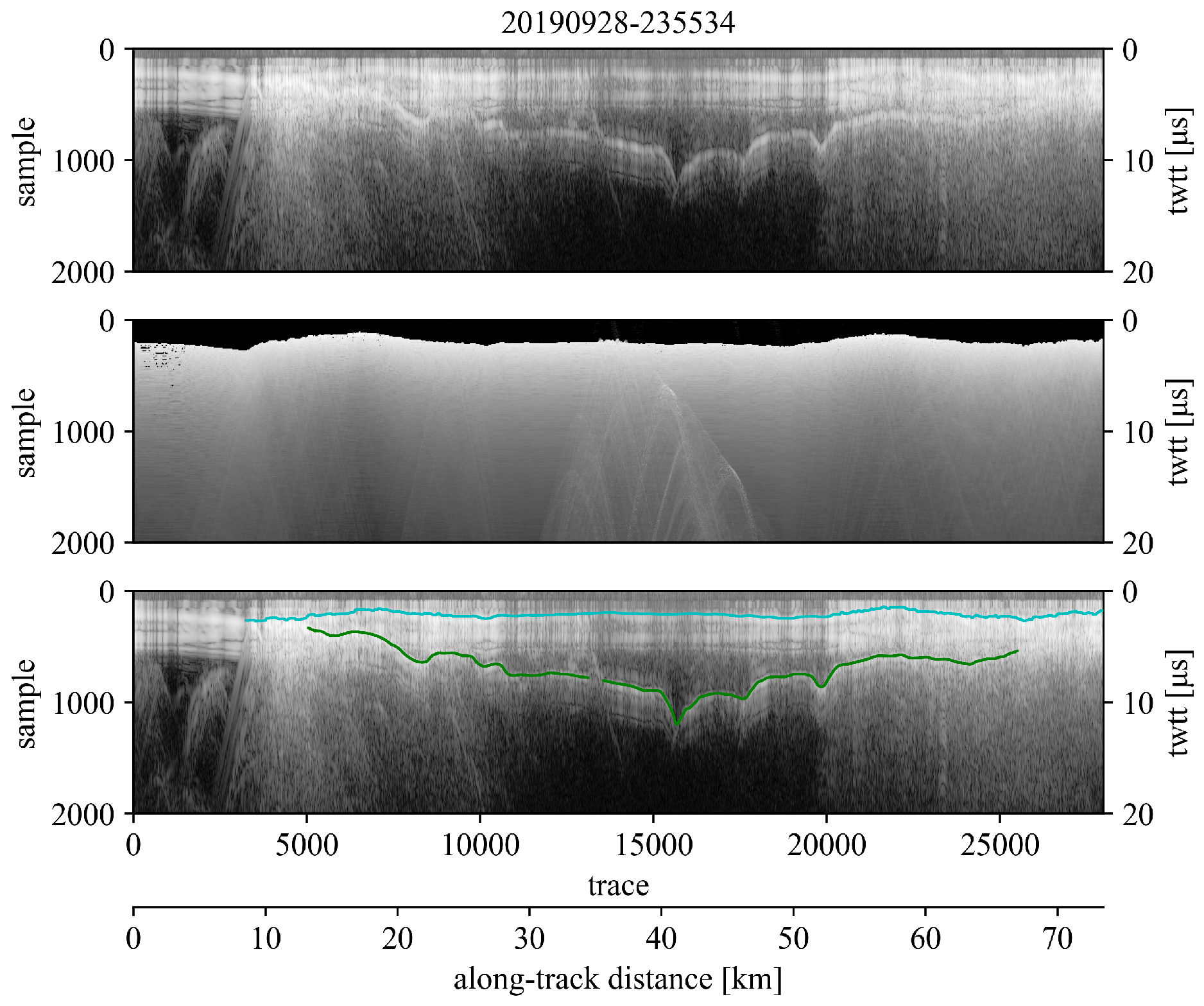
A figure each may also be exported for the uninterpreted radar profile, the accompanying clutter simulation, and the interpreted radar profile. Example over Malaspina Glacier, AK:
Processing Script:
A file log/processing script may also be exported to keep track of and easily repeat any data processing steps. Example processing script:
### RAGU processing log ###
from ragu import ingest

igst = ingest.ingest("/home/user/data/ARES/20140524-200130.h5")
rdata = igst.read("","+proj=longlat +ellps=WGS84 +datum=WGS84 +no_defs","earth")
rdata.lowpass(order=5, cf=1250000.0)
rdata.tpowGain(power=1.2)
Running RAGU
System Requirements
Supported Operating Systems:
- Linux (tested on Ubuntu 18.04, 20.04)
- Windows (tested on Windows 10)
- Mac (tested on Catalina)
Dependencies
- tkinter
- matplotlib
- numpy
- scipy
- pandas
- geopandas
- pyproj
- rasterio
- h5py
Setup
Note: Prior to installation, one may first wish to create an anaconda environment from which to install ragu.
- Install ragu via PyPi
pip install ragu
- To run ragu, call ragu from the command line to initialize the GUI:
ragu
The first time ragu is run on your machine, a configuration file will be created at ~/RAGU/config.ini. This configuration file can be edited to set appropriate data paths, data coordinate reference system, and output preferences. Path variables may be left blank, but must remain uncommented. An example ragu configuration file can be found here.
Note, ragu accepts several optional command line arguments:
- -configPath : ragu configuration file path, (default is ~/RAGU/config.ini)
- -datFile : data file path to load when ragu is initialized (default is None)
- -datPath : path to set as directory from which to load radar datafiles (default from ~/RAGU/config.ini)
To upgrade ragu via pypi:
pip install ragu --upgrade
Development
If you are interested in helping to develop RAGU, we recommend forking RAGU's github repository and then cloning the github repository onto your local machine.
Note, if RAGU was already installed via PyPI, first uninstall:
pip uninstall ragu
You can then use pip to install your locally cloned fork of RAGU in 'editable' mode to easily facilitate development like so:
pip install -e /path/to/your/RAGU/clone
Notes
Several auxiliary tools which RAGU users may find useful can be found at radar_tools. This includes scripts to merge the navigation data from numerous radar datafiles (ragu_nav_merge.py), to merge numerous RAGU pick files (ragu_picks_combine.py ), and a Jupyter Notebook to analyze radar crossover disagreement (ragu_pick_crossover.ipynb). Additional radar processing tools which users may find useful can be found in @mchristoffersen's Groundhog repository.
Publications
A list of publications that cite RAGU:
- Loso, Michael G., Christopher F. Larsen, Brandon S. Tober, Michael Christoffersen, Mark Fahnestock, John W. Holt, and Martin Truffer. “Quo Vadis, Alsek? Climate-Driven Glacier Retreat May Change the Course of a Major River Outlet in Southern Alaska.” Geomorphology 384 (July 1, 2021): 107701. https://doi.org/10.1016/j.geomorph.2021.107701.
- Tober, B. S., J. W. Holt, M. S. Christoffersen, M. Truffer, C. F. Larsen, D. J. Brinkerhoff, and S. A. Mooneyham. “Comprehensive Radar Mapping of Malaspina Glacier (Sít’ Tlein), Alaska—The World’s Largest Piedmont Glacier—Reveals Potential for Instability.” Journal of Geophysical Research: Earth Surface 128, no. 3 (2023): e2022JF006898. https://doi.org/10.1029/2022JF006898.
Release history Release notifications | RSS feed


Download files
Download the file for your platform. If you're not sure which to choose, learn more about installing packages.
Source Distribution
Built Distribution
Filter files by name, interpreter, ABI, and platform.
If you're not sure about the file name format, learn more about wheel file names.
Copy a direct link to the current filters
File details
Details for the file ragu-0.1.54.tar.gz.
File metadata
- Download URL: ragu-0.1.54.tar.gz
- Upload date:
- Size: 7.1 MB
- Tags: Source
- Uploaded using Trusted Publishing? No
- Uploaded via: twine/4.0.2 CPython/3.10.11
File hashes
| Algorithm | Hash digest | |
|---|---|---|
| SHA256 |
ab6a580f15aa44601be28fa9857715ff91bd5bddf76edcbc82d4dc2d0b98bb9b
|
|
| MD5 |
1d0dab2c23acb92f3d5fd5289e9f13d0
|
|
| BLAKE2b-256 |
c5f56032584764512a719feac2c0dca4f209663e632e3ee0bb93cb7a9f47e5f8
|
File details
Details for the file ragu-0.1.54-py3-none-any.whl.
File metadata
- Download URL: ragu-0.1.54-py3-none-any.whl
- Upload date:
- Size: 7.2 MB
- Tags: Python 3
- Uploaded using Trusted Publishing? No
- Uploaded via: twine/4.0.2 CPython/3.10.11
File hashes
| Algorithm | Hash digest | |
|---|---|---|
| SHA256 |
766487b1a302b95d4b558fe08c0692dc5ef5c431cbdce1c2a29180de619d19ae
|
|
| MD5 |
f168f2d48cda27667bbf6455fe459a17
|
|
| BLAKE2b-256 |
e371be1891c6834cc44981c23c6e8296988a3115469785869d2de21ca1123679
|






