





Simplistic python package to print colored/styled text and emojis with a user friendly API.
1. Introduction
Raia is a simplistic python package that intends to provide a user friendly API for printing formatted text on the terminal. To do so, raia uses ANSI RGB codes (as many similar packages do). Truecolor ANSI support of the running terminal is assumed.
2. Installation
Using pip,
pip install raia
3. Usage
3.1 Text formatting
Raia formats text through Formatter objects. All Formatter objects have two ways to format text:
- Used as a callable, i.e.
 initialization = 'some initialization'
 form = raia.Formatter(initialization)
 formatted_str = form("raia package")
 print(formatted_str)
- Using the fprint method that uses the builtin print with the chosen formatting, i.e.
initialization = 'some initialization'
form = raia.Formatter(initialization)
form.fprint("raia package")
Both of these have the same output (printed "raia package" with the formatting specified in the initialization string).
The Formatter object is initialized by a string of the ANSI escape code for the chosen formating, e.g. for printing red text we would initialize with:
Red = raia.Formatter("\x1b[38;2;255;0;0m")
To bereft the user of having anything to do with such codes, raia provides the Style, Color, FullStyle subclasses of the Formatter class. With them, the user just has to specify the necessary information (e.g. for Color the amounts of RGB, see example below).
customBlue = raia.Color(50,150,250)
customBlue.fprint('Some blue text')
Output:

To use a color as background, one must specify it in the initialization of the Color object as,
customBlueBG = raia.Color(50,150,250, as_background=True)
customBlueBG.fprint('Some text in blue background')
Output:

For commonly used colors and styles, some Color and Style objects are pre-initialized and can be used out of the box. For example,
print(raia.Red('This is red.'), raia.Underline('This is undeline.'))
is equivalent to,
Red = raia.Color(255,0,0) # or  = raia.Color('Red')
Underline = raia.Style('underline')
print(Red('This is red.'), Underline('This is undeline.'))
with output:

A full list of these default color/style keys can be found in
raia.defaults.keys() # default colors
raia.styles.keys()
3.2 Emojis
The emoji functionality, is implemented through Emoji objets. For example,
Heart = raia.Emoji('<3')
Cookie = raia.Emoji('cookie')
print('I ' + Heart + ' ' + Cookie + '!')
Output:
I ❤ 🍪!
A full list of currently supported emojis can be found in
raia.emojis.keys()
For more concreate usage examples check the example.py script.
4. example.py
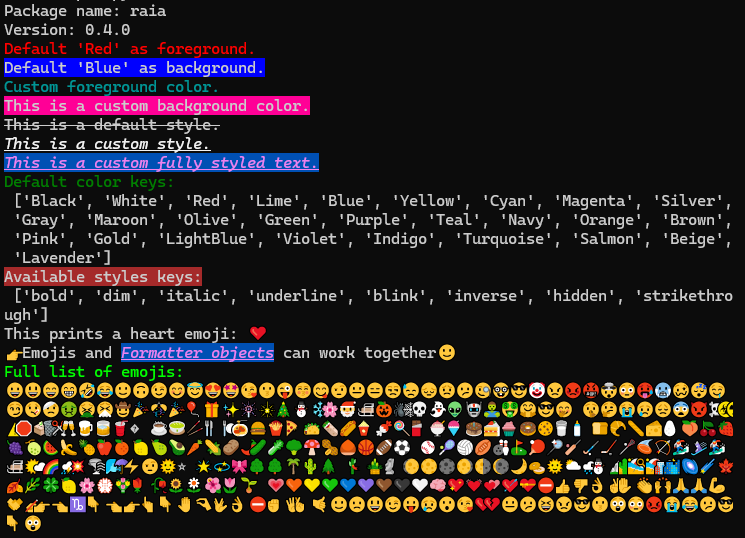
Below, you can see the code and output of the script example.py.
import raia

# Info
print("Package name: "+raia.__name__)
print("Version: " + raia.__version__)

# Default colors
print(raia.Red("Default 'Red' as foreground."))
print(raia.Blue_bg("Default 'Blue' as background."))

# Custom color
myColor = raia.Color(0, 150, 150)
print(myColor("Custom foreground color."))

# Custom background
myBackground = raia.Color(255, 0, 150, as_background=True)
myBackground.fprint('This is a custom background color.')

# Default style
print(raia.Strikethrough('This is a default style.'))

# Custom style
myStyle = raia.Style('underline', 'italic', 'bold')
myStyle.fprint('This is a custom style.')

# Custom Full-Style
myFullStyle = raia.FullStyle(foreground=raia.Violet, background=(
    0, 80, 180),                           style=myStyle)
myFullStyle.fprint('This is a custom fully styled text.')

# Default keys
print(raia.Green('Default color keys: \n'), [*raia.defaults])
print(raia.Brown_bg('Available styles keys:\n'), [*raia.styles])

# Some text with emojis
Heart = raia.Emoji('<3')
print('This prints a heart emoji: ' + Heart)

Smiley = raia.Emoji(':)')
pointRight = raia.Emoji('backhand_index_pointing_right')
print(pointRight + "Emojis and " +
      myFullStyle('Formatter objects') + ' can work together' + Smiley)


print(raia.Lime('Full list of emojis:'))
for emj_key in raia.emojis:
    tmpEmoji = raia.Emoji(emj_key)
    print(tmpEmoji, end='')
Output:
Important Note: Not all styles work on all consoles.
1 maintainer

Metadata
1 maintainer
Release files for raia 0.4.2
For a detailed explanation of source distributions (sdists) and built distributions (wheels), please see the package formats documentation.
Source distribution (sdist)
| File | Size | Uploaded | |
|---|---|---|---|
| raia-0.4.2.tar.gz | 12.8 kB | Details |
Built distribution (wheel)
| File | Interpreter | ABI | Platform | Reset |
|---|---|---|---|---|
| raia-0.4.2-py3-none-any.whl | Python 3 | none | any | Details |
Total release size: 23.9 kB
Release files / raia-0.4.2.tar.gz
| Download URL | raia-0.4.2.tar.gz |
|---|---|
| Size | 12.8 kB |
| Tags | Source |
|
SHA-256 checksum How to use checksums |
fbf993d26a183be116b663b140ee903482280162064c024e9a7965cad79ea23f
|
|
BLAKE2b-256 checksum How to use checksums |
d28d6c5145028e8ad95d6a4f8edd6cf677d5199483164f724713736b87fb4451
|
| Upload date | |
|
Uploaded using Trusted Publishing? What is trusted publishing? |
Yes |
| Uploaded via |
twine/6.0.1 CPython/3.12.8
|
Provenance
Provenance describes where a file came from. On PyPI, provenance is shared via attestations, which provide a verifiable record of the build or publishing details. View details, limitations and caveats.


PyPI Publish Attestation
PyPI verified that this artifact, at this checksum, originated from the publisher listed below.
Signed by GitHub Actions, verified by PyPI on Jan 16, 2025.
Transparency logRelease files / raia-0.4.2-py3-none-any.whl
| Download URL | raia-0.4.2-py3-none-any.whl |
|---|---|
| Size | 11.2 kB |
| Tags | Python 3 |
|
SHA-256 checksum How to use checksums |
3283894d0c031621685f8d94853ec2368c12512065921dfc2bd5b29eb4a571c5
|
|
BLAKE2b-256 checksum How to use checksums |
4bf83911432b14694b1025a0a1c59f9737ce0132f2c9de17bc0c05443df97a30
|
| Upload date | |
|
Uploaded using Trusted Publishing? What is trusted publishing? |
Yes |
| Uploaded via |
twine/6.0.1 CPython/3.12.8
|
Provenance
Provenance describes where a file came from. On PyPI, provenance is shared via attestations, which provide a verifiable record of the build or publishing details. View details, limitations and caveats.
PyPI Publish Attestation
PyPI verified that this artifact, at this checksum, originated from the publisher listed below.
Signed by GitHub Actions, verified by PyPI on Jan 16, 2025.
Transparency log













