


Ultimate Python colorized logger.
Usage
Generic usage example
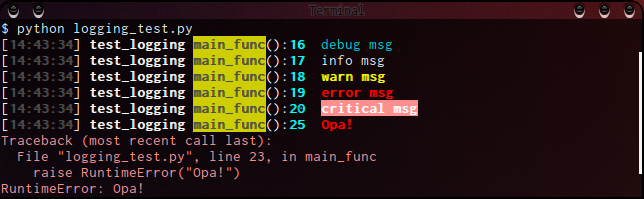
This script runs like above screenshot.
import sys
import logging
from rainbow_logging_handler import RainbowLoggingHandler

def main_func():
    # setup `logging` module
    logger = logging.getLogger('test_logging')
    logger.setLevel(logging.DEBUG)
    formatter = logging.Formatter("[%(asctime)s] %(name)s %(funcName)s():%(lineno)d\t%(message)s")  # same as default

    # setup `RainbowLoggingHandler`
    handler = RainbowLoggingHandler(sys.stderr, color_funcName=('black', 'yellow', True))
    handler.setFormatter(formatter)
    logger.addHandler(handler)

    logger.debug("debug msg")
    logger.info("info msg")
    logger.warn("warn msg")
    logger.error("error msg")
    logger.critical("critical msg")

    try:
        raise RuntimeError("Opa!")
    except Exception as e:
        logger.exception(e)

if __name__ == '__main__':
    main_func()
Usage with Django

Django is a popular Python web framework.
Put the following to your settings.py to get more pleasant development server console output:
# Add this to your settings.py
if DEBUG:
    # Install rainbow logging handler when running Django in develoment mode
    import sys
    LOGGING["handlers"]["rainbow"] = {"level": "DEBUG", "class": "rainbow_logging_handler.RainbowLoggingHandler", 'stream': sys.stderr}
    LOGGING["loggers"]['']["handlers"].append("rainbow")
Features
Column-by-column colored log
As apparent from above screenshot, each column of logs are differently colored. Even default coloring should make log reading easier.
User custom color
Every column colors are customizable.
formatter = logging.Formatter('%(pathname)s [%(module)s] - %(funcName)s:L%(lineno)d : %(message)s')
handler   = RainbowLoggingHandler(
    sys.stderr,
    # Customizing each column's color
    color_pathname=('black', 'red'  , True), color_module=('yellow', None, False),
    color_funcName=('blue' , 'white', True), color_lineno=('green' , None, False),
)
handler.setFormatter(formatter)
logger.addHandler(handler)
logger.info("hello custom world")
Above code produces output like this.

High portability
Linux, BSD, Mac OS, and Windows are supposed to be supported.
Runs with both Python 2.6 or higher & Python 3.2 or higher.
Install
Install from PyPI
$ pip install rainbow_logging_handlerInstall from Github repo
$ git clone https://github.com/laysakura/rainbow_logging_handler.git
$ cd rainbow_logging_handler
$ ./setup.py installLicense
This is free and unencumbered public domain software. For more information, see <http://unlicense.org/> or the accompanying LICENSE.txt file.


Release files for rainbow_logging_handler 2.2.2
For a detailed explanation of source distributions (sdists) and built distributions (wheels), please see the package formats documentation.
Source distribution (sdist)
| File | Size | Uploaded | |
|---|---|---|---|
| rainbow_logging_handler-2.2.2.zip | 15.1 kB | Details |
Release files / rainbow_logging_handler-2.2.2.zip
| Download URL | rainbow_logging_handler-2.2.2.zip |
|---|---|
| Size | 15.1 kB |
| Tags | Source |
|
SHA-256 checksum How to use checksums |
a504c20f1e074cc7f5a5b986c08eb6fb495c9153cffb36b5fa0a587de3a8db63
|
|
BLAKE2b-256 checksum How to use checksums |
3d15aa3cd5c46c709b2bc45e3f8612b6484bbc869d43f92dfc4a86b65e6a240a
|
| Upload date | |
|
Uploaded using Trusted Publishing? What is trusted publishing? |
No |














