
Quality control for rainfall data

Project description

RainfallQC - Quality control for rainfall data



Provides methods for running rainfall quality control.
Installation
RainfallQC can be installed from PyPi:
pip install rainfallqcExample use
Example 1. - Running individual checks on a single rain gauge
Let’s say you have data for a single rain gauge stored in “hourly_rain_gauge_data.csv” which looks like this:
time |
rain_mm |
|---|---|
2020-01-01 00:00 |
0.0 |
2020-01-01 01:00 |
0.1 |
2020-01-01 02:00 |
0.0 |
2020-01-01 03:00 |
105.0 |
2020-01-01 04:00 |
0.6 |
… |
… |
For the majority of the checks in RainfallQC, you can load in your data using polars and run the checks directly. Below, we run 2 example QC checks:
check_intermittency - to flag years where there are periods of non-zero bounded by 0 (see Figure 1.),
daily_accumulations - to flag accumulations of hourly values into daily.
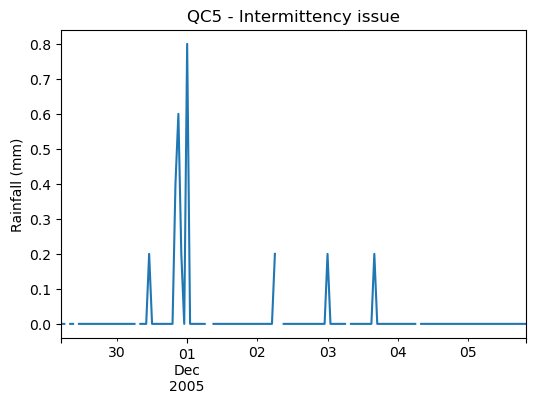
Figure 1. Example of an intermittency issue within the rainfall record
import polars as pl
from rainfallqc import gauge_checks, timeseries_checks

data = pl.read_csv("hourly_rain_gauge_data.csv")

intermittent_years = gauge_checks.check_intermittency(data, target_gauge_col="rain_mm")

daily_accumulation_flags = timeseries_checks.check_daily_accumulations(
    data,
    target_gauge_col="rain_mm",
    gauge_lat=52.0,
    gauge_lon=2.0,
    smallest_measurable_rainfall_amount=0.1,
)
Please note that some checks may require additional metadata, such as gauge location (latitude and longitude) or smallest measurable rainfall amount (e.g. 0.1 mm). This could look like:
station_id |
latitude |
longitude |
start_datetime |
end_datetime |
path |
|---|---|---|---|---|---|
rain_mm_gauge_1 |
53.0 |
2.0 |
2020-01-01 00:00 |
2024-01-01 00:00 |
path/to/gauge_1.csv |
rain_mm_gauge_2 |
54.1 |
-0.5 |
2018-01-01 00:00 |
2023-01-01 00:00 |
path/to/gauge_2.csv |
rain_mm_gauge_3 |
56.9 |
1.9 |
2015-01-01 00:00 |
2025-01-01 00:00 |
path/to/gauge_3.csv |
… |
… |
… |
… |
You could then run checks that require metadata i.e. the check_hourly_exceedance_etccdi_rx1day QC check which flags rainfall values exceeding the hourly day rainfall 1-day record at a given location (see Figure 2):
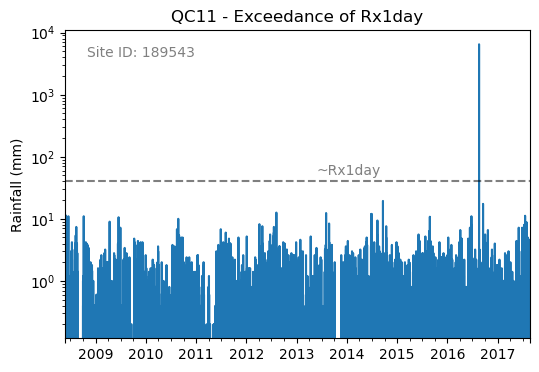
Figure 2. Example of an Rx1day check from the IntenseQC framework
The code for that check looks like:
import polars as pl
from rainfallqc import comparison_checks

data = pl.read_csv("hourly_rain_gauge_data_gauge_1.csv")
metadata = pl.read_csv("rain_gauge_metadata.csv")

target_gauge_id = "rain_mm_gauge_1"
target_metadata = metadata.filter(pl.col("station_id") == target_gauge_id)

rx1day_check = comparison_checks.check_hourly_exceedance_etccdi_rx1day(
     data,
     target_gauge_col=target_gauge_col,
     gauge_lat=target_metadata["latitude"],
     gauge_lon=target_metadata["longitude"]
)
Output flags will then look like:
time |
rx1day_check |
|---|---|
2020-01-01 00:00 |
0 |
2020-01-01 01:00 |
0 |
2020-01-01 02:00 |
0 |
2020-01-01 03:00 |
1 |
2020-01-01 04:00 |
0 |
… |
… |
Example 2. - Running multiple QC checks on a single target gauge
To run multiple QC checks, you can use the apply_qc_framework() method to run QC methods from a given framework (e.g. IntenseQC).
Let’s say you have hourly rainfall values from a rain gauge network data like:
time |
rain_mm_gauge_1 |
rain_mm_gauge_2 |
rain_mm_gauge_3 |
|---|---|---|---|
2020-01-01 00:00 |
0.0 |
0.5 |
0.0 |
2020-01-01 01:00 |
0.5 |
0.0 |
1.0 |
2020-01-01 02:00 |
0.0 |
1.0 |
0.0 |
2020-01-01 03:00 |
105.0 |
0.0 |
0.5 |
2020-01-01 04:00 |
0.0 |
0.5 |
0.0 |
… |
… |
… |
… |
… and metadata like example metdata 1. You can then run multiple QC checks at once by defining a QC framework, the methods to run and parameters for those methods.
As of RainfallQC v0.3.0, there are three QC frameworks:
“intenseqc” - All 25 checks from IntenseQC/GSDR-QC with names like: “QC1”, “QC2” … “QC25”,
“pypwsqc” - 2 checks from pyPWSQC with the names: “FZ” and “SO”,
“custom” - Allows the user to select a custom set of checks (see Example 8 in Tutorials).
Let’s run some QC checks from intenseqc framework below:
import polars as pl
from rainfallqc.qc_frameworks import apply_qc_framework

network_data = pl.read_csv("hourly_rain_gauge_network.csv")
metadata = pl.read_csv("rain_gauge_metadata.csv")

# 1. Decide which QC methods of IntenseQC will be run
qc_framework = "IntenseQC"
qc_methods_to_run = ["QC1", "QC8", "QC9", "QC10", "QC11", "QC12", "QC14", "QC15", "QC16"]

# 2. Determine nearest neighbouring gauges for neighbourhood checks
gauge_lat = gpcc_metadata["latitude"]
gauge_lon = gpcc_metadata["longitude"]
nearest_neighbourhours = ["rain_mm_gauge_2", "rain_mm_gauge_3", ...] # or see Example 3 if not determined

# 2 Decide which parameters for QC
qc_kwargs = {
    "QC1": {"quantile": 5},
    "QC14": {"wet_day_threshold": 1.0, "accumulation_multiplying_factor": 2.0},
    "QC16": {
        "list_of_nearest_stations": nearest_neighbourhours,
        "wet_threshold": 1.0,
        "min_n_neighbours": 5,
        "n_neighbours_ignored": 0,
    },
    "shared": {
        "target_gauge_col": "rain_mm_gauge_1",
        "gauge_lat": gauge_lat,
        "gauge_lon": gauge_lon,
        "time_res": "daily",
        "smallest_measurable_rainfall_amount": 0.1,
    },
}

# 3. Run QC methods on network data
qc_result = apply_qc_framework.run_qc_framework(
    daily_rain_gauge_network, qc_framework=qc_framework, qc_methods_to_run=qc_methods_to_run, qc_kwargs=qc_kwargs
)
Because lots of the checks share the same parameters with a standard vocabulary, you can use the “shared” part of the qc_kwargs dictionary to set those.
Other examples
Of course, your data may not be tabular, or may not be stored in a single file. Therefore, please see our other Tutorials.
There is also a demo notebook.
Finally, different QC methods are suitable for different temporal resolutions, see our Which checks are suitable for my data’s temporal resolution? for more information.
Documentation and License
RainfallQC is developed and maintained by UKCEH.
Free software: GNU General Public License v3
Documentation: https://rainfallqc.readthedocs.io.
Features
27 rainfall QC methods (25 from IntenseQC, 2 from pyPWSQC)
polars DataFrame support for fast data processing
modular structure so you can pick and choose which checks to run
support for single gauges or networks of gauges
editable parameters so you can tweak thresholds, streak or accumulation lengths, and distances to neighbouring gauges
How to cite this package
To cite a specific version of RainfallQC, please see Zenodo DOI. For v0.3.1: https://doi.org/10.5281/zenodo.17457013
Credits
Please email tomkee@ceh.ac.uk if you have any questions.
This package was created with Cookiecutter and the audreyr/cookiecutter-pypackage project template.
Release history Release notifications | RSS feed


Download files
Download the file for your platform. If you're not sure which to choose, learn more about installing packages.
Source Distribution
Built Distribution
Filter files by name, interpreter, ABI, and platform.
If you're not sure about the file name format, learn more about wheel file names.
Copy a direct link to the current filters
File details
Details for the file rainfallqc-0.4.4.tar.gz.
File metadata
- Download URL: rainfallqc-0.4.4.tar.gz
- Upload date:
- Size: 1.3 MB
- Tags: Source
- Uploaded using Trusted Publishing? Yes
- Uploaded via: twine/6.1.0 CPython/3.13.12
File hashes
| Algorithm | Hash digest | |
|---|---|---|
| SHA256 |
a06b2cab04b305f32aa0d3589aefc1fd2a71b3b08674d561b81488b6978596aa
|
|
| MD5 |
dd9ee21168ac8dc3778446551ab5cf7c
|
|
| BLAKE2b-256 |
f6b6dee4b31e72ffd8b783ec3bdaf979532b383efbdb7d04c2662d235b057d23
|
Provenance
The following attestation bundles were made for rainfallqc-0.4.4.tar.gz:
Publisher:
publish-to-pypi.yml on NERC-CEH/RainfallQC
-
Statement:
-
Statement type:
https://in-toto.io/Statement/v1 -
Predicate type:
https://docs.pypi.org/attestations/publish/v1 -
Subject name:
rainfallqc-0.4.4.tar.gz -
Subject digest:
a06b2cab04b305f32aa0d3589aefc1fd2a71b3b08674d561b81488b6978596aa - Sigstore transparency entry: 1368267909
- Sigstore integration time:
-
Permalink:
NERC-CEH/RainfallQC@efb0f1c0686914bfd14dd904eaa9be8bf2844a8e -
Branch / Tag:
refs/tags/v0.4.4 - Owner: https://github.com/NERC-CEH
-
Access:
public
-
Token Issuer:
https://token.actions.githubusercontent.com -
Runner Environment:
github-hosted -
Publication workflow:
publish-to-pypi.yml@efb0f1c0686914bfd14dd904eaa9be8bf2844a8e -
Trigger Event:
release
-
Statement type:
File details
Details for the file rainfallqc-0.4.4-py3-none-any.whl.
File metadata
- Download URL: rainfallqc-0.4.4-py3-none-any.whl
- Upload date:
- Size: 1.3 MB
- Tags: Python 3
- Uploaded using Trusted Publishing? Yes
- Uploaded via: twine/6.1.0 CPython/3.13.12
File hashes
| Algorithm | Hash digest | |
|---|---|---|
| SHA256 |
9580589bab170259b009d22c4520b1f356fad99769e2b6b4a22b6ed8731f623e
|
|
| MD5 |
045b1e526308a12e8889fef628a016ee
|
|
| BLAKE2b-256 |
a284e448d8a9aeed92fa3da8be8fafe70c174c3cbb53128a68dafffad9071c2c
|
Provenance
The following attestation bundles were made for rainfallqc-0.4.4-py3-none-any.whl:
Publisher:
publish-to-pypi.yml on NERC-CEH/RainfallQC
-
Statement:
-
Statement type:
https://in-toto.io/Statement/v1 -
Predicate type:
https://docs.pypi.org/attestations/publish/v1 -
Subject name:
rainfallqc-0.4.4-py3-none-any.whl -
Subject digest:
9580589bab170259b009d22c4520b1f356fad99769e2b6b4a22b6ed8731f623e - Sigstore transparency entry: 1368267919
- Sigstore integration time:
-
Permalink:
NERC-CEH/RainfallQC@efb0f1c0686914bfd14dd904eaa9be8bf2844a8e -
Branch / Tag:
refs/tags/v0.4.4 - Owner: https://github.com/NERC-CEH
-
Access:
public
-
Token Issuer:
https://token.actions.githubusercontent.com -
Runner Environment:
github-hosted -
Publication workflow:
publish-to-pypi.yml@efb0f1c0686914bfd14dd904eaa9be8bf2844a8e -
Trigger Event:
release
-
Statement type:






