
rake_new2
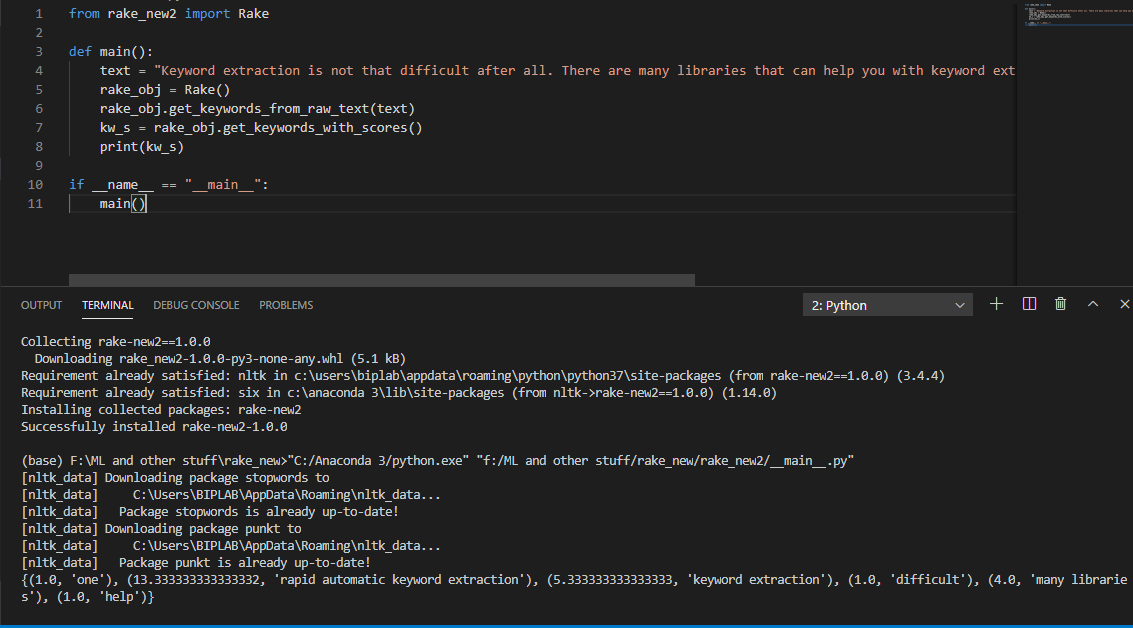
rake_new2 is a Python library that enables simple and fast keyword extraction from any text. As the name implies, this library works on the RAKE(Rapid Automatic Keyword Extraction) algorithm.
It tries to determine the key phrases in a text by calculating the co-occurrences of every word in a key phrase and also its frequency in the entire text.
New in this version
-
Handles repetitive keywords/key-phrases
-
Handles consecutive punctuations.
-
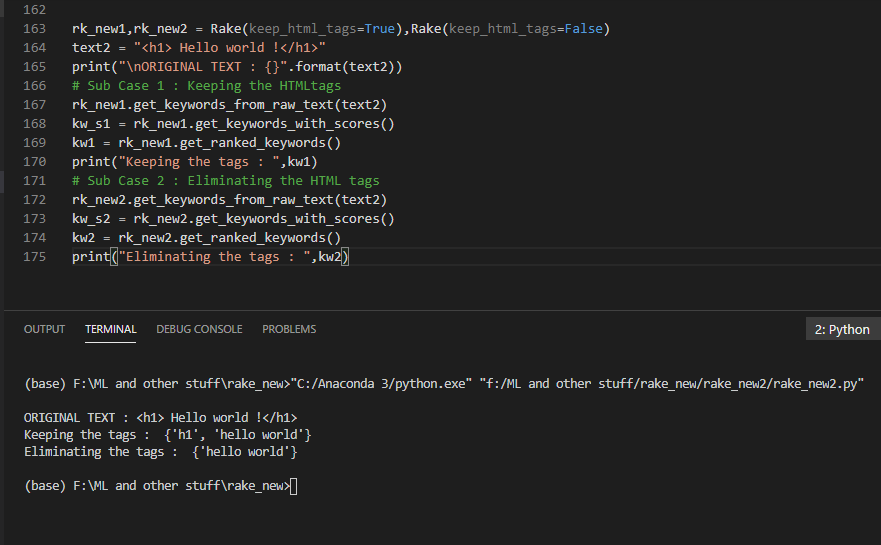
Handles HTML tags in text : The user is allowed an option to choose if they want to keep HTML tags as keywords too.
Installation
Use the package manager pip to install rake_new2.
pip install rake_new2
Quick Start
from rake_new2 import Rake

text = "Red apples are good in taste."
text2 = "<h1> Hello world !</h1>"
rk,rk_new1,rk_new2 = Rake(),Rake(keep_html_tags=True),Rake(keep_html_tags=False)

# Case 1
# Initialize
rk.get_keywords_from_raw_text(text)
kw_s = rk.get_keywords_with_scores()
# Returns keywords with degree scores : {(1.0, 'taste'), (1.0, 'good'), (4.0, 'red apples')}
kw = rk.get_ranked_keywords()
# Returns keywords only : ['red apples', 'taste', 'good']
f = rk.get_word_freq()
# Returns word frequencies as a Counter object : {'red': 1, 'apples': 1, 'good': 1, 'taste': 1}
deg = rk.get_kw_degree()
# Returns word degrees as defaultdict object : {'red': 2.0, 'apples': 2.0, 'good': 1.0, 'taste': 1.0}

# Case 2 : Sample case for testing the 'keep_html_tags' parameter. Default = False
print("\nORIGINAL TEXT : {}".format(text))
# Sub Case 1 : Keeping the HTMLtags
rk_new1.get_keywords_from_raw_text(text2)
kw_s1 = rk_new1.get_keywords_with_scores()
kw1 = rk_new1.get_ranked_keywords()
print("Keeping the tags : ",kw1)

# Sub Case 2 : Eliminating the HTML tags
rk_new2.get_keywords_from_raw_text(text2)
kw_s2 = rk_new2.get_keywords_with_scores()
kw2 = rk_new2.get_ranked_keywords()
print("Eliminating the tags : ",kw2)

'''OUTPUT >>
ORIGINAL TEXT : <h1> Hello world !</h1>
Keeping the tags :  {'h1', 'hello'}
Eliminating the tags :  {'hello world'}
'''
Debugging
You might come across a stopwords error.
It implies that you do not have the stopwords corpus downloaded from NLTK.
To download it, use the command below.
python -c "import nltk; nltk.download('stopwords')"
Contributing
Pull requests are welcome. For major changes, please open an issue first to discuss what you would like to change.
Please make sure to update tests as appropriate.
License
1 maintainer

Metadata
1 maintainer
Release files for rake-new2 1.0.5
For a detailed explanation of source distributions (sdists) and built distributions (wheels), please see the package formats documentation.
Source distribution (sdist)
| File | Size | Uploaded | |
|---|---|---|---|
| rake_new2-1.0.5.tar.gz | 4.9 kB | Details |
Built distribution (wheel)
| File | Interpreter | ABI | Platform | Reset |
|---|---|---|---|---|
| rake_new2-1.0.5-py3-none-any.whl | Python 3 | none | any | Details |
Total release size: 11.1 kB
Release files / rake_new2-1.0.5.tar.gz
| Download URL | rake_new2-1.0.5.tar.gz |
|---|---|
| Size | 4.9 kB |
| Tags | Source |
|
SHA-256 checksum How to use checksums |
6a48686b20d048c2294a89146c93ed0b73674f997e30d2419f0ae48344e845c3
|
|
BLAKE2b-256 checksum How to use checksums |
ac355ddfa8b5dc9eef44e1a61ff01157ed89f3ad6024f96e9c4f7b08858a7b7b
|
| Upload date | |
|
Uploaded using Trusted Publishing? What is trusted publishing? |
No |
| Uploaded via |
twine/3.1.1 pkginfo/1.5.0.1 requests/2.22.0 setuptools/46.1.3 requests-toolbelt/0.9.1 tqdm/4.32.1 CPython/3.7.3
|
Release files / rake_new2-1.0.5-py3-none-any.whl
| Download URL | rake_new2-1.0.5-py3-none-any.whl |
|---|---|
| Size | 6.2 kB |
| Tags | Python 3 |
|
SHA-256 checksum How to use checksums |
d846098a213a1c8d71ed0b858e31a2a9b01c2c884dfbc541e3582594061fd1b7
|
|
BLAKE2b-256 checksum How to use checksums |
92cc735ecde47d1eac530558039742d6295452ae142965fb830069dde6b58678
|
| Upload date | |
|
Uploaded using Trusted Publishing? What is trusted publishing? |
No |
| Uploaded via |
twine/3.1.1 pkginfo/1.5.0.1 requests/2.22.0 setuptools/46.1.3 requests-toolbelt/0.9.1 tqdm/4.32.1 CPython/3.7.3
|














