
   
About
Ansible-cmdb takes the output of Ansible’s fact gathering and converts it into a static HTML overview page (and other things) containing system configuration information.
It supports multiple types of output (html, csv, sql, etc) and extending information gathered by Ansible with custom data. For each host it also shows the groups, host variables, custom variables and machine-local facts.
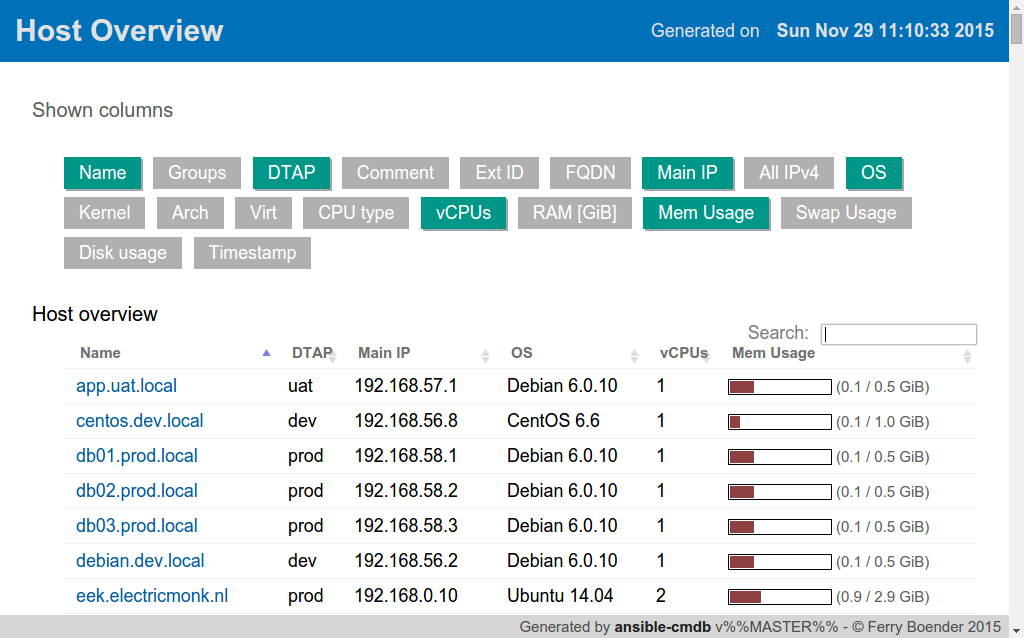
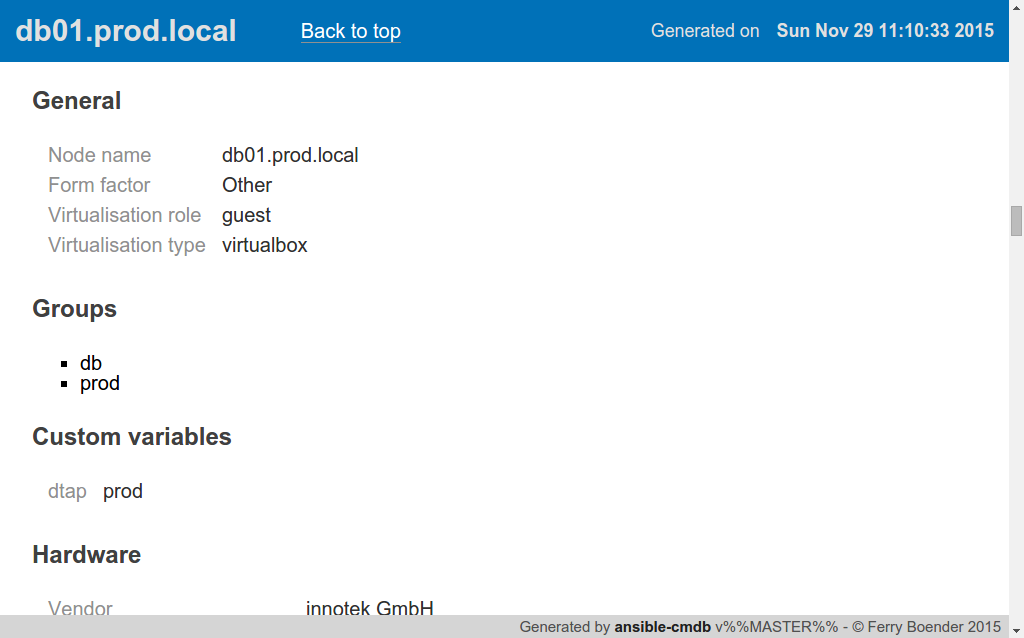
[HTML example](https://rawgit.com/fboender/ansible-cmdb/master/example/html_fancy.html) output.
Features
(Not all features are supported by all templates)
- Multiple formats / templates:
Fancy HTML (–template html_fancy), as seen in the screenshots above.
Fancy HTML Split (–template html_fancy_split), with each host’s details in a separate file (for large number of hosts).
CSV (–template csv), the trustworthy and flexible comma-separated format.
JSON (–template json), a dump of all facts in JSON format.
Markdown (–template markdown), useful for copy-pasting into Wiki’s and such.
Markdown Split (–template markdown_split), with each host’s details in a seperate file (for large number of hosts).
SQL (–template sql), for importing host facts into a (My)SQL database.
Plain Text table (–template txt_table), for the console gurus.
and of course, any custom template you’re willing to make.
Host overview and detailed host information.
Host and group variables.
Gathered host facts and manual custom facts.
Adding and extending facts of existing hosts and manually adding entirely new hosts.
Custom columns
Getting started
Links to the full documentation can be found below, but here’s a rough indication of how Ansible-cmdb works to give you an idea:
Install Ansible-cmdb from [source, a release package](https://github.com/fboender/ansible-cmdb/releases) or through pip: pip install ansible-cmdb.
Fetch your host’s facts through ansible:
$ mkdir out $ ansible -m setup –tree out/ all
Generate the CMDB HTML with Ansible-cmdb:
$ ansible-cmdb out/ > overview.html
Open overview.html in your browser.
That’s it! Please do read the full documentation on usage, as there are some caveats to how you can use the generated HTML.
Documentation
All documentation can be viewed at [readthedocs.io](http://ansible-cmdb.readthedocs.io/en/latest/).
[Full documentation](http://ansible-cmdb.readthedocs.io/en/latest/)
[Requirements and installation](http://ansible-cmdb.readthedocs.io/en/latest/installation/)
[Usage](http://ansible-cmdb.readthedocs.io/en/latest/usage/)
[Contributing and development](http://ansible-cmdb.readthedocs.io/en/latest/dev/)
License
Ansible-cmdb is licensed under the GPLv3:
This program is free software: you can redistribute it and/or modify it under the terms of the GNU General Public License as published by the Free Software Foundation, either version 3 of the License, or (at your option) any later version.
This program is distributed in the hope that it will be useful, but WITHOUT ANY WARRANTY; without even the implied warranty of MERCHANTABILITY or FITNESS FOR A PARTICULAR PURPOSE. See the GNU General Public License for more details.
You should have received a copy of the GNU General Public License along with this program. If not, see <http://www.gnu.org/licenses/>.
For the full license, see the LICENSE file.
1 maintainer

Release files for rami-ansible-cmdb 1.33.0
For a detailed explanation of source distributions (sdists) and built distributions (wheels), please see the package formats documentation.
Source distribution (sdist)
| File | Size | Uploaded | |
|---|---|---|---|
| rami_ansible_cmdb-1.33.0.tar.gz | 575.5 kB | Details |
Built distribution (wheel)
| File | Interpreter | ABI | Platform | Reset |
|---|---|---|---|---|
| rami_ansible_cmdb-1.33.0-py3-none-any.whl | Python 3 | none | any | Details |
Total release size: 777.0 kB
Release files / rami_ansible_cmdb-1.33.0.tar.gz
| Download URL | rami_ansible_cmdb-1.33.0.tar.gz |
|---|---|
| Size | 575.5 kB |
| Tags | Source |
|
SHA-256 checksum How to use checksums |
13eaf743239d61e26b31efc92e54b80036da74a1470bb86e45118dbf7c6940b9
|
|
BLAKE2b-256 checksum How to use checksums |
6c2b8bb26ad861de68e39b6b4d2eedea7b057299a59a80a21d8339deecf4ba86
|
| Upload date | |
|
Uploaded using Trusted Publishing? What is trusted publishing? |
No |
| Uploaded via |
twine/6.1.0 CPython/3.13.2
|
Release files / rami_ansible_cmdb-1.33.0-py3-none-any.whl
| Download URL | rami_ansible_cmdb-1.33.0-py3-none-any.whl |
|---|---|
| Size | 201.5 kB |
| Tags | Python 3 |
|
SHA-256 checksum How to use checksums |
4a04716b84f776a8e4e7c917fe0d28c3e413d9ff742ecdeae4406d25f5b3276b
|
|
BLAKE2b-256 checksum How to use checksums |
79524eb1b4e842811a257e4ca806ce391fbcb8f126144ea6e3a0b4adc602f9f9
|
| Upload date | |
|
Uploaded using Trusted Publishing? What is trusted publishing? |
No |
| Uploaded via |
twine/6.1.0 CPython/3.13.2
|



















