



Ranbval SDK v4.3.0
The Python client for Ranbval — a secret manager for API keys. Encrypt secrets in the
Ranbval dashboard, store the encrypted tokens in .ranbval files, and decrypt them only at
runtime — AES-256-GCM with PBKDF2 key derivation, no plaintext ever touches source control.
Unlike a plain .env, .ranbval is safe to commit, every use is attributable in the Live
Monitor, and — once you enable the repo allowlist — a stolen config is useless off your own
repos. See What Ranbval protects, and what it does not
for exactly where the line falls.
pip install ranbval-sdk
Why Ranbval Exists
Every team now juggles a pile of API keys — LLM providers, payment processors, databases, third-party services. Those keys leak constantly, and almost always the same handful of ways:
- A key gets committed to Git — and bots scrape public repos within minutes.
- A
.envfile is copied and shared over Slack/email — then forwarded, forgotten, and lives forever with no expiry. - A key is accidentally printed to logs or captured by an error reporter — and now it sits in Datadog/Sentry, readable by the whole org, retained for years.
- When a key does leak, nobody knows who leaked it or which repo burned the tokens — so you can't rotate with confidence.
.env + load_dotenv() does nothing about any of this: the secret is plaintext on disk, works
anywhere it's copied, forever, with zero visibility. Ranbval is built to close exactly these
gaps.
What it actually protects (and what nothing can)
Be clear-eyed about the threat model — it's what makes the guarantees trustworthy:
- What no tool can stop: an attacker who already runs code inside your process. If they can
execute in your app, they can read
os.environ, hook functions, or dump memory — and no secret manager (Vault, AWS/GCP Secrets Manager, Doppler, Ranbval) prevents that. It isn't the real-world leak vector. - What Ranbval does stop — the leaks that actually happen:
| Real-world leak | .env |
Ranbval |
|---|---|---|
| Key committed to Git | 🔴 plaintext, public instantly | 🟢 encrypted token — a commit leaks nothing usable |
| Config file copied / shared | 🔴 works anywhere, forever | 🟢 useless without the project secret — and, once you enable the allowlist, useless off your repos too |
| Key printed to logs / captured by Sentry | 🔴 sits in log storage for years | 🟢 SecretString masks every display path; can't be pickled into a cache/report |
| A key leaks — who? which repo? | 🔴 zero visibility | 🟢 Live Monitor flags the same credential on a new device/IP → rotate with proof |
| A thief probes a stolen config | 🔴 no way to know | 🟢 a canary key is a decoy — the moment they decrypt it, you get the alert |
The strongest control here is the repo allowlist — and it is off until you enable it for
a project. With it on, someone who steals your entire .ranbval and your project secret still
cannot decrypt from a repo that isn't on your control-plane allowlist: a stolen config is a dead
config. With it off, those two files are enough. It is the single highest-value switch in the
product, so turn it on; see
What Ranbval protects, and what it does not.
An analogy
You can't make a house key that opens your door but that a thief holding it can't use — if the key opens the lock, whoever holds it gets in. That's physics, not a flaw. Real security comes from three other things, and Ranbval gives you all three:
- The key isn't lying in the street → plaintext never touches Git (encrypted tokens).
- The key only works at your house → the repo allowlist makes a stolen file worthless elsewhere, once you switch it on.
- An alarm rings if a stranger walks in → leak detection alerts on a new device/IP, and a canary key is a decoy that turns any use into a confirmed-theft alert.
Why use it
- Drop-in. One
load_ranbval()replaces scatteredload_dotenv(); keys pass straight into your existing SDKs — Ranbval ships no vendor dependencies. - Safe by default. Secrets are sealed
SecretStrings that refuse to print, log, or serialize; plain config is opt-in plaintext viaPUBLIC_name prefixes andpublic(). - Accountable. Every decrypt is attributable, and misuse is detectable — something a plain
.envcan never offer.
Quick Start
One word per secret. use.NAME loads .ranbval on first touch, finds the key whatever prefix it
carries, decrypts it, caches it, and hands your client a value it can use directly:
from ranbval_sdk import use
import openai

client = openai.OpenAI(api_key=use.OPENAI_KEY)     # finds SECRET_OPENAI_KEY

response = client.chat.completions.create(
    model="gpt-4o",
    messages=[{"role": "user", "content": "Hello"}],
)
Write the short name — use.OPENAI_KEY tries OPENAI_KEY, SECRET_OPENAI_KEY and
PUBLIC_OPENAI_KEY in turn, so renaming a key's prefix in .ranbval doesn't break your code. Exact
names work too. A missing key raises MissingKeyError naming every spelling it tried — never a
silent None.
Shorter code, same guards: the returned value is still sealed (repr masked, pickling refused,
iteration/slicing/str() still raise), and every access is still audited. See
Enforcement.
.ranbval (safe to commit — every value is sealed):
SECRET_OPENAI_KEY=ranbval.4ii0a022aa.p1GOZ...ahsan
.ranbval.local (never commit this file — it holds the key that unseals the rest):
RANBVAL_PROJECT_SECRET=your_dashboard_project_secret
The explicit form — when you want each step visible
use is a shortcut, not a different mechanism. Every step it performs is still available on its
own, and nothing about the explicit form has changed:
from ranbval_sdk import load_ranbval, decrypt_key
import openai

# 1. Load encrypted config from .ranbval files (no network, no decryption)
load_ranbval()

# 2. Decrypt a vault token — returns a SecretString, never printable.
#    This also auto-reports the usage to your Live Monitor (no extra code).
api_key = decrypt_key("SECRET_OPENAI_KEY")

# 3. Pass directly to the SDK — value is never exposed in logs or prints
client = openai.OpenAI(api_key=api_key.use())
Reach for it when you need a stage pinned, a SecretString rather than a ready-to-pass value, or
an explicit reveal_scope / enforcement_scope around the handoff.
usewill not hand back aPROXY_secret. Those are meant never to be decrypted on your machine, so returning one as a string would defeat the point. Useranbval_httpx_client()orproxy_request().
CLI
pip install ranbval-sdk ships a ranbval command:
ranbval init                # starter .ranbval + gitignore .ranbval.local
ranbval check               # lint: unclassified keys, [section] headers, competing .env, mismatches
ranbval run -- python app.py  # load .ranbval into the env, then run (secrets only in that process)
ranbval check exits non-zero on errors, so drop it into CI or a pre-commit hook.
AI coding agents: every access is attributed, and you can fence them in
An agent working in your repository — Claude Code, Copilot, Cursor, anything running a terminal —
uses your credentials the same way you do. Two things follow, and they are worth stating separately
because only one of them is a wall.
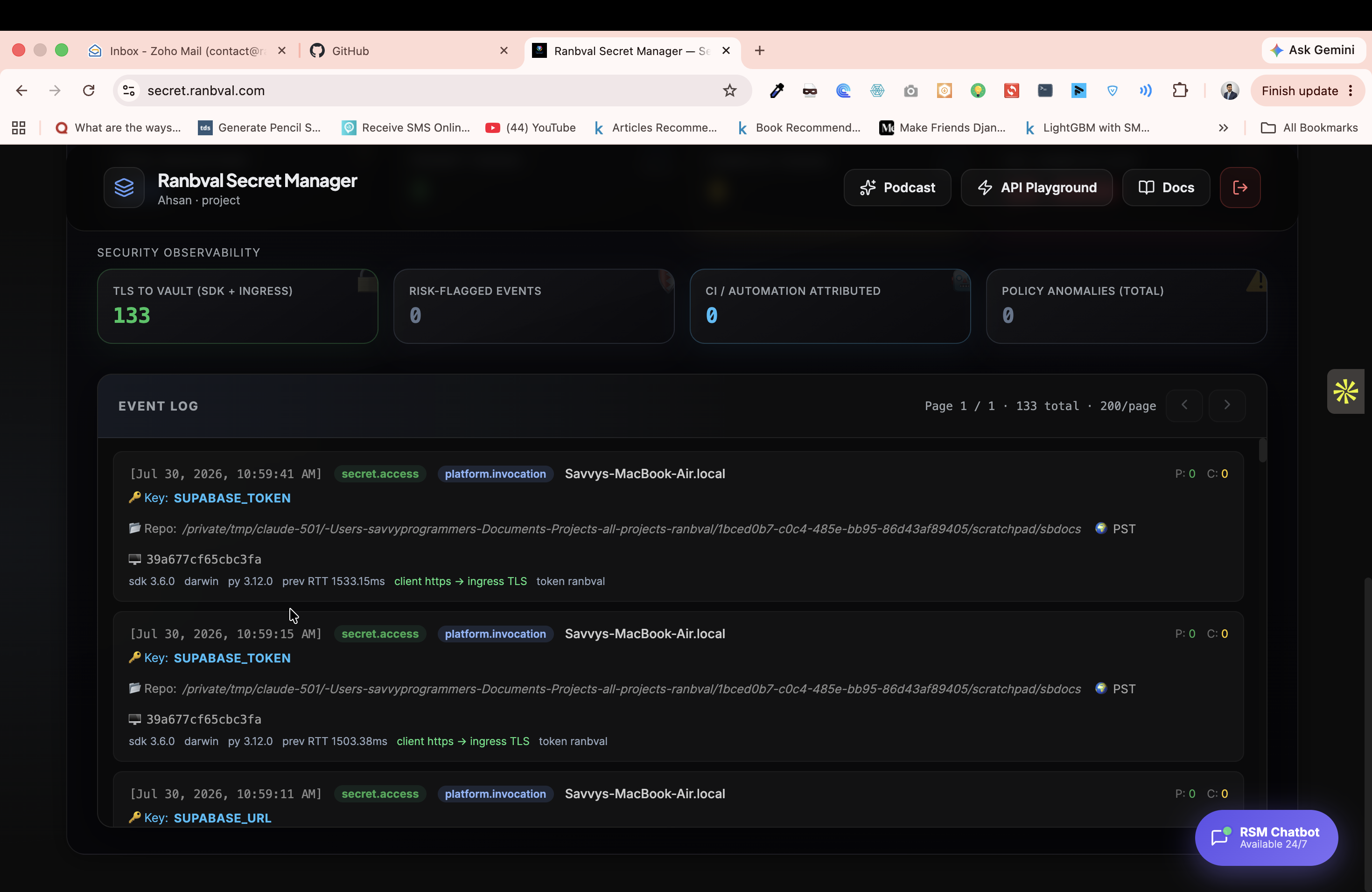
1. You see it. Every decrypt, with the directory it came from
Every .use() is reported to the Live Monitor with the working directory, device, SDK version and
timestamp. An agent does not get a quieter path than you do; it gets the same one, and its working
directory is usually conspicuous:
[secret.access]  SUPABASE_TOKEN   Savvys-MacBook-Air.local
  Repo: /private/tmp/claude-501/…/scratchpad/sbdocs        ← not a project path
  sdk 4.x  darwin  py 3.12  client https → ingress TLS
That is a real line from a real log, produced by an AI assistant working on this SDK. Nothing was configured to catch it — attribution is on by default and has no client-side off switch.
A .env gives you none of this. When a key leaks you cannot say which machine, which directory, or
which tool used it, so you rotate without knowing whether you got them all.
2. You can bind the keys to your repository
Turn on the repo allowlist in your dashboard and decryption is checked against your
git remote origin on every call. An agent working in a scratch directory, a temp clone, or a
fork has no matching origin and gets nothing:
RepoNotAllowedError: this key may only be used from an allowlisted Git repository.
The policy is fetched from the control plane per decrypt, so it is not on the machine the agent controls and cannot be edited out of the way. Turn it on — it is the only mechanism here that an agent able to edit your files cannot argue with.
A client-side path fence was considered and deliberately not shipped: it would have lived in the
.ranbval an agent can edit, so it would have read as protection while providing none against the
adversary it named.
What this does not claim
An agent running inside your allowlisted repo, in an allowed path, with your project secret present, can decrypt exactly what you can. That is not a gap to be closed — it is what "the agent is working in your project" means. Anything with your credentials and your working directory has your access.
So the honest statement is not "an AI cannot touch your keys." It is:
An AI cannot use them from somewhere you did not allow, and cannot use them anywhere without you seeing it.
For a credential where even that is too much — a service_role key, a production signing key —
use a PROXY_ secret. It is never decrypted on the
machine at all, so there is nothing for an agent, a dependency, or a stolen laptop to read.
The project secret can't be committed by accident
load_ranbval() refuses to run if the file holding your project secret is not git-ignored. The
project secret is the root key that unseals every token, so a committable secret file is the whole
vault one git add away from a public repo — the exact leak Ranbval exists to prevent.
RanbvalConfigError: .ranbval.local holds your project secret but is NOT git-ignored — one
`git add` from leaking the key that unseals every token. Fix it before anything else:
    echo '.ranbval.local' >> .gitignore
.ranbval itself is safe to commit — only sealed tokens live there — so the guard fires only on the
file that actually carries the secret (normally .ranbval.local), and it also catches the mistake of
putting the secret line in the committed .ranbval. Outside a git repo there's nothing to commit
into, so it stays silent. Override with RANBVAL_ALLOW_COMMITTABLE_SECRET=1 for unusual setups.
Remote config (no local file)
Pull the whole env-set from the Ranbval control plane instead of shipping a .ranbval — the
project secret is the credential, and everything downstream (decryption, prefixes, enforcement)
is identical to loading from a file:
from ranbval_sdk import load_ranbval, decrypt_key

load_ranbval(remote=True, project_secret="ranbval-proj-…")   # fetches SECRET_/PROXY_/PUBLIC_
client = openai.OpenAI(api_key=decrypt_key("SECRET_OPENAI_KEY").use())
SECRET_/PROXY_ values come down as encrypted ranbval.* tokens (decrypted client-side);
PUBLIC_ values are plaintext. Add a key in the dashboard → it appears here on the next load.
Owner vs developer. The owner fetches with the project secret. A developer fetches with a
ranbval-dev-… token the owner issues from the dashboard, and can add PUBLIC_ envs from code —
attributed to them:
load_ranbval(remote=True, api_key="ranbval-dev-…")          # developer fetch
from ranbval_sdk import push_env
push_env("PUBLIC_FEATURE_FLAG", "on", api_key="ranbval-dev-…")  # shows as "added by <dev>"
SECRET_/PROXY_ keys stay owner-only (created encrypted in the dashboard).
Plan & usage
plan_status() reports what plan the project is on, what it allows, and how much is used this
month — using the credentials the SDK already has:
from ranbval_sdk import plan_status

s = plan_status(project_secret="ranbval-proj-…")   # or api_key="ranbval-dev-…"

s["plan"]                        # "free"
s["plan_name"]                   # "Free"
s["limits"]                      # {"projects": 1, "secrets": 5, "requests_month": 1000}
s["usage"]["requests_month"]     # 412
s["usage"]["requests_remaining"] # 588
s["usage"]["period"]             # "2026-07"
s["enforced"]                    # False while billing is switched off
A null/None limit means unlimited on that plan.
With a developer token, usage["projects"] and usage["secrets"] come back as None — those
counts span the owner's other projects, which a scoped token has no business seeing. The request
meter is still reported, because that is what decides whether your own proxy calls go through.
When a proxied call is refused because the allowance is spent, proxy_request() raises
PlanLimitError rather than a generic ProxyError, with the numbers as fields:
from ranbval_sdk import PlanLimitError, proxy_request

try:
    proxy_request("PROXY_OPENAI", "https://api.openai.com/v1/chat/completions", body=payload)
except PlanLimitError as e:
    log.warning("%s: %d/%d requests used this %s", e.plan, e.used, e.limit, e.period)
    # back off, queue for next month, or prompt an upgrade — but don't retry into the wall
PlanLimitError subclasses RanbvalError, so existing except RanbvalError handlers keep working.
This reports; it does not enforce. The SDK runs on your machine, so any limit it checked here
you could simply delete — every limit is applied server-side, on the call itself. plan_status() is
for visibility: showing usage in your own tooling, or warning before a long batch job. There is
nothing to gain by calling it as a pre-flight check, and nothing lost by skipping it.
Environments (dev / staging / production)
A project holds up to 10 named environments, and every key and PUBLIC_ value lives in one of
them. The same name therefore holds a different value per stage:
project "My App"
  ├── development   SECRET_OPENAI_KEY=ranbval.…   PUBLIC_DATABASE_URL=postgres://dev…
  ├── staging       SECRET_OPENAI_KEY=ranbval.…   PUBLIC_DATABASE_URL=postgres://stg…
  └── production    SECRET_OPENAI_KEY=ranbval.…   PUBLIC_DATABASE_URL=postgres://prod…
Pull exactly one:
load_ranbval(remote=True, environment="production")
client = openai.OpenAI(api_key=decrypt_key("SECRET_OPENAI_KEY").use())  # production's key
Only that stage's values are fetched — production credentials never reach a development machine, even if the developer's token is valid for the project.
How the stage is chosen — explicit argument first, then the environment:
load_ranbval(remote=True, environment="staging")   # 1. explicit
# else RANBVAL_ENV / ENVIRONMENT / ENV             # 2. from the environment
# else the project's first environment             # 3. server default
export RANBVAL_ENV=production # CI / server sets this once; code stays identical
RANBVAL_ENV is the same variable that picks a local .ranbval.{mode} file — one idea ("which
stage am I running in"), one variable, whether the config comes from disk or the control plane.
The environment= argument works the same way for local files too: load_ranbval(environment= "production") (no remote=) merges .ranbval then .ranbval.production, so the stage is chosen
identically whether you read from disk or the server.
push_env takes the same argument, so a developer can add a PUBLIC_ value to one stage:
push_env("PUBLIC_FEATURE_FLAG", "on", api_key="ranbval-dev-…", environment="staging")
Environments are created, renamed, and deleted from the dashboard. Deleting one deletes every key
and PUBLIC_ value inside it; a project always keeps at least one.
Module Reference
| Symbol | Description |
|---|---|
use |
One word per secret — use.NAME loads, resolves the prefix, decrypts and caches in a single attribute access |
Use |
The class behind use, for pinning a stage: Use(mode="staging").SUPABASE_URL |
load_ranbval() |
Merges layered .ranbval* files into os.environ; remote=True, environment="…" pulls one stage from the control plane |
public() |
Read a plaintext (unencrypted) config value — never decrypts |
public_config() |
Dict of every PUBLIC_-prefixed key as {name: plaintext} |
proxy_token() |
Raw encrypted token for a PROXY_ key — pass to proxy_request() (never decrypted client-side) |
safe_decrypt() |
Decrypts a vault token string → SecretString |
decrypt_key() |
Reads an env var and decrypts it in one call |
SecretString |
Wrapper that blocks all display paths — value only via .use() |
require_reveal_scope() / reveal_scope() |
Restrict a secret so .use() works only inside an approved block |
install_access_monitor() |
Detect & report suspicious secret access / possible exfiltration |
set_enforcement() / is_enforced() |
Toggle strict mode process-wide — extraction attempts raise RanbvalSecurityError (on by default) |
enforcement_scope() |
Relax the guards for one block and restore them after — prefer this over the process-wide switch |
set_strict_encode() |
Make .encode() raise again instead of being audited-but-allowed |
proxy_request() |
Route an HTTP request through the Ranbval proxy (key injected server-side) |
ranbval_httpx_client() |
An httpx.Client that proxies every request — run supabase/openai with the key never local |
emit_telemetry() |
Record a custom usage event (basic usage is auto-reported on every decrypt_key()) |
get_audit_log() |
Return the in-process audit log list |
clear_audit_log() |
Clear the in-process audit log |
get_project_key() |
Read RANBVAL_PROJECT_SECRET from env |
find_ranbval_file() |
Locate the nearest .ranbval* file on disk |
find_ranbval_directory() |
Locate the config root directory |
resolve_ranbval_mode() |
Determine the active mode from env/args |
Package Layout
Everything is organized by concern. You only import from the top level
(from ranbval_sdk import …); the table shows where each piece lives.
ranbval_sdk/
├── __init__.py          # the public API (re-exports everything below)
├── exceptions.py        # RanbvalError hierarchy
├── py.typed             # ships type information (PEP 561)
├── config/              # your .ranbval configuration surface
│   ├── loader.py        #   load_ranbval, find_*, resolve_ranbval_mode, get_project_key
│   ├── access.py        #   imperative access — Vault, env, inject, secrets, iter_secrets
│   ├── quick.py         #   the one-word form — use.NAME (prefix resolution + cache)
│   ├── reveal.py        #   reveal scopes — .use() only at approved call sites
│   └── declarative.py   #   class-based access — Secret, SecretConfig
├── crypto/              # cryptography & sealed secrets (only crypto lives here)
│   ├── cipher.py        #   AES-256-GCM decrypt + project-secret resolution
│   ├── secret_string.py #   SecretString — the sealed, never-printable value
│   ├── enforcement.py   #   extraction guards, enforcement_scope, handoff methods
│   ├── memory.py        #   best-effort RAM pinning (mlock), per-platform
│   └── audit.py         #   in-memory log of every .use()
├── policy/              # provenance & access policy (the decrypt gate)
│   └── repo.py          #   git-remote allowlist enforcement (server-controlled)
├── serializers/         # wire (de)serializers — one module per payload shape
│   ├── telemetry.py     #   /api/telemetry body + security metadata
│   ├── proxy.py         #   /api/execute request body
│   ├── token.py         #   parse ranbval.<salt>.<blob>.<label>
│   └── audit.py         #   AuditEntry record shape
├── telemetry/           # usage reporting to the Live Monitor
│   ├── client.py        #   emit_telemetry / aemit_telemetry (I/O)
│   ├── context.py       #   collect_client_context — gather client runtime signals
│   ├── sampling.py      #   adaptive aggregation (first-seen send, repeats counted)
│   └── decorators.py    #   @track / tracked()
├── integrations/        # optional server-side proxy
│   ├── proxy.py         #   proxy_request / aproxy_request (key never leaves the server)
│   └── httpx_transport.py #  run any httpx-based client library through that proxy
└── _internal/           # private cross-cutting utilities
    ├── defaults.py      #   shared constants
    ├── logging.py       #   opt-in stderr diagnostics (RANBVAL_TELEMETRY_DEBUG)
    └── transport.py     #   HTTPS via urllib + certifi
Layered by responsibility: gather (
telemetry.context) → shape (serializers/) → send (telemetry.client). Policy enforcement (policy/) is separate from cryptography (crypto/). You still only import from the top level.
Function Reference
use
The one-word form. use.NAME performs the whole sequence — load, resolve, decrypt, cache — on a
single attribute access, and returns a value your client library can use directly.
from ranbval_sdk import use

use.SUPABASE_URL        # sealed value, ready to pass to any client
use["SUPABASE_URL"]     # item access, same thing
"SUPABASE_URL" in use   # membership test
use.get("MAYBE", "fallback")
use.wipe()              # drop every cached plaintext; later reads decrypt again
Name resolution. SECRET_, PUBLIC_ and the bare spelling are tried in turn, so
use.SUPABASE_TOKEN finds SECRET_SUPABASE_TOKEN. A miss raises MissingKeyError listing every
name it tried.
What you get back depends on how the key is classified in .ranbval:
prefix in .ranbval |
returned |
|---|---|
PUBLIC_ |
a plain str — it was never a secret |
SECRET_ |
a sealed value: real str to your client, masked repr, unpicklable, guarded |
PROXY_ |
refused — RanbvalConfigError, because it must never decrypt here |
Where .ranbval is found: searched upward from the current directory, so any subfolder of your
project works; running from outside it raises MissingKeyError. .ranbval.local must be present —
it holds the root key, and without it decryption fails with RanbvalConfigError.
Pin a stage with the class:
from ranbval_sdk import Use
staging = Use(mode="staging")
client = create_client(staging.SUPABASE_URL, staging.SUPABASE_TOKEN)
load_ranbval()
Loads configuration from .ranbval* files into os.environ. No network calls, no decryption, zero side effects on import.
from ranbval_sdk import load_ranbval

load_ranbval()                              # auto-discover from cwd upward
load_ranbval(mode="production")             # force a specific mode
load_ranbval(start="/path/to/project")      # start search from a custom directory
load_ranbval("/absolute/path/to/file")      # single file, skip layer discovery
load_ranbval(override=True)                 # file values overwrite existing os.environ
How it finds files
Walks from cwd upward until it finds a directory containing .ranbval or any .ranbval.* file. That becomes the config root.
Merge order (later file wins for duplicate keys):
.ranbval                   ← shared base
.ranbval.{mode}            ← e.g. .ranbval.production
.ranbval.local             ← machine-only, add to .gitignore
.ranbval.{mode}.local      ← highest priority
Mode resolution order:
load_ranbval(mode="...")explicit argumentRANBVAL_ENVenvironment variableENVIRONMENTenvironment variableENVenvironment variable- Default:
development
Returns: True if at least one file was read, False if none found.
Example .ranbval file:
# Plain values — safe to commit
APP_NAME=my-app
DATABASE_URL=postgresql://localhost/mydb

# Encrypted vault token — generated in the Ranbval dashboard
OPENAI_API_KEY=ranbval.4ii0a022aa.p1GOZ...ahsan
safe_decrypt()
Decrypts a ranbval.* vault token string using AES-256-GCM with PBKDF2 key derivation.
from ranbval_sdk import load_ranbval, safe_decrypt
import os

load_ranbval()

secret = safe_decrypt(
    os.environ["OPENAI_API_KEY"],          # the ranbval.* token string
    os.environ["RANBVAL_PROJECT_SECRET"],  # your project secret
)

client = openai.OpenAI(api_key=secret.use())
Returns: a SecretString — the decrypted value is never accessible via print, str, repr, f-strings, or logs.
print(secret)        # → [ranbval:secret]
str(secret)          # → [ranbval:secret]
f"key={secret}"      # → key=[ranbval:secret]
repr(secret)         # → SecretString(***)
len(secret)          # → 164  (safe — reveals only length)

# Only correct usage:
client = openai.OpenAI(api_key=secret.use())
headers = {"Authorization": f"Bearer {secret.use()}"}
Raises:
RepoNotAllowedError(aPermissionError) — this Git repo is not in the allowed listRanbvalDecryptError(aValueError) — wrong project secret or corrupted token
The repo allowlist is enforced by the control plane and cannot be skipped on the client — there is no local bypass flag. Manage the allowed repositories from the Ranbval dashboard.
decrypt_key()
Convenience wrapper: reads an env var and decrypts it in one call. The project secret is read from RANBVAL_PROJECT_SECRET automatically.
from ranbval_sdk import load_ranbval, decrypt_key

load_ranbval()

# Reads os.environ["OPENAI_API_KEY"] and os.environ["RANBVAL_PROJECT_SECRET"]
api_key = decrypt_key("OPENAI_API_KEY")

client = openai.OpenAI(api_key=api_key.use())
This is the recommended pattern for most applications — it reduces boilerplate and keeps the project secret out of your application code. Each call also auto-reports the usage to the Live Monitor.
Raises: RanbvalConfigError (env var not set / no project secret), RanbvalDecryptError (wrong secret or corrupt token), RepoNotAllowedError (repo not in the allowlist) — all subclasses of RanbvalError, and each also a subclass of the built-in it replaces (ValueError / PermissionError).
SecretString
A wrapper that blocks the accidental ways a secret leaks — print, logging, f-strings, repr, and even serialization (pickle/copy). It cannot stop a deliberate reveal, and it makes no promise your OS/runtime can't keep (see Honest limits below).
from ranbval_sdk import SecretString

# Created automatically by safe_decrypt() / decrypt_key()
# — but you can also wrap your own values:
secret = SecretString("sk-proj-super-secret-key", label="openai")

print(secret)           # [ranbval:secret]
repr(secret)            # SecretString(***)      ← what Sentry/error reporters capture
f"key={secret}"         # key=[ranbval:secret]
"key=%s" % secret       # key=[ranbval:secret]
str(secret)             # [ranbval:secret]
len(secret)             # 26  ← safe
pickle.dumps(secret)    # TypeError — can't ride out via cache/queue/error report
copy.deepcopy(secret)   # TypeError — no silent plaintext duplicate

# Only way to get the real value:
real_value = secret.use()
The one rule that keeps a secret unseen: call .use() only inline, right where you hand it to the SDK — never store it in a variable and never print it:
client = openai.OpenAI(api_key=decrypt_key("OPENAI_KEY").use())   # ✓ correct
headers = {"Authorization": f"Bearer {decrypt_key('X').use()}"}    # ✓ correct

secret = decrypt_key("OPENAI_KEY")
print(f"Using key: {secret}")            # → Using key: [ranbval:secret]   (masked)
Honest limits (a security library must not over-promise):
.use()returns a realstrso third-party SDKs can build request headers with it. That meanssecret.use()[:]orprint(f"{secret.use()}")will reveal the value — that is deliberate bypassing, not the accidental leak this guards. Anything the SDK can read to build a request, code can read too.- Memory "zeroing" and
mlockare best-effort defence-in-depth, not guarantees. In CPython the interpreter and SDK make immutablestr/bytescopies this class can't pin or wipe. An attacker who can read your process memory (ptrace / core dump / debugger) is out of scope for any Python SDK. - The real protection is upstream: plaintext never touches your repo, and the control plane governs who may decrypt. RAM hardening is a minor extra layer.
| Method / Property | Description |
|---|---|
.use() |
Returns the raw string — the only access point |
len(secret) |
Length of the secret (safe to log) |
.label |
Optional name set at creation |
== |
Compares two SecretString values securely |
pickle / copy |
Refused with TypeError — a secret can't be serialized or duplicated |
Use with any provider
Ranbval is provider-agnostic. There is no per-vendor wrapper to learn or wait for — you decrypt
the key with decrypt_key(...) and pass .use() wherever that provider wants it. This works
identically for OpenAI, Anthropic, Google Gemini, Mistral, Cohere, AWS Bedrock, or a raw HTTP call
— every one of them is just "give me the key, here's where it goes":
from ranbval_sdk import load_ranbval, decrypt_key, public
load_ranbval()

# OpenAI — constructor kwarg
import openai
client = openai.OpenAI(api_key=decrypt_key("OPENAI_API_KEY").use())

# Anthropic — constructor kwarg
import anthropic
claude = anthropic.Anthropic(api_key=decrypt_key("ANTHROPIC_API_KEY").use())

# Google Gemini — module-level configure()
import google.generativeai as genai
genai.configure(api_key=decrypt_key("GEMINI_API_KEY").use())

# Raw HTTP — any client, any header
import httpx
httpx.post(
    public("SERVICE_URL"),                                   # plaintext config
    headers={"Authorization": f"Bearer {decrypt_key('MY_API_KEY').use()}"},
    json={"hello": "world"},
)
That's the whole contract: decrypt_key("X").use() gives you the plaintext at the call site,
sealed everywhere else. No SDK is special-cased, so a provider Ranbval has never heard of works
on day one. Every decrypt_key() still auto-reports usage to the Live Monitor.
Tip — cache the client, not the key. Call
decrypt_key(...).use()right where you build the client or the request; don't store the plaintext in a long-lived variable (seeSecretStringfor why).
emit_telemetry()
Posts a usage event to the Ranbval Live Monitor.
You usually don't need to call this.
decrypt_key()already reports usage to the Live Monitor automatically — and does it efficiently: the first use of a credential is sent immediately, then repeats are counted locally and flushed as one aggregated event (~every 30s and at process exit) carrying anitem_countweight. So a hot loop that decrypts the same key 10,000× produces a handful of events, not 10,000 POSTs. Callemit_telemetry()only to record a richer custom event — e.g. model name and token counts after an LLM call.
from ranbval_sdk import emit_telemetry

emit_telemetry(
    vault_token_env="OPENAI_API_KEY",   # env var holding a ranbval.* token
    model_used="gpt-4o",
    prompt_tokens=512,
    completion_tokens=128,
    event_kind="llm.chat",
    background=True,                    # non-blocking daemon thread
)
Or pass the salt directly if you have it:
emit_telemetry(
    client_salt="4ii0a022aa",
    model_used="stripe.charge",
    background=True,
)
| Parameter | Type | Description |
|---|---|---|
vault_token_env |
str |
Env var name holding a ranbval.* token — salt extracted automatically |
client_salt |
str |
Use instead of vault_token_env if you already have the salt |
model_used |
str |
Label shown in the dashboard (e.g. "gpt-4o", "stripe.charge") |
prompt_tokens |
int |
Input tokens (0 if not an LLM call) |
completion_tokens |
int |
Output tokens (0 if not an LLM call) |
event_kind |
str |
Event category (e.g. "llm.chat", "custom.request") |
item_count |
int |
Aggregation weight — how many actual uses this event represents (default 1) |
roundtrip_ms |
float |
Client-measured decrypt/round-trip latency, if you want to report it |
background |
bool |
True = fire-and-forget in a daemon thread |
host_url |
str |
Override RANBVAL_HOST for this call |
If no client_salt can be resolved the call is a silent no-op — safe to call even with plain (non-ranbval) keys.
What each event sends. Only a non-reversible token salt (never the plaintext secret) plus operational
metadata: SDK/Python version and platform, transport scheme, git branch, a coarse timezone geo hint,
decrypt latency, and a hashed, non-reversible device_id (a truncated SHA-256 of the machine ID —
the raw MAC is never sent). The device_id is the signal the control plane uses for leak detection:
the same credential appearing on multiple distinct devices/IPs raises an alert in the Live Monitor.
Always on. Usage reporting is the leak-detection control plane, so it has no client-side off switch — a control an attacker (or a curious insider) could flip off would defeat the purpose. Only a non-reversible salt + operational metadata are sent, never plaintext.
Privacy control.
git config user.email(developer identity) is not sent by default. SetRANBVAL_TELEMETRY_IDENTITY=1to opt in to attaching it (useful for attributing usage to a person on a shared machine).
proxy_request()
Route an outbound HTTP request through the Ranbval secure proxy. The real API key is decrypted server-side and never returned to the caller. Raises ProxyError on failure.
from ranbval_sdk import load_ranbval, proxy_request, ProxyError
import os

load_ranbval()

try:
    result = proxy_request(
        token=os.environ["OPENAI_API_KEY"],        # ranbval.* vault token
        target_url="https://api.openai.com/v1/chat/completions",
        method="POST",
        inject_as="bearer",                         # Authorization: Bearer <secret>
        body={"model": "gpt-4o", "messages": [{"role": "user", "content": "Hello"}]},
    )
    print(result["status"])   # HTTP status from the target
    print(result["body"])     # parsed JSON response
except ProxyError as e:
    print(f"Proxy failed: {e}")
Inject modes: "bearer" · "basic" · "header:X-Api-Key" · "query:api_key"
Return value: dict with keys status (int), ok (bool), body (parsed JSON or str), headers (dict).
ProxyError is raised when the proxy rejects the request (bad credentials, unknown token) or is unreachable.
Running a client library through the proxy
proxy_request() keeps a PROXY_ secret off your machine entirely — but it only speaks raw HTTP,
so you lose the client library and hand-roll requests instead. That's a bad trade: the libraries
exist for a reason.
ranbval_httpx_client() closes the gap. It is an ordinary httpx.Client whose transport forwards
every request through Ranbval, so the library keeps working exactly as written while the credential
is injected server-side:
from supabase import create_client, ClientOptions
from ranbval_sdk import proxy_token
from ranbval_sdk.integrations.httpx_transport import ranbval_httpx_client

supabase = create_client(
    use.SUPABASE_URL, "unused-placeholder",
    options=ClientOptions(httpx_client=ranbval_httpx_client(
        token=proxy_token("PROXY_SUPABASE_TOKEN"),
        inject_as="header:apikey",
    )),
)

supabase.table("profiles").select("*").execute()   # normal SDK call, key never local
This is stronger than any enforcement setting: there is no plaintext in the process to guard, so there is nothing to reveal — no window, no flag, no honour system. The placeholder key you pass the library is never used; the proxy overwrites that header.
Works with anything that accepts a custom httpx client — supabase's
ClientOptions(httpx_client=…), openai's http_client=…, and so on.
Limits worth knowing:
- Every request takes an extra hop through Ranbval, and each one counts against your plan.
- Streaming and websocket transports are not proxied (Supabase Realtime, SSE) — those still need a local credential.
- Libraries that don't use
httpx—psycopg2,asyncpg,redis, anything on raw sockets — can't be proxied this way. They need the credential in-process, and no in-process tool can change that; scope it withreveal_scope+enforcement_scopeand rely on rotation and least-privilege roles instead.
get_audit_log() / clear_audit_log()
The SDK records every decrypt and telemetry event in an in-process audit log. Useful for testing and compliance verification.
from ranbval_sdk import load_ranbval, decrypt_key, get_audit_log, clear_audit_log

load_ranbval()
decrypt_key("OPENAI_API_KEY")

log = get_audit_log()
# [{"label": "OPENAI_API_KEY", "timestamp": 1716000000.0, "caller": "app.py:12"}]

clear_audit_log()
assert get_audit_log() == []
audit_scope() captures just the accesses inside a with block (handy for tests): with audit_scope() as accesses: ... then inspect accesses. install_access_monitor() / uninstall_access_monitor() turn live suspicious-access detection on and off (see Trusted-party controls).
Exceptions
Every error derives from RanbvalError; each also subclasses the built-in it replaces, so existing except ValueError / except KeyError / except PermissionError code keeps working. Each carries a machine-readable .code and a .context dict.
| Exception | Also a | Raised when |
|---|---|---|
RanbvalDecryptError |
ValueError |
wrong project secret, corrupt/expired token |
RanbvalConfigError |
ValueError |
env var/secret missing, wrong section (proxy_only, not_a_public_key, reveal_out_of_scope) |
MissingKeyError |
KeyError |
attribute/item access to an absent key |
RepoNotAllowedError |
PermissionError |
git remote not in the project allowlist |
RepoPolicyError |
PermissionError |
repo policy couldn't be loaded/verified |
ProxyError |
RuntimeError |
the secure proxy rejected the request or was unreachable |
PlanLimitError |
RuntimeError |
the plan's allowance is spent (HTTP 429/402) — carries used, limit, period, plan, kind |
The SecretProvider protocol types anything that can reveal(name) -> str (e.g. Vault).
Variable classification: PUBLIC_ · SECRET_ · PROXY_
Not every value needs the same protection. In Ranbval, every variable declares its exposure
class in its own name via a required prefix — the class is visible everywhere it is referenced
(the file, os.environ, your code), and there are no [section] headers to keep in sync.
| Prefix | Encrypted at rest? | Can your app read the plaintext? | For |
|---|---|---|---|
PUBLIC_ |
No | Yes — anyone (safe to show in a UI) | PUBLIC_DATABASE_URL, PUBLIC_CORS_ORIGINS, PUBLIC_PORT |
SECRET_ |
Yes | Yes, at runtime via decrypt_key().use() |
a password you must display or use in a direct DB/driver connection |
PROXY_ |
Yes | No — never. Usable only through the Ranbval proxy | PROXY_OPENAI_KEY, PROXY_STRIPE_KEY, any HTTP API key |
Every key must carry one of these prefixes. RANBVAL_* and *_PROJECT_SECRET are exempt
(infrastructure). Anything else — or a legacy [section] header — raises RanbvalConfigError at
load time.
# .ranbval
RANBVAL_PROJECT_SECRET=ranbval-proj-xxx          # exempt (or keep in .ranbval.local)

PUBLIC_DATABASE_URL=postgresql://localhost/mydb  # plaintext — anyone may read
PUBLIC_CORS_ORIGINS=https://app.example.com,https://admin.example.com

SECRET_DASHBOARD_PASSWORD=ranbval.4ii0a022aa.p1GO...ahsan  # encrypted; app CAN decrypt at runtime

PROXY_OPENAI_KEY=ranbval.7cc2b931ff.xYz...openai  # encrypted; plaintext NEVER reaches the client
PROXY_STRIPE_KEY=ranbval.9dd4c012aa.aBc...stripe
from ranbval_sdk import load_ranbval, public, decrypt_key, proxy_request, proxy_token

load_ranbval()

# PUBLIC_ — plain str, safe to show anywhere
db = public("PUBLIC_DATABASE_URL")

# SECRET_ — app decrypts & may view/use the plaintext (e.g. show it, or open a DB connection)
pw = decrypt_key("SECRET_DASHBOARD_PASSWORD").use()

# PROXY_ — plaintext NEVER enters your process; the key is injected server-side
resp = proxy_request(
    token=proxy_token("PROXY_OPENAI_KEY"),        # only the encrypted token leaves your code
    target_url="https://api.openai.com/v1/chat/completions",
    inject_as="bearer",
    body={"model": "gpt-4o", "messages": [{"role": "user", "content": "hi"}]},
)
How the three behave
public("PUBLIC_X")returns plaintext — and refuses aSECRET_/PROXY_key (or anyranbval.*token).decrypt_key("SECRET_X").use()returns plaintext forSECRET_— and refusesPROXY_(code=proxy_only) andPUBLIC_(code=not_a_secret).proxy_token("PROXY_X")returns the raw encrypted token forPROXY_keys, to pass toproxy_request()— the real key is decrypted and injected only on Ranbval's server.is_public("X")/is_proxy("X")report the class from the prefix.
Why PROXY_ matters: once plaintext reaches your process, any code there (including an AI
agent you gave code execution) can copy it — no library can prevent that. PROXY_ keys never
become plaintext on the client, so there is nothing to copy. Pair it with not shipping
RANBVAL_PROJECT_SECRET to that client and it is cryptographically impossible for that
environment to produce the plaintext at all.
Rules & safety rails
- Every variable is classified — an unprefixed key raises
RanbvalConfigError(code=unclassified_key); a[section]header raisescode=section_not_supported. load_ranbval()warns when a value contradicts its prefix (e.g. plaintext underSECRET_, aranbval.*token underPUBLIC_).- Sole loader: by default
load_ranbval()refuses to run beside a competing.env*file or an imported dotenv-style library — see below.
The same policy is available on the Vault / env object, so a secret can never come out of a
public path on any access surface:
from ranbval_sdk import env
env.public("PUBLIC_DATABASE_URL")   # -> plain str
env.public("PROXY_OPENAI_KEY")      # -> raises (PROXY_) — use proxy_request()
Ranbval is the sole loader
Ranbval must be the only thing loading your config/secrets — mixing in a .env file or
python-dotenv reintroduces the plaintext sprawl it exists to remove. load_ranbval() enforces
this by default:
load_ranbval()                     # raises if a .env* file sits beside .ranbval,
                                    # or if python-dotenv/decouple/environs/dynaconf is imported
load_ranbval(sole_loader=False)    # opt out (only if a dependency pulls one in unavoidably)
Honest limit: a bare os.getenv("X") is ordinary Python and cannot be detected or
forbidden — the SDK uses os.environ internally too. Only competing config files and imported
loader libraries are caught.
Trusted-party controls: restrict & detect
For a value your app must decrypt locally (a DB password, a signing key) but that you don't want an engineer to read from anywhere but one approved place. Once plaintext exists in a process, in-process code can always reach it — so these tools restrict where it's revealed and detect attempts, rather than promising the impossible ("hide it from your own code").
Reveal scopes — .use() only at the approved line
from ranbval_sdk import require_reveal_scope, reveal_scope, decrypt_key

require_reveal_scope("DATABASE_PASSWORD")          # once, at startup

# The ONLY place its plaintext may be produced:
with reveal_scope("DATABASE_PASSWORD"):
    conn = psycopg2.connect(password=decrypt_key("DATABASE_PASSWORD").use())

# Anywhere else — an engineer can't extract it:
decrypt_key("DATABASE_PASSWORD").use()
# → RanbvalConfigError: may only be revealed inside `with reveal_scope("DATABASE_PASSWORD")`
reveal_scope("NAME") becomes an explicit, greppable marker you can enforce in CI ("this token
must appear in exactly one file"). It is thread-local — a scope open on one thread never permits
a reveal on another.
Enforcement — extraction attempts raise (strict by default)
As of 2.3.0, the naive in-memory extraction vectors don't just get reported — they raise
RanbvalSecurityError, so a script trying to steal the value fails loudly instead of walking
off with it:
key = decrypt_key("OPENAI_API_KEY")
val = key.use()

client = OpenAI(api_key=key.use())    # ✅ correct — pass it straight in
f"Bearer {val}"                        # ✅ works (SDK header building)
"Bearer " + val                        # ✅ works (concatenation)

val.encode()                           # ✅ works, and is audited (see below)

"".join(c for c in val)                # ❌ RanbvalSecurityError (iteration)
val[:]  /  val[0]                       # ❌ RanbvalSecurityError (slice / index)
str(val)  /  print(val)  /  "%s" % val  # ❌ RanbvalSecurityError (str/display)
some_secret._buf                       # ❌ RanbvalSecurityError (buffer read)
object.__getattribute__(s, "_buf")     # ❌ RanbvalSecurityError (honeypot property)
str(val)raises under enforcement (loud) instead of returning[ranbval:secret]; withset_enforcement(False)it masks as before.repr(val)always stays masked (so error reporters and debuggers don't crash).
Why .encode() is audited rather than blocked
Blocking it was measured against what it actually bought, and the answer was nothing:
| spelling | result |
|---|---|
f"{val}" |
full plaintext — no guard, not even a monitor event |
"{}".format(val) |
full plaintext |
val.encode() |
used to raise |
Anyone after the plaintext writes f"{val}". Meanwhile httpx calls value.encode("ascii") on
every header value it builds, so the guard's only reliable effect was to push real users into
set_enforcement(False) process-wide — switching off the guards that do work, for the whole
life of the app. A guard that reliably causes security to be disabled is worse than no guard.
So .encode() is now recorded in the audit log and seen by the access monitor, but allowed.
Restore the old loud failure if your threat model prefers it:
from ranbval_sdk import set_strict_encode
set_strict_encode(True)    # .encode() raises again
Note that with strict encode on, every httpx/requests-based client must be constructed inside
an enforcement_scope block, because header building always encodes.
When a library genuinely trips a guard
An AWS SigV4 signer or a DB driver may slice or iterate the credential. Narrow the window to the handoff line — don't disable enforcement process-wide:
from ranbval_sdk import enforcement_scope

with enforcement_scope(False):          # the only unguarded window
    client = SomeClient(use.API_KEY)

# strict again from here on, for every other line of the app
set_enforcement(False) still exists for the whole-process switch, but prefer the scope: it is the
difference between two unguarded lines and an unguarded program.
Honest limit. Enforcement is a single process-wide flag, so
enforcement_scopeis process-wide for its duration too — it is not thread-local isolation. Keep the block to the handoff itself, and use aPROXY_secret when the value must never exist in the process at all.
Output guard — catch a secret on its way out, however it was formatted
The guards above act on the value, so they only see a secret that is still a secret. Format it and the marker is gone:
print(key.use())          # ❌ blocked — still a _ProtectedStr
print(f"{key.use()}")     # ⚠️ an ordinary str carrying the plaintext
print("Bearer " + key.use())
That gap cannot be closed at the source. __format__ has to return the real value or no client
library can build Authorization: Bearer <key>, and str is immutable, so str.__add__ cannot be
intercepted at all. The type test catches exactly one of those three lines.
The output guard checks the destination instead. Every value a .use() reveals is registered,
and anything heading for stdout is checked against them:
load_ranbval()                       # the guard is installed here, by default

print(f"{key.use()}")                # PermissionError
print("Bearer " + key.use())         # PermissionError
print("%s" % key.use())              # PermissionError
print({"api_key": f"{key.use()}"})   # PermissionError — nested, still caught
sys.stderr.write(f"{key.use()}")     # PermissionError
logging.info("token=%s", f"{key}")   # never reaches the stream
print(f"{key.use():.8}")             # RanbvalSecurityError — truncation, see below

print("ordinary output")             # fine
client = OpenAI(api_key=use.OPENAI_KEY)   # fine — passing is not printing
Truncation is blocked at the source. f"{key:.8}" yields a prefix, which is not the value,
so no content check can recognise it — it would print straight past the guard. A precision spec on
a secret raises. Padding does not (f"{key:>40}", f"{key:.<40}" — a . can be a fill character,
which truncates nothing).
On by default since 4.0.0. load_ranbval() installs it during load — the only point
guaranteed to precede your first decrypt, since a guard installed after a reveal cannot recognise
that value in formatted output (it warns if you install it late).
Two costs come with that, neither hidden:
- Patching
builtins.print/sys.stdout.writeis invasive — it can surprise other libraries, test capture, and REPLs. The patch records whichsys.stdoutobject it mutated and refuses to restore onto a different one, so a framework that swaps stdout is left intact. - While installed, the registry holds each revealed plaintext for the life of the process.
strsubclasses cannot be weak-referenced, so a value cannot be tracked without being kept. Nothing is retained while the guard is off.
Opt out with load_ranbval(guard_stdout=False), or uninstall_output_guards() at runtime. The
opt-out is deliberately not an environment variable — an attacker able to set the environment
should not be able to switch a security control off for free.
Honest limits:
- Covers
sys.stdoutandsys.stderras they were when the guard was installed. A stream replaced afterwards — a redirect, a test capture fixture, a handler opened on a new file object — is a different object and is not patched. - Not a file your app writes itself, not an outbound request, not a subprocess's output.
loggingis covered only because its default handler writes tosys.stderr. The write raises, butloggingswallows handler exceptions, so you see--- Logging error ---rather than a propagated failure. The credential still does not reach the stream.- Values shorter than 8 characters are not tracked; below that a "secret" collides with ordinary output more often than it matches one.
It is a guard against the accident (a debug print left in, a secret inside a logged dict), not
against code that is deliberately exfiltrating.
Access monitor — detect suspicious access / exfiltration
With enforcement off, the same vectors are detected and reported instead of blocked (and the access monitor always adds context — REPL use, file-write correlation — regardless):
from ranbval_sdk import install_access_monitor

install_access_monitor()                    # signals go to the Live Monitor
# or handle them yourself:
install_access_monitor(on_event=lambda e: log.warning("secret access", **e))
It fires an event when a secret is accessed or manipulated in a way that signals extraction:
| Signal | Fires when | Enforced (raises)? |
|---|---|---|
secret.suspicious_access |
.use() from python -c / a REPL / a notebook (not your app) |
no — reported only |
secret.possible_exfil (iteration) |
''.join(ch for ch in key.use()) / list(...) / a comprehension |
yes |
secret.possible_exfil (encode) |
key.use().encode() |
yes |
secret.possible_exfil (slice) |
val[:] / val[0] / any indexing of a revealed value |
yes |
secret.possible_exfil (buffer_read) |
s._buf / s._pad — including via object.__getattribute__ (honeypot properties) |
yes |
secret.possible_exfil (file_write / subprocess) |
a file write or subprocess right after a .use() |
no — reported only |
Nothing legitimate breaks — an SDK never iterates or slices an API key, and f-strings build
headers through a base-str path that is not flagged.
Honest limit (what still can't be blocked). Enforcement raises the bar — it turns silent
theft into a loud, alerting crash, and now catches the naive str()/_buf/slice/iterate
spellings — but it does not make in-process extraction impossible. Two floors remain, and we
deliberately do not fake-guard them:
str.__str__(val)(and other base-strmethods:str.__getitem__(val, ...),str.encode(val), and concatenation"x" + val) return the real value. The built-instrtype is immutable — CPython won't let any library override it — so these cannot be intercepted, and the SDK depends on them:OpenAI(api_key=key.use())only works because the value is a real string that libraries can format/concatenate into a request. A value the SDK can use is a value any in-process code can read. That's the fundamental trade-off, not a missing feature.object.__getattribute__(s, "_b")still reads the real (XOR-masked) buffer slot. Ranbval is open source, so anyone who reads this file finds the slot name. Renaming it again would only move the same hole.
The one true "value never on the client" answer is the proxy — the real key is decrypted server-side and never returned to your process at all.
Canary keys — a decoy that only a thief would ever touch
Leak detection tells you a real key showed up somewhere new, and asks you to judge whether that new device or IP is suspicious. A canary removes the judgement call: it is a decoy key your code never uses, so any use of it is theft — with zero false positives, and nothing to interpret.
Mark a key as a canary in the dashboard. In your .ranbval it looks exactly like every other
sealed token — that is the point; a thief who steals the file cannot tell the bait from the real
keys:
SECRET_STRIPE_KEY=ranbval.7727i722a0.U6pwpmYVwYv….ahsan   # ← a canary, indistinguishable
SECRET_OPENAI_KEY=ranbval.a772a0a2ai.QNFncB7Dp4E….ahsan   # ← a real key
Your application never references SECRET_STRIPE_KEY, so it never fires. But a thief who steals
the .ranbval has no way to know which keys are live, and the moment they run
decrypt_key("SECRET_STRIPE_KEY") to find out, the alarm goes off — with the IP:
🚨 CONFIRMED credential theft — your canary key 'SECRET_STRIPE_KEY' was just
   used from IP 100.64.0.19. Canary keys are decoys that legitimate code never touches.
Two properties worth knowing:
- It fires even on a smash-and-grab. The classic theft is a one-liner —
python -c "print(decrypt_key('SECRET_STRIPE_KEY').use())"— that exits immediately. The alert still lands: the first use of a credential is reported before the process is allowed to die. - A canary must be
SECRET_, neverPROXY_. A canary catches a thief because they can decrypt it. APROXY_value can never be decrypted locally, so aPROXY_canary is a trap whose jaws are welded shut — the thief's attempt is refused, nothing is reported, and you learn nothing. The dashboard refuses the combination outright.
Give a canary a name a thief would reach for first — SECRET_STRIPE_KEY, SECRET_AWS_SECRET_KEY —
not SECRET_TEST. Bait that nobody grabs is not bait.
.ranbval File Format
.ranbval files follow the same KEY=VALUE format as .env files. Lines starting with # are comments. Blank lines are ignored. Every key declares its class by name prefix — PUBLIC_ (plaintext), SECRET_ (sealed ranbval.* tokens), or PROXY_ (proxy-only); [section] headers are not supported.
# Plain value — stored and used as-is
APP_NAME=my-app
DATABASE_URL=postgresql://localhost/mydb

# Encrypted vault token — generated in the Ranbval dashboard
# Format: ranbval.<client_salt>.<aes-gcm-blob>.<label>
OPENAI_API_KEY=ranbval.4ii0a022aa.p1GOZtBx...3Kq==.ahsan
STRIPE_SECRET_KEY=ranbval.7cc2b931ff.xYZabc...Pq==.stripe
Token format: ranbval.<client_salt>.<aes-gcm-blob>.<label>
| Part | Description |
|---|---|
client_salt |
10-character identifier used for session lookup and telemetry |
aes-gcm-blob |
IV + ciphertext, base64url-encoded |
label |
Human-readable tag shown in the dashboard |
File Layout Example
my-project/
├── .ranbval                   ← shared defaults (safe to commit if no secrets)
├── .ranbval.production        ← production overrides (safe to commit)
├── .ranbval.local             ← machine secrets (gitignore this)
├── .ranbval.production.local  ← production + local overrides (gitignore this)
└── src/
    └── main.py
.gitignore:
.ranbval.local
.ranbval.*.local
.ranbval (committed, no secrets):
APP_NAME=my-app
RANBVAL_ENV=development
.ranbval.production (committed, encrypted tokens only):
OPENAI_API_KEY=ranbval.4ii0a022aa.p1GOZtBx...3Kq==.ahsan
.ranbval.local (never committed):
RANBVAL_PROJECT_SECRET=your_project_secret_from_dashboard
Environment Variables
| Variable | Default | Description |
|---|---|---|
RANBVAL_HOST |
https://api.secret.ranbval.com |
Ranbval API base URL |
RANBVAL_ENV |
(project's first) | Which stage to use — picks the local .ranbval.{mode} file and the remote environment to pull |
RANBVAL_ENV |
development |
Active mode for layered config |
RANBVAL_PROJECT_SECRET |
(required) | Project secret for safe_decrypt() / decrypt_key() |
RANBVAL_TELEMETRY_DEBUG |
0 |
1 = print telemetry errors to stderr |
RANBVAL_TELEMETRY_IDENTITY |
0 |
1 = opt in to sending git config user.email with events |
Usage telemetry is always on and controlled by the Ranbval control plane — there is no client-side flag to skip it (a disable switch would let an attacker turn off the very leak detection that catches them). The repo-allowlist policy is likewise fetched server-side on every decrypt and cannot be bypassed from the client, but it only blocks a decrypt once you enable it for the project — it is off by default.
decrypt_key()reports each use to the Live Monitor automatically; callemit_telemetry()only for richer custom events.
n8n — HTTP Request + Telemetry
No Python needed. Use two HTTP Request nodes in your n8n workflow:
Node 1 — Your API call (OpenAI, Stripe, etc.) via HTTPS.
Node 2 — Telemetry log to Ranbval:
POST https://api.secret.ranbval.com/api/telemetry
Content-Type: application/json

{
  "client_salt": "{{ $json.client_salt }}",
  "machine_name": "n8n",
  "repo_path": "{{ $workflow.name }}",
  "model_used": "openai.chat",
  "prompt_tokens": 0,
  "completion_tokens": 0,
  "security": {
    "event_kind": "custom.request",
    "transport": "https",
    "client_platform": "n8n"
  }
}
Extract client_salt from a ranbval.* token in a Code node:
const token = $json.apiKey;
const salt = token.startsWith("ranbval.") ? token.split(".")[1] : null;
return [{ json: { client_salt: salt } }];
Security Architecture
Your Code
    │
    ├── load_ranbval()          Reads .ranbval* files → os.environ (no network, no decrypt)
    │
    ├── decrypt_key("ENV_VAR")
    │       │
    │       ├── 1. Repo allowlist check  →  GET /api/public/repo-policy  (mandatory, server-controlled)
    │       ├── 2. AES-256-GCM decrypt   →  SecretString (value sealed, never printable)
    │       └── 3. Auto usage report     →  POST /api/telemetry → Live Monitor (automatic)
    │
    └── secret.use()            Only access point — pass directly to SDK / headers
AES-256-GCM encryption with PBKDF2 key derivation (100,000 iterations). The project secret
never leaves your environment — the decryption itself happens on your machine. The repo policy is
fetched on every decrypt and cannot be bypassed from the client, but it only blocks a decrypt
when you have turned the allowlist on for that project; with enforce_allowlist off (the default)
the policy is fetched and permits everything. Usage reporting is always on (it is the
leak-detection control plane; there is no client-side off switch).
Network requirement: because the allowlist is verified server-side on every decrypt,
resolving a vault token requires connectivity to the Ranbval control plane — the same as any
cloud secret manager (HashiCorp Vault, Doppler, AWS/GCP Secrets Manager). Plain (non-ranbval.*)
values in your .ranbval files resolve fully offline.
What Ranbval protects, and what it does not
A secret manager that oversells itself is worse than none, because you stop applying the controls that actually matter. So, plainly:
The project secret is plaintext, and that cannot be fixed
.ranbval.local holds RANBVAL_PROJECT_SECRET in the clear. Encrypting it would need a second
key, which would need to be stored, which would need a third — the regress never terminates. Every
system has this floor: Vault's unseal keys, an AWS instance's IAM credentials, the private key
behind age/sops, your GPG key. Something is ultimately unencrypted.
What Ranbval actually changes is the blast radius. Your secrets stop living in twenty places
that leak — git history, CI logs, Docker layers, a .env pasted into Slack — and start living in
one gitignored file on one machine. That is a large, real reduction. It is not "encrypted at rest
with no key anywhere," and nothing can be.
The three controls that decide how much that floor matters
| control | default | what it buys |
|---|---|---|
| Repo allowlist | off | The stolen file stops being enough — a thief also needs to be inside a clone of an allowlisted repo. Turn this on. |
| File mode | 0600 via ranbval init |
Other accounts on the machine cannot read the root key. The SDK warns if it is group/world-readable. |
PROXY_ secrets |
opt-in per key | The plaintext never reaches your machine at all, so the project secret being stolen does not expose it. |
Without the allowlist, the project secret is the whole vault: copy .ranbval and
.ranbval.local to any machine and every token opens. With it on, those two files alone are inert.
If you take one action after reading this page, make it enabling the allowlist for your project.
The in-process guards are tripwires, not walls
SecretString blocks the accidental paths — print, logging, repr, pickling, and the naive
extraction spellings. Against someone deliberately reading the plaintext inside your own process,
it is bar-raising only: f"{val}" returns the real value (a client library must be able to build a
header), and str.__str__(val) / object.__getattribute__ reach it too. Anything your SDK can
read to sign a request, determined code in the same process can read as well.
Likewise, mlock and buffer zeroing are best-effort. CPython makes immutable str/bytes copies
this library cannot pin or wipe, and anyone who can read your process memory has already won.
PROXY_ is the only mechanism here with a guarantee rather than a deterrent, because the value
is never in your process to begin with.
Out of scope
A compromised machine, a malicious dependency in your own environment, and a user who deliberately exfiltrates a secret they are authorised to use. No client-side library can address these; rotation, least-privilege credentials, and the Live Monitor's access record are the answers to them.
License
MIT — see LICENSE.
Links
- PyPI: pypi.org/project/ranbval-sdk
- Dashboard: ranbval.com
- API docs: api.secret.ranbval.com/docs
- Repository: github.com/TariqDreamsTech/ranbval-sdk
1 maintainer

Download files
Download the file for your platform. If you're not sure which to choose, learn more about installing packages.
Source Distribution
Built Distribution
Filter files by name, interpreter, ABI, and platform.
If you're not sure about the file name format, learn more about wheel file names.
Copy a direct link to the current filters
File details
Details for the file ranbval_sdk-4.3.0.tar.gz.
File metadata
- Download URL: ranbval_sdk-4.3.0.tar.gz
- Upload date:
- Size: 113.6 kB
- Tags: Source
- Uploaded using Trusted Publishing? No
- Uploaded via:
poetry/2.3.2 CPython/3.12.0 Darwin/25.4.0
File hashes
| Algorithm | Hash digest | |
|---|---|---|
| SHA256 |
61b4b99eb0e877c9a0676143daa02c0c4bbf93177a9ab97d2f4af58a25cb2592
|
|
| MD5 |
e1f15a01856251bf4891a3dbac775c74
|
|
| BLAKE2b-256 |
a9a59f5a439bba7ef88aac56a4f8af5844f7617a5dec61b40f6fbef7887aabac
|
File details
Details for the file ranbval_sdk-4.3.0-py3-none-any.whl.
File metadata
- Download URL: ranbval_sdk-4.3.0-py3-none-any.whl
- Upload date:
- Size: 115.6 kB
- Tags: Python 3
- Uploaded using Trusted Publishing? No
- Uploaded via:
poetry/2.3.2 CPython/3.12.0 Darwin/25.4.0
File hashes
| Algorithm | Hash digest | |
|---|---|---|
| SHA256 |
6880312c75bc17870a753a916077809c2db9366d2771b0e3eb1247cba37681d4
|
|
| MD5 |
06fb76b449a9dba77c2a7bca4528ad21
|
|
| BLAKE2b-256 |
dd0e130ad13d663f5911200c150b7d1d2b6598b5ab63f4cae93ef7229205def0
|














