
CLI tool for extremely fast random bytes.

Project description
The World's Fastest Random Generator v2
I was disappointed with the sad state of random number generators. Many languages don't ship anything useful and some are stuck with whatever the OS provides. Most existing implementations are slow, often maxing out at a few hundred megabytes per second, which becomes a real bottleneck in high-throughput systems.
Secondly, flaws have been found in popular non-cryptographic algorithms such as Mersenne Twister and PCG-style generators. These issues range from detectable structure to repeating sequences, making them unsuitable for serious or long-running workloads.
The cryptographic alternative is simply better. Proper CSPRNGs avoid these pitfalls entirely and, on modern hardware, can now be faster than legacy non-cryptographic designs. There is little reason left to accept weaker guarantees for worse performance.
This version uses AEGIS, a modern authenticated encryption primitive that leverages AES hardware acceleration. AEGIS provides extremely high throughput while retaining strong cryptographic properties, significantly outperforming our legacy implementation and serving as an ideal foundation for a high-performance CSPRNG.
Quick start
Install UV and install the CLI tool with it:
uv tool install randquik
You can try how it performs on your machine and find the optimal parameters:
randquik --benchmark
Wipe an entire file without altering its size:
randquik -o sensitive.dat
Piping and redirection:
randquik --quiet | hexdump -C | head
Features
- Blazing-fast CSPRNG built on AEGIS single or multithreaded
- Deterministic seeding: same seed, same byte stream
- Seekable random stream and file output
- Flexible I/O: piping, files, and
mmap - Built-in benchmarking and dry-run modes
- Full screen console graphics for speed display
Below are the most important features with example commands.
Performance
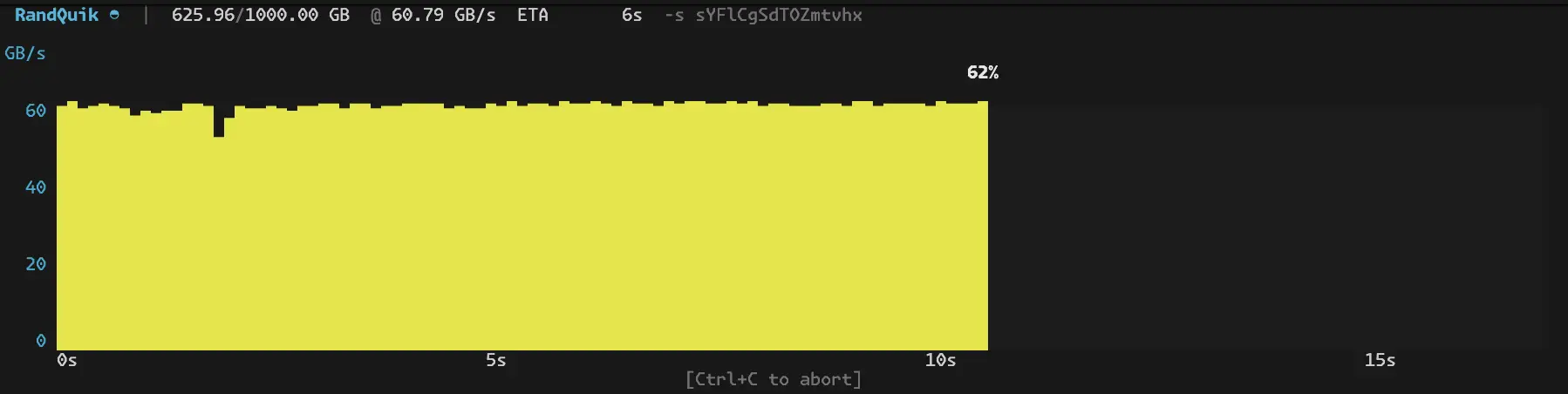
You'll be looking at up to 100 GB/s raw generation speed, making this some orders of magnitude faster than your traditional random number generation. Single-threaded performance still is 10-20 times faster than other options that don't have threading.
Your output, e.g. writing a file, will always be the bottle neck, not your random generator, but modern SSDs allow up to 10 GB/s write speeds already.
Size units
Many options such as --len, --seek accept human-readable units. The table uses conventional, capitalized forms (e.g. KiB, MB), but you may write them in lower case and with or without the trailing B (for example 1m or 5gi).
| SI unit | Binary unit | Meaning | Bytes factor |
|---|---|---|---|
| 100 | — | 100 bytes | 1 |
| 1kB | 1KiB | Kilobyte / kibibyte | 1_000 / 1_024 |
| 1MB | 1MiB | Megabyte / mebibyte | 1_000_000 / 1_048_576 |
| 1GB | 1GiB | Gigabyte / gibibyte | 1_000_000_000 / 1_073_741_824 |
| 1TB | 1TiB | Terabyte / tebibyte | 1_000_000_000_000 / 1_099_511_627_776 |
| 1PB | 1PiB | Petabyte / pebibyte | 1_000_... / 1_125_... |
| — | 1sect | Sectors of output device | 512 (typical), 4096 (rarely) |
Seeding for repeatable output
You can provide an explicit seed string, always providing the same output, which can be useful e.g. for memory/disk testing where the data needs to be read back and verified.
randquik -l 64MiB -s my-seed-string -o chunk.bin
If no seed is provided, a secure new random one is created and printed on console (unless hidden by -q).
Seekable random stream and output file
It is possible to seek to any byte position in the stream without delay.
--iseek: seek the input random stream--oseek: seek in the output file--seek: set both input and output to the same position
Example: resume as if 5 terabytes had already been written, and continue writing to out.dat. The seed from the prior invocation should be included:
randquik --seek 5T --len 1G -s a5Z8Ew1Hfc2VfEtY -o out.dat
Bytes prior to seek position are kept as they were while the file is expanded to fit all the data starting at five terabytes mark (using sparse allocation so it doesn't actually consume 5 terabytes).
Wipe a specific range of a disk or USB drive (using sector numbers e.g. from gdisk):
randquik -oseek 2048sect --len 100MiB -o /dev/sde
Benchmark and dry-run modes
Benchmark different modes and thread counts. Prints the options that perform the best on your system:
randquik --benchmark
To do a single run without actually writing anywhere, use --dry:
randquik --len 50GiB -t8 --dry
Legacy
The original implementation is preserved in the legacy git branch.
That version was once the fastest CSPRNG available, built around ChaCha20 with SIMD Assembly and C code written by me, making it faster than traditional algorithms without such optimizations and faster than the Linux kernel that also uses ChaCha20 to make random numbers. While historically significant, it has been greatly surpassed by the current AEGIS-based design in performance and features.
The legacy branch remains available for reference and benchmarking, but version 2 is the recommended implementation.
Release history Release notifications | RSS feed


Download files
Download the file for your platform. If you're not sure which to choose, learn more about installing packages.
Source Distribution
Built Distribution
Filter files by name, interpreter, ABI, and platform.
If you're not sure about the file name format, learn more about wheel file names.
Copy a direct link to the current filters
File details
Details for the file randquik-2.0.0.tar.gz.
File metadata
- Download URL: randquik-2.0.0.tar.gz
- Upload date:
- Size: 31.5 kB
- Tags: Source
- Uploaded using Trusted Publishing? No
- Uploaded via: uv/0.9.13 {"installer":{"name":"uv","version":"0.9.13"},"python":null,"implementation":{"name":null,"version":null},"distro":{"name":"macOS","version":null,"id":null,"libc":null},"system":{"name":null,"release":null},"cpu":null,"openssl_version":null,"setuptools_version":null,"rustc_version":null,"ci":null}
File hashes
| Algorithm | Hash digest | |
|---|---|---|
| SHA256 |
478707d4e3e4c21d716b16d82de8c0c721d85467231d4ae4180a622f06a60033
|
|
| MD5 |
03a41f3685f361d6400c7e2b6db4dffa
|
|
| BLAKE2b-256 |
9f41a9f6e942f474eb7dcb11fef79f9fde974ae9a5cbcdca45a224a3146c2a90
|
File details
Details for the file randquik-2.0.0-py3-none-any.whl.
File metadata
- Download URL: randquik-2.0.0-py3-none-any.whl
- Upload date:
- Size: 23.7 kB
- Tags: Python 3
- Uploaded using Trusted Publishing? No
- Uploaded via: uv/0.9.13 {"installer":{"name":"uv","version":"0.9.13"},"python":null,"implementation":{"name":null,"version":null},"distro":{"name":"macOS","version":null,"id":null,"libc":null},"system":{"name":null,"release":null},"cpu":null,"openssl_version":null,"setuptools_version":null,"rustc_version":null,"ci":null}
File hashes
| Algorithm | Hash digest | |
|---|---|---|
| SHA256 |
fc1c5cc1aadfd71f20dddd03f966b51722d2947601e4e2bc81ebb6189922c284
|
|
| MD5 |
07b64ba266b2fa3715c0ec8c2d31c289
|
|
| BLAKE2b-256 |
88b266fc868e324544f4eeebeee7fce83803f0f356e57fa4caeeb561ce354ed8
|






