
ranger



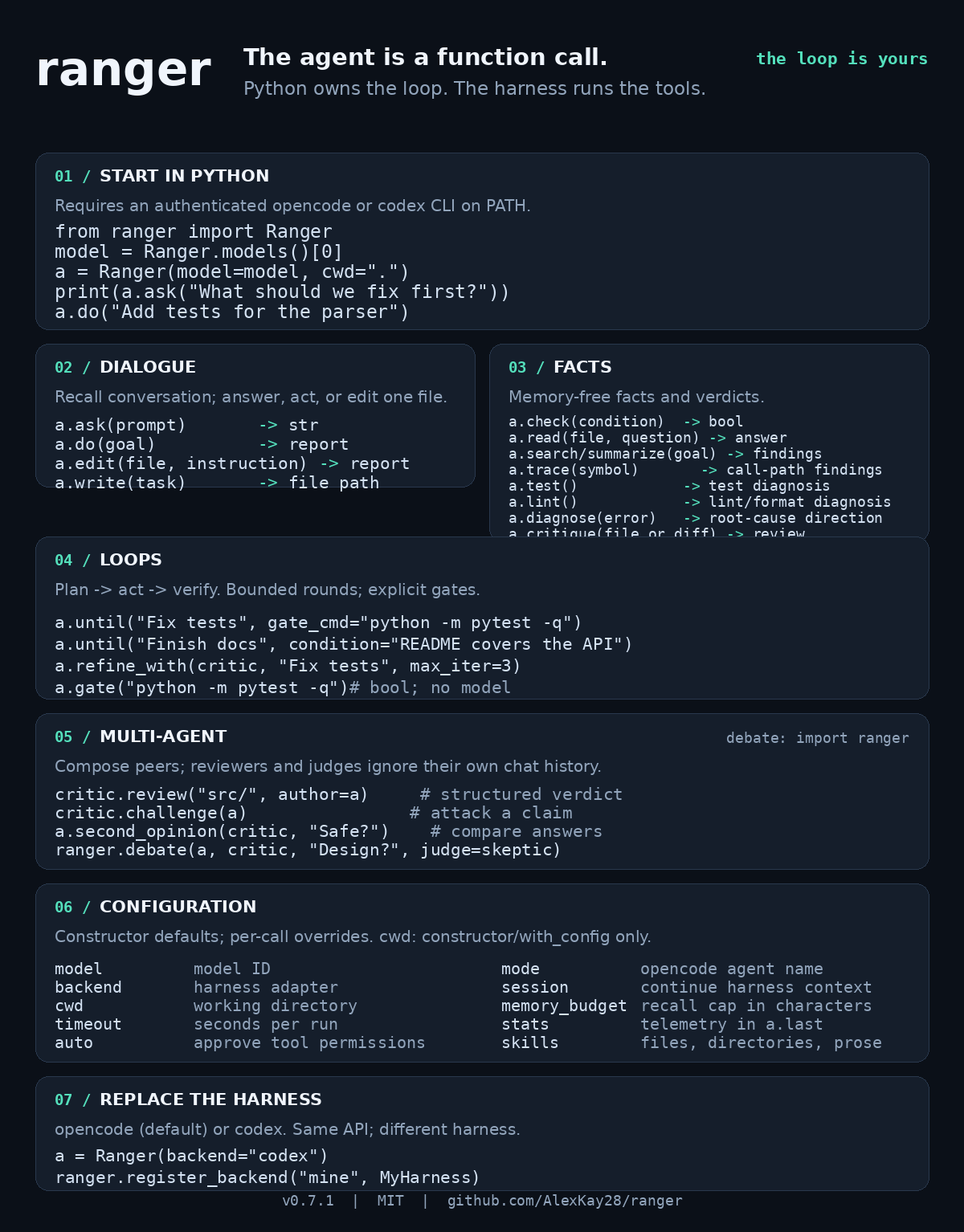
Agent-as-a-library. Run the opencode or codex coding agents headlessly from plain Python code — for agentic-loop prototyping. You write code, not chat.
The whole design follows one paradigm: the agent is a function call — Python owns the loop, the harness is just the data plane. Plan → act → check → repeat maps 1:1 onto expression, statement and condition. See docs/PARADIGM.md for the seven laws every feature is reviewed against.
AI coding agents: start with SKILL.md for the library's safe workflow, contracts, and repository contribution rules.
Install
pip install rangers
The distribution is named rangers on PyPI; the Python import remains
import ranger. For development from a clone: pip install -e .[dev].
Maintainers: see the publishing checklist before any
release.
Requires a harness CLI on PATH: opencode (default
backend) and/or codex. On a distro-pegged
pip (e.g. 22.x) an editable install can fail with "build backend is missing
the build_editable hook" — fix the tool, not the package:
pip install -U pip, then retry.
Quick start (no clone needed)
Straight from GitHub, then a one-line sanity check in your terminal:
pip install git+https://github.com/AlexKay28/ranger

python -c "import ranger; print(ranger.Ranger.models(match='claude'))"
The check needs no model or API budget — it just lists what your local opencode CLI offers. Got model ids back? You're ready:
import ranger
agent = ranger.Ranger(model="<one of the ids above>")
print(agent.ask("say ok"))
Runnable applications live in examples/: quickstart, model discovery, a full agentic loop, a self-hosted project-growth loop, plus three small day-to-day recipes — repair a red test command, independently review a local diff before merge, review one file, and draft release notes from git history. They are organized by use case in the examples index: getting started, code work, monitoring, multi-agent, backends, and no-model dummy runs.
Live progress: each command draws a morphing line on stderr while it runs
(⠹ search · TODO items in this repo · 00:03) and settles as
✓ search · 00:07 · <first line of answer> — opencode-wizard style, colors
included. It auto-disables in pipes/tests and honors NO_COLOR;
turn it off with pretty=False.
Model priority: explicit Ranger(model=...) → $RANGER_MODEL env var →
package default.
Usage
agent = ranger.Ranger(model="openrouter/anthropic/claude-sonnet-4.5")
agent.summarize("notes.md")          # -> str summary of the file
agent.write("a one-page report on X")  # -> path of the file the agent wrote
agent.do("rename all *.txt files in data/ to *.md")  # -> report of CLI-like work
agent.search("where do we parse config?")            # -> multiline findings report
agent.ask("anything at all")         # -> raw prompt, raw answer
agent.check("all tests pass")        # -> YES/NO verdict as a bool
agent.gate("python -m pytest -q")    # -> exit-code booleans, no model
agent.until("make the tests green", gate_cmd="python -m pytest -q")
                                    # -> loop: plan/do/verify until green
Each call is one fresh headless opencode run in the agent's working directory
(cwd=), with permissions auto-approved so it can actually touch the filesystem.
Pass session="..." to share context between calls, model= to pick any
provider/model ID from opencode models.
Model discovery & configuration
import ranger

ranger.Ranger.models()                      # -> all model IDs
ranger.Ranger.models(match="claude")           # -> substring filter

smart = ranger.Ranger(model="openrouter/anthropic/claude-sonnet-4.5")
fast  = smart.with_config(model="openrouter/google/gemini-2.5-flash", agent="build")
Every command method also accepts per-call overrides:
fast.search("todo items", title="quick scan")
smart.do("refactor auth", timeout=1800)
Overridable: model, timeout, auto, session, agent (opencode agent
name like "build"/"plan"), title, thinking. Unknown keywords raise
TypeError so typos fail loudly.
See docs/commands.md for the full command catalog — 15 methods at three maturity tiers: what's shipped, what's next, and what needs bigger machinery (gates, retries, safety rails) — docs/API.md for the complete, per-setting API reference (kept mechanically in sync with the code by the test suite), and docs/ARCHITECTURE.md for a high-level tour of the codebase and its three architectural decisions.
Context state (memory)
The agent remembers. Every command exchange is recorded to
agent.context in classic OpenAI message format
({"role": "user"|"assistant"|"system", "content": ...}) and recent
history (within a character budget) is recalled into later runs — so
follow-ups like "now do the same for tests/" just work.
agent.context         # the message list
agent.context_summarize()   # -> digest of what happened so far
agent.context_compact()     # collapse history to one system digest
agent.context_clear()       # wipe; returns what was cleared
agent.ask("...", memory=False)  # one stateless run
ranger.Ranger(memory=False)      # or a fully stateless agent
Context memory colors your dialogues, never your facts: ask/do/write
recall the recent conversation; check/search/summarize always run
history-independent, so a verdict is about the repo, not the chat
(PARADIGM.md, law 4).
Backends (harness adapters)
The same API drives different harnesses; the setting is one constructor argument, per-call overridable:
import ranger

agent = ranger.Ranger(model="openrouter/anthropic/claude-sonnet-4.5")  # opencode (default)
gpt   = ranger.Ranger(backend="codex")            # model from ~/.codex/config.toml
gpt   = ranger.Ranger(backend="codex", model="gpt-5.1-codex")
pi    = ranger.Ranger(backend="pi")              # minimal, token-frugal harness
oh    = ranger.Ranger(backend="openhands")       # autonomous headless runs

ranger.register_backend("mine", MyHarnessAdapter)  # your own — one small class
Harness differences (flags, sessions, sandboxes, output schemas) are absorbed by one adapter class per backend — see the Backends section of docs/API.md for the full capability map and the recipe for adding your own harness.
Multi-agent interactions
Two (or three) agents, and the expected patterns as ready-made methods — verdicts are grammar, budgets are honest, reviewers run free of their own chat history:
both    = builder.second_opinion(critic, prompt)    # {mine, theirs, differs}
verdict = critic.review(subject, author=builder)    # APPROVE/REJECT/REQUEST_CHANGES
outcome = builder.refine_with(critic, goal)          # the two-agent until()
duel    = critic.challenge(builder)                  # adversarial claim attack
talk    = ranger.debate(builder, critic, topic, judge=skeptic)
See the Multi-agent interactions section of docs/API.md
and examples/multiagent/multi_agent.py.
Skills allow-list
Grant the agent specific skills or operating rules per run — a markdown
file or directory rides along via opencode's --file attachment; plain
prose entries are injected as prompt grants.
agent = ranger.Ranger(skills=[
    "skills/haiku/SKILL.md",        # file -> --file attachment
    "skills/pack",                  # dir -> all its *.md attached
    'Always answer in British spelling',  # prose -> prompt grant
])
agent.do("write the changelog", skills=["docs/changelog_style.md"])  # per call
AGI loop, the point of the whole thing
agent = ranger.Ranger(model="openrouter/anthropic/claude-sonnet-4.5")

for i in range(10):
    hits = agent.search(f"TODO and unimplemented spots, pass {i}")
    plan = agent.ask(f"Pick ONE thing to fix from:\n{hits}\nReply with a one-line fix plan.")
    report = agent.do(plan)
    print(f"[pass {i}] {report}")
1 maintainer

Metadata
1 maintainer
Release files for rangers 0.7.1
For a detailed explanation of source distributions (sdists) and built distributions (wheels), please see the package formats documentation.
Source distribution (sdist)
| File | Size | Uploaded | Provenance | |
|---|---|---|---|---|
| rangers-0.7.1.tar.gz | 282.6 kB | Without provenance | Details |
Built distribution (wheel)
| File | Interpreter | ABI | Platform | Reset |
|---|---|---|---|---|
| rangers-0.7.1-py3-none-any.whl | Python 3 | none | any | Details |
Total release size: 313.5 kB
Release files / rangers-0.7.1.tar.gz
| Download URL | rangers-0.7.1.tar.gz |
|---|---|
| Size | 282.6 kB |
| Tags | Source |
|
SHA-256 checksum How to use checksums |
56201485bb0f255a6a80d99e3abd85077724fb89467cf479b7e70f9e6ee66887
|
|
BLAKE2b-256 checksum How to use checksums |
77005d19fb0f2897d6493a0e88bf528e039d6785b68f90d81712a195c1955a41
|
| Upload date | |
|
Uploaded using Trusted Publishing? What is trusted publishing? |
No |
| Uploaded via |
twine/7.0.0 CPython/3.10.12
|
Release files / rangers-0.7.1-py3-none-any.whl
| Download URL | rangers-0.7.1-py3-none-any.whl |
|---|---|
| Size | 31.0 kB |
| Tags | Python 3 |
|
SHA-256 checksum How to use checksums |
99e67ce0fff4d8d697dad403ac4178bb9aaa301e37417e8bd02600cab4914810
|
|
BLAKE2b-256 checksum How to use checksums |
e0b7a4fa203a360812a66126654f0d3e91ab2b17c272df2482ebb9770367173c
|
| Upload date | |
|
Uploaded using Trusted Publishing? What is trusted publishing? |
No |
| Uploaded via |
twine/7.0.0 CPython/3.10.12
|
Security for rangers 0.7.1
Provenance
Provenance describes where a file came from. On PyPI, provenance is shared via attestations, which provide a verifiable record of the build or publishing details. View details, limitations and caveats.
No provenance found
None of the files in this release were uploaded with provenance metadata.
A note on package security
PyPI is a repository for distributing packages, not a service for auditing them. While third-party security researchers and our staff do their best to detect and remove malicious packages, PyPI cannot guarantee the quality, security or suitability of any given package.
To learn more about protecting yourself from malicious actors, visit our package security documentation.














