
Visualize and evaluate rank evolution across retrieval steps - rankflow plots, retrieval metrics, and pipeline comparison for RAG.

Project description
RankFlow



Library for plotting multiple ranks evolved over processing steps - drawing a rankflow.
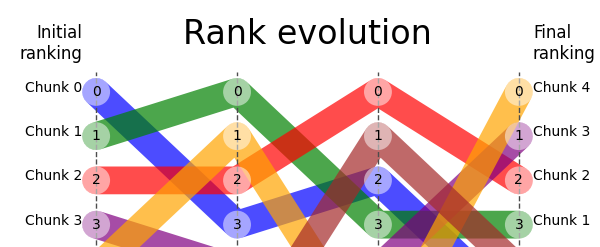
RankFlow is a Python package that allows you to create rank flow plots (bump charts), helping visualize the changes in ranking of nodes.
Initially it was applied to re-ranking visualization of nodes (parts of documents, document chunks) during the retrieval and re-ranking processes within a Retrieval Augmented Generation (RAG) retriever, but the usage is not limited to RAG.
⭐️ Please star the repository if you find it useful.
Installation
pip install rankflow
Usage
plot from pandas DataFrame
Start with creating pandas DataFrame with ranks for each document at each step.
import pandas as pd
import matplotlib.pyplot as plt
from rankflow import RankFlow

data = {"Doc 1": [2, 1, 3, 2], "Doc 2": [1, 2, 1, 3], "Doc 3": [3, 3, 2, 1]}
df = pd.DataFrame(data, index=["Step_1", "Step_2", "Step_3", "Step_4"])
This creates the following DataFrame:
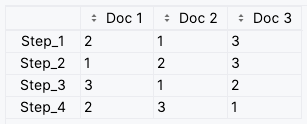
NOTE: The rows of the DataFrame are the steps and the columns are the documents. The values are the ranks of the documents at each step. Remember to define proper column names and index values since they will be used as labels in the plot.
When the DataFrame is ready, then it is time to create RankFlow object and call plot() method.
rf = RankFlow(df=df)
rf.plot()

# save the plot to png
plt.savefig("rankflow.png")

plt.show()
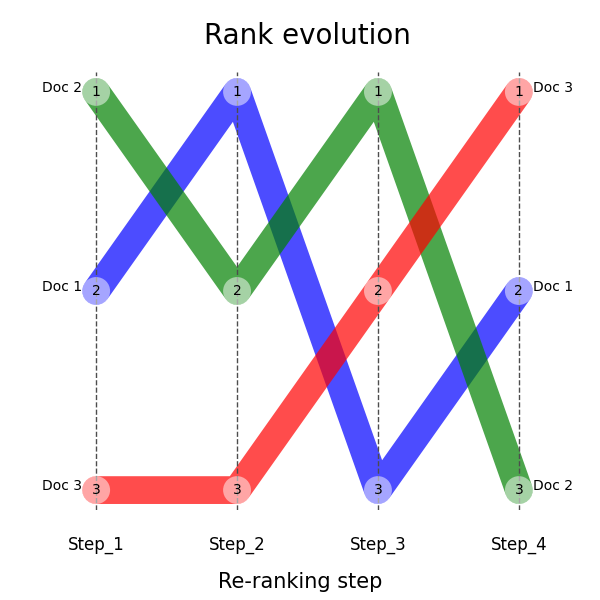
Here is the expected output:
plot from numpy array
You can also create RankFlow object without using pandas DataFrame. You can pass numpy array with ranks for each document at each step and provide labels for steps and documents.
import matplotlib.pyplot as plt
from rankflow import RankFlow
import numpy as np

my_step_labels: list[str] = [
    "Hybrid Search",
    "Cross-encoder",
    "Graph-reranker",
    "Booster",
]
my_chunk_labels: list[str] = [
    "Doc 0",
    "Doc 1",
    "Doc 2",
    "Doc 3",
    "Doc 4",
    "Doc 5",
    "Doc 6",
    "Doc 7",
    "Doc 8",
    "Doc 9",
]
my_ranks = np.array(
    [
        [0, 1, 2, 3, 4, 5, 6, 7, 8, 9],
        [3, 0, 2, 4, 1, 6, 7, 9, 5, 8],
        [2, 3, 0, 4, 6, 1, 7, 8, 5, 9],
        [5, 3, 2, 1, 0, 4, 6, 7, 8, 9],
    ]
)

rf = RankFlow(
    ranks=my_ranks,
    step_labels=my_step_labels,
    chunk_labels=my_chunk_labels,
    fig_size=(6, 6),
    title_font_size=24,
)
_ = rf.plot()
plt.show()
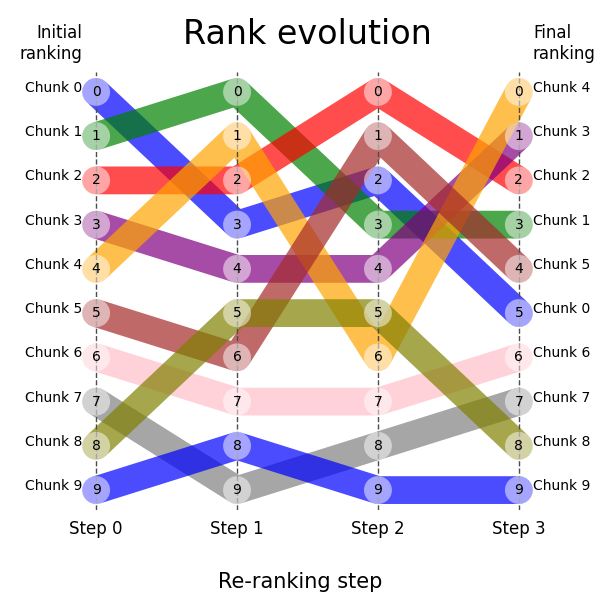
This should produce the following plot:
Further reading
There is and blog article describing usage of this package in RAG retriever: RankFlow plot for retriever visual evaluation that might be helpful if you are wondering how to efficienty track rank changes in your retriever and finally visualize them.
License


Download files
Download the file for your platform. If you're not sure which to choose, learn more about installing packages.
Source Distribution
Built Distribution
Filter files by name, interpreter, ABI, and platform.
If you're not sure about the file name format, learn more about wheel file names.
Copy a direct link to the current filters
File details
Details for the file rankflow-0.2.0.tar.gz.
File metadata
- Download URL: rankflow-0.2.0.tar.gz
- Upload date:
- Size: 34.9 kB
- Tags: Source
- Uploaded using Trusted Publishing? No
- Uploaded via: twine/6.2.0 CPython/3.13.5
File hashes
| Algorithm | Hash digest | |
|---|---|---|
| SHA256 |
1d393de66933f5e6ae25deb65667fc885963b1b3a9ea65b699a78f64888d0320
|
|
| MD5 |
afb4f72deb23876ecd68931edfd2bf4b
|
|
| BLAKE2b-256 |
358e6e6ca44060ccb997d1318136555a5821fb0e8f873575948897257e1fb0d9
|
File details
Details for the file rankflow-0.2.0-py3-none-any.whl.
File metadata
- Download URL: rankflow-0.2.0-py3-none-any.whl
- Upload date:
- Size: 35.0 kB
- Tags: Python 3
- Uploaded using Trusted Publishing? No
- Uploaded via: twine/6.2.0 CPython/3.13.5
File hashes
| Algorithm | Hash digest | |
|---|---|---|
| SHA256 |
4f590b6c897e48b67a64f238014b7ec5fe84be0bb7c40a7229e413e9ea7db0e0
|
|
| MD5 |
8c3e743b5aadc428a5bf7b2bd45537c3
|
|
| BLAKE2b-256 |
97a69c912dc5e45fa8ae3ae18c708315adf755001d13841f087fd408ed9f3f14
|






