
rapiDU
A much faster du that tells you why your quota is full.




Install
pip install rapidu
Use
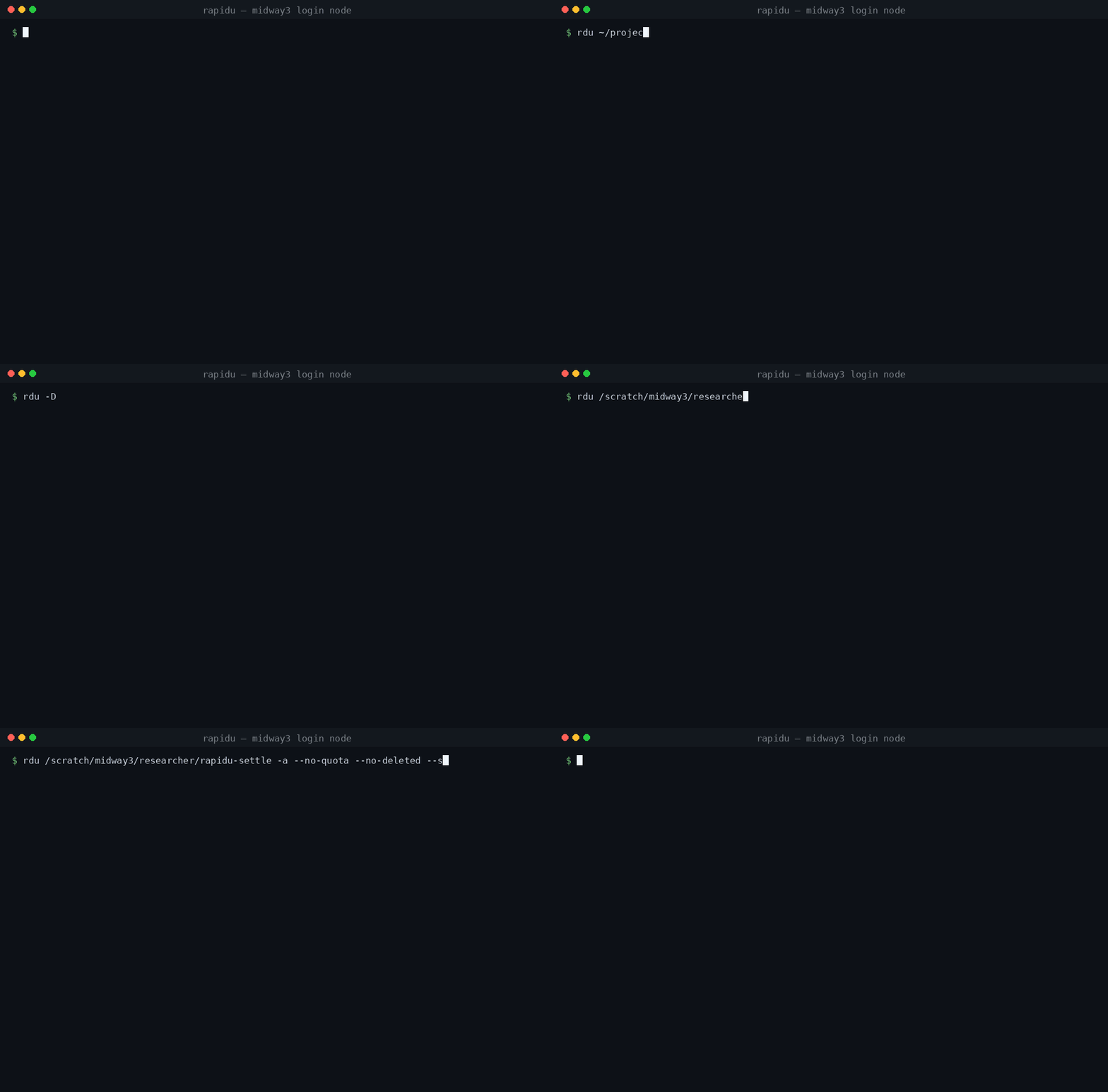
rdu                      # this directory: how big, and what is big inside it
rdu /project/mylab       # any other path
rdu ~/scratch -n 20      # list 20 entries instead of 10

rdu -i                   # rank by inode count -- what an inode quota limits
rdu -c                   # count files only, no stat: ~8x again on GPFS
rdu -Q                   # the quota table, and the age of its figures
rdu -D                   # space held by files deleted while still open
rdu -a                   # the full audit: quota + /proc scan + reconciliation
Faster, and the same number
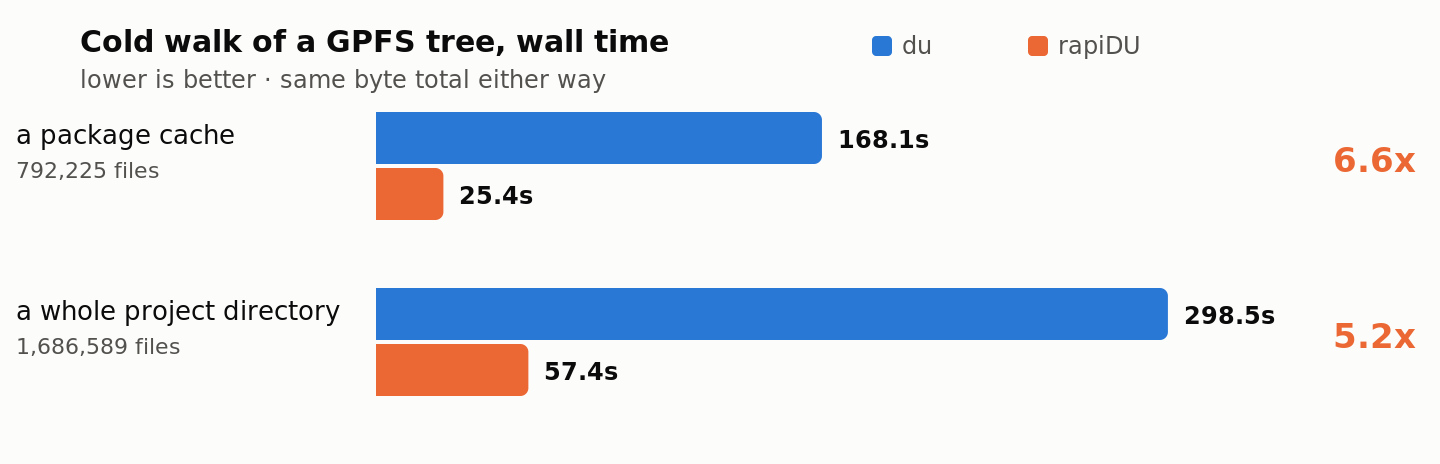
Same total as du, to the byte. That is checked on every commit.
One deliberate difference, and only when you name more than one path. du -s a b
dedupes inodes across its arguments, so a hard link already counted under a is
missing from b — and the two figures swap when you swap the arguments: the same
directory reads 23 after a and 100023 before it. Each rdu report is
self-contained instead. Every path gets its own true total, in whatever order you
name them.
Reading the table
╭───────────────────────────────────────────────────────────────────────────────────╮
│ /project/lab/shared                                                               │
│ 1.4 TiB  ·  5,434 inodes  ·  4.12s                                                │
│                                                                                   │
│   ─────────────────────────────────────────────────────────────────────────────── │
│         size  share                          inodes  entry                        │
│    661.5 GiB  ████████░░░░░░░░░░   44.8%        350  checkpoints/                 │
│    343.8 GiB  ████▏░░░░░░░░░░░░░   23.3%        968  datasets/                    │
│    470.9 GiB  ▒▒▒▒▒▒░░░░░░░░░░░░   31.9%      4,116  (84 more — use -n 0 for all) │
╰───────────────────────────────────────────────────────────────────────────────────╯
The frame carries no title and it always closes: a line too wide for it wraps
inside, at a path separator, rather than running past the border, and the
continuation is indented so it reads as one. Its colour is a
gradient sweeping from the top-left corner, and it degrades — 24-bit if your
terminal advertises COLORTERM=truecolor, a 12-step ramp at 256 colours, and
two bright cyan-to-blue tones at 8. --ascii turns it into +--+; --no-box removes it,
which is what you want when piping into grep or a diff.
The path leads, because it is what the report is about; the size is the first of
the three numbers describing it. share labels the bar and the percentage beside
it, which are one measurement in two forms -- the picture and the number. The last
column is entry, not path, because it holds plain files as well as directories
and what is printed is a name relative to the root.
The hatched last row is everything not listed, and it names how many that is --
so a truncated table always says it is truncated. The bar is share of the whole
walk, so it always agrees with the number beside it.
The count column is headed inodes, not files: it counts directories too,
which is what an inode quota charges for. files in this tool means every
non-directory entry — regular files, symlinks, and the sockets and fifos a live
home directory collects — which is the population BY AGE buckets, and one word
naming two quantities is the confusion this heading used to cause. -a splits
that population into terms that sum to the total, so each one is checkable
against the find -type that measures it.
The column you sorted by is the one in colour — under -i, inodes takes the tone
and size steps back. Sizes are cumulative, so any row agrees with du -s on
that path.
What changes with the filesystem
Three things the tool reports are properties of the storage, not of the tool, and they differ enough between clusters to be worth naming. All three are measured, on GPFS, on xfs, and on an NFS export of OneFS.
Deleted-but-open space looks different on NFS. Everywhere else, unlinking an
open file removes the directory entry at once and the blocks stay charged with no
name attached — that invisible space is what -D exists to find. NFS instead
renames the entry to .nfsXXXX and removes it when the last descriptor closes,
so nothing is ever unlinked: du can see the space, under a name that explains
nothing. -D reports both forms, and says which it found, because the remedy
differs — a .nfsXXXX entry goes away on its own and deleting it by hand frees
nothing sooner.
Allocated above apparent is not always padding. On a filesystem with a fixed
allocation unit, a tree charged more than it holds is paying for partly filled
units, and packing the files returns the difference. Where the overhead is
charged per byte stored — replication, erasure coding, per-block checksums — it
is not, and packing returns none of it. rapiDU tells them apart from its own
figures: padding above padded_files × (unit − 1) cannot be a partly filled
unit, so it is reported as what it is instead of carrying advice that cannot
work.
A quota backend may be absent rather than broken. quota exits 1 with no
output on one of these clusters and prints Disk quotas for user ...: none on
another; mmlsquota is installed on a third whose GPFS client is not running.
None of those is a parse failure, and none of them is "you have no quota" — the
panel names the backend, what it said, and falls back to statvfs with the
caveat that statvfs cannot tell a per-user export limit from the whole
filesystem.
1 maintainer

Release files for rapiDU 0.6.0
For a detailed explanation of source distributions (sdists) and built distributions (wheels), please see the package formats documentation.
Source distribution (sdist)
| File | Size | Uploaded | |
|---|---|---|---|
| rapidu-0.6.0.tar.gz | 545.9 kB | Details |
Built distribution (wheel)
| File | Interpreter | ABI | Platform | Reset |
|---|---|---|---|---|
| rapidu-0.6.0-py3-none-any.whl | Python 3 | none | any | Details |
Total release size: 757.2 kB
Release files / rapidu-0.6.0.tar.gz
| Download URL | rapidu-0.6.0.tar.gz |
|---|---|
| Size | 545.9 kB |
| Tags | Source |
|
SHA-256 checksum How to use checksums |
5e8a32fb573372973841ccc662aef8a300cc587b904d1b57783b7d2751ac47f5
|
|
BLAKE2b-256 checksum How to use checksums |
24c36806f397fdd0910ab60d95913d1ec5ca83bfb3827339ab0f037dbdda0131
|
| Upload date | |
|
Uploaded using Trusted Publishing? What is trusted publishing? |
Yes |
| Uploaded via |
twine/7.0.0 CPython/3.13.14
|
Provenance
Provenance describes where a file came from. On PyPI, provenance is shared via attestations, which provide a verifiable record of the build or publishing details. View details, limitations and caveats.


PyPI Publish Attestation
PyPI verified that this artifact, at this checksum, originated from the publisher listed below.
Signed by GitHub Actions, verified by PyPI on Sep 10, 2026.
Transparency logRelease files / rapidu-0.6.0-py3-none-any.whl
| Download URL | rapidu-0.6.0-py3-none-any.whl |
|---|---|
| Size | 211.2 kB |
| Tags | Python 3 |
|
SHA-256 checksum How to use checksums |
e6480caf60ae0741a609db5dea3de04f75a813277e30d6d3d14c74251eb68aa8
|
|
BLAKE2b-256 checksum How to use checksums |
2fc8a6b5650075c059479dfabb819f45d36e7427a71494e6db4ffa72d5d5f9df
|
| Upload date | |
|
Uploaded using Trusted Publishing? What is trusted publishing? |
Yes |
| Uploaded via |
twine/7.0.0 CPython/3.13.14
|
Provenance
Provenance describes where a file came from. On PyPI, provenance is shared via attestations, which provide a verifiable record of the build or publishing details. View details, limitations and caveats.
PyPI Publish Attestation
PyPI verified that this artifact, at this checksum, originated from the publisher listed below.
Signed by GitHub Actions, verified by PyPI on Sep 10, 2026.
Transparency log













