
RapidDoc - 高速文档解析系统
😺 项目介绍
RapidDoc 是一个轻量级、专注于文档解析的开源框架,支持 OCR、版面分析、公式识别、表格识别和阅读顺序恢复 等多种功能,支持将复杂 PDF 文档转换为 Markdown、JSON、WORD、HTML 格式。
支持docx/doc、pptx/ppt、xlsx/xls的原生解析(不使用模型)。
框架基于 Mineru 二次开发,移除 VLM,专注于 Pipeline 产线下的高效文档解析,在 CPU 上也能保持不错的解析速度。
本项目所使用的默认模型主要来源于 PaddleOCR 的 PP-StructureV3 系列(OCR、版面分析、公式识别、阅读顺序恢复,以及部分表格识别模型),并已全部转换为 ONNX 格式,支持在 CPU/GPU 上高效推理。
同时支持自定义OCR、公式、表格模型,需实现 CustomBaseModel 的 batch_predict 方法,目前内置 PaddleOCRVL 系列模型的集成。
KittyDoc 已经成为 RapidAI 开源家族成员
✨如果该项目对您有帮助,您的star是我不断优化的动力!!!
👏 项目特点
-
OCR 识别
- 使用 RapidOCR 支持多种推理引擎
- CPU/CUDA 下默认使用 ONNX Runtime:CPU 安装
rapid-doc[cpu],CUDA GPU 安装rapid-doc[gpu]
-
版面识别
- 模型使用
PP-DocLayout系列 ONNX 模型(v2、plus-L、L、M、S)- PP-DocLayoutV3:自带阅读顺序,支持异形框,默认使用
- PP-DocLayoutV2:自带阅读顺序
- PP-DocLayout_plus-L:效果好运行稳定
- PP-DocLayout-L:速度快,效果也不错
- PP-DocLayout-S:速度极快,存在部分漏检
- 模型使用
-
公式识别
- 使用
PP-FormulaNet_plus系列 ONNX 模型(L、M、S)- PP-FormulaNet_plus-L:速度慢,支持onnx
- PP-FormulaNet_plus-M:默认使用,支持onnx和torch
- PP-FormulaNet_plus-S:速度最快,支持onnx,复杂公式精度不够
- 支持配置只识别行间公式
- CPU/CUDA 下默认使用 ONNX Runtime;GPU 路径已接入内置 CUDA 算子库,详见 算子库说明
- 显式选择 Torch 引擎时,需自行安装对应的 Torch 依赖
- 使用
-
表格识别
- 基于 rapid_table_self 增强,在原有基础上增强为多模型串联方案:
- 表格分类(区分有线/无线表格)
- 有线表格识别UNET + SLANET_plus/UNITABLE(作为无线表格识别)
- 基于 rapid_table_self 增强,在原有基础上增强为多模型串联方案:
内置的 DocVortex 原生 PDF 解析
非扫描 PDF 可使用内置 DocVortex 核心的规则版面识别和原生表格结构恢复,六种 Office 格式直接原生解析,无需 LibreOffice 转换。核心采用 Python 后端,已移除 fasttext 依赖。
按运行环境安装一种 Runtime:
pip install "rapid-doc[cpu]"
# CUDA 环境选择:pip install "rapid-doc[gpu]"
源码来源、变更和验收记录见 迁移记录。
from rapid_doc import RapidDoc

parser = RapidDoc(
    layout_config={
        "model_type": "pp_doclayoutv2",  # 扫描页和原生解析失败时的兜底模型
        "docvortex_mode": "rule",  # 电子版快速模式
        # "docvortex_mode": "rule_plus_s",  # PP-DocLayout-S 补公式、公式编号和印章
    },
    table_config={"rule_table_engine": "docvortex"},
)
result = parser("document.pdf")
docvortex_mode 默认为 off,此时直接使用 model_type。rule 优先用 DocVortex 解析电子版 PDF;rule_plus_s 额外用 PP-DocLayout-S 定位公式、公式编号和印章。配置 PP 版面模型作为 model_type 时,扫描页或 DocVortex 异常页逐页回退到该模型。只配置 model_type="docvortex_rule" 时保留原始 DocVortex 结果,不执行 PP 版面兜底,便于对比效果;没有原生版面结果的页面会为空。若同时设置 docvortex_mode="rule_plus_s",仍会运行 PP-DocLayout-S 补充识别。表格优先使用 DocVortex 已生成的 HTML,或按表格区域恢复原生结构;未命中时使用现有表格模型。
-
阅读顺序恢复
- PP-DocLayoutV2和PP-DocLayoutV3使用版面模型自带的阅读顺序
- 其余版面模型,使用 PP-StructureV3 阅读顺序恢复算法,基于xycut算法和版面的结果
-
推理方式
- 默认 Pipeline 模型(OCR、版面、公式、表格)使用 ONNX Runtime,CPU/CUDA 按安装的 Runtime 和设备配置运行
- OCR、公式等模块可显式配置其支持的其他引擎;原生 Office 和 DocVortex 规则解析不使用模型推理
基准测试结果
1. OmniDocBench
以下是RapidDoc在 OmniDocBench v1.6 上的评估结果。
Pipeline 模型使用 PP-DocLayoutV3、PP-OCRv6-small、PP-FormulaNet_plus-M、UNET_SLANET_PLUS。
| Model Type | Methods | Size | Overall↑ | TextEdit↓ | FormulaCDM↑ | TableTEDS↑ | TableTEDS-S↑ | Read OrderEdit↓ |
|---|---|---|---|---|---|---|---|---|
| MinerU2.5-Pro | Specialized VLMs | 1.2B | 95.75 | 0.036 | 97.45 | 93.42 | 95.92 | 0.120 |
| GLM-OCR | Specialized VLMs | 0.9B | 95.22 | 0.044 | 97.18 | 92.83 | 95.39 | 0.133 |
| PaddleOCR-VL-1.5 | Specialized VLMs | 0.9B | 94.93 | 0.038 | 96.89 | 91.67 | 94.37 | 0.130 |
| PaddleOCR-VL | Specialized VLMs | 0.9B | 94.18 | 0.040 | 95.91 | 90.65 | 93.74 | 0.135 |
| Youtu-Parsing | Specialized VLMs | 2.5B | 93.74 | 0.044 | 93.63 | 92.02 | 95.00 | 0.116 |
| Qianfan-OCR | Specialized VLMs | 4B | 93.90 | 0.04 | 95.08 | 90.53 | 93.31 | 0.13 |
| Ovis2.6-30B-A3B | General VLMs | 30B | 93.70 | 0.035 | 95.17 | 89.44 | 92.40 | 0.135 |
| Logics-Parsing-v2 | Specialized VLMs | 4B | 93.33 | 0.041 | 95.65 | 88.42 | 91.98 | 0.137 |
| ABot-OCR | Specialized VLMs | 2B | 93.30 | 0.037 | 94.86 | 88.69 | 91.87 | 0.137 |
| FireRed-OCR | Specialized VLMs | 2B | 93.26 | 0.037 | 95.44 | 88.04 | 91.06 | 0.131 |
| MinerU-2.5 | Specialized VLMs | 1.2B | 93.04 | 0.045 | 95.77 | 87.88 | 91.47 | 0.130 |
| Gemini 3 Pro | General VLMs | - | 92.91 | 0.064 | 95.99 | 89.15 | 92.96 | 0.165 |
| Gemini 3 Flash | General VLMs | - | 92.62 | 0.066 | 95.16 | 89.29 | 93.51 | 0.172 |
| dots.ocr | Specialized VLMs | 3B | 90.77 | 0.048 | 89.95 | 87.18 | 90.58 | 0.138 |
| OpenDoc-0.1B | Specialized VLMs | 0.1B | 90.67 | 0.049 | 93.02 | 83.88 | 87.45 | 0.140 |
| DeepSeek-OCR 2 | Specialized VLMs | 3B | 90.25 | 0.050 | 91.84 | 83.89 | 87.75 | 0.144 |
| RapidDoc | Pipeline Tools | - | 90.479 | 0.047 | 94.342 | 81.797 | 88.433 | 0.135 |
| HunyuanOCR | Specialized VLMs | 1B | 89.95 | 0.088 | 87.68 | 91.01 | 93.23 | 0.171 |
| Qwen3-VL-235B | General VLMs | 235B | 89.78 | 0.063 | 92.55 | 83.07 | 86.75 | 0.166 |
| Dolphin-v2 | Specialized VLMs | 3B | 89.50 | 0.069 | 91.01 | 84.40 | 87.44 | 0.150 |
| OCRVerse | Specialized VLMs | 4B | 88.60 | 0.063 | 89.61 | 82.44 | 86.27 | 0.163 |
| MonkeyOCR-pro-3B | Specialized VLMs | 3B | 88.57 | 0.074 | 88.74 | 84.35 | 88.62 | 0.189 |
| GPT-5.2 | General VLMs | - | 86.59 | 0.114 | 88.21 | 82.95 | 87.93 | 0.193 |
| Dolphin-1.5 | Specialized VLMs | 0.3B | 86.52 | 0.094 | 87.49 | 81.43 | 84.82 | 0.167 |
| MinerU-Pipeline | Pipeline Tools | - | 86.47 | 0.055 | 83.07 | 81.88 | 88.68 | 0.153 |
| olmOCR | Specialized VLMs | 7B | 85.74 | 0.139 | 88.10 | 83.00 | 87.17 | 0.216 |
| Mistral OCR | Specialized VLMs | - | 85.66 | 0.097 | 89.91 | 76.78 | 80.93 | 0.171 |
| Kimi K2.5 | General VLMs | 1T | 84.53 | 0.107 | 83.50 | 80.76 | 84.00 | 0.211 |
| InternVL3.5-241B | General VLMs | 241B | 83.76 | 0.130 | 89.95 | 74.35 | 79.78 | 0.215 |
| Nanonets-OCR-s | Specialized VLMs | 3B | 83.61 | 0.108 | 81.46 | 80.18 | 84.51 | 0.213 |
| POINTS-Reader | Specialized VLMs | 3B | 83.37 | 0.096 | 85.72 | 73.98 | 77.40 | 0.198 |
| Marker | Pipeline Tools | - | 78.44 | 0.157 | 85.24 | 65.77 | 73.24 | 0.243 |
🛠️ 安装RapidDoc
使用pip安装
# CPU 环境
pip install "rapid-doc[cpu]" -i https://mirrors.aliyun.com/pypi/simple
# 或 CUDA GPU 环境
pip install "rapid-doc[gpu]" -i https://mirrors.aliyun.com/pypi/simple
CPU extra 安装 onnxruntime,GPU extra 安装 onnxruntime-gpu,用于默认模型的推理,包括 OCR 和公式模型。按运行环境选择一种;GPU extra 不会额外安装 CPU 版 Runtime,也不默认安装 Torch。两个 Runtime 发行包使用同一个 onnxruntime 导入名,不要同时安装。
通过源码安装
# 克隆仓库
git clone https://github.com/RapidAI/RapidDoc.git
cd RapidDoc

# 安装依赖
pip install -e ".[cpu]" -i https://mirrors.aliyun.com/pypi/simple
# 或 CUDA GPU 环境
pip install -e ".[gpu]" -i https://mirrors.aliyun.com/pypi/simple
使用gpu推理
rapid-doc[gpu] 按项目依赖约束安装 onnxruntime-gpu(当前为 <=1.23.0)。CUDA/cuDNN 需满足 CUDA Execution Provider 要求。默认 OCR 和公式模型使用 ONNX Runtime,无需切换到 Torch。
OCR 默认启用 onnx_ops,公式 ONNX 路径也已接入内置算子库,用于 CUDA 算子支持与优化。原生库及其 CUDA/cuDNN 要求、构建方法和平台验证范围见 算子库说明。这些原生库与 onnxruntime-gpu 是不同组件,安装 Runtime 不代表原生库及其系统依赖都已就绪。
# 在 Python 中指定 GPU(必须在导入 rapid_doc 之前设置)
import os
# 使用默认 GPU(cuda:0)
os.environ['MINERU_DEVICE_MODE'] = "cuda"
# 或指定 GPU 编号,例如使用第二块 GPU(cuda:1)
os.environ['MINERU_DEVICE_MODE'] = "cuda:1"
使用PaddleOCRVL系列推理
vl模型的部署,参考官方文档
import os
os.environ['PADDLEOCRVL_VERSION'] = "v1.6"
os.environ['PADDLEOCRVL_VL_REC_BACKEND'] = "vllm-server"
os.environ['PADDLEOCRVL_VL_VL_REC_SERVER_URL'] = "http://localhost:8118/v1"

from rapid_doc.model.layout.rapid_layout_self import ModelType as LayoutModelType
from rapid_doc.model.custom.paddleocr_vl.paddleocr_vl import PaddleOCRVLTableModel, PaddleOCRVLOCRModel, PaddleOCRVLFormulaModel
layout_config = {
    "model_type": LayoutModelType.PP_DOCLAYOUTV3,
}
ocr_config = {
    "custom_model": PaddleOCRVLOCRModel()
}
formula_config = {
    "custom_model": PaddleOCRVLFormulaModel()
}
table_config = {
    "custom_model": PaddleOCRVLTableModel()
}
使用docker部署RapidDoc
RapidDoc提供了便捷的docker部署方式,这有助于快速搭建环境并解决一些棘手的环境兼容问题。
您可以在文档中获取 Docker部署说明,镜像已推送至 Docker Hub。
📋 使用
import os
from pathlib import Path
from rapid_doc import RapidDoc
__dir__ = Path(__file__).resolve().parent.parent
output_dir = os.path.join(__dir__, "output")

doc_path_list = [
    __dir__ / "demo/pdfs/示例1-论文模板.pdf",
    __dir__ / "demo/docx/test.docx",
]
engine = RapidDoc()
outputs = engine(doc_path_list, output_dir=output_dir)
for output in outputs:
    print(output.markdown)
在线体验
基于Gradio的在线demo
基于gradio开发的webui,界面简洁,仅包含核心解析功能,免登录

📋 使用示例
模型下载
不指定模型路径,初次运行时,会自动下载
📌 TODO
- 跨页表格合并
- 复选框识别,使用opencv(默认关闭、opencv识别存在误检)
- 提供 fastapi,支持cpu和gpu版本的docker镜像构建
- 文本型pdf,表格非OCR文本提取
- 文本型pdf,使用pypdfium2提取文本框bbox
- 文本型pdf,支持0/90/270度三个方向的表格解析
- 文本型pdf,使用pypdfium2提取原始图片(默认截图会导致清晰度降低和图片边界可能丢失部分)
- 表格内公式提取,表格内图片提取
- 优化阅读顺序,支持多栏、竖排等复杂版面恢复
- OCR 和公式默认使用 ONNX Runtime,支持 CUDA GPU 推理;公式仍可显式选择 Torch
- 版面、表格模型支持openvino
- markdown转docx、html
- 支持 PP-DocLayoutV2 版面识别+阅读顺序
- OmniDocBench评测
- 支持自定义的ocr、table、公式。支持PaddleOCR-VL系列
- 支持docx/doc、pptx/ppt、xlsx/xls的原生解析(不使用模型)
- 支持印章文本检测
- 文档方向90°、270°矫正(默认关闭),表格方向90°、270°矫正(默认开启)
🙏 致谢
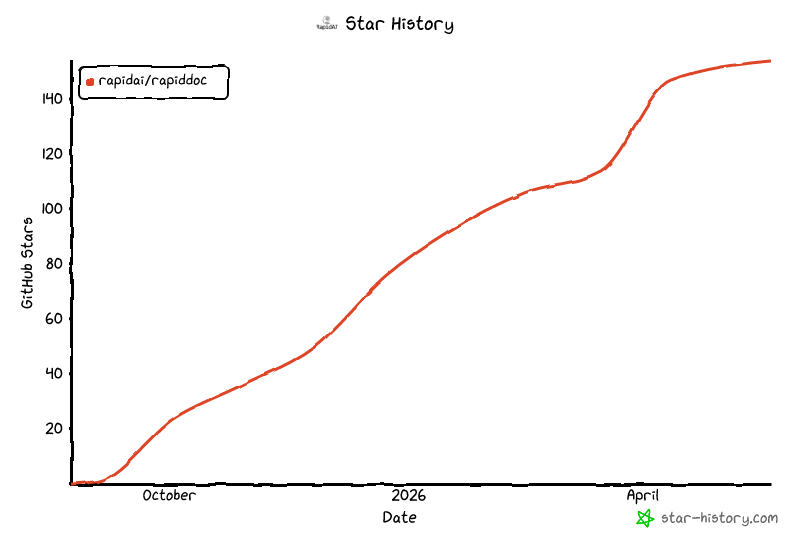
Star History
⚖️ 开源许可
该项目采用 Apache 2.0 license 开源许可证。
Metadata
Release files for rapid-doc 0.9.11
For a detailed explanation of source distributions (sdists) and built distributions (wheels), please see the package formats documentation.
Built distributions (wheels)
| File | Interpreter | ABI | Platform | Actions Reset |
|---|---|---|---|---|
| rapid_doc-0.9.11-py3-none-win_amd64.whl | Python 3 | none | Windows x86-64 | Details for rapid_doc-0.9.11-py3-none-win_amd64.whl |
| rapid_doc-0.9.11-py3-none-manylinux_2_34_x86_64.whl | Python 3 | none | Linux glibc 2.34+ x86-64 | Details for rapid_doc-0.9.11-py3-none-manylinux_2_34_x86_64.whl |
Total release size: 152.1 MB
Release files / rapid_doc-0.9.11-py3-none-win_amd64.whl
| Download URL | rapid_doc-0.9.11-py3-none-win_amd64.whl |
|---|---|
| Size | 76.0 MB |
| Tags | Python 3 Windows x86-64 |
|
SHA-256 checksum How to use checksums |
228b156d2a16cc94064c21ba6d6eb532150169b33d80349a64663e714b541dc1
|
|
BLAKE2b-256 checksum How to use checksums |
95e4c9a864bed64649bb71315cbf9a814e923acfabfa8509871cfdb355704e72
|
| Upload date | |
|
Uploaded using Trusted Publishing? What is trusted publishing? |
No |
| Uploaded via |
twine/7.0.0 CPython/3.13.14
|
Release files / rapid_doc-0.9.11-py3-none-manylinux_2_34_x86_64.whl
| Download URL | rapid_doc-0.9.11-py3-none-manylinux_2_34_x86_64.whl |
|---|---|
| Size | 76.1 MB |
| Tags | Linux glibc 2.34+ x86-64 Python 3 |
|
SHA-256 checksum How to use checksums |
7bfa7427b2b8ccc233c8fb919834d5441fcb006b928c948140829ffead17b398
|
|
BLAKE2b-256 checksum How to use checksums |
af67b4cfcd11649c1034b5532eb2db8945d322daead59f7d902af47d50aca196
|
| Upload date | |
|
Uploaded using Trusted Publishing? What is trusted publishing? |
No |
| Uploaded via |
twine/7.0.0 CPython/3.13.14
|
Security for rapid-doc 0.9.11
Provenance
Provenance describes where a file came from. On PyPI, provenance is shared via attestations, which provide a verifiable record of the build or publishing details. View details, limitations and caveats.
No provenance found
None of the files in this release were uploaded with provenance metadata.
A note on package security
PyPI is a repository for distributing packages, not a service for auditing them. While third-party security researchers and our staff do their best to detect and remove malicious packages, PyPI cannot guarantee the quality, security or suitability of any given package.
To learn more about protecting yourself from malicious actors, visit our package security documentation.














