
This release is a pre-release and may not be stable for production use.

eagle
Runs kernels on CPU and GPU, with precise control. Part of the RAPTOR family.
eagle: run a million per-sample kernels on the GPU or the CPU
Each sample stops when it is done. eagle records the loop on the GPU once, replays it, and skips the samples that already finished.








eagle is the execution layer of the RAPTOR family: it captures and replays kernels as CUDA graphs to keep work efficient on the GPU, and connects them to the code you already have. See where RAPTOR fits for the full four-part story.
Linux x86_64 wheels (Python 3.9-3.14). On macOS or Windows, open the notebook on Colab or Kaggle (the Kaggle badge above).
pip install raptor-eagle raptor-hawk                           # CPU threads, no NVIDIA packages
pip install "raptor-eagle[cuda12]" "raptor-hawk[cuda12]"       # NVIDIA GPU ([cuda13] for a CUDA 13 driver)
import cupy as cp

import eagle
import hawk
from hawk import Mutable, Param, Scalar, Terminated


@hawk.kernel
def oscillator(omega: Scalar, t_end: Param, dt: Param, terminated: Terminated,
               x: Mutable[Scalar], v: Mutable[Scalar], t: Mutable[Scalar]):
    x0, v0 = x, v
    x = x0 + dt * v0
    v = v0 - dt * omega * omega * x0
    t += dt
    terminated = t >= t_end


n = 1_000_000
result = eagle.simulate(
    oscillator,
    omega=cp.linspace(1.0, 3.0, n), t_end=1.0, dt=1e-3,
    x=cp.ones(n), v=cp.zeros(n), t=cp.zeros(n),
    max_steps=10_000,
)
print(result.status, result.steps, result.x[:3])
# finished 1000 [0.54057281 0.54057112 0.54056944]
# (steps counts whole check intervals, so it varies with the launch strategy eagle picks; x does not)
The same call runs on CPU threads with NumPy arrays. No GPU? Change the first line of the example to:
import numpy as cp # CPU route: the rest runs unchanged (steps then prints 1024, not 1000: it counts whole check intervals, which differ by route)
Errors: no CUDA GPU visible means there is no GPU (or CUDA_VISIBLE_DEVICES hides it); cudaErrorInsufficientDriver means the
installed extra does not match the driver, so install raptor-eagle[cuda12] for a CUDA 12 driver or [cuda13] for CUDA 13.
With the [torch] extra, a hawk kernel works inside PyTorch autograd:
import torch
from eagle.frameworks import torch as eagle_torch

step = eagle_torch.function(decay, wrt=("k", "x"))   # decay: a hawk kernel
k = torch.full((1000,), 0.5, dtype=torch.float64, requires_grad=True)
x_next = step(k, torch.ones(1000, dtype=torch.float64), torch.zeros(1000, dtype=torch.bool))
x_next.sum().backward()      # fills k.grad
Quickstart · Install · Performance · C++ API
| 613 µs at N = 1,000,000, 199 µs at N = 100,000 | 2.5×–600× faster at N = 1,000,000, 1.1×–1700× at N = 100,000 | 4.8×–6.0× less GPU memory at N = 1,000,000, 5.5×–42× at N = 100,000 |
|---|---|---|
| RK4 oscillators, each stopping at its own step, up to 1000 steps | than NVIDIA Warp (2.5×), JAX (76×), CuPy (600×), PyTorch with torch.compile (130×) at N = 1,000,000; Warp is level or ahead when every sample runs all its steps | than CuPy and PyTorch with torch.compile: 40 MiB for N = 1,000,000, 1.1× the bare minimum state |
NVIDIA H100 80GB HBM3 (card of 2026-10-13). NVIDIA Warp's per-thread kernel is the fastest GPU arm in 2 of 12 RK4 cells; on the dense batch (every sample running all 1000 steps) at N = 1,000,000 it takes 1.71 ms and eagle.simulate 1.75 ms. See every number, every arm.
Threading
Free-threaded CPython (3.13t/3.14t) is supported: the compiled modules declare GIL-free operation and the GIL stays disabled after import. Any number of threads may call module-level functions, build, compile, plan and cache concurrently. Distinct objects may be used from distinct threads without synchronisation. One stateful object (a stream, capture, launcher, graph, composer, plan, pipeline, active set, host kernel or arg block) shared by several threads is memory-safe — its calls serialise and a consumed object raises — but the ORDER of those calls is the caller's responsibility, exactly as for a NumPy array or a CuPy stream. CUDA adds two rules of its own: a stream capture is begun, filled and ended by one thread, and while any capture is open no thread may synchronise the whole device (stream-level synchronisation is fine). GPU routes are supported on free-threaded 3.14; on 3.13t the CPU route runs. CUDA graph capture is per thread: a nested capture on one thread raises, while two threads may capture concurrently.
Install
pip install raptor-eagle raptor-hawk                      # CPU threads: no NVIDIA packages, nothing else to install
pip install "raptor-eagle[cuda12]" "raptor-hawk[cuda12]"  # NVIDIA GPU; [cuda13] for CUDA 13; add [torch] for PyTorch interop
Extras, platforms, driver and Python versions: installation. Building from source: build from source. The C++ library is a separate CMake install; the Python package from source is under Python package below.
C++ library: build, test, install
Requirements: CMake ≥ 3.20 and a C++23 compiler (GCC ≥ 12 or Clang ≥ 16); CUDA
mode also needs a CUDA toolkit 12.6 or newer (the performance cards record the toolkit each was built with), whose nvcc accepts host compilers only up to
its own ceiling (for example GCC 13 for CUDA 12.6; the ceiling differs per toolkit — pass -DCMAKE_CUDA_HOST_COMPILER=<g++-13>
if your default is newer). aether must already be installed into PREFIX (see
aether's README); PREFIX is the install directory (inside a conda environment,
use ${CONDA_PREFIX}).
# Configure (CUDA/C++ mode, with tests)
cmake -DCMAKE_PREFIX_PATH=${PREFIX} -DEAGLE_BUILD_TESTS=ON -B build .

# Configure (pure C++ mode)
cmake -DCMAKE_PREFIX_PATH=${PREFIX} -DEAGLE_CPP_MODE=ON -DEAGLE_BUILD_TESTS=ON -B build .

# Build
cmake --build build

# Test — the same command CI runs (there is no ctest wiring)
tests/check_gate.sh cuda build/tests/eagle_tests     # or: cpp, for a CPP_MODE build

# Install
cmake --install build --prefix ${PREFIX}
The gate checks both the run and the test listing against the committed name list
tests/expected_tests_<mode>.txt, so a filtered or empty run cannot pass. After adding or removing tests,
regenerate that list from your build and commit it with the test change (removals also need --allow-removals):
tests/check_gate.sh cuda build/tests/eagle_tests --remint.
Downstream projects consume it with find_package(eagle CONFIG REQUIRED) and link eagle::eagle.
Build the Python package from source
The Python package (raptor-eagle, imported as eagle) has two compiled
parts: eagle._core is plain C++ (g++) and needs no CUDA toolkit, runtime or
driver, while eagle/libeagle_cuda.so, the CUDA plugin the core loads on
first use, is built with nvcc (pass -DEAGLE_PYTHON_CUDA_PLUGIN=OFF to
build the core alone) and at run time needs only the NVIDIA driver — it
bundles no CUDA runtime. The build needs aether installed in CUDA mode
(without -DAETHER_CPP_MODE=ON) plus eagle's own headers, both in PREFIX,
and raptor (pip install raptor-core, or a clone next to this one: pip install ../raptor).
cmake -DCMAKE_PREFIX_PATH=${PREFIX} -B build-hdr . && cmake --install build-hdr --prefix ${PREFIX}
pip install raptor-core         # or a clone of the raptor repository: pip install ../raptor
export CMAKE_PREFIX_PATH=${PREFIX}
# append ;-DCMAKE_CUDA_HOST_COMPILER=<g++-13> if your default compiler is newer than nvcc accepts
export SKBUILD_CMAKE_ARGS="-DCMAKE_CUDA_ARCHITECTURES=<your GPU's arch, e.g. 70>"
pip install -e ./python
pytest python/tests -m "not gpu and not interop_matrix"   # drop the -m filter on a GPU machine with cupy and torch
C++ API
#include <eagle/eagle.h>

__global__ void addOne(int* buf, int n) {
    int tid = threadIdx.x + blockIdx.x * blockDim.x;
    if (tid < n) buf[tid] += 1;
}

// Record a launch once, replay the captured graph many times.
eagle::cuda::Stream stream;
eagle::cuda::Graph graph;
graph.stream(stream.cuda());

eagle::cuda::StreamCapturer capturer(stream.cuda());
capturer.begin();
addOne<<<1, 64, 0, stream.cuda()>>>(buf, 64);
graph.addNode(capturer.end());

eagle::cuda::Launcher launcher = graph.launcher();
launcher.launch();          // cudaGraphLaunch — no per-call kernel-config overhead
launcher.synchronize();
EAGLE — Extensible Adaptive Graph Launch Engine — is a header-only C++23/CUDA library providing a parallel-dispatch substrate for GPU batch workloads. It bundles the reusable launch machinery in one place:
- CUDA-graph capture & launch — record a stream of kernel launches once
(
StreamCapturer), assemble them into a dependency graph (Graph), and replay via an instantiatedLauncherwith microsecond-class per-launch re-tuning (setLogicalSize). - Stream primitives — RAII
Stream,Event, and host-callback wrappers. - OpenMP + SIMD host dispatch —
eagle::cpu::Hostpacket-batched launchers with masked / flag-aware variants for the pure-C++ path. - Scan / scatter / compaction —
filtering::Scanner,filtering::Slice, and the prefix-sum + scatter kernels behind stream compaction. - Reduction —
eagle::cuda::Reduction(multi-level GPU) andeagle::cpu::Reduction(cache-padded OpenMP). - PyTorch bridge — kernels plug into
loss.backward()andtorch.autograd.forward_ad, so both reverse-mode and forward-mode derivatives run through the same dual-mode engine.
Like its sibling libraries it is dual-mode: the same API compiles as CUDA or as pure C++23 (OpenMP), selected
by EAGLE_CPP_MODE. The C++ core depends only on aether; the Python package (raptor-eagle) also depends on
raptor, whose schema constants it re-exports.
Performance
eagle's committed performance card compares many
ways of integrating a batch of damped harmonic oscillators (fixed-step RK4, float64, each sample stopping at its
own step count) from 1,000 to 1,000,000 samples: eagle.simulate (the arm above), the CUDA-graph device loop
alone, the same loop with active-set compaction, the same loop with compaction plus an occasional reorder, two
K-fused-steps variants, the automatic-policy and persistent-launch arms, a plain eager launch loop, a CuPy array
implementation, PyTorch masked, CUDA-graph and torch.compile implementations, a JAX jit(vmap(while_loop))
implementation, an NVIDIA Warp per-thread kernel, and a CPU OpenMP arm (no device or transfers needed, and the
correctness reference the rest are checked against). The tables below show the NVIDIA H100 card; the five-arm
table is the headline cut (both distributions, N = 1,000,000), and the
full performance page has every arm, every N.
Where the performance comes from explains why eagle is ahead where samples finish at different times and level where they do not.
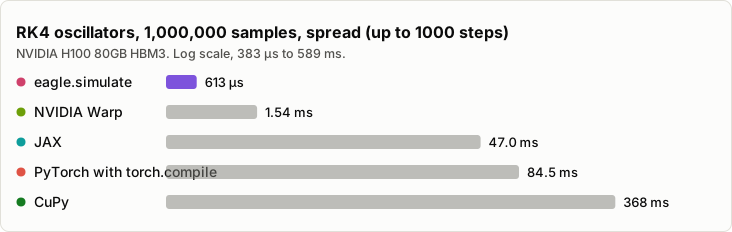
The chart shows the H100; the performance page has a tab for every device and CPU measured.
NVIDIA H100 80GB HBM3, card of 2026-10-13
| Distribution (N = 1,000,000) | Arm | wall (range) | sample·steps/s | useful FLOP/s (% of peak) |
|---|---|---|---|---|
| Spread (log-uniform stop steps, up to 1000) | eagle graph (device loop) | 2.13 ms (2.11 ms–2.14 ms) | 1.02e11 | 4.47e12 (13 %) |
| Spread (log-uniform stop steps, up to 1000) | eagle graph + compaction | 16 ms (16 ms–16 ms) | 1.35e10 | 5.96e11 (1.8 %) |
| Spread (log-uniform stop steps, up to 1000) | eagle graph + compaction + reorder | 10.7 ms (10.6 ms–10.7 ms) | 2.03e10 | 8.93e11 (2.7 %) |
| Spread (log-uniform stop steps, up to 1000) | CuPy masked | 368 ms (367 ms–369 ms) | 5.88e8 | 2.59e10 (0.077 %) |
| Spread (log-uniform stop steps, up to 1000) | CPU OpenMP | 199 ms (198 ms–200 ms) | 1.09e9 | 4.79e10 (–) |
| Uniform (every sample runs 1000 steps) | eagle graph (device loop) | 2.32 ms (2.31 ms–2.33 ms) | 4.30e11 | 1.89e13 (57 %) |
| Uniform (every sample runs 1000 steps) | eagle graph + compaction | 22.9 ms (22.9 ms–22.9 ms) | 4.37e10 | 1.92e12 (5.7 %) |
| Uniform (every sample runs 1000 steps) | eagle graph + compaction + reorder | 23.3 ms (23.3 ms–23.3 ms) | 4.30e10 | 1.89e12 (5.7 %) |
| Uniform (every sample runs 1000 steps) | CuPy masked | 365 ms (364 ms–366 ms) | 2.74e9 | 1.21e11 (0.36 %) |
| Uniform (every sample runs 1000 steps) | CPU OpenMP | 170 ms (169 ms–170 ms) | 5.90e9 | 2.59e11 (–) |
Measured on:
- NVIDIA H100 80GB HBM3
- NVIDIA L4
- NVIDIA A100-SXM4-40GB
- Tesla T4
- Quadro P2000
- NVIDIA RTX PRO 6000 Blackwell Server Edition
- AMD EPYC 9B45
- AMD EPYC 7B13
- Google Axion (Arm Neoverse-V2)
- Intel Xeon Platinum 8581C
On a CPU alone: AMD EPYC 9B45, 8 cores, card of 2026-10-13
| Arm (N = 1,000,000) | spread S=1000 wall | uniform S=1000 wall | vs eagle 8 threads (spread) |
|---|---|---|---|
| eagle host, termination loop, up to 8 threads | 142 ms | 187 ms | 1.0× |
| Numba prange, 8 threads | 328 ms | 1.53 s | 2.3× |
| JAX sharded over 8 CPU devices | 1.86 s | 1.94 s | 13× |
| PyTorch masked, 8 threads | 10.2 s | 10.2 s | 72× |
| NumPy masked | 15.3 s | 13.4 s | 100× |
On a CPU alone: AMD EPYC 7B13, 8 cores, card of 2026-10-13
| Arm (N = 1,000,000) | spread S=1000 wall | uniform S=1000 wall | vs eagle 8 threads (spread) |
|---|---|---|---|
| eagle host, termination loop, up to 8 threads | 400 ms | 693 ms | 1.0× |
| Numba prange, 8 threads | 398 ms | 1.85 s | 0.99× |
| JAX sharded over 8 CPU devices | 2.15 s | 2.14 s | 5.3× |
| PyTorch masked, 8 threads | 8.19 s | 8.37 s | 20× |
| NumPy masked | 21.6 s | 19.6 s | 54× |
On a CPU alone: Google Axion (Arm Neoverse-V2), 16 cores, card of 2026-10-13
| Arm (N = 1,000,000) | spread S=1000 wall | uniform S=1000 wall | vs eagle 8 threads (spread) |
|---|---|---|---|
| eagle host, termination loop, up to 8 threads | 330 ms | 648 ms | 1.0× |
| Numba prange, 8 threads | 388 ms | 1.8 s | 1.1× |
| JAX sharded over 8 CPU devices | 410 ms | 411 ms | 1.2× |
| PyTorch masked, 8 threads | 3.02 s | 2.76 s | 9.1× |
| NumPy masked | 16.4 s | 15.6 s | 49× |
On a CPU alone: Intel Xeon Platinum 8581C, 8 cores, card of 2026-10-13
| Arm (N = 1,000,000) | spread S=1000 wall | uniform S=1000 wall | vs eagle 8 threads (spread) |
|---|---|---|---|
| eagle host, termination loop, up to 8 threads | 162 ms | 123 ms | 1.0× |
| Numba prange, 8 threads | 335 ms | 1.59 s | 2.0× |
| JAX sharded over 8 CPU devices | 1.03 s | 1.03 s | 6.3× |
| PyTorch masked, 8 threads | 7.39 s | 7.24 s | 45× |
| NumPy masked | 29.1 s | 28.4 s | 170× |
Figures are written by tools/sync_readme_cards.py from the card JSON (the
same numbers card_nvidia-h100-80gb-hbm3.md renders): wall time and rates rounded to 3
significant figures, percent-of-peak to 2; a dash means that arm has no
FP64-peak baseline recorded (CPU). Re-run the script after a card is re-run or
a new perf_card device is added; python/tests/test_readme_cards.py fails
if the committed block has drifted from a fresh render.
Where each tool fits. On a dense batch, where every sample runs all 1000 steps, NVIDIA Warp's per-thread
kernel is a few percent ahead of eagle.simulate from N = 100,000 up (245 µs vs 260 µs at N = 100,000, 6%;
than Warp's per-thread kernel at N = 1,000,000 (613 µs against Warp's 1.54 ms, 2.5×). JAX compiles cold faster than hawk + eagle
(about 242 ms, against eagle.simulate's 875 ms; NVIDIA Warp's cold compile is 574 ms), and
JAX's warm recompile (40 ms) is shorter than hawk + eagle's own (70 ms). These are
complementary tools: Warp and hawk + eagle both skip nothing, and the difference is who writes the per-thread loop and
who decides when to compact. The CPU OpenMP arm needs no GPU, which makes it the tool to reach for on a machine
without one; where a GPU is present, the GPU arms are far ahead on this card (199 ms against
eagle.simulate's 613 µs on spread, 170 ms against 1.75 ms on uniform, at N = 1,000,000).
Compaction's advantage tracks how early the batch thins, and the device matters. On this H100 the plain graph runs the whole batch so quickly that active-set bookkeeping has little to recover: the plain graph is faster than the compaction arm in every cell of the card, 2.13 ms against 16 ms on the spread distribution at N = 1,000,000 and 2.32 ms against
22.9 ms on the uniform one, so plain `hawk + eagle graph` is the better fit here. The P2000 tab on the performance pageshows a card where compaction pays on a thinning batch: 586 ms → 374 ms at N = 1,000,000 on spread (1.5×). The eager launch loop takes 15× (spread) and 16× (uniform) the plain graph's time at this N (32.3 ms / 39.1 ms vs 2.13 ms / 2.32 ms), which is what the CUDA graph is for: it keeps the step loop on the device. CuPy masked is the array-style option (368 ms on spread, 74% of peak memory bandwidth on uniform, recorded in the card).
The reorder arm is compaction's index map plus an occasional physical reorder, opt-in through
eagle.ActiveSet(mask, reorder=theta). On the H100 it is faster than compaction alone in one cell of the card, N = 1,000,000 on
the spread distribution (16 ms → 10.7 ms, 1.4×), and takes longer in the others, for example 23.3 ms against
CPU, no GPU at all: the CPU block above shows each CPU card measured; on the AMD EPYC 9B45 the host termination loop on 8 threads takes 142 ms (spread) / 187 ms (uniform) at N = 1,000,000, against Numba's
328 ms / 1.53 s. On the harder RK7(8) family (adaptive orbits, heavier per-step work) the GPU still leads clearly atN = 1,000,000: 43.6 ms for eagle.simulate on the H100, 3.76 s for the eagle CPU path on 8 EPYC threads, and
where RAPTOR fits for that comparison.
Hardware caveat: the tables and text above are measured on a NVIDIA H100 80GB HBM3, a data-centre card (132 SMs,
3.35e13 FLOP/s FP64 peak at its rated clock, from the card). The methodcarries over unchanged to other GPUs; the absolute numbers, and the crossover points between arms, differ from device to device, and the performance page has a tab for each one measured.
Full write-up, method and the per-N tables: the performance
page. Raw
numbers:
card_nvidia-h100-80gb-hbm3.json /
card_nvidia-h100-80gb-hbm3.md.
hawk write it · eagle run it (this repo) · aether the numerics core · raptor the shared contracts — the RAPTOR family
Apache-2.0 (see LICENSE and
NOTICE) · cite via "Cite this repository"
(CITATION.cff; every tagged release is archived on Zenodo: doi:10.5281/zenodo.23250240) · built to
make GPU computing accessible on modest hardware, for research and education. Collaboration is the point, and a
citation is the currency — get in touch.
1 maintainer

Metadata
1 maintainer
Release files for raptor-eagle 0.6.2rc2
For a detailed explanation of source distributions (sdists) and built distributions (wheels), please see the package formats documentation.
Source distribution (sdist)
| File | Size | Uploaded | |
|---|---|---|---|
| raptor_eagle-0.6.2rc2.tar.gz | 1.5 MB | Details |
Built distributions (wheels)
| File | Reset | |||
|---|---|---|---|---|
| raptor_eagle-0.6.2rc2-cp314-cp314t-manylinux_2_26_x86_64.manylinux_2_28_x86_64.whl | CPython 3.14 | CPython 3.14 free-threading | Linux glibc 2.28+ x86-64, Linux glibc 2.26+ x86-64 | Details |
| raptor_eagle-0.6.2rc2-cp314-cp314-manylinux_2_26_x86_64.manylinux_2_28_x86_64.whl | CPython 3.14 | CPython 3.14 | Linux glibc 2.28+ x86-64, Linux glibc 2.26+ x86-64 | Details |
| raptor_eagle-0.6.2rc2-cp313-cp313t-manylinux_2_26_x86_64.manylinux_2_28_x86_64.whl | CPython 3.13 | CPython 3.13 free-threading | Linux glibc 2.28+ x86-64, Linux glibc 2.26+ x86-64 | Details |
| raptor_eagle-0.6.2rc2-cp313-cp313-manylinux_2_26_x86_64.manylinux_2_28_x86_64.whl | CPython 3.13 | CPython 3.13 | Linux glibc 2.26+ x86-64, Linux glibc 2.28+ x86-64 | Details |
| raptor_eagle-0.6.2rc2-cp312-cp312-manylinux_2_26_x86_64.manylinux_2_28_x86_64.whl | CPython 3.12 | CPython 3.12 | Linux glibc 2.28+ x86-64, Linux glibc 2.26+ x86-64 | Details |
| raptor_eagle-0.6.2rc2-cp311-cp311-manylinux_2_26_x86_64.manylinux_2_28_x86_64.whl | CPython 3.11 | CPython 3.11 | Linux glibc 2.28+ x86-64, Linux glibc 2.26+ x86-64 | Details |
| raptor_eagle-0.6.2rc2-cp310-cp310-manylinux_2_26_x86_64.manylinux_2_28_x86_64.whl | CPython 3.10 | CPython 3.10 | Linux glibc 2.28+ x86-64, Linux glibc 2.26+ x86-64 | Details |
| raptor_eagle-0.6.2rc2-cp39-cp39-manylinux_2_26_x86_64.manylinux_2_28_x86_64.whl | CPython 3.9 | CPython 3.9 | Linux glibc 2.28+ x86-64, Linux glibc 2.26+ x86-64 | Details |
Total release size: 27.1 MB
Release files / raptor_eagle-0.6.2rc2.tar.gz
| Download URL | raptor_eagle-0.6.2rc2.tar.gz |
|---|---|
| Size | 1.5 MB |
| Tags | Source |
|
SHA-256 checksum How to use checksums |
ad7c16dc4857575da2f686603640c702684c6afba80ee5e90bfaa6a6b0e6f5f9
|
|
BLAKE2b-256 checksum How to use checksums |
865bfb7ff8cbdd72823ac2336653d2aac5cbe480fbe4ea2839d9e27eedaa1fed
|
| Upload date | |
|
Uploaded using Trusted Publishing? What is trusted publishing? |
Yes |
| Uploaded via |
twine/7.0.0 CPython/3.13.14
|
Provenance
Provenance describes where a file came from. On PyPI, provenance is shared via attestations, which provide a verifiable record of the build or publishing details. View details, limitations and caveats.


PyPI Publish Attestation
PyPI verified that this artifact, at this checksum, originated from the publisher listed below.
Signed by GitHub Actions, verified by PyPI on Oct 17, 2026.
Transparency logRelease files / raptor_eagle-0.6.2rc2-cp314-cp314t-manylinux_2_26_x86_64.manylinux_2_28_x86_64.whl
| Download URL | raptor_eagle-0.6.2rc2-cp314-cp314t-manylinux_2_26_x86_64.manylinux_2_28_x86_64.whl |
|---|---|
| Size | 3.2 MB |
| Tags | CPython 3.14 CPython 3.14 free-threading Linux glibc 2.26+ x86-64 Linux glibc 2.28+ x86-64 |
|
SHA-256 checksum How to use checksums |
212b3e14fecaf4194c823822a503898f7df47d88e0a6e59ea7a1e9a0251de5cc
|
|
BLAKE2b-256 checksum How to use checksums |
810f9707a686346aed7464e0663a782169fd0b792d50f7d9cc36aad28281eaae
|
| Upload date | |
|
Uploaded using Trusted Publishing? What is trusted publishing? |
Yes |
| Uploaded via |
twine/7.0.0 CPython/3.13.14
|
Provenance
Provenance describes where a file came from. On PyPI, provenance is shared via attestations, which provide a verifiable record of the build or publishing details. View details, limitations and caveats.
PyPI Publish Attestation
PyPI verified that this artifact, at this checksum, originated from the publisher listed below.
Signed by GitHub Actions, verified by PyPI on Oct 17, 2026.
Transparency logRelease files / raptor_eagle-0.6.2rc2-cp314-cp314-manylinux_2_26_x86_64.manylinux_2_28_x86_64.whl
| Download URL | raptor_eagle-0.6.2rc2-cp314-cp314-manylinux_2_26_x86_64.manylinux_2_28_x86_64.whl |
|---|---|
| Size | 3.2 MB |
| Tags | CPython 3.14 Linux glibc 2.26+ x86-64 Linux glibc 2.28+ x86-64 |
|
SHA-256 checksum How to use checksums |
bffad5b145945830446ade6f95f2a08eb4a9d02f4eeb079c2c7223682c6fdd38
|
|
BLAKE2b-256 checksum How to use checksums |
fd44a42f84e3faad969aae14b085ac467b4273494a22547a7d97dd0f1db505eb
|
| Upload date | |
|
Uploaded using Trusted Publishing? What is trusted publishing? |
Yes |
| Uploaded via |
twine/7.0.0 CPython/3.13.14
|
Provenance
Provenance describes where a file came from. On PyPI, provenance is shared via attestations, which provide a verifiable record of the build or publishing details. View details, limitations and caveats.
PyPI Publish Attestation
PyPI verified that this artifact, at this checksum, originated from the publisher listed below.
Signed by GitHub Actions, verified by PyPI on Oct 17, 2026.
Transparency logRelease files / raptor_eagle-0.6.2rc2-cp313-cp313t-manylinux_2_26_x86_64.manylinux_2_28_x86_64.whl
| Download URL | raptor_eagle-0.6.2rc2-cp313-cp313t-manylinux_2_26_x86_64.manylinux_2_28_x86_64.whl |
|---|---|
| Size | 3.2 MB |
| Tags | CPython 3.13 CPython 3.13 free-threading Linux glibc 2.26+ x86-64 Linux glibc 2.28+ x86-64 |
|
SHA-256 checksum How to use checksums |
5513a3d4a1cce4ca1c70b44d9b2bc40321d897ff8c7e460ea6643c7cf2802e14
|
|
BLAKE2b-256 checksum How to use checksums |
36d7fb49c7ef151fee5d5eab2021114803911b08b6aabba248ee3eb64d090786
|
| Upload date | |
|
Uploaded using Trusted Publishing? What is trusted publishing? |
Yes |
| Uploaded via |
twine/7.0.0 CPython/3.13.14
|
Provenance
Provenance describes where a file came from. On PyPI, provenance is shared via attestations, which provide a verifiable record of the build or publishing details. View details, limitations and caveats.
PyPI Publish Attestation
PyPI verified that this artifact, at this checksum, originated from the publisher listed below.
Signed by GitHub Actions, verified by PyPI on Oct 17, 2026.
Transparency logRelease files / raptor_eagle-0.6.2rc2-cp313-cp313-manylinux_2_26_x86_64.manylinux_2_28_x86_64.whl
| Download URL | raptor_eagle-0.6.2rc2-cp313-cp313-manylinux_2_26_x86_64.manylinux_2_28_x86_64.whl |
|---|---|
| Size | 3.2 MB |
| Tags | CPython 3.13 Linux glibc 2.26+ x86-64 Linux glibc 2.28+ x86-64 |
|
SHA-256 checksum How to use checksums |
185de52d183cde0eb523efd0dcfc7d9be2c1be26de6d2a851747453da408a89d
|
|
BLAKE2b-256 checksum How to use checksums |
621b142fc80215d1669fdae5e16512f8f7915c451c25aeaf74abf66ef69ea7a5
|
| Upload date | |
|
Uploaded using Trusted Publishing? What is trusted publishing? |
Yes |
| Uploaded via |
twine/7.0.0 CPython/3.13.14
|
Provenance
Provenance describes where a file came from. On PyPI, provenance is shared via attestations, which provide a verifiable record of the build or publishing details. View details, limitations and caveats.
PyPI Publish Attestation
PyPI verified that this artifact, at this checksum, originated from the publisher listed below.
Signed by GitHub Actions, verified by PyPI on Oct 17, 2026.
Transparency logRelease files / raptor_eagle-0.6.2rc2-cp312-cp312-manylinux_2_26_x86_64.manylinux_2_28_x86_64.whl
| Download URL | raptor_eagle-0.6.2rc2-cp312-cp312-manylinux_2_26_x86_64.manylinux_2_28_x86_64.whl |
|---|---|
| Size | 3.2 MB |
| Tags | CPython 3.12 Linux glibc 2.26+ x86-64 Linux glibc 2.28+ x86-64 |
|
SHA-256 checksum How to use checksums |
af134bb05c8e9ea2c3115ad4c7446d8feb7eb26a93744c9a5bc4789cd1a84879
|
|
BLAKE2b-256 checksum How to use checksums |
5a96b6b4845f0a5c6eb22f0d72d3af64f678bf29a7452e5a3592ba8b25a65205
|
| Upload date | |
|
Uploaded using Trusted Publishing? What is trusted publishing? |
Yes |
| Uploaded via |
twine/7.0.0 CPython/3.13.14
|
Provenance
Provenance describes where a file came from. On PyPI, provenance is shared via attestations, which provide a verifiable record of the build or publishing details. View details, limitations and caveats.
PyPI Publish Attestation
PyPI verified that this artifact, at this checksum, originated from the publisher listed below.
Signed by GitHub Actions, verified by PyPI on Oct 17, 2026.
Transparency logRelease files / raptor_eagle-0.6.2rc2-cp311-cp311-manylinux_2_26_x86_64.manylinux_2_28_x86_64.whl
| Download URL | raptor_eagle-0.6.2rc2-cp311-cp311-manylinux_2_26_x86_64.manylinux_2_28_x86_64.whl |
|---|---|
| Size | 3.2 MB |
| Tags | CPython 3.11 Linux glibc 2.26+ x86-64 Linux glibc 2.28+ x86-64 |
|
SHA-256 checksum How to use checksums |
d5ac7c7513cd6df8fd3167777cdaf986d97e741570b15e11879c8663363d881b
|
|
BLAKE2b-256 checksum How to use checksums |
31eff147d7572825d7ca09b799a2ced829e12d69903764e67c768a9979d98595
|
| Upload date | |
|
Uploaded using Trusted Publishing? What is trusted publishing? |
Yes |
| Uploaded via |
twine/7.0.0 CPython/3.13.14
|
Provenance
Provenance describes where a file came from. On PyPI, provenance is shared via attestations, which provide a verifiable record of the build or publishing details. View details, limitations and caveats.
PyPI Publish Attestation
PyPI verified that this artifact, at this checksum, originated from the publisher listed below.
Signed by GitHub Actions, verified by PyPI on Oct 17, 2026.
Transparency logRelease files / raptor_eagle-0.6.2rc2-cp310-cp310-manylinux_2_26_x86_64.manylinux_2_28_x86_64.whl
| Download URL | raptor_eagle-0.6.2rc2-cp310-cp310-manylinux_2_26_x86_64.manylinux_2_28_x86_64.whl |
|---|---|
| Size | 3.2 MB |
| Tags | CPython 3.10 Linux glibc 2.26+ x86-64 Linux glibc 2.28+ x86-64 |
|
SHA-256 checksum How to use checksums |
c4fa53a5296911217ece1577415cb7709c79bec6e2faca88f0e63ad3c6e9bf68
|
|
BLAKE2b-256 checksum How to use checksums |
9de57779510ed61150eed0a2fb7150e731ce6c25dabc0f80a1a438e7ad614711
|
| Upload date | |
|
Uploaded using Trusted Publishing? What is trusted publishing? |
Yes |
| Uploaded via |
twine/7.0.0 CPython/3.13.14
|
Provenance
Provenance describes where a file came from. On PyPI, provenance is shared via attestations, which provide a verifiable record of the build or publishing details. View details, limitations and caveats.
PyPI Publish Attestation
PyPI verified that this artifact, at this checksum, originated from the publisher listed below.
Signed by GitHub Actions, verified by PyPI on Oct 17, 2026.
Transparency logRelease files / raptor_eagle-0.6.2rc2-cp39-cp39-manylinux_2_26_x86_64.manylinux_2_28_x86_64.whl
| Download URL | raptor_eagle-0.6.2rc2-cp39-cp39-manylinux_2_26_x86_64.manylinux_2_28_x86_64.whl |
|---|---|
| Size | 3.2 MB |
| Tags | CPython 3.9 Linux glibc 2.26+ x86-64 Linux glibc 2.28+ x86-64 |
|
SHA-256 checksum How to use checksums |
7b7b1b7a804c5b76c748e92d17051b47f610589e9eb420dc2418e2a3b028c000
|
|
BLAKE2b-256 checksum How to use checksums |
e7ef8a456444208bada9f68e7be1666d4cf19a6605912b7fc6f80646570065a0
|
| Upload date | |
|
Uploaded using Trusted Publishing? What is trusted publishing? |
Yes |
| Uploaded via |
twine/7.0.0 CPython/3.13.14
|
Provenance
Provenance describes where a file came from. On PyPI, provenance is shared via attestations, which provide a verifiable record of the build or publishing details. View details, limitations and caveats.
PyPI Publish Attestation
PyPI verified that this artifact, at this checksum, originated from the publisher listed below.
Signed by GitHub Actions, verified by PyPI on Oct 17, 2026.
Transparency log













