
RAPTOR Studio
An open-source reliability block diagram (RBD) simulator for Windows, macOS and Linux. Draw a diagram of parts that can fail and be repaired, run thousands of simulated futures, and read availability, reliability, maintenance, spares and cost numbers like an engineer, then find out which part to spend money on.
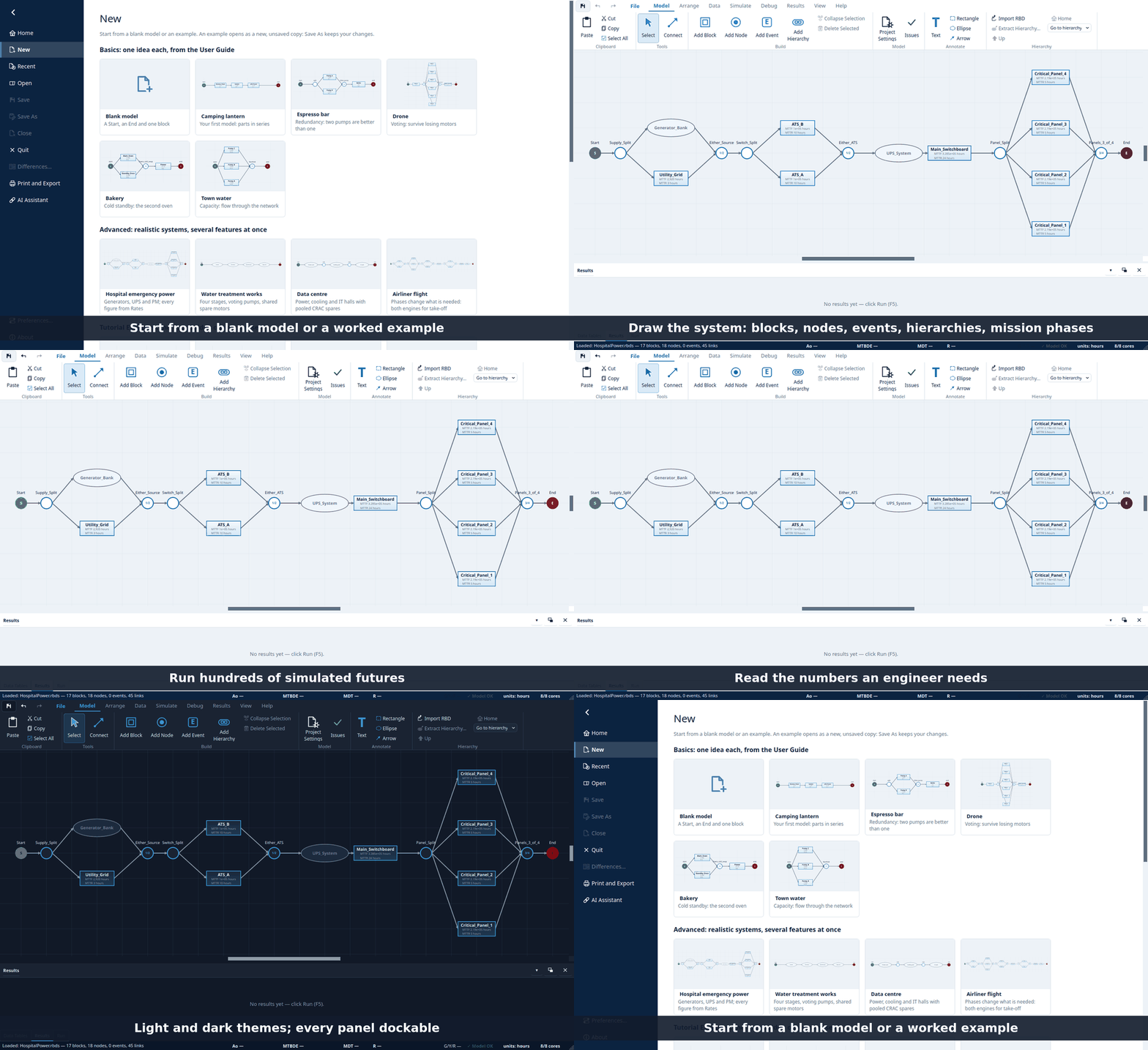
RAPTOR Studio carries on from Raptor 7, the simulator written at ARINC and released as open source by Booz Allen Hamilton. Its simulation engine was ported from Raptor 7's own source and checked, event by event, against what Raptor 7 itself writes, so the numbers are the ones reliability engineers already trust. Models made in Raptor 7 open here. Around that engine is a new application, a command line, and an AI-assistant server.
Like Raptor 7, it is released under the Booz Allen Public License (BAPL). Anyone may use, modify and share it, but a commercial entity may use it only for its internal business and for services to government and non-profit organisations, and nobody may charge a fee for it without Booz Allen Hamilton's permission. See Licence & credits.
Why use it
-
Numbers you can rely on. The detailed event logs and report files of hundreds of models captured from Raptor 7 are reproduced character for character, including its random-number generator. Where Raptor 7 does something surprising, the port reproduces it and says so.
-
It tells you what to fix, not just how you are doing. Weak-link analysis, single-point-failure lists and importance measures (Birnbaum, RAW, RRW and Vesely–Fussell, see below) rank the parts of your system by how much they matter, and colour the diagram to match.
-
Built for speed. Runs split across your processor cores, and the engine, layout, validation and file loading have been tuned so that models with hundreds or thousands of blocks are practical to build, open and run. We expect it to be faster than Raptor 7 on most models, particularly large ones and batches on several cores.
raptor estimatetimes a few runs and tells you how long a full batch will take before you start it. -
Runs anywhere. One installer or
pip install, on Windows, macOS and Linux. -
Scriptable. Everything the application does is also a command (
raptor run,sweep,compare,diff,estimate,validate,spf,fev,step,extract,renderand more) with machine-readable results. It fits in a continuous-integration job, a Jupyter notebook or a shell loop. -
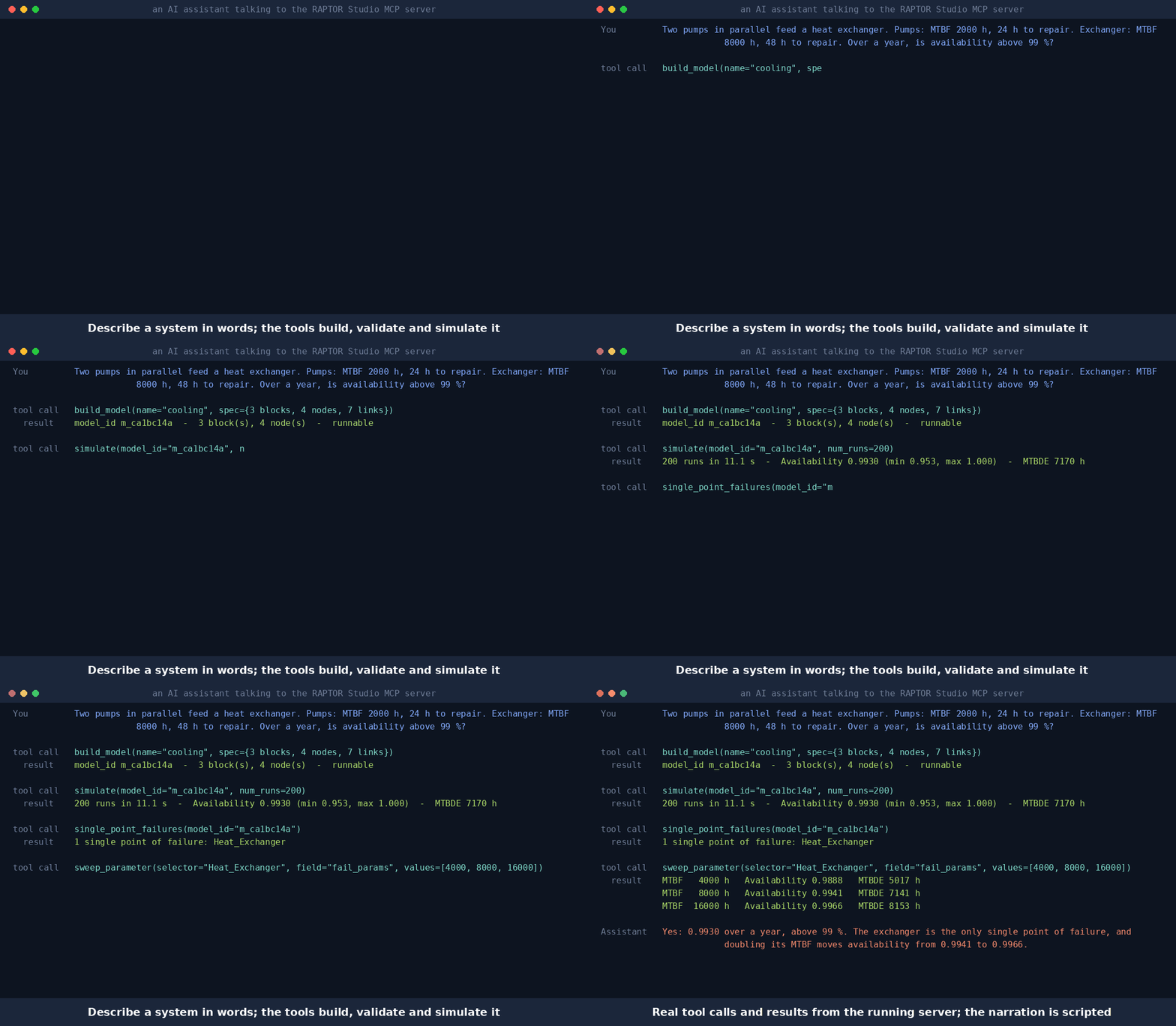
Usable from an AI assistant. An MCP server with 64 tools lets an assistant build, edit, validate, simulate, compare and explain models, run long batches in the background, and draw the diagram. The MCP server reference covers install, client setup and every tool, resource and prompt. The recording below is a real run of those tools (the numbers are the engine's; the assistant's narration is scripted):
-
A model file you can read and diff.
.rbdsis one JSON document with friendly field names, andraptor diff(or File ▸ Differences) says in words what changed between two versions of a model..rbdfiles open and save exactly as before. -
Documentation that ships with it. Break It Before It Breaks, a 23-chapter tutorial book with a model for each chapter that opens from the page, a field-by-field reference manual, and a formulas page. F1 opens the right section.
Which part matters most? Importance measures
Availability says how good the system is. Importance says which block to improve. Switch on Run ▸ Analysis ▸
Importance measures (or raptor run --importance both, or importance on the MCP simulate tool) and RAPTOR Studio
re-simulates the model with each block in turn made unable to fail, and with it dead, then ranks every block by how
much the system moves. You get:
- Birnbaum, RAW (risk achievement worth), RRW (risk reduction worth) and Vesely–Fussell importance, the IEC 61078 Annex D measures, each with its sampling error so you can tell a real ranking from noise;
- an Importance tab in the results, and a Show on Canvas colouring that paints the most influential blocks red and badges each block with its rank;
- an up-front time estimate that includes the extra batches, so a long analysis never surprises you.
The equations are on the Formulas page, and the tutorial's weak-link chapter works through an example.
What is new compared with Raptor 7
| Importance measures | Rank blocks by Birnbaum, RAW, RRW and Vesely–Fussell importance, with sampling error, a results tab and a canvas overlay. |
| Parallel batches | Runs spread over your cores (-j N on the command line); results are reproducible for a given core count, and one core reproduces Raptor 7's own random sequence exactly. |
| Run-time estimate | Know how long a batch will take before you start it, in the app, on the command line and from an assistant. |
| Check part of a model | Run one hierarchy on its own, with its input assumed available, or save it as a standalone model (raptor extract). The results are labelled as isolated. |
| Parameter sweeps and comparisons | Vary any field over a list of values, or run two or more models side by side, from the application, the command line or an assistant. Differences shows what is different between two models, and runs nothing. |
| AI assistant (MCP) | 64 tools to build, edit, run, analyse and explain models, over stdio or authenticated HTTP. |
| Stepping debugger | Step a run event by event, pause on a condition, jump to the next run, and see what each step changed. Failure Effects View and the Single Point Failure file are also available headless. |
| Several models at once | Each model opens in its own window with its own undo history and results. |
| Edit while looking at results | Results stay on screen while you edit; undo and redo for edits; spread-banded Weak Link, Cost, Capacity, Spares and Importance colourings. |
| Block labels and rates | Choose what the lines under each block show (mean, standard deviation, rate); keep the derivation of a failure rate in a named, reusable Rate. |
| Reports | Results export as PDF, HTML, AsciiDoc, spreadsheet, CSV or JSON (a versioned schema). |
| Diagram | Light and dark themes, dockable panels, annotations, mini-map, key tips for every ribbon button, and a diagram renderer for documents (raptor render). |
| Safer files | Validation catches the model shapes that crash Raptor 7 on open (a node's declared path count, a stale phase header) before you save them. |
Install
Windows / macOS / Linux (recommended for non-technical users)
Grab the installer for your platform from the Releases page:
| File | Platform | Install |
|---|---|---|
raptor-studio-*-windows-setup.exe |
Windows 10/11 (x64) | Double-click, follow the wizard |
raptor-studio-*-windows-portable.zip |
Windows 10/11 (x64) | Unzip anywhere, run raptor-studio.exe |
raptor-studio-*-macos-arm64.dmg |
macOS 13+ (Apple Silicon) | Open the DMG, drag RAPTOR Studio to Applications |
raptor-studio-*-macos-x64.dmg |
macOS 13+ (Intel) | Open the DMG, drag RAPTOR Studio to Applications |
raptor-studio-*-linux-amd64.deb |
Debian/Ubuntu (x64) | Double-click or sudo apt install ./…deb |
raptor-studio-*-linux-x86_64.AppImage |
Most Linux distros (x64) | chmod +x the file, then run it |
Verify the checksums against SHA256SUMS.txt in the same release. The installers carry the desktop application only;
the raptor command line and the MCP server come with the pip package (below).
macOS note (unsigned build): Gatekeeper will ask for confirmation.
Right-click RAPTOR Studio → Open → Open, or run
xattr -cr "/Applications/RAPTOR Studio.app" once in Terminal.
Windows note (unsigned build): SmartScreen may show "Windows protected your PC" — click More info → Run anyway.
PyPI (technical users, and for the MCP server)
pip install raptor-studio              # the application and command line
pip install "raptor-studio[mcp]"       # plus the MCP server for AI assistants
or, isolated from your system Python:
pipx install "raptor-studio[mcp]"
For the assistant server alone, uvx raptor-studio-mcp --workspace ~/raptor-models runs it without an install
step.
Then run raptor-studio for the application, raptor --help for the command line, or raptor-studio-mcp for the
assistant server. Requirements: Python 3.12+. The PDF export uses WeasyPrint, which needs system Pango — Linux:
sudo apt install libpango-1.0-0 libpangocairo-1.0-0, macOS: brew install pango. The Windows/macOS installers
bundle it.
A first run from the command line
raptor validate model.rbd            # errors and warnings
raptor run model.rbd -n 200 -j 4     # 200 runs on 4 processes, summary on screen
raptor run model.rbd -n 500 --importance both   # also rank the blocks by importance
raptor run model.rbd -r events -r end-of-run -o results/   # also write Raptor 7-format report files
raptor sweep model.rbd --vary "block:Pump A.repair_params[0]=12,24,48" --metric Availability
raptor diff before.rbds after.rbds   # what changed between two versions
raptor help lists every command and topic.
Learning materials
The app opens on a start page with a blank model, worked examples (from the guide's basics to a hospital's emergency power, a water-treatment works, a data centre and a phased airliner flight) and links to the built-in documentation, which the Help ribbon tab also opens:
- User Guide — the tutorial book Break It Before It Breaks: 23 chapters, from a three-block lantern to a tuned
data centre, with companion
.rbdsmodels you can open straight from the book (theopsmodelbuttons). - Reference Manual — field-by-field reference; F1 jumps to the section for the focused panel or dialog.
- Formulas — every metric, the importance measures and the distribution table as equations, on one page.
- Keyboard shortcuts —
docs/KEYBOARD_SHORTCUTS.md, also under Help. Press Alt in the app to show a key tip on every ribbon button. - AI assistant —
docs/MCP.mdand the book's last chapter. - File format —
docs/RBDS_FORMAT.mddescribes the.rbdsJSON format.
IEC 61078
IEC 61078:2016 defines reliability block diagrams and the methods used to evaluate them. RAPTOR Studio uses the same vocabulary (series, parallel, m-out-of-n, sub-RBDs, repaired and non-repaired blocks) but evaluates a model by Monte Carlo simulation, which lets it include repair, spares, phases, dependencies and limited resources. It is not a certified implementation of the standard, and this is a capability statement, not a compliance claim.
In short: series, parallel, mixed and m-out-of-n structures, repaired and non-repaired blocks and sub-RBDs are
supported, and the standard's worked examples are regression-tested against the simulator. The Annex D importance
measures are estimated by re-simulation (see above). Minimal cut/tie sets, Boolean and BDD evaluation, analytical
availability and PFDavg, repeated blocks, non-coherent blocks and PAND/SEQ/CCF gates are not implemented.
The full clause-by-clause table is in docs/IEC61078.md; MCP clients can read it with
read_doc('iec61078').
How the fidelity is checked
The engine is tested against files written by Raptor 7 itself, captured while driving it under Wine and, for the hardest cases, while following its scheduler with a debugger.
tests/golden/holds over 200 models with Raptor 7's output for each. Their event logs, report files and random-draw logs are compared exactly, and a scan of the captured event logs currently finds none of the recorded runs different.- The engine code names the Raptor 7 procedure each part reproduces, and the design of each part is described in
docs/engine-design/. - More than 7,500 automated tests run on every change, including the application's own windows and dialogs and an adversarial test of the MCP server.
Development
pip install -e ".[dev,mcp]"   # `mcp` extra needed by the MCP server tests
pytest                        # unit + fast integration; add -m slow for UI sweeps
CONTRIBUTING.md describes the test tiers and the conventions for changing the engine.
The docs render with Ruby asciidoctor: new_docs/tools/render_docs.sh (see new_docs/README.md).
Repository layout
| Path | Contents |
|---|---|
raptor/ |
The application: core/ engine, api/, cli/, gui/, mcp/, render/ |
tests/ |
unit/, behaviour/, integration/ (incl. sweeps/), golden/ (Raptor 7's captured output; large captures gzipped), fixtures/ (probe models), ladder/, data/ (shared sample models) |
new_docs/ |
User Guide (tutorial book), its models and build tools |
docs/ |
Reference manual, engine design, MCP server reference, formulas, keyboard shortcuts, .rbds file format, IEC 61078 |
tools/ |
Developer tools the tests and CI run: engine snapshot, coverage, type gate, doc generators |
installer/ |
Packaging (PyInstaller, Inno Setup, deb/AppImage) |
packaging/ |
raptor-studio-mcp, the small PyPI package the MCP Registry lists |
Roadmap
Directions under consideration — ideas, not commitments, in no fixed order:
- A live view of an assistant's work. Watch the model an AI assistant is building through the MCP server in a second, read-only window, redrawn on each edit.
- More Raptor 7 parity checks. Keep comparing results with the original on new model shapes and rarely used options.
- Further solution methods. Analytical and fault-tree solvers beside the simulation, for quick answers and cross-checks; minimal cut/tie sets and BDD evaluation; importance of whole hierarchies; common-cause and dynamic gates.
- Richer maintenance and logistics. Crews, shifts and supply chains that the model can express directly.
- Uncertainty and sensitivity analysis. Ask which input matters most, and how sure the answer is.
Licence & credits
RAPTOR was originally created at ARINC (Chuck Carter, Steve Brown,
Tony Malerich, Elizabeth Grimes) and released as open source by
Booz Allen Hamilton — many thanks to BAH. RAPTOR-derived material
stays under the Booz Allen Public License v1.0 (LICENSE); new
code in this port is licensed under the Apache License 2.0
(LICENSES/Apache-2.0.txt). See NOTICE.md for attribution details.
1 maintainer

Metadata
1 maintainer
Release files for raptor-studio 0.8.0
For a detailed explanation of source distributions (sdists) and built distributions (wheels), please see the package formats documentation.
Source distribution (sdist)
| File | Size | Uploaded | Provenance | Actions |
|---|---|---|---|---|
| raptor_studio-0.8.0.tar.gz | 8.5 MB | With provenance | Details for raptor_studio-0.8.0.tar.gz |
Built distribution (wheel)
| File | Interpreter | ABI | Platform | Actions Reset |
|---|---|---|---|---|
| raptor_studio-0.8.0-py3-none-any.whl | Python 3 | none | any | Details for raptor_studio-0.8.0-py3-none-any.whl |
Total release size: 17.3 MB
Release files / raptor_studio-0.8.0.tar.gz
| Download URL | raptor_studio-0.8.0.tar.gz |
|---|---|
| Size | 8.5 MB |
| Tags | Source |
|
SHA-256 checksum How to use checksums |
9a40277e243031534d36a9d215f90239885d0efbcfd34b831f5791b15292c225
|
|
BLAKE2b-256 checksum How to use checksums |
bd3b0b42caf8b178580c72801d9dc6f047a24463b8d544fce0aefb5b6ca40f17
|
| Upload date | |
|
Uploaded using Trusted Publishing? What is trusted publishing? |
Yes |
| Uploaded via |
twine/7.0.0 CPython/3.13.16
|
Provenance
Provenance describes where a file came from. On PyPI, provenance is shared via attestations, which provide a verifiable record of the build or publishing details. View details, limitations and caveats.


PyPI Publish Attestation
PyPI verified that this artifact, at this checksum, originated from the publisher listed below.
Signed by GitHub Actions, verified by PyPI on Oct 28, 2026.
Transparency logRelease files / raptor_studio-0.8.0-py3-none-any.whl
| Download URL | raptor_studio-0.8.0-py3-none-any.whl |
|---|---|
| Size | 8.8 MB |
| Tags | Python 3 |
|
SHA-256 checksum How to use checksums |
7e2da950b66923d5c4d0cc88a0aee2216999e2e3369164d89e4e87518c3b7f34
|
|
BLAKE2b-256 checksum How to use checksums |
4c3b4d4b2a79e434924b274678cb60a18deeb3aae8e5e4a2e27f0aad32d3870c
|
| Upload date | |
|
Uploaded using Trusted Publishing? What is trusted publishing? |
Yes |
| Uploaded via |
twine/7.0.0 CPython/3.13.16
|
Provenance
Provenance describes where a file came from. On PyPI, provenance is shared via attestations, which provide a verifiable record of the build or publishing details. View details, limitations and caveats.
PyPI Publish Attestation
PyPI verified that this artifact, at this checksum, originated from the publisher listed below.
Signed by GitHub Actions, verified by PyPI on Oct 28, 2026.
Transparency logSecurity for raptor-studio 0.8.0
Provenance
Provenance describes where a file came from. On PyPI, provenance is shared via attestations, which provide a verifiable record of the build or publishing details. View details, limitations and caveats.
Full provenance
All 2 files in this release have been uploaded with provenance metadata.
Attestation for raptor_studio-0.8.0.tar.gz
PyPI Publish Attestation
PyPI verified that this artifact, at this checksum, originated from the publisher listed below.
Signed by GitHub Actions, verified by PyPI on Oct 28, 2026.
Transparency logA note on package security
PyPI is a repository for distributing packages, not a service for auditing them. While third-party security researchers and our staff do their best to detect and remove malicious packages, PyPI cannot guarantee the quality, security or suitability of any given package.
To learn more about protecting yourself from malicious actors, visit our package security documentation.













