
Document reader with OCR & image detection support.

Project description
RaRa Digitizer
rara-digitizer is a module designed for extracting text, images, and other metadata from various file types.
The module is primarily intended for documents in the Estonian and English language but can also support other
languages.
⚙️ Installation Guide
Follow the steps below to install the rara-digitizer package, either via pip or locally.
Click to expand
Preparing the Environment
- Set Up Your Python Environment
Create or activate a Python environment using Python 3.10 or above. - Install Required Dependencies
Debian / Ubuntu installation:sudo apt-get update && apt-get install libc6 unpaper tesseract-ocr ghostscript libreoffice-writer
Installation via PyPI
GPU Version:
pip install rara_digitizer
CPU Version:
pip install rara_digitizer[cpu] --extra-index-url https://download.pytorch.org/whl/cpu
Local Installation
-
Clone the Repository
Clone the repository and navigate into it:
git clone https://gitlab.com/e1544/kratt-kata24/rara-digitizer
cd rara-digitizer
-
Install Git LFS
Ensure you have Git LFS installed and initialized:
git lfs install
-
Pull Git LFS Files
Retrieve the large files tracked by Git LFS:
git lfs pull
-
Install Build Package
Install the build package to enable local builds:
pip install build
-
Build the Package
Run the following command inside the repository:
python -m build
-
Install the Package
Install the built package locally:
pip install .
🚀 Testing Guide
Follow these steps to test the rara-digitizer package.
Click to expand
How to Test
-
Clone the Repository
Clone the repository and navigate into it:git clone https://gitlab.com/e1544/kratt-kata24/rara-digitizer cd rara-digitizer
-
Install Git LFS
Ensure Git LFS is installed and initialized:git lfs install
-
Pull Git LFS Files
Retrieve the large files tracked by Git LFS:git lfs pull
-
Set Up Your Python Environment
Create or activate a Python environment using Python 3.10 or above. -
Install Build Package
Install thebuildpackage:pip install build
-
Build the Package
Build the package inside the repository:python -m build
-
Install with Testing Dependencies
Install the package along with its testing dependencies:pip install .[testing]
-
Run Tests
Run the test suite from the repository root:python -m pytest -v tests
📝 Documentation
Click to expand
rara-digitizer abstracts document processing into two high-level classes.
FileHandler: An abstract base class designed for handling various types of files.FileHandlerFactory: Selects the appropriateFileHandlersubclass based on the file type or folder structure.
🔍 FileHandler Class
The class provides a framework for extracting text, images, and metadata from documents. It determines whether OCR is necessary, evaluates the need for image extraction and classification, handles pagination for documents without explicit page structures, and calculates physical dimensions when the requisite metadata is available. While offering a concise overview of core capabilities, it supports extensive, specialized functionality tailored to specific file types.
Click to expand
Parameters
| Name | Type | Optional | Default | Description |
|---|---|---|---|---|
| file_path | str | False | None | Path to the file being handled. |
Key Functions
requires_ocr()
Abstract method to determine whether OCR is required for text extraction.
Returns: bool - True if OCR should be used, False otherwise.
extract_text()
Abstract method to extract text from the file.
Returns: list[dict[str, str | int | None]] - List of extracted text segments with metadata.
extract_images()
Abstract method to extract images from the file.
Returns: list[dict[str, str | int | dict | None]] - List of dictionaries representing extracted images metadata.
extract_page_numbers()
Abstract method to extract the total number of pages.
Returns: int | None - Total page count or None if unavailable.
extract_physical_dimensions()
Abstract method to extract the largest physical dimension of the document.
Returns: int | None - Largest dimension in centimeters or None.
extract_all_data()
Combines all extracted information into a dictionary.
Returns: dict[str, Any] - Comprehensive data about the file.
🔍 FileHandlerFactory Class
The FileHandlerFactory class provides a mechanism to select and return the appropriate file handler based on the file type or folder structure. It supports various file formats and ensures extensibility for additional file types.
Click to expand
Parameters
| Name | Type | Optional | Default | Description |
|---|---|---|---|---|
base_dir |
str | True | "./models" | Directory path to resources used by handlers. |
resource_manager |
ResourceManager | True | None | Custom resource manager for handling resources (e.g., models). |
Keyword Arguments
| Name | Type | Optional | Default | Description |
|---|---|---|---|---|
start_page |
int | True | 1 | For paginated documents such as PDF and METS/ALTO, specifies the page to start processing from. |
max_pages |
int | True | None | For paginated documents such as PDF and METS/ALTO, specifies the maximum number of pages to process, starting from start_page. |
text_extraction_method |
str | True | "auto" | Whether to force OCR without evaluating text quality. Availablel options are: ["auto", "text_layer_extraction", "ocr"]. "auto" - Necessity for OCR application is detected automatically; "text_layer_extraction" - Text is extracted only from the text layer, OCR is disabled; "ocr" - OCR is always used, even if text layer exists. |
text_quality_threshold |
float | True | TEXT_QUALITY_THRESHOLD | Threshold for assessing text quality; text with confidence below this value triggers OCR. |
ocr_confidence_threshold |
float | True | OCR_CONFIDENCE_THRESHOLD | Minimum confidence level required for OCR results; values below this result in alternate handling. |
lang |
str | True | None | Language used for OCR processing; determines the script and language-specific settings. Read more. |
text_length_cutoff |
int | True | 30 | Minimum number of characters required to evaluate texts. |
evaluator_default_response |
Any | True | None | Default value used when evaluated text is shorter than text_length_cutoff |
tesseract_script_overrides |
dict | True | {"Latin": "Latin", "Fraktur": "est_frak", "Cyrillic": "Cyrillic"} | A mapping of language codes to specific Tesseract OCR script configurations for improved recognition. Read more. |
enable_image_extraction |
bool | True | True | Whether to perform image extraction and classification during calls to extract_images() or extract_all_data(). |
unknown_language_fallback |
bool | True | "unk" | Language string to output when language detection fails. |
local_image_classifier_path |
str | True | None | Path towards the directory that contains the MLFLow structure of an image classification model. |
enable_character_mapping |
bool | True | False | Whether to apply character mapping for OCR post-processing. See next kwarg for example. |
character_map |
dict | True | {"et": {"ð": "õ", "ı": "i", "é": "e", "ã": "ä"}} | Custom language-specific character map for OCR post-processing. Language codes follow ISO 639-1. |
Changing the OCR Language Parameter
The default language for OCR is set to the general Latin script, as that best covers the various languages
that the module is designed to work with. However, the language can be changed by setting the
lang keyword argument when creating the FileHandlerFactory object.
The possible values for the parameter can be found in the tessdata_best repository, either in the root, where the language model files are located, or in the same repository's scripts directory, where the general script-based models are located.
For example, to set the language to Estonian, the relevant change would look like this:
kwargs = {"lang": "est"}  # (Add the filename without the .traineddata extension)
with FileHandlerFactory().get_handler(file_or_folder_path=file_path, **kwargs) as handler:
    output = handler.extract_all_data()
Do note that the changed language model should be downloaded from the aforementioned repository and placed in the
DIGITIZER_MODEL_DIR/tesseract directory.
Changing the OCR Script Detection
When the lang parameter is not set, the OCR language is determined based on the script detected in the document.
The script detection is done by Tesseract itself, and the script name is then used to switch to the appropriate
language model.
To change which script detected by Tesseract triggers which language model, the tesseract_script_overrides
keyword argument can be used. This argument should be a dictionary where the keys are the script names and the values
are the filenames of the language models without the .traineddata extension.
For example, to add a script override for the Fraktur script, the relevant change would look like this:
kwargs = {"tesseract_script_overrides": {"Fraktur": "est_frak"}}
with FileHandlerFactory().get_handler(file_or_folder_path=file_path, **kwargs) as handler:
    output = handler.extract_all_data()
To add more script overrides, simply add more key-value pairs to the dictionary.
The added script should be downloaded from the
tessdata_best repository's script directory
and placed in the DIGITIZER_MODEL_DIR/tesseract directory.
It is possible to remove the script override by setting the variable to an empty dictionary, but note that this will make OCR always use the default Latin script model.
Key Functions
get_handler(file_or_folder_path: str, **kwargs) -> FileHandler
Finds an appropriate file handler subclass for the given file type or folder structure.
Returns: an appropriate FileHandler subclass for the given file type or folder structure, e.g., PDFHandler for .pdf files.
Raises:
- PathNotFound: If the specified file or folder path doesn't exist.
- UnsupportedFile: For unsupported file types.
- FileTypeOrStructureMismatch: For unrecognized file types or folder structures.
Supported File Types
| File Type | Handler | Logical Flow |
|---|---|---|
.docx |
DOCXHandler |
Processed with DOCXHandler. |
.doc |
DOCXHandler |
Converted to .docx and processed with DOCXHandler. |
.html, .xml |
HTMLHandler |
Processed with HTMLHandler. |
.txt |
TXTHandler |
Processed with TXTHandler. |
.pdf |
PDFHandler |
Processed with PDFHandler. |
.jpg, .jpeg, .png |
PDFHandler |
Converted to .pdf and processed with PDFHandler. |
.epub |
EPUBHandler |
Processed with EPUBHandler. |
Directory containing METS .xml |
METSALTOHandler |
Processed with METSALTOHandler. |
Usage Examples
from rara_digitizer.factory.file_handler_factory import FileHandlerFactory

file_path = "kevade.pdf"

# The Context Manager ensures that any temporary files are deleted after use
with FileHandlerFactory().get_handler(file_or_folder_path=file_path) as handler:
    output = handler.extract_all_data()
🔍 ImageClassificator Class
The ImageClassificator class uses a Vision Transformer (ViT) model to classify images extracted from documents. It supports batch processing for efficient handling of large image datasets and integrates seamlessly with the FileHandler and FileHandlerFactory classes.
Click to expand
Parameters
| Name | Type | Optional | Default | Description |
|---|---|---|---|---|
resource_manager |
ResourceManager |
False | Custom resource manager for handling resources. |
Key Functions
classify_images(images: list[np.ndarray], batch_size: int = 16) -> list[str]
Classifies input images in batches and returns the most likely label for each image.
Parameters:
images: List of input images as NumPy arrays.batch_size: Number of images to process in one batch.
Returns: List of predicted labels for each image.
classify_extracted_images(extracted_images: list[dict], allowed_labels: list[str] = None) -> list[dict]
Classifies cropped images from extracted document metadata output and updates their classification labels.
Existing labels in allowed_labels are retained.
Input follows the format returned by the extract_images() method of the FileHandler class.
Parameters:
extracted_images: List of dictionaries containing image metadata, including cropped images.allowed_labels: Optional list of labels to keep if already present in metadata.
Returns: Updated list of dictionaries with classification labels.
Classifying Extracted Images
from rara_digitizer.tools.image_classification import ImageClassificator
from rara_digitizer.factory.resource_manager import ResourceManager

resource_manager = ResourceManager()
image_classifier = ImageClassificator(resource_manager=resource_manager)

# Extracted images, follows format of FileHandler.extract_images()
extracted_images = [
    {"cropped_image": some_pil_image_object, "label": ""},
    {"cropped_image": another_pil_image_object, "label": ""},
]

classified_images = image_classifier.classify_extracted_images(extracted_images)
🧑💻 Usage
Information on how to use the rara-digitizer package can be found below.
Click to expand
Environment Variables
| Variable Name | Description | Default Value |
|---|---|---|
DIGITIZER_YOLO_MODELS_RESOURCE |
URL location for downloading YOLO models | https://packages.texta.ee/texta-resources/rara_models/yolo/ |
DIGITIZER_YOLO_MODELS |
YOLO model files for object detection | yolov10b-doclaynet.pt |
DIGITIZER_IMG_CLF_MODELS_RESOURCE |
URL location for downloading image classification models | https://packages.texta.ee/texta-resources/rara_models/image_classifier/ |
DIGITIZER_IMG_CLF_MODELS |
Image classification model files | image_classifier.zip |
DIGITIZER_IMG_CLF_PREPROCESS_CONFIGS |
Image preprocessing configuration files | vit_preprocessor_config.json |
DIGITIZER_TESSERACT_MODELS_RESOURCE |
URL location for downloading Tesseract OCR models | https://packages.texta.ee/texta-resources/rara_models/tesseract/ |
DIGITIZER_TESSERACT_MODELS |
Tesseract model files for text recognition | Cyrillic.traineddata, Latin.traineddata, eng.traineddata, est_frak.traineddata, osd.traineddata |
Caching
Multiple components and tools load files from the disk into memory and initialize them into Python objects, which usually would bring with it a certain amount of overhead during larger workflows.
To prevent that, a mechanism was created to handle (download, initialize etc) the management of such resources and caching them into memory to be shared amongst the necessary parts of the code that need it. When creating a factory, the process of loading the components into memory is already included internally and no further action on the user is necessary.
However, when using handlers and other components as stand-alone, the user needs to initialize and pass an instance
of the ResourceManager class.
Caching through FileHandlerFactory
from rara_digitizer.factory.file_handler_factory import FileHandlerFactory

### BAD
# This creates two factories, with each their separate caches.
with FileHandlerFactory().get_handler(file_or_folder_path="rara_review.pdf") as handler:
    handler.extract_all_data()

with FileHandlerFactory().get_handler(file_or_folder_path="rara_manual.docx") as manager:
    manager.extract_all_data()

### GOOD
# This creates a ResourceManager (the cache mechanism) inside the factory and sends
# it to every handler it returns to the user.
factory = FileHandlerFactory()

with factory.get_handler(file_or_folder_path="rara_review.pdf") as handler:
    handler.extract_all_data()

with factory.get_handler(file_or_folder_path="rara_manual.docx") as manager:
    manager.extract_all_data()
Initializing the cache manually
from rara_digitizer.factory.resource_manager import ResourceManager
from rara_digitizer.tools.image_classification import ImageClassificator
from rara_digitizer.tools.text_postproc import TextPostprocessor

resource_manager = ResourceManager()
classifier = ImageClassificator(resource_manager)
text_posprocessor = TextPostprocessor(resource_manager)
Limited model initialization
By default, the ResourceManager will download every single model necessary for this application
automatically on initialization, however that process can be turned off entirely or changed depending on the need.
from rara_digitizer.factory.resource_manager import ResourceManager
from rara_digitizer.factory.file_handler_factory import FileHandlerFactory

# Disabling automatic download.
resource_manager = ResourceManager(autodownload_true=False)
factory = FileHandlerFactory(resource_manager=resource_manager)
resource_manager.initialize_resources()  # Starts the download process.

# Limiting the resources to download.
# Paths needs to be dot notated to the source of the class that implements the Resource base class.
class_paths = ["rara_digitizer.factory.resources.yolo.YOLOImageDetector"]
resource_manager = ResourceManager(resources=class_paths)
factory = FileHandlerFactory(resource_manager=resource_manager)
Custom resources
In case the user wants to use a custom resource, they need create a class that implements the Resource interface.
Class variables other than unique_key can be left empty, what matters is the implementation of the methods.
ResourceManager will first run the download_resource method and then the initialize_resource method.
import pathlib
from rara_digitizer.factory.resource_manager import ResourceManager, DEFAULT_RESOURCES
from rara_digitizer.factory.resources.base import Resource


class Huggingface(Resource):
    unique_key = "huggingface"
    resource_uri = "..."
    location_dir = "..."
    models = ["..."]
    default_model = "..."

    def __init__(self, base_directory: str, **kwargs):
        self.base_directory = pathlib.Path(base_directory)

    def download_resource(self):
        ...

    def initialize_resource(self):
        ...

    def get_resource(self, **kwargs):
        ...


huggingface_resource = Huggingface(base_directory="./models")
resource_manager = ResourceManager(resources=[*DEFAULT_RESOURCES, huggingface_resource])
resource_manager = ResourceManager(resources=[*DEFAULT_RESOURCES, "path.to.Huggingface"])

# To access the resource, the get_resource method most be implemented and called through
# the ResourceManager class through the unique_key of the resource.
model = resource_manager.get_resource("huggingface")
Available Models
| Model Name | Description |
|---|---|
| YOLO | A deep learning-based object detection model used for tasks like document layout analysis, with support for models such as yolov10b-doclaynet.pt to detect and categorize elements within an image or document. |
| ViT Image Classifier | A deep learning-based image classification model (fine-tuned Google's Vision Transformer). Used for classifying images in documents. |
| Tesseract | An OCR (Optical Character Recognition) engine capable of recognizing text from images, supporting various language and script models. By default, Cyrillic and Latin script, English language, Orientation and Script Detection (osd), and fine-tuned Estonian Fraktur models are available. |
Using Custom Models
Replace the default models with custom ones by setting the corresponding environment variables to the desired model files. Code and documentation for retraining the ViT image classifier and Tesseract OCR models can be found at
Examples
It is possible to extract all possible data from various filetypes by feeding the file into FileHandlerFactory.
A sample code snippet using the FileHandlerFactory and running the extract_all_data() method would look like this:
from rara_digitizer.factory.file_handler_factory import FileHandlerFactory

file_path = "kevade.epub"

# The Context Manager ensures that any temporary files are deleted after use
with FileHandlerFactory().get_handler(file_or_folder_path=file_path) as handler:
    output = handler.extract_all_data()
The example output could then look like this:
{
  "doc_meta": {
    "physical_measurements": 22,
    "pages": {
      "count": 346,
      "is_estimated": true
    },
    "languages": [
      {
        "language": "et",
        "count": 344,
        "ratio": 0.994
      },
      {
        "language": "en",
        "count": 1,
        "ratio": 0.003
      },
      {
        "language": "de",
        "count": 1,
        "ratio": 0.003
      }
    ],
    "text_quality": 0.56,
    "alto_text_quality": 0.56,
    "is_ocr_applied": true,
    "n_words": 125765,
    "n_chars": 1278936,
    "mets_alto_metadata": null,
    "epub_metadata": {
      "title": "KEVADE"
    }
  },
  "texts": [
    {
      "text": "Kevade\n\n\n Oskar Luts",
      "section_type": null,
      "section_meta": null,
      "section_id": "",
      "section_title": "Kevade",
      "start_page": 1,
      "end_page": 1,
      "sequence_nr": 1,
      "language": "et",
      "text_quality": 0.67,
      "n_words": 3,
      "n_chars": 20
    },
    {
      "text": "kuw Armo issaga koolimajja joudi S, olid tummid juba alanud.",
      "section_type": null,
      "section_meta": null,
      "section_id": "",
      "section_title": null,
      "start_page": 2,
      "end_page": 2,
      "sequence_nr": 2,
      "language": "et",
      "text_quality": 0.45,
      "n_words": 10,
      "n_chars": 47
    }
  ],
  "images": [
    {
      "label": "varia",
      "image_id": 1,
      "coordinates": {
        "HPOS": null,
        "VPOS": null,
        "WIDTH": null,
        "HEIGHT": null
      },
      "page": null
    }
  ]
}
🏗️ Digitizer's Logical Structure
Overview of the rara-digitizer component's logical structure.
Click to expand
The component's input is a document, which is passed to the FileHandlerFactory class. The class's task is to
find a suitable Handler class for the document based on its file type.
The handlers support various file formats (e.g., DOCXHandler for DOCX files, PDFHandler for PDF files, etc.),
as shown on the diagram.
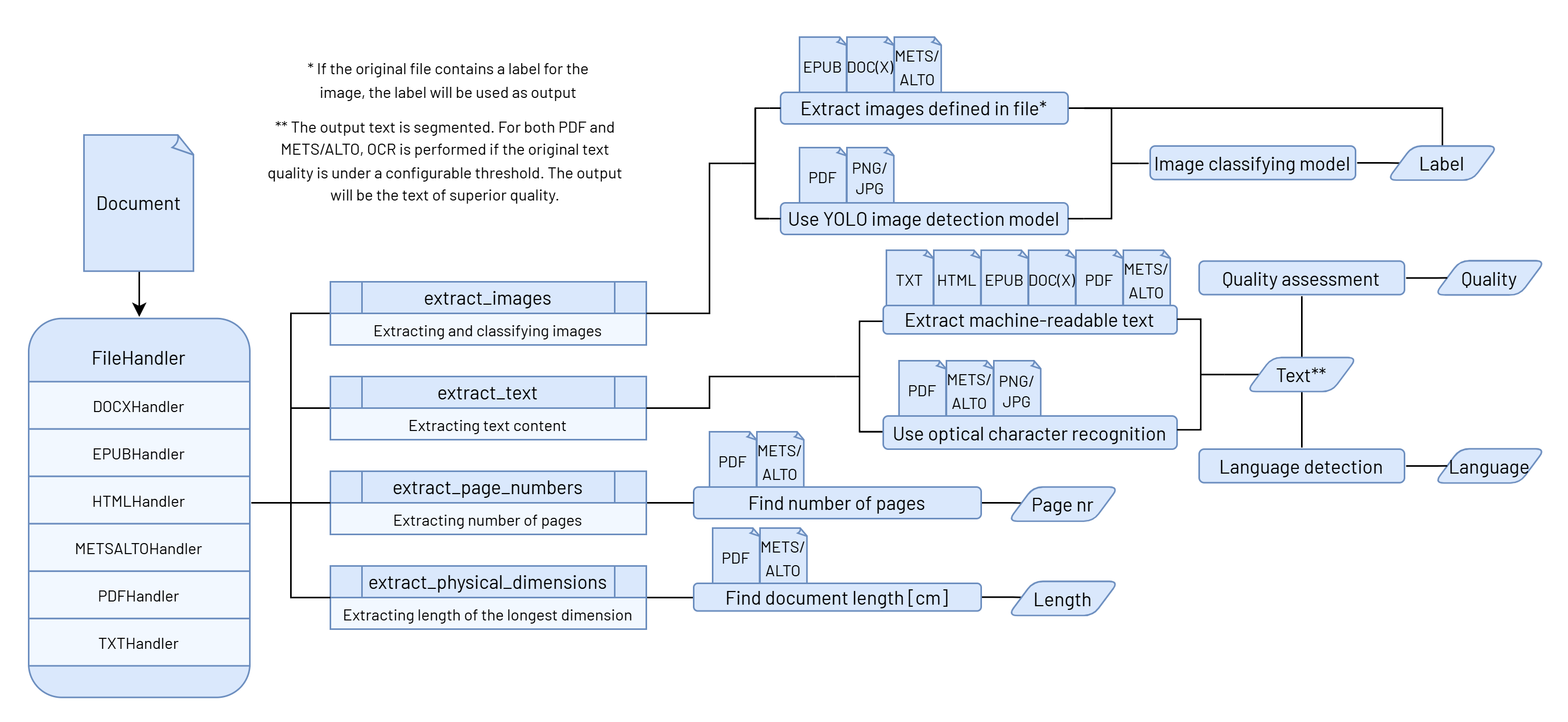
Each file type has its own implementation for various extraction methods, with each one focusing on different content, such as text, images, or document-related metadata.
All of these methods can be run independently, but most of the time, it is necessary to collect all the data
at once. For this purpose, the BaseHandler class has an extract_all_data() method that combines the results
of different methods into a single standardized output. This function collects the following data:
- The document's longest physical measurement (e.g., height or width),
- Number of pages (including an indication of whether the count is estimated based on word count),
- The estimation is necessary for file types like TXT, DOC(X), EPUB, where the number of pages is not physically defined,
- Language distribution, including the segment count and ratio of each language,
- Average text quality [0-1], including the original ALTO text quality and OCR application status,
- It is important to note that ALTO quality is not used in OCR need assessment, as it does not exist for all file types, and therefore the text quality assessment is always done by the text quality model.
- Word and character count,
- Metadata specific to the file type, such as EPUB or METS/ALTO metadata,
- Texts, each with additional information such as page numbers, language, text quality, and word/character count, and other metadata
- Images, each with classification and page number.
Release history Release notifications | RSS feed


Download files
Download the file for your platform. If you're not sure which to choose, learn more about installing packages.
Source Distribution
Built Distribution
Filter files by name, interpreter, ABI, and platform.
If you're not sure about the file name format, learn more about wheel file names.
Copy a direct link to the current filters
File details
Details for the file rara_digitizer-1.4.13.tar.gz.
File metadata
- Download URL: rara_digitizer-1.4.13.tar.gz
- Upload date:
- Size: 89.9 kB
- Tags: Source
- Uploaded using Trusted Publishing? No
- Uploaded via: twine/6.0.1 CPython/3.13.2
File hashes
| Algorithm | Hash digest | |
|---|---|---|
| SHA256 |
f6987e914da173a71b0118d15543ac5a8a6bf0cf6974fc83f21be7706fb96b71
|
|
| MD5 |
a0334fe1e70d7e61bfcbfbafcf15594c
|
|
| BLAKE2b-256 |
3c7759be22d8984522ada09bbf87df6bacff0289e1cf4ac107f684d9bd2b80cd
|
File details
Details for the file rara_digitizer-1.4.13-py3-none-any.whl.
File metadata
- Download URL: rara_digitizer-1.4.13-py3-none-any.whl
- Upload date:
- Size: 81.3 kB
- Tags: Python 3
- Uploaded using Trusted Publishing? No
- Uploaded via: twine/6.0.1 CPython/3.13.2
File hashes
| Algorithm | Hash digest | |
|---|---|---|
| SHA256 |
c9ffd59a4a3b4a5ccc732e641d0026789630dbf7fcc1d59a2940a582212654f9
|
|
| MD5 |
081a00532f58eca2275340b6e03ba09b
|
|
| BLAKE2b-256 |
27493c8e3730f6381aa752e8d08719dabf59fb5b606d76c0dcaf35d33c229e90
|






