
RASCAL - Resources for Analyzing Speech in Clinical Aphasiology Labs




Open-source Python infrastructure for reproducible discourse analysis in clinical aphasiology.
⚠️ Development Notice
Active development of the generalized discourse-analysis engine now continues under the DIAAD project.
This repository remains available for historical continuity and may later serve as a wrapper or specialized extension of DIAAD.
Description
RASCAL is an open-source Python package designed to enhance efficiency, rigor, and replicability in a variety of monologic discourse analyses common in clinical aphasiology. Initially, the program tabularizes CHAT-formatted (.cha) transcripts with unique identifiers for samples and utterances, facilitating hierarchical organization through filename-derived grouping variables. While structured around our laboratory's workflow, users can run any selection of RASCAL's modules, which include algorithmic transcription reliability evaluation, complete utterance (CU) coding summarization, and batched core lexicon (CoreLex) analysis. The program aims to help researchers and clinicians streamline discourse analysis pipelines, particularly when managing large datasets.
Installation
We recommend installing RASCAL into a dedicated virtual environment using Anaconda:
1. Create and activate your environment:
conda create --name rascal python=3.12
conda activate rascal
2. Download RASCAL:
# directly from PyPI
pip install rascal-speech

# or from GitHub
pip install git+https://github.com/nmccloskey/rascal.git@main
Analysis Pipeline
BU-TU Semi-Automated Monologic Narrative Analysis Overview
- Stage 0 (ASR + Manual): Complete transcription for all samples.
- Stage 1 (RASCAL):
- Input: Transcriptions (
.cha) - Output: Transcription reliability samples
- Input: Transcriptions (
- Stage 2 (Manual): Transcribe reliability samples
- Stage 3 (RASCAL):
- Input: Original & reliability transcriptions
- Output: Transcription reliability reports, reselected reliability samples
- Stage 4 (RASCAL):
- Input: Transcriptions (
.cha) - Output: Transcript tables, CU coding & reliability files
- Input: Transcriptions (
- Stage 5 (Manual): CU coding and reliability checks
- Stage 6 (RASCAL):
- Input: Manually completed CU coding files
- Output: CU reliability analysis, reselected CU reliability samples
- Stage 7 (RASCAL):
- Input: CU coding files
- Output: CU coding summaries, word count files
- Stage 8 (Manual): Word counting and reliability checks, record speaking times
- Stage 9 (RASCAL):
- Input: Manually completed word count files
- Output: Word count reliability analysis, reselected reliability samples
- Stage 10 (RASCAL):
- Input: Transcript tables (with speaking times), CU Coding summaries & word count files
- Output: Blind & unblind summaries, CoreLex analysis
Links
GitHub Repository
Access the full RASCAL source code, issue tracker, and development history:
Web App
Run RASCAL directly in your browser — no local installation required:
PyPI Distribution
Install the stable RASCAL package from the Python Package Index:
pip install rascal-speech
Zenodo Archival Release
A fully versioned, citable archive of RASCAL (v1.0.0) is available on Zenodo, including:
- RASCAL Instruction Manual (PDF)
- Synthetic, non-identifiable example data for all major functionalities
- MIT license text
- A release-specific README
The example data include:
toy_data/: minimal example inputs.function_*: representative output directories with metadata.
Please ensure HIPAA compliance when analyzing real clinical data.
👉 Zenodo record
📌 DOI: 10.5281/zenodo.17624073
Setup
To prepare for running RASCAL, complete the following steps:
1. Create your working directory:
We recommend creating a fresh project directory where you'll run your analysis.
Example structure:
your_project/
├── config.yaml           # Configuration file (see below)
└── rascal_data/
    └── input/            # Place your CHAT (.cha) files and/or Excel data here
                          # (RASCAL will make an output directory)
2. Provide a config.yaml file
This file specifies the directories, coders, reliability settings, and tier structure.
You can download the example config file from the repo or create your own like this:
input_dir: rascal_data/input
output_dir: rascal_data/output
random_seed: 8
reliability_fraction: 0.2
coders:
- '1'
- '2'
- '3'
CU_paradigms:
- SAE
- AAE
exclude_participants:
- INV
strip_clan: true
prefer_correction: true
lowercase: true
tiers:
  site:
    values:
    - AC
    - BU
    - TU
    partition: true
    blind: true
  test:
    values:
    - Pre
    - Post
    - Maint
    blind: true
  study_id:
    values: (AC|BU|TU)\d+
  narrative:
    values:
    - CATGrandpa
    - BrokenWindow
    - RefusedUmbrella
    - CatRescue
    - BirthdayScene
Explanation:
-
General
-
random_seed- ensures deterministic selections for replicability -
reliability_fraction- the proportion of data to subset for reliability (default 20%). -
coders- alphanumeric coder identifiers (2 required for function g and 3 for c, see below). -
CU_paradigms- allows users to accommodate multiple dialects if desired. If at least two paradigms are entered, parallel coding columns will be prepared and processed in all CU functions. -
exclude_participants- speakers appearing in .cha files to exclude from transcription reliability and CU coding (neutral utterances).
-
-
Transcription Reliability
-
strip_clan- removes CLAN markup but preserve speech-like content, including filled pauses (e.g., '&um' -> 'um') and partial words. -
prefer_correction- toggles policy for accepted corrections '[: x] [*]': True keeps x, False keeps original. -
lowercase- toggles case regularization.
-
Specifying tiers: The tier system facilitates tabularization by associating a unit of analysis with its possible values and extracting this information from the file name of individual transcripts.
-
Multiple values: enter as a comma- or newline-separated list. These are treated as literal choices and combined into a regex internally. See below examples.
- narrative:
BrokenWindow, RefusedUmbrella, CatRescue - test:
PreTx, PostTx
- narrative:
-
Single value: treated as a regular expression and validated immediately. Examples include:
- Digits only:
\\d+ - Lab site + digits:
(AC|BU|TU)\\d+ - Three uppercase letters + three digits:
[A-Z]{3}\\d{3}
- Digits only:
-
Tier attributes
- Partition: creates separate coding files and separate reliability subsets by that tier. In this example, separate CU coding files will be generated for each site (AC, BU, TU), but not for each narrative or test value.
- Blind: generates blind codes for CU summaries (function j below).
Example: Tier-Based Tabularization from Filenames (according to the above config).
Source files:
TU88PreTxBrokenWindow.chaBU77Maintenance_CatRescue.cha
Tabularization:
| Site | Test | ParticipantID | Narrative |
|---|---|---|---|
| TU | Pre | TU88 | BrokenWindow |
| BU | Maint | BU77 | CatRescue |
Running the Program
Once installed, RASCAL can be run from any directory using the command-line interface. Commands can be entered in succinct, expanded, or omnibus form (see below tables).
rascal [-h] [--config CONFIG] command [command ...]
Examples:
# Reselect transcription reliability:
rascal 3b
# or
rascal "transcripts reselect"

# Prepare utterance tables and CU coding & reliability files from chat transcripts:
rascal 4
# or
rascal 4a,4b
# or
rascal "utterances make", "cus make"

# Summarize CUs and specify config (default 'config.yaml'):
rascal 10a --config other_config.yaml
Batched CoreLex:
# Minimal command for batched CoreLex analysis of .cha-formatted transcripts:
rascal 10b
# or
rascal "corelex analyze"

# To include speaking rate, run the below and fill in the speaking_time column (in seconds) before calling 10b.
rascal 4a
# or
rascal "transcripts make"
Command Modes
| Mode | Example | Typical Use |
|---|---|---|
| Succinct | rascal 4b |
Fast single-stage execution |
| Expanded | rascal "cus make" |
Clearer readability; use quotes for multi-word commands |
| Omnibus | rascal 4 |
Runs all sub-steps in that stage (e.g., 4a–4b) |
RASCAL Pipeline Commands
| Stage (succinct command) | Expanded command | Description | Input | Output | Function name |
|---|---|---|---|---|---|
| 1a | transcripts select | Select transcription reliability samples | Raw .cha files |
Reliability & full sample lists + template .cha files |
select_transcription_reliability_samples |
| 3a | transcripts evaluate | Evaluate transcription reliability | Reliability .cha pairs |
Agreement metrics + alignment text reports | evaluate_transcription_reliability |
| 3b | transcripts reselect | Reselect transcription reliability samples | Original + reliability transcription tables (from 1a) | New reliability subset(s) | reselect_transcription_reliability_samples |
| 4a | transcripts make | Prepare transcript tables | Raw .cha files |
Sample & utterance-level spreadsheets | make_transcript_tables |
| 4b | cus make | Make CU coding & reliability files | Utterance tables (from 4a) | CU coding + reliability spreadsheets | make_cu_coding_files |
| 6a | cus evaluate | Analyze CU reliability | Manually completed CU coding (from 4b) | Reliability summary tables + reports | evaluate_cu_reliability |
| 6b | cus reselect | Reselect CU reliability samples | Manually completed CU coding (from 4b) | New reliability subset(s) | reselect_cu_wc_reliability |
| 7a | cus analyze | Analyze CU coding | Manually completed CU coding (from 4b) | Sample- and utterance-level CU analyses | analyze_cu_coding |
| 7b | words make | Make word count & reliability files | CU coding tables (from 7a) | Word count + reliability spreadsheets | make_word_count_files |
| 9a | words evaluate | Evaluate word count reliability | Manually completed word counts (from 7b) | Reliability summaries + agreement reports | evaluate_word_count_reliability |
| 9b | words reselect | Reselect word count reliability samples | Manually completed word counts (from 7b) | New reliability subset(s) | reselect_cu_wc_reliability |
| 10a | cus summarize | Summarize CU coding & word counts | CU and WC coding results | Blind + unblind utterance and sample summaries + blind codes | summarize_cus |
| 10b | corelex analyze | Run CoreLex analysis | CU and WC sample summaries | CoreLex coverage and percentile metrics | run_corelex |
Command Mappings
| Omnibus command | Succinct command | Expanded command |
|---|---|---|
| 1 | 1a | transcripts select |
| 4 | 4a, 4b | utterances make, cus make |
| 7 | 7a, 7b | cus analyze, words make |
| 10 | 10a, 10b | cus summarize, corelex analyze |
RASCAL Workflow
Below is the current RASCAL pipeline.
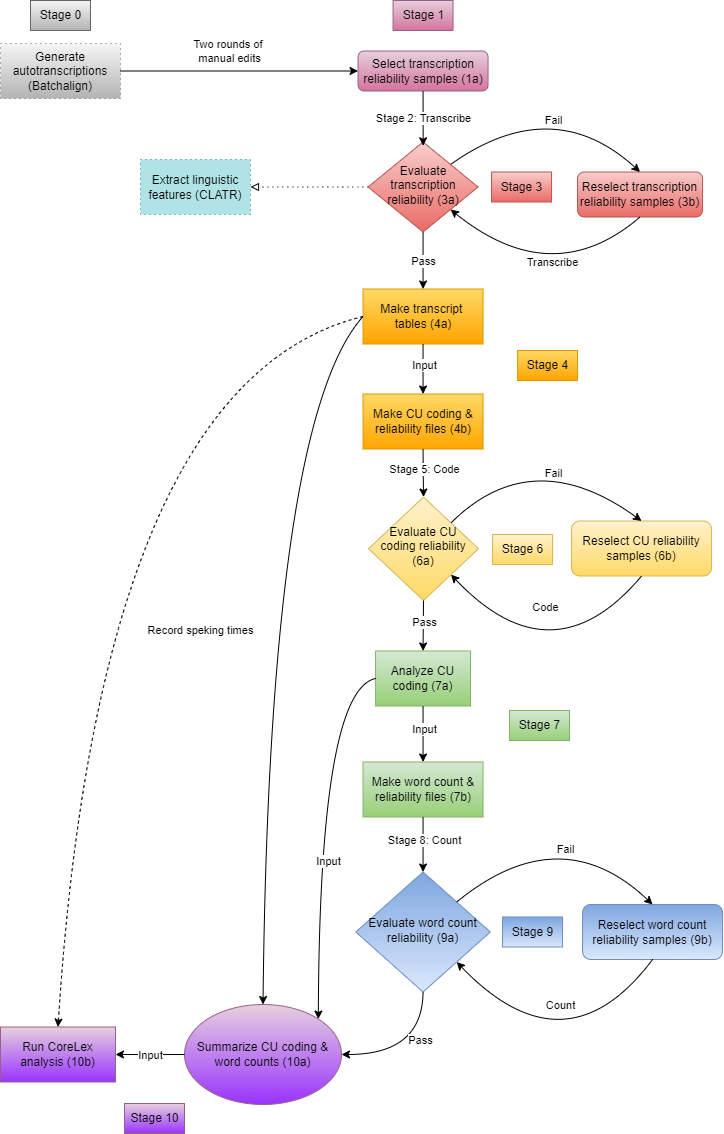
Stages 2, 5, & 8 are entirely manual. Dashed arrows show the alternate inputs to function 10b: function 4a output is required, and recording speaking time in the samples sheet is optional but recommended.
Notes
Input Transcriptions
.chafiles must be formatted correctly according to CHAT conventions.- Ensure filenames match tier values as specified in
config.yaml. - RASCAL searches tier values using exact spelling and capitalization.
Transcript Tables (function 4a)
Function 4a prepares both utterance- and sample-level tabulations of CHAT-formatted transcripts in Excel files, assigning unique alphanumeric identifiers encoding level of analysis – ‘S’ for sample and ‘U’ for utterance – for example, S008 and U0246.
The transcript_tables.xlsx output contains two sheets:
samplesfor transcript metadata, including file name and tier valuesutterancesfor transcript content, i.e., (CHAT-coded) utterances & comments (from%comlines)
This encoded tabularization:
- establishes unique, human-readable identifiers that satisfy database logic
- facilitates data management across RASCAL inputs and outputs, including joins between tables
- promotes transparency and consistency in text processing
- minimizes potential bias during manual coding
If not provided, these tables are automatically generated from .cha inputs for functions 4b, 7b, & 10b.
Transcription Reliability Input (function 3a)
In both the CLI and webapp versions, RASCAL function 3a matches original with reliability transcripts based on common tiers plus a reliability tag in the file name, e.g., TU88_PreTxBrokenWindow.cha & TU88PreTxBrokenWindow_reliability.cha. Function 1a generates empty .cha file templates with the reliabiilty tag for the randomly selected samples. In the CLI version, reliability samples can be collected into a /reliability subdirectory in the input folder. The tier values must match the originals, but this provides an alternative to tagging filenames.
Logs & Metadata
The logs subdirectory in the output folder contains two files describing the program run:
rascal_YYMMDD_HHMM.log- contains log messages (e.g, runtime, detected files, errors, etc.)rascal_YYMMDD_HHMM_metadata.json- takes a snapshot of input & output directory content just before program terminates
🧪 Testing
This project uses pytest for its testing suite.
All tests are located under the tests/ directory, organized by module/function.
Running Tests
To run the full suite:
pytest
Run with verbose output:
pytest -v
Run a specific test file:
pytest tests/test_coding/test_corelex_analyze.py
Status and Contact
I warmly welcome feedback, feature suggestions, or bug reports. Feel free to reach out by:
-
Submitting an issue through the GitHub Issues tab
-
Emailing me directly at: nsm [at] temple.edu
Thanks for your interest and collaboration!
Citation
If using RASCAL in your research, please cite:
McCloskey, N., et al. (2025, April). The RASCAL pipeline: User-friendly and time-saving computational resources for coding and analyzing language samples. Poster presented at the Aphasia Access Leadership Summit, Pittsburgh, PA.
There is a formal writeup in preparation.
(in prep) McCloskey, N., Hoover, E., Vitale, S., Kohen, F., and DeDe, G. (2025) The RASCAL pipeline: User-friendly and time-saving computational resources for coding and analyzing monologic discourse samples.
Acknowledgments
RASCAL builds on and integrates functionality from two excellent open-source tools which I highly recommend to researchers and clinicians working with language data:
- batchalign2 – Developed by the TalkBank team, Batchalign provides a robust backend for automatic speech recognition (ASR). RASCAL was designed to function downstream of this system, leveraging its debulletized
.chafiles as input. This integration allows researchers to significantly expedite batch transcription, which without an ASR springboard might bottleneck discourse analysis.
Liu H, MacWhinney B, Fromm D, Lanzi A. Automation of Language Sample Analysis. J Speech Lang Hear Res. 2023 Jul 12;66(7):2421-2433. doi: 10.1044/2023_JSLHR-22-00642. Epub 2023 Jun 22. PMID: 37348510; PMCID: PMC10555460.
-
coreLexicon – A web-based interface for Core Lexicon analysis developed by Rob Cavanaugh, et al (2021). RASCAL implements its own Core Lexicon analysis that has high reliability with this web app: ICC(2) values (two-way random, absolute agreement) on primary metrics were 0.9627 for accuracy (number of core words) and 0.9689 for efficiency (core words per minute) - measured on 402 narratives (Brokem Window, Cat Rescue, and Refused Umbrella) from our conversation treatment study. RASCAL does not use the webapp but accesses the normative data associated with this repository (using Google sheet IDs) to calculate percentiles.
- Inspiration & overlap: RASCAL’s output table design was directly inspired by the original web app, with many of the same fields (accuracy, efficiency, percentiles, CoreLex tokens produced).
- Enhancements: RASCAL extends this model by (a) supporting batch analysis of uploaded/input tabular data (rather than manual entry through a web interface), and (b) including some new metrics, particularly a normalized lexicon coverage, which enables aggregate comparisons across narratives.
- Recommended use cases: The original web app remains an excellent choice for users working with a small number of samples who want individualized reports, while RASCAL's CoreLex functionality fills the niche of higher-throughput analysis ready for downstream statistical workflows.
Cavanaugh, R., Dalton, S. G., & Richardson, J. (2021). coreLexicon: An open-source web-app for scoring core lexicon analysis. R package version 0.0.1.0000. https://github.com/aphasia-apps/coreLexicon
1 maintainer

Download files
Download the file for your platform. If you're not sure which to choose, learn more about installing packages.
Source Distribution
Built Distribution
Filter files by name, interpreter, ABI, and platform.
If you're not sure about the file name format, learn more about wheel file names.
Copy a direct link to the current filters
File details
Details for the file rascal_speech-1.0.8.tar.gz.
File metadata
- Download URL: rascal_speech-1.0.8.tar.gz
- Upload date:
- Size: 64.1 kB
- Tags: Source
- Uploaded using Trusted Publishing? No
- Uploaded via:
twine/6.2.0 CPython/3.12.12
File hashes
| Algorithm | Hash digest | |
|---|---|---|
| SHA256 |
b0c9c39e893dbdc40ef0ba6745622e412651927ba0f9b25aa30b2c92d6ebfe04
|
|
| MD5 |
034b73cf5098a4ce416f6c89c1ea7b07
|
|
| BLAKE2b-256 |
2cbae039f89e9b3fd3905802986c779635a5c87efd03d29b3a6783f54bd4de14
|
File details
Details for the file rascal_speech-1.0.8-py3-none-any.whl.
File metadata
- Download URL: rascal_speech-1.0.8-py3-none-any.whl
- Upload date:
- Size: 63.0 kB
- Tags: Python 3
- Uploaded using Trusted Publishing? No
- Uploaded via:
twine/6.2.0 CPython/3.12.12
File hashes
| Algorithm | Hash digest | |
|---|---|---|
| SHA256 |
aad0df71b42dc7c4cc31fee805043f0af9c05dd6f91a54dccbddb5e352a6a5f1
|
|
| MD5 |
14ffaebd4df11b0efaeacd217145ea4e
|
|
| BLAKE2b-256 |
769ff87d2edc8be7b28a76885a468e1c8be49e791203ba6ce31a6885243e67af
|














