
An open source framework for deep learning on satellite and aerial imagery


Project description








Raster Vision is an open source Python framework for building computer vision models on satellite, aerial, and other large imagery sets (including oblique drone imagery).
- It allows users (who don't need to be experts in deep learning!) to quickly and repeatably configure experiments that execute a machine learning pipeline including: analyzing training data, creating training chips, training models, creating predictions, evaluating models, and bundling the model files and configuration for easy deployment.
- There is built-in support for chip classification, object detection, and semantic segmentation with backends using PyTorch.
- Experiments can be executed on CPUs and GPUs with built-in support for running in the cloud using AWS Batch.
- The framework is extensible to new data sources, tasks (eg. instance segmentation), backends (eg. Detectron2), and cloud providers.
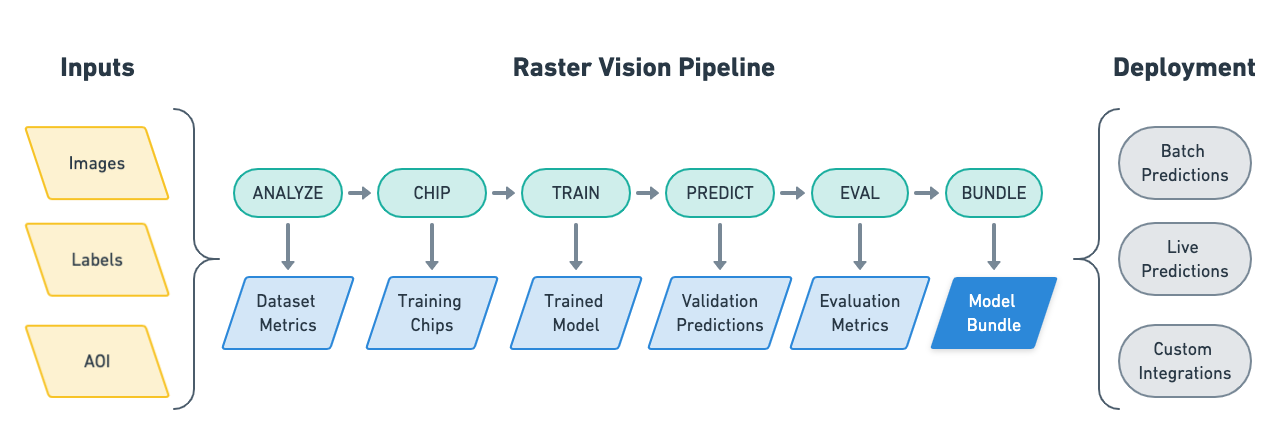
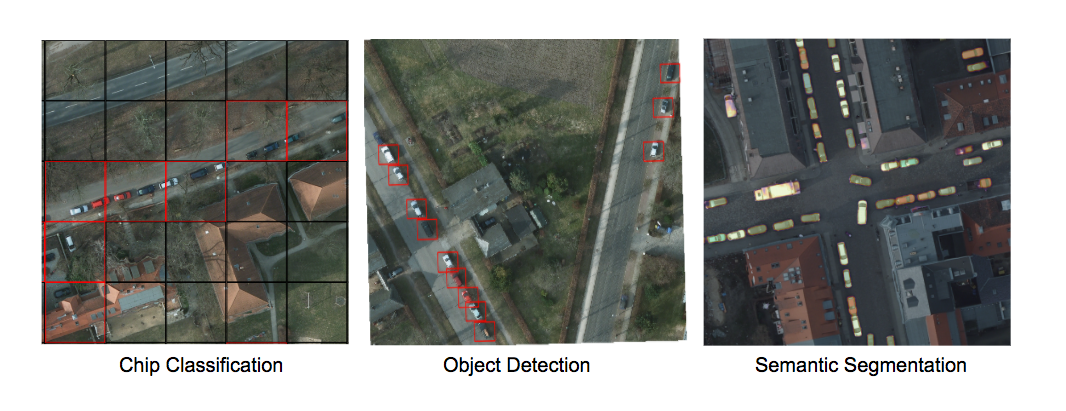
See the documentation for more details.
Setup
There are several ways to setup Raster Vision:
- To build Docker images from scratch, after cloning this repo, run
docker/build, and run the container usingdocker/run. - Docker images are published to quay.io. The tag for the
raster-visionimage determines what type of image it is:- The
pytorch-*tags are for running the PyTorch containers. - We publish a new tag per merge into
master, which is tagged with the first 7 characters of the commit hash. To use the latest version, pull thelatestsuffix, e.g.raster-vision:pytorch-latest. Git tags are also published, with the Github tag name as the Docker tag suffix.
- The
- Raster Vision can be installed directly using
pip install rastervision. However, some of its dependencies will have to be installed manually.
For more detailed instructions, see the Setup docs.
Example
The best way to get a feel for what Raster Vision enables is to look at an example of how to configure and run an experiment. Experiments are configured using a fluent builder pattern that makes configuration easy to read, reuse and maintain.
# tiny_spacenet.py

from os.path import join

from rastervision.core.rv_pipeline import *
from rastervision.core.backend import *
from rastervision.core.data import *
from rastervision.pytorch_backend import *
from rastervision.pytorch_learner import *


def get_config(runner):
    root_uri = '/opt/data/output/'
    base_uri = ('https://s3.amazonaws.com/azavea-research-public-data/'
                'raster-vision/examples/spacenet')
    train_image_uri = '{}/RGB-PanSharpen_AOI_2_Vegas_img205.tif'.format(
        base_uri)
    train_label_uri = '{}/buildings_AOI_2_Vegas_img205.geojson'.format(
        base_uri)
    val_image_uri = '{}/RGB-PanSharpen_AOI_2_Vegas_img25.tif'.format(base_uri)
    val_label_uri = '{}/buildings_AOI_2_Vegas_img25.geojson'.format(base_uri)
    channel_order = [0, 1, 2]
    class_config = ClassConfig(
        names=['building', 'background'], colors=['red', 'black'])

    def make_scene(scene_id, image_uri, label_uri):
        """
        - StatsTransformer is used to convert uint16 values to uint8.
        - The GeoJSON does not have a class_id property for each geom,
          so it is inferred as 0 (ie. building) because the default_class_id
          is set to 0.
        - The labels are in the form of GeoJSON which needs to be rasterized
          to use as label for semantic segmentation, so we use a RasterizedSource.
        - The rasterizer set the background (as opposed to foreground) pixels
          to 1 because background_class_id is set to 1.
        """
        raster_source = RasterioSourceConfig(
            uris=[image_uri],
            channel_order=channel_order,
            transformers=[StatsTransformerConfig()])
        vector_source = GeoJSONVectorSourceConfig(
            uri=label_uri, default_class_id=0, ignore_crs_field=True)
        label_source = SemanticSegmentationLabelSourceConfig(
            raster_source=RasterizedSourceConfig(
                vector_source=vector_source,
                rasterizer_config=RasterizerConfig(background_class_id=1)))
        return SceneConfig(
            id=scene_id,
            raster_source=raster_source,
            label_source=label_source)

    dataset = DatasetConfig(
        class_config=class_config,
        train_scenes=[
            make_scene('scene_205', train_image_uri, train_label_uri)
        ],
        validation_scenes=[
            make_scene('scene_25', val_image_uri, val_label_uri)
        ])

    # Use the PyTorch backend for the SemanticSegmentation pipeline.
    chip_sz = 300
    backend = PyTorchSemanticSegmentationConfig(
        model=SemanticSegmentationModelConfig(backbone=Backbone.resnet50),
        solver=SolverConfig(lr=1e-4, num_epochs=1, batch_sz=2))
    chip_options = SemanticSegmentationChipOptions(
        window_method=SemanticSegmentationWindowMethod.random_sample,
        chips_per_scene=10)

    return SemanticSegmentationConfig(
        root_uri=root_uri,
        dataset=dataset,
        backend=backend,
        train_chip_sz=chip_sz,
        predict_chip_sz=chip_sz,
        chip_options=chip_options)
Raster Vision uses a unittest-like method for executing experiments. For instance, if the above was defined in tiny_spacenet.py, with the proper setup you could run the experiment using:
> rastervision run local tiny_spacenet.py
See the Quickstart for a more complete description of running this example.
Resources
Contact and Support
You can find more information and talk to developers (let us know what you're working on!) at:
Contributing
We are happy to take contributions! It is best to get in touch with the maintainers about larger features or design changes before starting the work, as it will make the process of accepting changes smoother.
Everyone who contributes code to Raster Vision will be asked to sign the Azavea CLA, which is based off of the Apache CLA.
-
Download a copy of the Raster Vision Individual Contributor License Agreement or the Raster Vision Corporate Contributor License Agreement
-
Print out the CLAs and sign them, or use PDF software that allows placement of a signature image.
-
Send the CLAs to Azavea by one of:
- Scanning and emailing the document to cla@azavea.com
- Faxing a copy to +1-215-925-2600.
- Mailing a hardcopy to: Azavea, 990 Spring Garden Street, 5th Floor, Philadelphia, PA 19107 USA
Release history Release notifications | RSS feed


Download files
Download the file for your platform. If you're not sure which to choose, learn more about installing packages.
Source Distribution
Built Distribution
Filter files by name, interpreter, ABI, and platform.
If you're not sure about the file name format, learn more about wheel file names.
Copy a direct link to the current filters
File details
Details for the file rastervision-0.12.tar.gz.
File metadata
- Download URL: rastervision-0.12.tar.gz
- Upload date:
- Size: 5.6 kB
- Tags: Source
- Uploaded using Trusted Publishing? No
- Uploaded via: twine/2.0.0 pkginfo/1.5.0.1 requests/2.22.0 setuptools/42.0.2 requests-toolbelt/0.9.1 tqdm/4.35.0 CPython/3.6.5
File hashes
| Algorithm | Hash digest | |
|---|---|---|
| SHA256 |
b46ac0bbddb0010ffbb576f9ad586375e9c9139cb5a160ee20def668c210304c
|
|
| MD5 |
8fb741e03c1ff01b741d5bb1fea4a5b3
|
|
| BLAKE2b-256 |
e4e6c9bde6345671a85efbfef9c5e71da14f08a5cda9611ec6e1b69cce3168f2
|
File details
Details for the file rastervision-0.12-py3-none-any.whl.
File metadata
- Download URL: rastervision-0.12-py3-none-any.whl
- Upload date:
- Size: 5.1 kB
- Tags: Python 3
- Uploaded using Trusted Publishing? No
- Uploaded via: twine/2.0.0 pkginfo/1.5.0.1 requests/2.22.0 setuptools/42.0.2 requests-toolbelt/0.9.1 tqdm/4.35.0 CPython/3.6.5
File hashes
| Algorithm | Hash digest | |
|---|---|---|
| SHA256 |
bf2597702f12fd4c3a7969abc0a53fd704a5e37aa8b9ad169febb70adfd9a628
|
|
| MD5 |
647da508af8d6c40392202f2a189d681
|
|
| BLAKE2b-256 |
93ebcece39420ecef7ea87b1fdddac8d02cbbf9257202e4942305763034133e5
|






