
rastrolog
See which AI crawlers read your site and which AI chat products send you visitors.
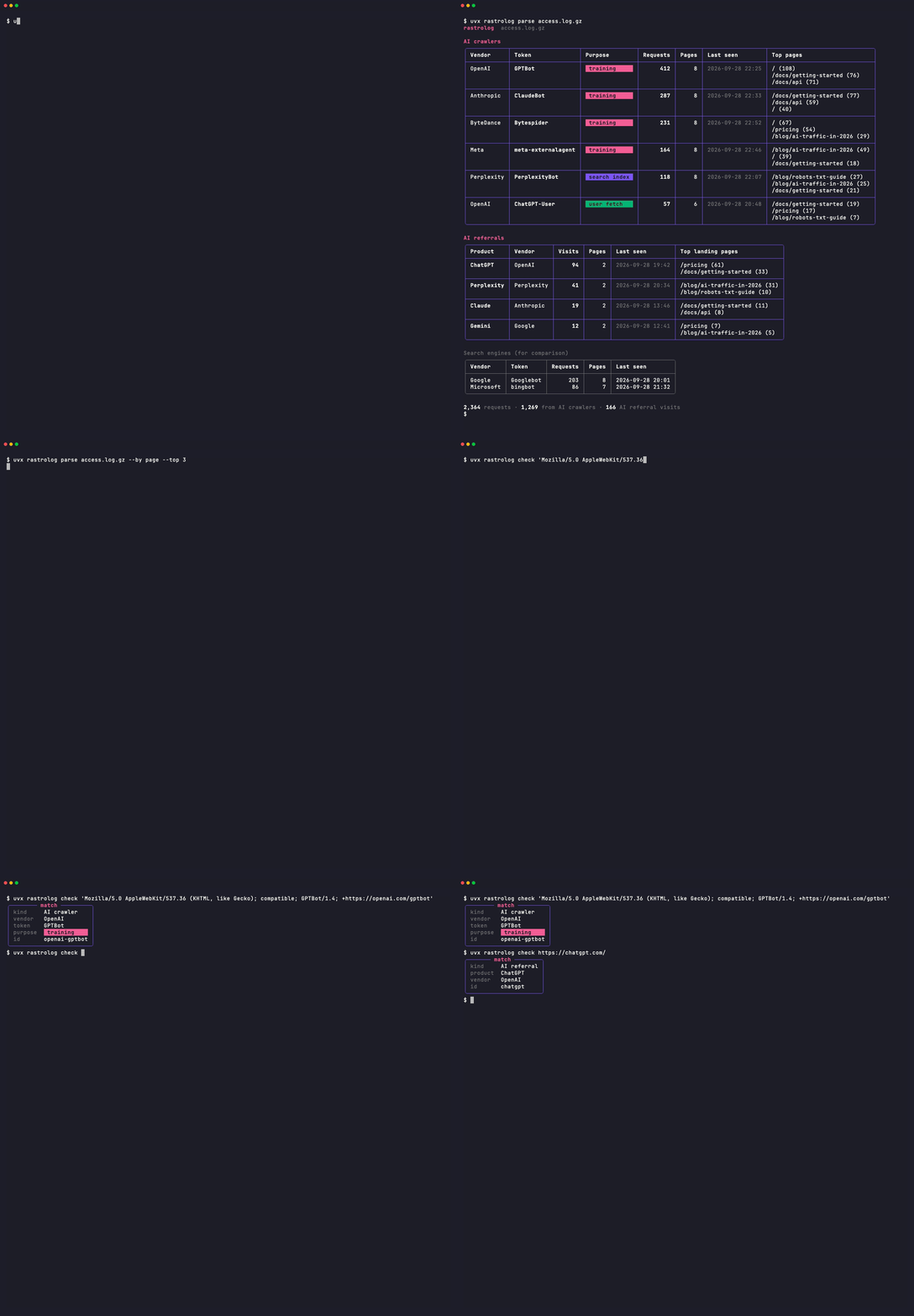
rastrolog reads your access logs and prints two tables:
- AI crawlers by user agent (GPTBot, ClaudeBot, PerplexityBot, …): what they fetched, and whether each one is there to train, to fetch a page for a user, or to build a search index.
- AI referrals: people who clicked a link inside ChatGPT, Claude, Perplexity, Gemini or Copilot, and the pages they landed on.
It classifies where a visit came from, never who the visitor is. There is no hosting, no storage and no telemetry.
Install
pip install rastrolog # or: uv tool install rastrolog
Use
rastrolog parse access.log                     # nginx, Apache combined, CloudFront, ALB; .gz is fine
rastrolog parse access.log.gz --since 7d --json
rastrolog parse access.log --by page --top 20  # which pages AI tools touch
rastrolog check "https://chatgpt.com/"         # classify one referrer or user agent
--json writes the same report as JSON on stdout, for piping into anything else.
In your app
FastAPI / Starlette:
from rastrolog.middleware.asgi import AITrafficMiddleware

app.add_middleware(
    AITrafficMiddleware, on_match=lambda match, scope: counter.labels(match.id).inc()
)
# in a handler: request.state.ai_traffic -> rastrolog.Match | None
Django:
MIDDLEWARE = [..., "rastrolog.middleware.django.AITrafficMiddleware"]
RASTROLOG = {"on_match": "myproject.metrics.count_ai_traffic", "log": True}
# in a view: request.ai_traffic -> rastrolog.Match | None
Library:
from rastrolog import classify_user_agent, classify_referrer

classify_user_agent("Mozilla/5.0 ... GPTBot/1.3 ...")
# Match(kind='crawler', id='openai-gptbot', vendor='openai', token='GPTBot', purpose='training', ...)
classify_referrer("https://www.google.com/")  # None
What it detects
The lists live in signals.json. Crawler tokens cite the vendor's own documentation, except Bytespider (ByteDance publishes none, so that entry is flagged vendor_documented: false and sourced from a reputable third party instead). Referrer hosts cite either vendor docs or a published AI-source list from an analytics vendor (Matomo, Plausible). robots.txt-only tokens (Google-Extended, Applebot-Extended) never appear in a user agent string; they're read by the robots.txt checker, not by log classification. Every user-agent crawler and every referrer has a fixture in conformance/; robots.txt-only tokens are exercised by the robots.txt checker instead.
Known gaps, stated plainly:
- Google AI Overviews and AI Mode send visitors with a plain
google.comreferrer, which can't be told apart from ordinary search. rastrolog doesn't guess. - AWS ALB logs have no Referer field, so ALB logs show crawlers only.
- Some AI apps strip the referrer entirely. Those visits look like direct traffic.
Get notified when the list changes
New AI crawlers appear every few months, and your robots.txt goes out of date the day they do. Until the email signup page launches, watch this repo's releases (Watch → Custom → Releases). Every release that changes signals.json says what was added.
1 maintainer

Metadata
1 maintainer
Release files for rastrolog 0.2.1
For a detailed explanation of source distributions (sdists) and built distributions (wheels), please see the package formats documentation.
Source distribution (sdist)
| File | Size | Uploaded | |
|---|---|---|---|
| rastrolog-0.2.1.tar.gz | 133.4 kB | Details |
Built distribution (wheel)
| File | Interpreter | ABI | Platform | Reset |
|---|---|---|---|---|
| rastrolog-0.2.1-py3-none-any.whl | Python 3 | none | any | Details |
Total release size: 159.7 kB
Release files / rastrolog-0.2.1.tar.gz
| Download URL | rastrolog-0.2.1.tar.gz |
|---|---|
| Size | 133.4 kB |
| Tags | Source |
|
SHA-256 checksum How to use checksums |
10757bc2fc9ae6f892c679944103246226fc6f5f83126bfb54fad70c484a8322
|
|
BLAKE2b-256 checksum How to use checksums |
69de1ba9689aee9f6709bfadc3ffcc99da77f08704f5728fd571d44dbb8259a2
|
| Upload date | |
|
Uploaded using Trusted Publishing? What is trusted publishing? |
Yes |
| Uploaded via |
twine/7.0.0 CPython/3.13.14
|
Provenance
Provenance describes where a file came from. On PyPI, provenance is shared via attestations, which provide a verifiable record of the build or publishing details. View details, limitations and caveats.


PyPI Publish Attestation
PyPI verified that this artifact, at this checksum, originated from the publisher listed below.
Signed by GitHub Actions, verified by PyPI on Sep 29, 2026.
Transparency logRelease files / rastrolog-0.2.1-py3-none-any.whl
| Download URL | rastrolog-0.2.1-py3-none-any.whl |
|---|---|
| Size | 26.3 kB |
| Tags | Python 3 |
|
SHA-256 checksum How to use checksums |
9784fb7709456f66019523d6082d5514322b6f3fa76d51ea4208087b7a4f467a
|
|
BLAKE2b-256 checksum How to use checksums |
791b02cd952e14c777f2be772676ddd4ae85646aaa05b9d8f16cc126abe3c1ef
|
| Upload date | |
|
Uploaded using Trusted Publishing? What is trusted publishing? |
Yes |
| Uploaded via |
twine/7.0.0 CPython/3.13.14
|
Provenance
Provenance describes where a file came from. On PyPI, provenance is shared via attestations, which provide a verifiable record of the build or publishing details. View details, limitations and caveats.
PyPI Publish Attestation
PyPI verified that this artifact, at this checksum, originated from the publisher listed below.
Signed by GitHub Actions, verified by PyPI on Sep 29, 2026.
Transparency log













