
A CLI task time tracker with JSON storage

Project description
rata: raw time tracker
Painless interactive terminal time tracker with git versioning running on python 3 and urwid.
What I disliked in other terminal time trackers was that I had to use complicated key strokes or type commands to start/stop and switch between tasks. I wanted single-key actions, fast switching and typing only for naming tasks.
Demo screencast
See a demo screencast here: https://asciinema.org/a/uyiaMiwlXnZjSj12N8fTudIrt
Screenshot
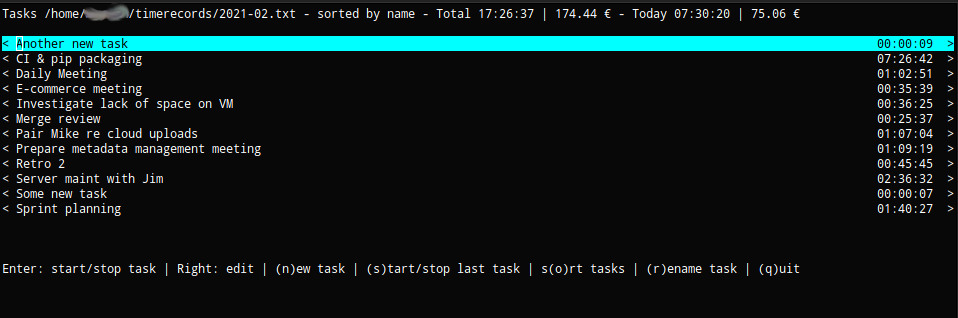
It suits people who only want to track the name, duration, start and end time of tasks they worked on, e.g. for billing a project per hour.
It's my first urwid project and there is no test coverage. Use at own risk, though it commits all changes directly to git. So you should always be able to recover your entries.
Features
- runs in the terminal and adjusts to terminal size
- track time per task in a single JSON file
- quickly change between, add and rename tasks
- shows when you started tracking, since when you are tracking and total duration tracked per task
- edit previous records with check for overlaps
- keep track of all changes through automatic git commits
- sort by duration/name/most recently worked on (default: most recent)
- status line shows total, today, yesterday, and current week hours
- JSON file format for easy parsing and integration
Installation
pip install rata
Or to install the latest master, clone this repo and run this command in the project root folder:
pip install --upgrade .
Usage
rata requires a file name in a git-versioned folder. It will create a new commit for any change.
git init ~/timerecords
rata ~/timerecords/projectFoo.json

or if you want to see how much you will have to bill:

RATE=<hourly rate> rata ~/timerecords/projectFoo.json
I would strongly recommend to not keep other files than what rata creates in the repository as it runs git reset before committing and may mess with your git stage.
Key-bindings
Main view
- Enter: Start/Stop tracking task under cursor
- up/down: Move cursor over task list
- right: Show and edit list of time records of task under cursor
- n: Add new task and start tracking it
- r: Rename task under cursor
- s: Start/Stop current/last track (independant of cursor position)
- o: Toggle sorting: by name, total task duration, most recently tracked
- l: Show daily log with duration and tasks per day
- q: Quit program
Edit mode
- Enter: Edit record under cursor (modify the timestamps and confirm with Enter again)
- h: Quick-edit: Move start time under cursor 1 minute ahead
- j: Quick-edit: Move start time under cursor 1 minute back
- k: Quick-edit: Move end time under cursor 1 minute ahead
- l: Quick-edit: Move end time under cursor 1 minute back
- Esc: Go back to main view
New task mode
- Enter a name for your new task
- Enter: Confirm
- Esc: Go back to main view
Sample output file
{
  "Client support": [
    {"start": "2020-12-27 10:22:10", "end": "2020-12-27 11:30:11"},
    {"start": "2020-12-24 09:30:03", "end": "2020-12-24 10:40:06"}
  ],
  "On-site meetings": [
    {"start": "2020-12-25 15:00:07", "end": "2020-12-25 17:38:10"},
    {"start": "2020-12-20 13:44:11", "end": "2020-12-20 16:50:14"}
  ]
}
Breaking changes in 1.0.0
The file format changed from org-mode to JSON. Existing org-mode files need to be converted.


Download files
Download the file for your platform. If you're not sure which to choose, learn more about installing packages.
Source Distribution
Built Distribution
Filter files by name, interpreter, ABI, and platform.
If you're not sure about the file name format, learn more about wheel file names.
Copy a direct link to the current filters
File details
Details for the file rata-1.0.0.tar.gz.
File metadata
- Download URL: rata-1.0.0.tar.gz
- Upload date:
- Size: 12.4 kB
- Tags: Source
- Uploaded using Trusted Publishing? No
- Uploaded via: twine/6.2.0 CPython/3.13.5
File hashes
| Algorithm | Hash digest | |
|---|---|---|
| SHA256 |
6f7dcc04bed2e0ab845c06aeddec7004cc8151b8eeead4e85730eb96cf4bb568
|
|
| MD5 |
2a867c922b73478e1242947484a9ccc5
|
|
| BLAKE2b-256 |
b02dcdc1a89ebd8058a20968d18b8b389c57e25cb5c3067a248a0f9f94da86f0
|
File details
Details for the file rata-1.0.0-py3-none-any.whl.
File metadata
- Download URL: rata-1.0.0-py3-none-any.whl
- Upload date:
- Size: 12.6 kB
- Tags: Python 3
- Uploaded using Trusted Publishing? No
- Uploaded via: twine/6.2.0 CPython/3.13.5
File hashes
| Algorithm | Hash digest | |
|---|---|---|
| SHA256 |
6d18afe43b120adb937111b9aa2e09073f89db0466bd3c820fb17919be177b12
|
|
| MD5 |
9325d67bc2959fb829c7ae6b1533844a
|
|
| BLAKE2b-256 |
6b21b5e4bf80649098ee07d76c4fd1fec4c4b1b2887c60fb2cf274914872ae0a
|






