
Rate my project


Table of Contents
Overview
rate my project is a tool designed to help analyze and improve the efficiency of a project and the team working on it. It does this by integrating with Jira, a popular project management tool from Atlassian, to retrieve data and statistics about the project's progress and the team's performance.
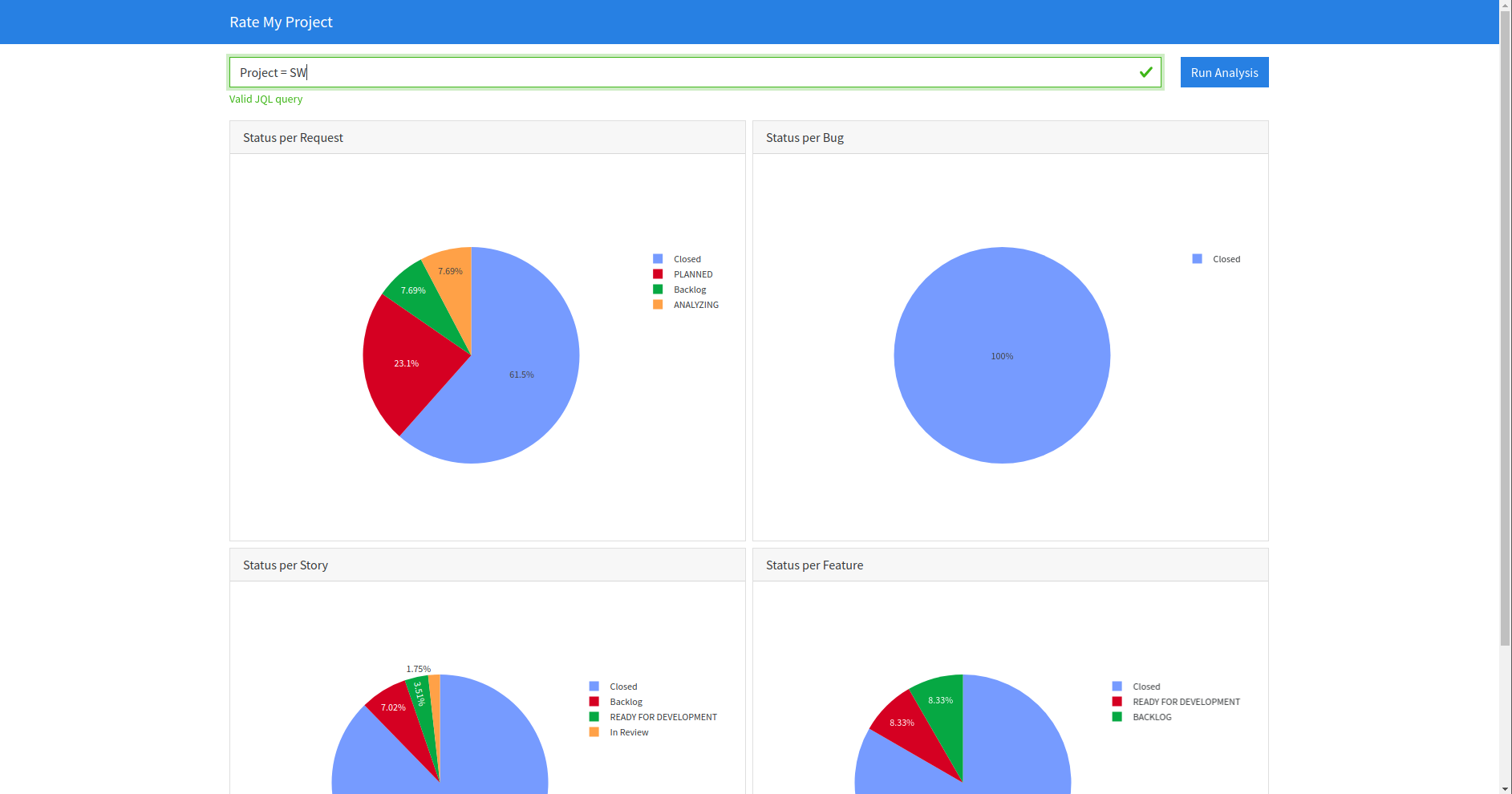
By collecting this data from Jira, rate my project can provide an objective view of the project's status and help identify areas for improvement. This can include metrics such as how long tasks take to complete, how many tasks are being completed on time, and how much work is being done by each team member.
In addition to analyzing the data, rate my project also offers the ability to produce reports in Confluence, another popular collaboration tool in Atlassian suite. These reports can help visualize the data collected by rate my project and communicate it to stakeholders, team members, and other interested parties.
Overall, rate my project is a useful tool for project managers and team leaders who want to improve their team's efficiency and effectiveness. By using data to gain an objective view of the project's progress, they can make informed decisions and take actions that lead to better outcomes.
In developing this tool, it became clear that defining universal metrics according to the topology of your JIRA projects was a complex task, so it was essential to be able to provide a simple way of adding your own metrics in the form of a plugin.
Installation
From PyPI (Recommended)
You can install easily with the following command or insert into your requirements file :
pip install rate-my-project
From sources
It is recommended to use a virtual environment :
python -m venv venv
To install the module and the main script, simply do :
pip install .
For the developers, it is useful to install extra tools like :
These tools can be installed with the following command :
pip install '.[dev]'
The Git hooks can be installed with :
pre-commit install
The hooks can be run manually at any time :
pre-commit run --all-file
Usage
The full list of arguments supported can be displayed with the following helper :
./rate_my_project -h
Usage: rate_my_project [OPTIONS] COMMAND [ARGS]...

  Swiss knife for measuring project efficiency.

Options:
  -v, --verbose  Enables verbose mode.
  -h, --help     Show this message and exit.

Commands:
  explore  Explore efficiency metrics with web interface from CONFIG file.
  report   Generate report from CONFIG file.
Exploration mode
The first command is used to create a dynamic dashboard to explore the metrics. The dashboard is a simple webapp which let the user entered a JQL query and interact with the results.
This mode can be started by executing the following command :
./rate_my_project explore my_config.yaml
The dashboard will be accessible at : http://127.0.0.1:8050
Report mode
The second command is used to create a report on Confluence for every project in the config file. The objective of this mode is to automate the reporting after finding the right query in exploration mode.
This mode can be started by executing the following command :
./rate_my_project report my_config.yaml
Configuration
The configuration file support 2 formats :
- YAML format (Recommended format)
- JSON format
In the configuration file, there are 4 main sections required :
servermetricsfieldsprojects
Some fields could use double quotes to preserve space in their names. The YAML syntax provides a solution by replacing with simple quote or escaping like JSON :
In Yaml :
jql: 'project = "MY TEST"'
In Json :
{
  "jql": "project = \"MY TEST\""
}
Server configuration
The server node will configure the URL of the Jira and Confluence server.
The credentials could be defined with environment variables or .env file.
For the moment, only the username/token authentication is supported.
ATLASSIAN_USER=<your login>
ATLASSIAN_TOKEN=<your token>
In Yaml :
server:
  jira: "https://my.jira.server.com"
  confluence: "https://my.confluence.server.com"
In Json :
{
  "server": {
    "jira": "https://my.jira.server.com",
    "confluence": "https://my.confluence.server.com"
  }
}
| Attribute | Required | Description |
|---|---|---|
| server | ✅ | Main configuration node for server. |
| jira | ✅ | Jira server URL to retrieve tickets information. |
| confluence | ✅ | Confluence server URL to publish the report. |
Metrics configuration
The metrics node will define the list of metrics to be used to avoid
unnecessary calculations or analysis.
In Yaml :
metrics:
  - status
In Json :
{
  "metrics": [
    "status"
  ]
}
| Attribute | Required | Description |
|---|---|---|
| metrics | ✅ | Main configuration node for metrics. |
| <metric> | ✅ | List of metric name. At least one metric is mandatory |
Fields configuration
The fields node will configure the field name to use since it could be custom
fields.
In Yaml :
fields:
  sprint: "customfield_10001"
  story_points: "customfield_10002"
In Json :
{
  "fields": {
    "sprint": "customfield_10001",
    "story_points": "customfield_10002"
  }
}
| Attribute | Required | Description |
|---|---|---|
| fields | ✅ | Main configuration node for fields. |
| sprint | ✅ | Field to store the current sprint. |
| story_points | ✅ | Field to store the estimation in story points of a development. |
Project configuration
The projects node will provide the configuration for each project.
In Yaml :
projects:
  <project name>:
    jql: "project = TEST"
    report:
      space: "SPACE"
      parent_page: "My Parent Page"
    workflow:
      - name: "Backlog"
        status:
          - "Backlog"
      - name: "In progress"
        status:
          - "In progress"
          - "In review"
      - name: "Done"
        status:
          - "Closed"
In Json :
{
  "projects": {
    "<project name>": {
      "jql": "project = TEST",
      "report": {
        "space": "SPACE",
        "parent_page": "My Parent Page"
      },
      "workflow": [
        {
          "name": "Backlog",
          "status": [
            "Backlog"
          ]
        },
        {
          "name": "In progress",
          "status": [
            "In progress",
            "In review"
          ]
        },
        {
          "name": "Done",
          "status": [
            "Closed"
          ]
        }
      ]
    }
  }
}
| Attribute | Required | Description |
|---|---|---|
| projects | ✅ | Main configuration node for all projects. |
| <project name> | ✅ | Must be replaced by the name of the project. This name will be used as a title of the report. |
| jql | ✅ | JQL query to retrieve the list of tickets. |
| report | ✅ | Configuration node for all attributes related to report generation. |
| space | ✅ | Confluence destination space. |
| parent_page | ✅ | Confluence parent page of the report page. |
| workflow | ✅ | Configuration node for defining workflow. |
Report configuration
Specific configuration to publish the report on Confluence.
| Attribute | Required | Description |
|---|---|---|
| space | ✅ | Confluence destination space. |
| parent_page | ✅ | Confluence parent page of the report page. |
| template | ❌ | Path to Jinja2 template used to produce the report page. |
Workflow configuration
The workflow defines a list of states. Each state permits to map several Jira state to a "Virtual" state to simplify the metrics charts.
| Attribute | Required | Description |
|---|---|---|
| name | ✅ | Confluence destination space. |
| status | ✅ | Confluence parent page of the report page. |
| start | ❌ | Boolean value to define the current state is considered as the start of the work in order to compute metrics. |
| stop | ❌ | Boolean value to define the current state is considered as the stop of the work in order to compute metrics. |
Contribution
Unless you explicitly state otherwise, any contribution intentionally submitted for inclusion in the work by you, shall be as defined in the Apache-2.0 license without any additional terms or conditions.
See CONTRIBUTING.md.
1 maintainer

Metadata
1 maintainer
Release files for rate-my-project 1.2.0
For a detailed explanation of source distributions (sdists) and built distributions (wheels), please see the package formats documentation.
Source distribution (sdist)
| File | Size | Uploaded | |
|---|---|---|---|
| rate_my_project-1.2.0.tar.gz | 28.1 kB | Details |
Built distribution (wheel)
| File | Interpreter | ABI | Platform | Reset |
|---|---|---|---|---|
| rate_my_project-1.2.0-py3-none-any.whl | Python 3 | none | any | Details |
Total release size: 54.2 kB
Release files / rate_my_project-1.2.0.tar.gz
| Download URL | rate_my_project-1.2.0.tar.gz |
|---|---|
| Size | 28.1 kB |
| Tags | Source |
|
SHA-256 checksum How to use checksums |
864a4314118ed11dc5f7b6d443009238fc76888afe27a1ed80d41835d2e3ba6a
|
|
BLAKE2b-256 checksum How to use checksums |
6cd260ecb759e747028bb3867102b6f550eeb0ea6d7c48245aa188c1aa25249c
|
| Upload date | |
|
Uploaded using Trusted Publishing? What is trusted publishing? |
No |
| Uploaded via |
twine/4.0.2 CPython/3.9.18
|
Release files / rate_my_project-1.2.0-py3-none-any.whl
| Download URL | rate_my_project-1.2.0-py3-none-any.whl |
|---|---|
| Size | 26.1 kB |
| Tags | Python 3 |
|
SHA-256 checksum How to use checksums |
9a0004afba0fb8f9eb895b13bd7b285b97df17c4a579e46830214812a2aa8247
|
|
BLAKE2b-256 checksum How to use checksums |
d23b30d9f94eeb0b12941d7ece87740c86eaec4774afd3d81b42e88dc2b57fc2
|
| Upload date | |
|
Uploaded using Trusted Publishing? What is trusted publishing? |
No |
| Uploaded via |
twine/4.0.2 CPython/3.9.18
|














