
rawtrace-qc



rawtrace-qc creates interactive HTML reports from mass spectrometry raw files, so that you can compare runs and spot problems in them. You select Thermo .raw files or Bruker timsTOF .d folders in a desktop application, and the report then opens in your browser.
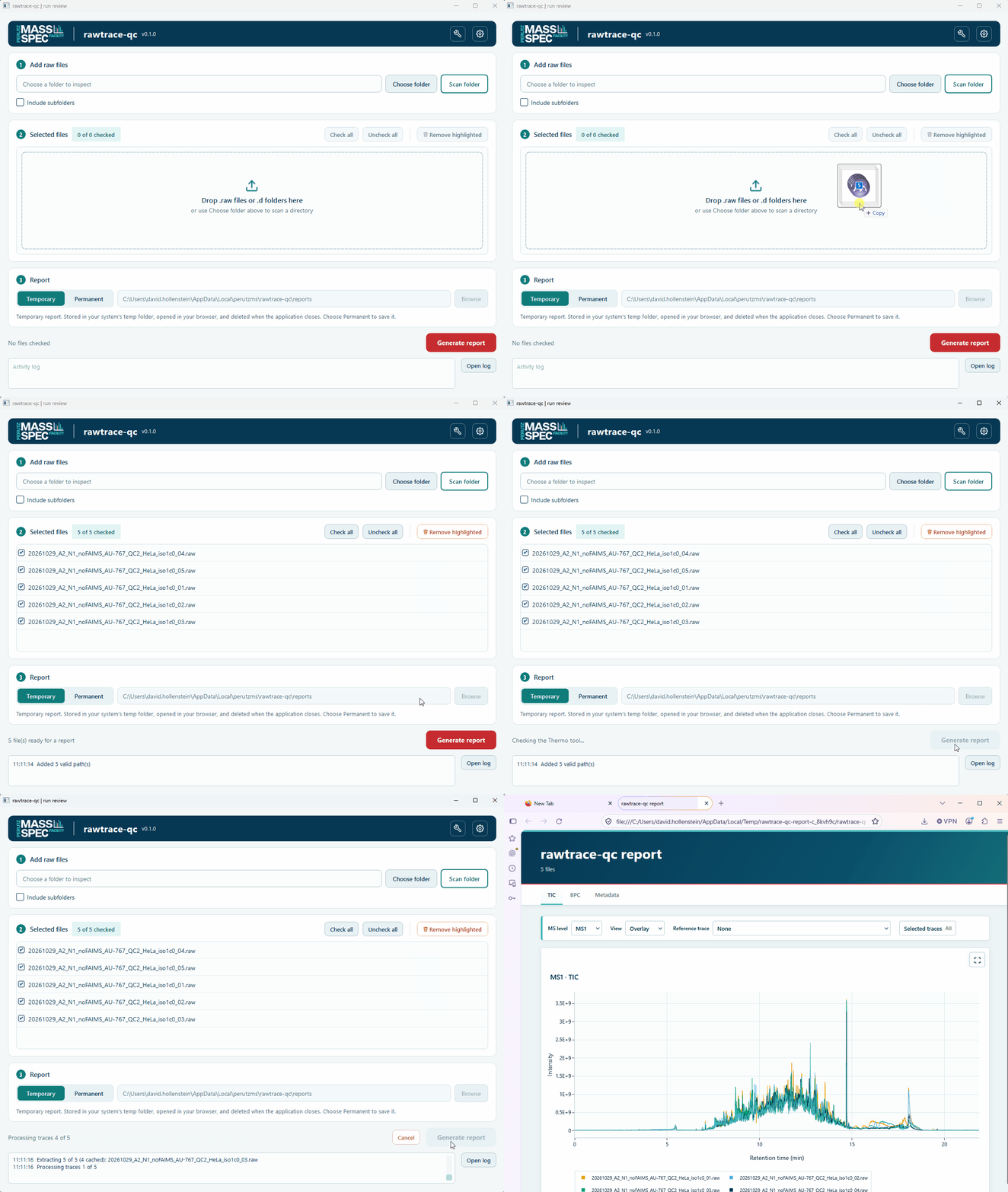
This recording uses traces that rawtrace-qc had already extracted and cached. Your first report takes longer because rawtrace-qc must extract the traces first.
Install
You need Windows to use the desktop application in this release. We recommend uv because it installs rawtrace-qc in a separate environment and downloads a suitable Python version if necessary:
uv tool install "rawtrace-qc[gui]"
If you prefer pip, you need Python 3.12 or later:
pip install "rawtrace-qc[gui]"
Then start the application with this command:
rawtrace-qc-gui
Set up Thermo support
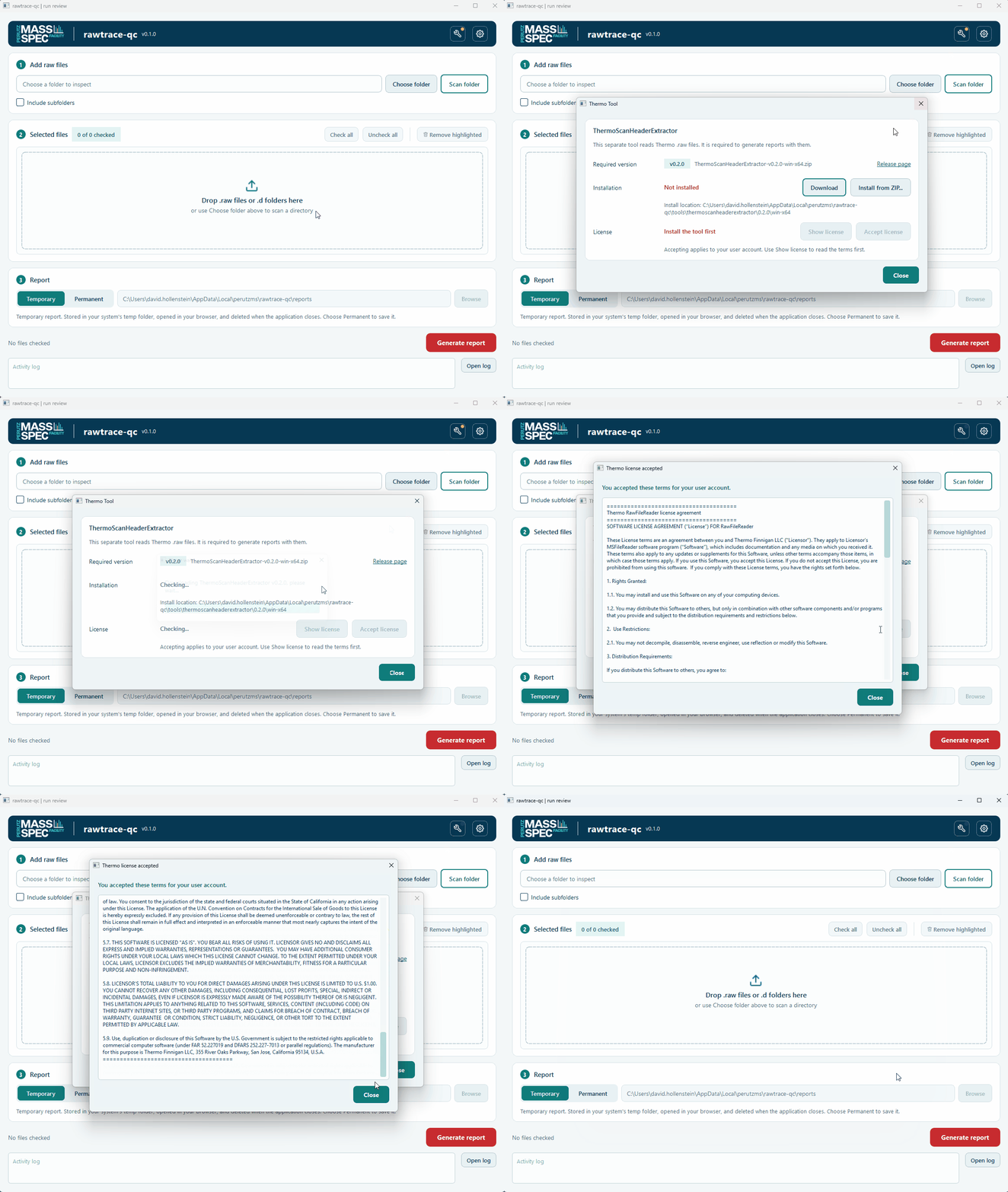
To read .raw files, rawtrace-qc uses a separate program from us called the Thermo tool (ThermoScanHeaderExtractor). This program has its own license from Thermo, so you install it and accept the license yourself. You can skip this section if you only use Bruker .d folders.
- Click the wrench button at the top right of the application. A dot on this button shows that the setup is not complete.
- Click Download.
- Click Show license to read the terms.
- Click Accept license if you agree to the terms. Your acceptance applies to your user account.
- Click Close.
If your computer has no internet access, use another computer to download the ZIP file that the window names. Then copy the file to your computer and click Install from ZIP instead of Download.
Create a report
- Drag your raw files into the Selected files area. Alternatively, click Choose folder and then Scan folder.
- Check the files that you want in the report.
- Select Temporary or Permanent. The application deletes a temporary report when you close the application, while a permanent report stays in the folder that you choose.
- Click Generate report.
The report opens in your default browser when it is ready. Because rawtrace-qc keeps the extracted traces in a cache, it does not extract the same files again for later reports.
If rawtrace-qc cannot use a file, it marks that file with a red cross and creates the report without it. To see the reason, hold the mouse pointer over the file.
Read a report
Each report is one HTML file that you can open without a network connection. The report has these tabs:
- TIC shows the total ion current.
- BPC shows the base peak chromatogram.
- Metadata lists one row for each trace.
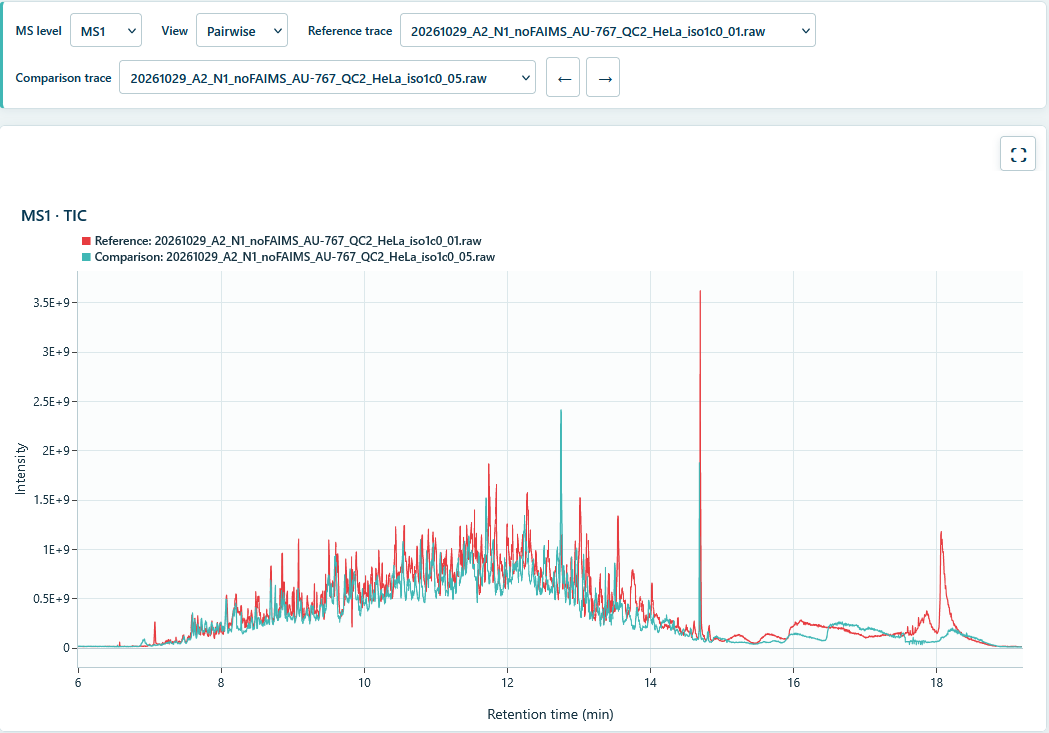
You can show the traces of the selected MS level in three views:
- Overlay draws the selected traces in one plot.
- Stacked gives each selected trace its own plot.
- Pairwise compares the reference trace with one other trace. Use the arrow buttons or the arrow keys to move to the next trace.
To compare runs against one specific run, select it as the Reference trace. The report then draws that run in red, which is the only trace with this color. In the Metadata tab, you can click a column header to sort the rows, and the plots then use the same order.
Limitations
This release has the following limitations, which we will address in upcoming releases:
- Desktop application: The desktop application runs only on Windows. We plan to add support for Linux and macOS.
- Thermo files: You can read
.rawfiles only on Windows for now. Although the Thermo tool itself is cross-platform, rawtrace-qc does not yet use it on other systems. - Command line: The command-line interface cannot create reports yet, although it can extract traces.
- MS2 traces: The reports include MS2 traces, but these traces are not very useful yet. We are working on a better way to show MS2 data.
- FAIMS: rawtrace-qc splits a FAIMS run into one trace for each compensation voltage (CV). This split is not optimal, and a combined view is not available yet.
Use the command line
The command-line interface extracts traces in batches and sets up the Thermo tool. Install it with the cli option:
uv tool install "rawtrace-qc[cli]"
Use "rawtrace-qc[cli,gui]" if you want both interfaces. The same options work with pip install.
To set up the Thermo tool, run the commands below. The accept-license command prints the terms and records your acceptance in one step, so run it only if you agree to them. To read the terms first, use Show license in the desktop application.
rawtrace-qc thermo install
rawtrace-qc thermo accept-license
rawtrace-qc thermo status
The extract command then writes the traces of each raw file as Parquet files:
rawtrace-qc extract sample.raw run.d
rawtrace-qc extract /data/acquisitions --recursive --output-dir /data/traces
Run rawtrace-qc extract --help to see all options.
Use the Python library
The Python library does not need an extra option, so pip install rawtrace-qc is sufficient. Unlike the command line, the library can create reports. This example creates a report from Parquet files that the extract command wrote:
from pathlib import Path

from rawtrace_qc.processing import process_traces
from rawtrace_qc.report import write_html
from rawtrace_qc.traces import load_trace

traces = [
    load_trace(Path("traces/sample.raw.ms1-trace.parquet")),
    load_trace(Path("traces/sample.raw.msn-trace.parquet")),
]
write_html(process_traces(traces), Path("sample-qc.html"))
Develop rawtrace-qc
We build rawtrace-qc library-first, so the desktop application and the command-line interface call the same library services. To set up a development environment, clone the repository and install all dependencies with uv:
git clone https://github.com/maxperutzlabs-ms/rawtrace-qc.git
cd rawtrace-qc
uv sync --all-extras
Run the tests and the code checks with these commands:
uv run pytest
uv run ruff check .
uv run ruff format --check .
uv run pyrefly check
License
rawtrace-qc is licensed under the Apache License 2.0. The Thermo tool is a separate program, so it has its own license terms.
1 maintainer

Metadata
1 maintainer
Release files for rawtrace-qc 0.1.0
For a detailed explanation of source distributions (sdists) and built distributions (wheels), please see the package formats documentation.
Source distribution (sdist)
| File | Size | Uploaded | Provenance | Actions |
|---|---|---|---|---|
| rawtrace_qc-0.1.0.tar.gz | 115.1 kB | Without provenance | Details for rawtrace_qc-0.1.0.tar.gz |
Built distribution (wheel)
| File | Interpreter | ABI | Platform | Actions Reset |
|---|---|---|---|---|
| rawtrace_qc-0.1.0-py3-none-any.whl | Python 3 | none | any | Details for rawtrace_qc-0.1.0-py3-none-any.whl |
Total release size: 249.0 kB
Release files / rawtrace_qc-0.1.0.tar.gz
| Download URL | rawtrace_qc-0.1.0.tar.gz |
|---|---|
| Size | 115.1 kB |
| Tags | Source |
|
SHA-256 checksum How to use checksums |
e80695ce120ac88642374a765a32051ab72a1fe25cb929304dac5848f6aeae8a
|
|
BLAKE2b-256 checksum How to use checksums |
f51f6b917ff15e76e34104ce53a5208a33a0981da63f519074a414844e2980a0
|
| Upload date | |
|
Uploaded using Trusted Publishing? What is trusted publishing? |
No |
| Uploaded via |
uv/0.13.5 {"installer":{"name":"uv","version":"0.13.5","subcommand":["publish"]},"python":null,"implementation":{"name":null,"version":null},"distro":null,"system":{"name":null,"release":null},"cpu":null,"openssl_version":null,"setuptools_version":null,"rustc_version":null,"ci":null}
|
Release files / rawtrace_qc-0.1.0-py3-none-any.whl
| Download URL | rawtrace_qc-0.1.0-py3-none-any.whl |
|---|---|
| Size | 133.9 kB |
| Tags | Python 3 |
|
SHA-256 checksum How to use checksums |
5b5de76ff40dd22f134f43846d13ebc960552f7b9038b5aca6372e18c25cfcc5
|
|
BLAKE2b-256 checksum How to use checksums |
257c1cbe8006adbfaa881fd15c0327799603ab99e3dddac20227f99912617752
|
| Upload date | |
|
Uploaded using Trusted Publishing? What is trusted publishing? |
No |
| Uploaded via |
uv/0.13.5 {"installer":{"name":"uv","version":"0.13.5","subcommand":["publish"]},"python":null,"implementation":{"name":null,"version":null},"distro":null,"system":{"name":null,"release":null},"cpu":null,"openssl_version":null,"setuptools_version":null,"rustc_version":null,"ci":null}
|
Security for rawtrace-qc 0.1.0
Provenance
Provenance describes where a file came from. On PyPI, provenance is shared via attestations, which provide a verifiable record of the build or publishing details. View details, limitations and caveats.
No provenance found
None of the files in this release were uploaded with provenance metadata.
A note on package security
PyPI is a repository for distributing packages, not a service for auditing them. While third-party security researchers and our staff do their best to detect and remove malicious packages, PyPI cannot guarantee the quality, security or suitability of any given package.
To learn more about protecting yourself from malicious actors, visit our package security documentation.













