
This release is a pre-release and may not be stable for production use.
RayFed



A multiple parties joint, distributed execution engine based on Ray, to help build your own federated learning frameworks in minutes.
Overview
Note: This project is now in actively developing.
RayFed is a distributed computing framework for cross-parties federated learning. Built in the Ray ecosystem, RayFed provides a Ray native programming pattern for federated learning so that users can build a distributed program easily.
It provides users the role of "party", thus users can write code belonging to the specific party explicitly imposing more clear data perimeters. These codes will be restricted to execute within the party.
As for the code execution, RayFed introduces the multi-controller architecture: The code view in each party is exactly the same, but the execution differs based on the declared party of code and the current party of executor.
Features
-
Ray Native Programming Pattern
Let you write your federated and distributed computing applications like a single-machine program.
-
Multiple Controller Execution Mode
The RayFed job can be run in the single-controller mode for developing and debugging and the multiple-controller mode for production without code change.
-
Very Restricted and Clear Data Perimeters
Because of the PUSH-BASED data transferring mechanism and multiple controller execution mode, the data transmission authority is held by the data owner rather than the data demander.
-
Very Large Scale Federated Computing and Training
Powered by the scalabilities and the distributed abilities from Ray, large scale federated computing and training jobs are naturally supported.
Supported Ray Versions
| RayFed Versions | ray-1.13.0 | ray-2.4.0 | ray-2.5.1 | ray-2.6.3 | ray-2.7.1 | ray-2.8.1 | ray-2.9.0 |
|---|---|---|---|---|---|---|---|
| 0.1.0 | ✅ | ✅ | ✅ | ✅ | ✅ | ✅ | ✅ |
| 0.2.0 | not released | not released | not released | not released | not released | not released | not released |
Installation
Install it from pypi.
pip install -U rayfed
Install the nightly released version from pypi.
pip install -U rayfed-nightly
Quick Start
This example shows how to aggregate values across two participators.
Step 1: Write an Actor that Generates Value
The MyActor increment its value by num.
This actor will be executed within the explicitly declared party.
import sys
import ray
import fed

@fed.remote
class MyActor:
    def __init__(self, value):
        self.value = value

    def inc(self, num):
        self.value = self.value + num
        return self.value
Step 2: Define Aggregation Function
The below function collects and aggragates values from two parties separately, and will also be executed within the declared party.
@fed.remote
def aggregate(val1, val2):
    return val1 + val2
Step 3: Create the actor and call methods in a specific party
The creation code is similar with Ray, however, the difference is that in RayFed the actor must be explicitly created within a party:
actor_alice = MyActor.party("alice").remote(1)
actor_bob = MyActor.party("bob").remote(1)

val_alice = actor_alice.inc.remote(1)
val_bob = actor_bob.inc.remote(2)

sum_val_obj = aggregate.party("bob").remote(val_alice, val_bob)
The above codes:
- Create two
MyActors separately in each party, i.e. 'alice' and 'bob'; - Increment by '1' in alice and '2' in 'bob';
- Execute the aggregation function in party 'bob'.
Step 4: Declare Cross-party Cluster & Init
def main(party):
    ray.init(address='local', include_dashboard=False)

    addresses = {
        'alice': '127.0.0.1:11012',
        'bob': '127.0.0.1:11011',
    }
    fed.init(addresses=addresses, party=party)
This first declares a two-party cluster, whose addresses corresponding to '127.0.0.1:11012' in 'alice' and '127.0.0.1:11011' in 'bob'.
And then, the fed.init create a cluster in the specified party.
Note that fed.init should be called twice, passing in the different party each time.
When executing codes in step 1~3, the 'alice' cluster will only execute functions whose "party" are also declared as 'alice'.
Put it together !
Save below codes as demo.py:
import sys
import ray
import fed


@fed.remote
class MyActor:
    def __init__(self, value):
        self.value = value

    def inc(self, num):
        self.value = self.value + num
        return self.value


@fed.remote
def aggregate(val1, val2):
    return val1 + val2


def main(party):
    ray.init(address='local', include_dashboard=False)

    addresses = {
        'alice': '127.0.0.1:11012',
        'bob': '127.0.0.1:11011',
    }
    fed.init(addresses=addresses, party=party)

    actor_alice = MyActor.party("alice").remote(1)
    actor_bob = MyActor.party("bob").remote(1)

    val_alice = actor_alice.inc.remote(1)
    val_bob = actor_bob.inc.remote(2)

    sum_val_obj = aggregate.party("bob").remote(val_alice, val_bob)
    result = fed.get(sum_val_obj)
    print(f"The result in party {party} is {result}")

    fed.shutdown()
    ray.shutdown()


if __name__ == "__main__":
    assert len(sys.argv) == 2, 'Please run this script with party.'
    main(sys.argv[1])
Run The Code.
Open a terminal and run the code as alice. It's recommended to run the code with Ray TLS enabled (please refer to Ray TLS)
RAY_USE_TLS=1 \
RAY_TLS_SERVER_CERT='/path/to/the/server/cert/file' \
RAY_TLS_SERVER_KEY='/path/to/the/server/key/file' \
RAY_TLS_CA_CERT='/path/to/the/ca/cert/file' \
python test.py alice
In the mean time, open another terminal and run the code as bob.
RAY_USE_TLS=1 \
RAY_TLS_SERVER_CERT='/path/to/the/server/cert/file' \
RAY_TLS_SERVER_KEY='/path/to/the/server/key/file' \
RAY_TLS_CA_CERT='/path/to/the/ca/cert/file' \
python test.py bob
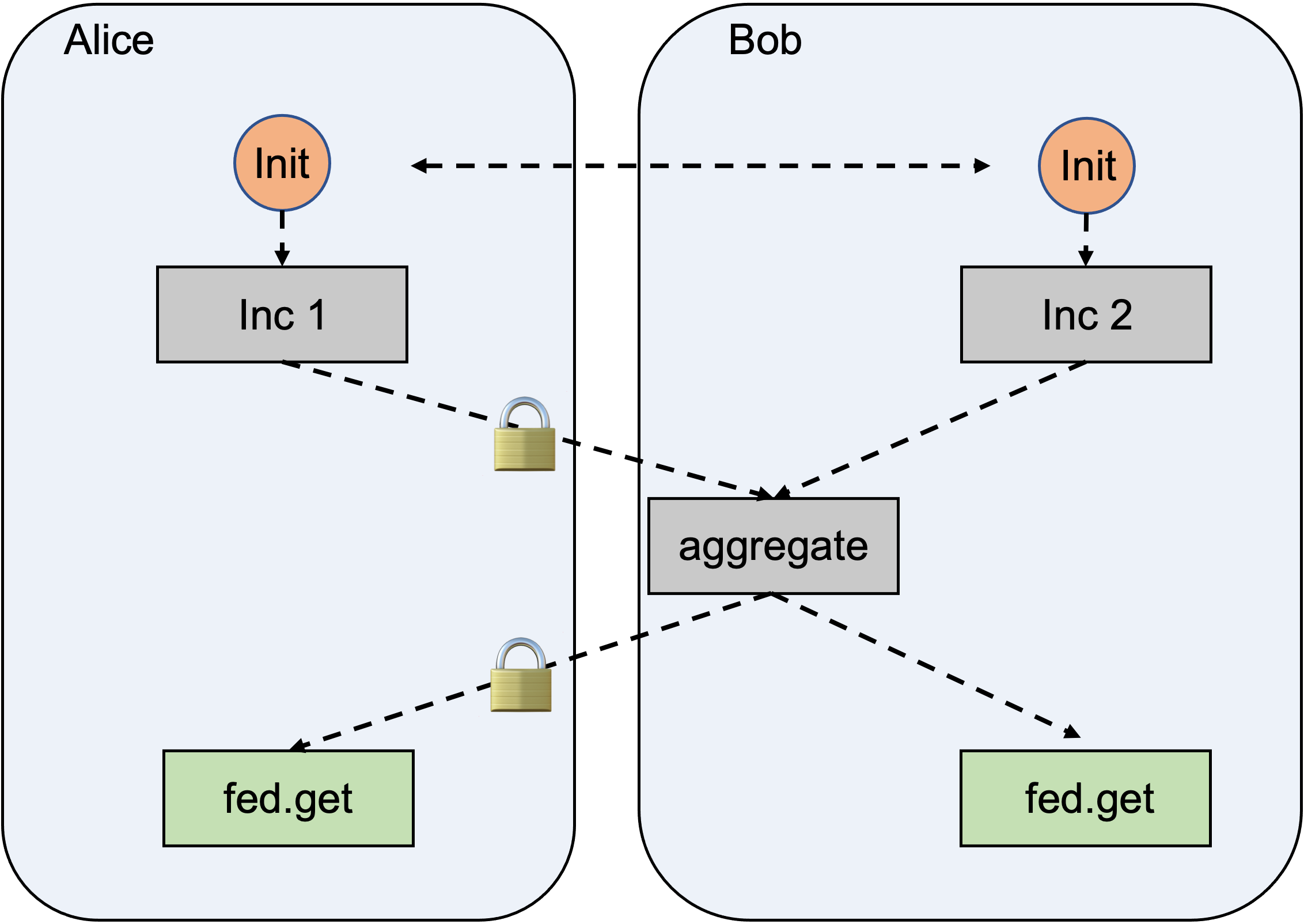
Then you will get The result in party alice is 5 on the first terminal screen and The result in party bob is 5 on the second terminal screen.
Figure shows the execution under the hood:
Who use us


1 maintainer

Metadata
1 maintainer
Release files for rayfed-nightly 0.1.0b20240201.dev0
For a detailed explanation of source distributions (sdists) and built distributions (wheels), please see the package formats documentation.
Built distribution (wheel)
| File | Interpreter | ABI | Platform | Reset |
|---|---|---|---|---|
| rayfed_nightly-0.1.0b20240201.dev0-py3-none-any.whl | Python 3 | none | any | Details |
Release files / rayfed_nightly-0.1.0b20240201.dev0-py3-none-any.whl
| Download URL | rayfed_nightly-0.1.0b20240201.dev0-py3-none-any.whl |
|---|---|
| Size | 92.8 kB |
| Tags | Python 3 |
|
SHA-256 checksum How to use checksums |
35d46f8825056366e12dc5a4eabc414b9f7cedcef62cd6daf8845b27dd479eb4
|
|
BLAKE2b-256 checksum How to use checksums |
22b818fe2204227e3e3f0c15bb9bbd23ca76b5c42f982566e22142ea9d745e7c
|
| Upload date | |
|
Uploaded using Trusted Publishing? What is trusted publishing? |
No |
| Uploaded via |
twine/4.0.2 CPython/3.11.7
|














