
A zero-dependency Python library for ANSI coloring and smart CLI icons with automatic environment detection
Verified details
These details have been verified by PyPIProject links
GitHub Statistics
Maintainers

Project description






A zero-dependency Python library for ANSI coloring and smart CLI icons that automatically adapt to your environment.
Table of Contents
- Preview
- What is RazTint?
- Why RazTint?
- Features
- Requirements
- Installation
- Quick Start
- Configuration
- API Reference
- Icons & Detection
- Performance & Debugging
- Development
- Support
- License
Preview
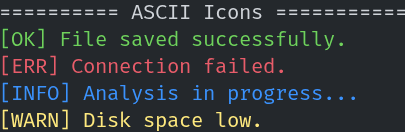
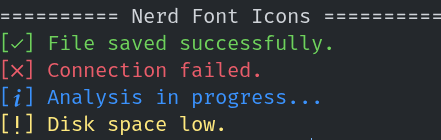
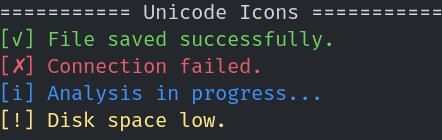
| ASCII Icons | Nerd Font Icons | Unicode Icons |
|---|---|---|
 |
 |
 |
What is RazTint?
RazTint is a zero-dependency Python library for colored terminal output and smart CLI icons that automatically adapt to your environment.
Why RazTint?
Most CLI coloring libraries either pull in many dependencies (like rich) or
need platform-specific workarounds. RazTint was built for developers who want:
- A single-file copy-pasteable solution without any dependency hell.
- Smart icons that look great whether the user has a Nerd Font installed or not, without manual configuration.
- Predictable cross-platform behavior — it works identically on Linux, macOS, and Windows, even in CI environments.
- Minimal decisions to make — just import and use; it auto-detects everything.
If you’ve ever included a 30-line color script in a small CLI tool, RazTint is that script, done right and fully tested.
Features
- Zero external dependencies (Python ≥ 3.10 standard library only)
- Three-tiered icon fallback: Nerd Font → Unicode → ASCII, with environment-aware detection
- Full ANSI 16-color support for foreground text
- Automatic TTY and Windows VT detection
- Fully type-hinted public API
- Support for text styles: bold, dim, italic, underline, and strikethrough
- Configurable via environment variables (
NO_COLOR,RAZTINT_FORCE_COLOR, ...) - Debug mode for troubleshooting font/color detection (
RAZTINT_DEBUG=1) - Cached detection results for negligible runtime overhead
Requirements
- Python 3.10 or newer
Installation
From PyPI
pip install raztint
From source
git clone https://github.com/razbuild/raztint.git
cd raztint

pip install -e .  # -e allows you to modify the source code in place
Quick Start
You can import functions directly for quick usage, or instantiate the class for more control.
Functional Usage
The easiest way to use RazTint is importing the pre-instantiated helpers:
from raztint import green, red, ok, err, info, warn

# Coloring text
print(green("Success! The operation completed."))
print(red("Critical Error: Database not found."))

# Styling text
print(bold("This is bold text."))
print(underline(red("This is underlined red text.")))

# Using Icons (Auto-adapts to Nerd Font/Unicode/ASCII)
print(f"{ok()} File saved successfully.")
print(f"{err()} Connection failed.")
print(f"{info()} Analysis in progress...")
print(f"{warn()} Disk space low.")
Using the tint Instance
from raztint import tint

print(tint.red("text"))
print(tint.ok(), "hello")
tint is a pre-instantiated singleton of RazTint for convenience.
Class-based Usage
Useful if you need to toggle color support dynamically within an application instance or want a scoped instance.
from raztint import RazTint

tint = RazTint()

# Toggle features manually if needed
tint.set_color(False)

print(tint.blue("This will be plain text now because color is disabled."))
Icons & Detection
Icon Functions
from raztint import ok, err, warn, info

print(ok(), "Operation completed")
print(err(), "An error happened")
print(warn(), "Be careful")
print(info(), "For your information")
Icon Modes
RazTint attempts to make your CLI look as good as possible by detecting the font capabilities of the terminal.
| Mode | ok | err | warn | info | Condition |
|---|---|---|---|---|---|
| Nerd | [] | [] | [] | [] | Detected Nerd Font via Env/Registry |
| Std | [✓] | [✗] | [!] | [i] | UTF-8 supported, no Nerd Font |
| ASCII | [OK] | [ERR] | [WARN] | [INFO] | Fallback |
Note: Icons may not render correctly in GitHub preview depending on your browser font.
Detection Logic
RazTint determines the best available icon and color mode using the following rules:
-
Nerd Font Mode:
- Enabled if:
RAZTINT_USE_NERD_ICONSenvironment variable is set to1,true,yes, oron, ORNERDFONTSorNERD_FONTSenvironment variable is set, ORFONT_NAMEorTERM_FONTenvironment variable contains "nerd" or "nf-", OR- A Nerd Font is detected via system checks:
- Linux: Uses
fc-list(fontconfig) to check installed fonts - macOS: Checks via
system_profilerand font directories (~/Library/Fonts,/Library/Fonts) - Windows: Checks
C:\Windows\Fontsdirectory via PowerShell
- Linux: Uses
- Enabled if:
-
Standard Unicode Mode:
- Enabled when UTF-8 encoding is available AND
RAZTINT_NO_NERD_ICONSis set (explicitly disables Nerd Fonts), OR- Nerd Fonts are not detected and not forced via
RAZTINT_USE_NERD_ICONS
-
ASCII Mode:
- Used when:
- Output encoding is not UTF-8 (cannot encode Nerd Font or Unicode characters), OR
- System encoding test fails for Unicode characters
- Used when:
How to install Nerd Font?
To install Nerd Fonts, visit the official website.
Configuration
You can control RazTint behavior using environment variables. This is useful for CI/CD pipelines or user overrides.
| Environment Variable | Value | Description |
|---|---|---|
NO_COLOR |
any | Disables all color output (standard specification). |
RAZTINT_NO_COLOR |
any | Specific override to disable RazTint colors. |
RAZTINT_FORCE_COLOR |
1, true, yes, on |
Forces color output even if not a TTY. |
RAZTINT_USE_NERD_ICONS |
1, true, yes, on |
Forces the use of Nerd Font icons. |
RAZTINT_NO_NERD_ICONS |
1, true, yes, on |
Disables Nerd Font detection (falls back to Standard Unicode mode). |
RAZTINT_SKIP_SYSTEM_FONT_SCAN |
1, true, yes, on |
Skips OS-level font scanning; only environment-based nerd font hints used. |
RAZTINT_DEBUG |
1, true, yes, on |
Enables debug logging about color/icon/font detection decisions to stderr. |
API Reference
Color Functions
The following functions return strings wrapped with ANSI styling when supported:
| Standard Colors | Bright Variants |
|---|---|
black(text) |
gray(text) |
red(text) |
bright_red(text) |
green(text) |
bright_green(text) |
yellow(text) |
bright_yellow(text) |
blue(text) |
bright_blue(text) |
magenta(text) |
bright_magenta(text) |
cyan(text) |
bright_cyan(text) |
white(text) |
bright_white(text) |
Internally, these use tint.color().
Text Style Functions
In addition to colors, RazTint provides functions for applying text styles. These styles use their own reset codes, so applying a style won't remove any color you have already applied.
| Function | Description |
|---|---|
bold(text) |
Makes text bold |
dim(text) |
Makes text dimmed |
italic(text) |
Makes text italic |
underline(text) |
Underlines text |
strikethrough(text) |
Applies strikethrough |
Example:
from raztint import bold, italic, underline, red

# Mixing styles with colors
print(bold(red("This is a very important error message.")))
print(italic("This text is italic."))
print(underline("This text is underlined."))
Known Limitation: bold and dim share the same ANSI reset code. Nesting one inside the other may lead to unexpected behavior.
Icon Functions
These return appropriate status symbols based on environment detection:
-
ok()- Returns a success icon (green checkmark) -
err()- Returns an error icon (red cross) -
warn()- Returns a warning icon (yellow exclamation) -
info()- Returns an info icon (blue 'i')
RazTint selects the best available style in this order:
- Nerd Font icons (if installed)
- Unicode icons (if UTF-8 is supported)
- ASCII fallback
RazTint Class Methods
When using the RazTint class directly, you have access to additional methods:
color(text: str, fg_code: str) -> str
Low-level method to apply ANSI color codes to text. Returns the text with ANSI escape sequences when color is enabled, otherwise returns plain text.
Parameters:
text: The text to colorizefg_code: ANSI color code (e.g., "31" for red, "32" for green)
Example:
from raztint import RazTint

tint = RazTint()
colored = tint.color("Hello", "31")  # Red text
set_color(enabled: bool) -> None
Enable or disable color output programmatically.
Parameters:
enabled:Trueto enable colors,Falseto disable
Example:
from raztint import RazTint

tint = RazTint()
tint.set_color(False)  # Disable colors
print(tint.red("This will be plain text"))
RazTint Class Attributes
use_color: bool
Boolean indicating whether color output is currently enabled. This is automatically set based on environment detection but can be modified via set_color().
icon_mode: str
Current icon mode being used. Possible values:
"nerd"- Nerd Font icons"std"- Standard Unicode icons"ascii"- ASCII fallback icons
Color Detection
Color support is determined by checking (in order):
NO_COLORorRAZTINT_NO_COLORenvironment variables (disables colors)RAZTINT_FORCE_COLORenvironment variable (forces colors)- Whether output is connected to a TTY (
sys.stdout.isatty()) - On Windows: Attempts to enable Virtual Terminal processing
TERMenvironment variable (must not be "dumb")
If color is not supported, all color functions return plain text.
Performance & Debugging
In most environments, RazTint's detection overhead is negligible thanks to internal caching. However, in restricted or slow environments you can:
-
Disable OS-level font scanning while still allowing env-based nerd font hints:
RAZTINT_SKIP_SYSTEM_FONT_SCAN=1
-
Inspect why a particular mode was chosen (color on/off, icon mode, font detection) by enabling debug logs:
RAZTINT_DEBUG=1
Debug messages are printed to standard error and are disabled by default.
Development
If you want to work on RazTint locally:
-
Clone the repository and install in editable mode with development tools:
git clone https://github.com/razbuild/raztint.git
cd raztint
pip install -e .[dev]
-
Run the test suite:
python -m pytest
-
Run formatting, linting, and type checking (kept in sync with CI):
black src tests
ruff check src tests
ty check src tests
Support
- 🐛 Found a bug? Open an issue
- 💡 Have a suggestion? Open an issue
License
MIT License
Project details
Verified details
These details have been verified by PyPIProject links
GitHub Statistics
Maintainers
Release history Release notifications | RSS feed


Download files
Download the file for your platform. If you're not sure which to choose, learn more about installing packages.
Source Distribution
Built Distribution
Filter files by name, interpreter, ABI, and platform.
If you're not sure about the file name format, learn more about wheel file names.
Copy a direct link to the current filters
File details
Details for the file raztint-0.4.1.tar.gz.
File metadata
- Download URL: raztint-0.4.1.tar.gz
- Upload date:
- Size: 80.8 kB
- Tags: Source
- Uploaded using Trusted Publishing? Yes
- Uploaded via: twine/6.1.0 CPython/3.13.13
File hashes
| Algorithm | Hash digest | |
|---|---|---|
| SHA256 |
e5f3594a8a8db975728cd6569d986ac367f6ab0e00a96b0e2feb9f3fd8bf3ebf
|
|
| MD5 |
2900604daef2611b9f1ff40984287f70
|
|
| BLAKE2b-256 |
b77e0267a68d8ef1d224ce0260452f7bde22e0b8316a0a3b8c06389f1980644f
|
Provenance
The following attestation bundles were made for raztint-0.4.1.tar.gz:
Publisher:
publish.yml on razbuild/raztint
-
Statement:
-
Statement type:
https://in-toto.io/Statement/v1 -
Predicate type:
https://docs.pypi.org/attestations/publish/v1 -
Subject name:
raztint-0.4.1.tar.gz -
Subject digest:
e5f3594a8a8db975728cd6569d986ac367f6ab0e00a96b0e2feb9f3fd8bf3ebf - Sigstore transparency entry: 1518961812
- Sigstore integration time:
-
Permalink:
razbuild/raztint@9fb72f3a8c4a7484a17d02dc1be5691950836269 -
Branch / Tag:
refs/tags/v0.4.1 - Owner: https://github.com/razbuild
-
Access:
public
-
Token Issuer:
https://token.actions.githubusercontent.com -
Runner Environment:
github-hosted -
Publication workflow:
publish.yml@9fb72f3a8c4a7484a17d02dc1be5691950836269 -
Trigger Event:
release
-
Statement type:
File details
Details for the file raztint-0.4.1-py3-none-any.whl.
File metadata
- Download URL: raztint-0.4.1-py3-none-any.whl
- Upload date:
- Size: 12.3 kB
- Tags: Python 3
- Uploaded using Trusted Publishing? Yes
- Uploaded via: twine/6.1.0 CPython/3.13.13
File hashes
| Algorithm | Hash digest | |
|---|---|---|
| SHA256 |
d6da1eacca6643435b65e75e08fe3c3d3309739ed1b43ede135fd22fdee96c82
|
|
| MD5 |
c726142b571da1bf1b13e4df0532b87b
|
|
| BLAKE2b-256 |
89b22de2742e947696d9fe06bb6145fed65ea41ec9df625ebfd582f92d51241a
|
Provenance
The following attestation bundles were made for raztint-0.4.1-py3-none-any.whl:
Publisher:
publish.yml on razbuild/raztint
-
Statement:
-
Statement type:
https://in-toto.io/Statement/v1 -
Predicate type:
https://docs.pypi.org/attestations/publish/v1 -
Subject name:
raztint-0.4.1-py3-none-any.whl -
Subject digest:
d6da1eacca6643435b65e75e08fe3c3d3309739ed1b43ede135fd22fdee96c82 - Sigstore transparency entry: 1518961840
- Sigstore integration time:
-
Permalink:
razbuild/raztint@9fb72f3a8c4a7484a17d02dc1be5691950836269 -
Branch / Tag:
refs/tags/v0.4.1 - Owner: https://github.com/razbuild
-
Access:
public
-
Token Issuer:
https://token.actions.githubusercontent.com -
Runner Environment:
github-hosted -
Publication workflow:
publish.yml@9fb72f3a8c4a7484a17d02dc1be5691950836269 -
Trigger Event:
release
-
Statement type:






