
A fast, zero-dependency command-line todo/task manager using SQLite.

Project description






About
RazTodo is a lightweight, cross-platform CLI task manager powered by SQLite, offering fast, privacy-first todo management with minimal external dependencies.
| Preview |
|---|
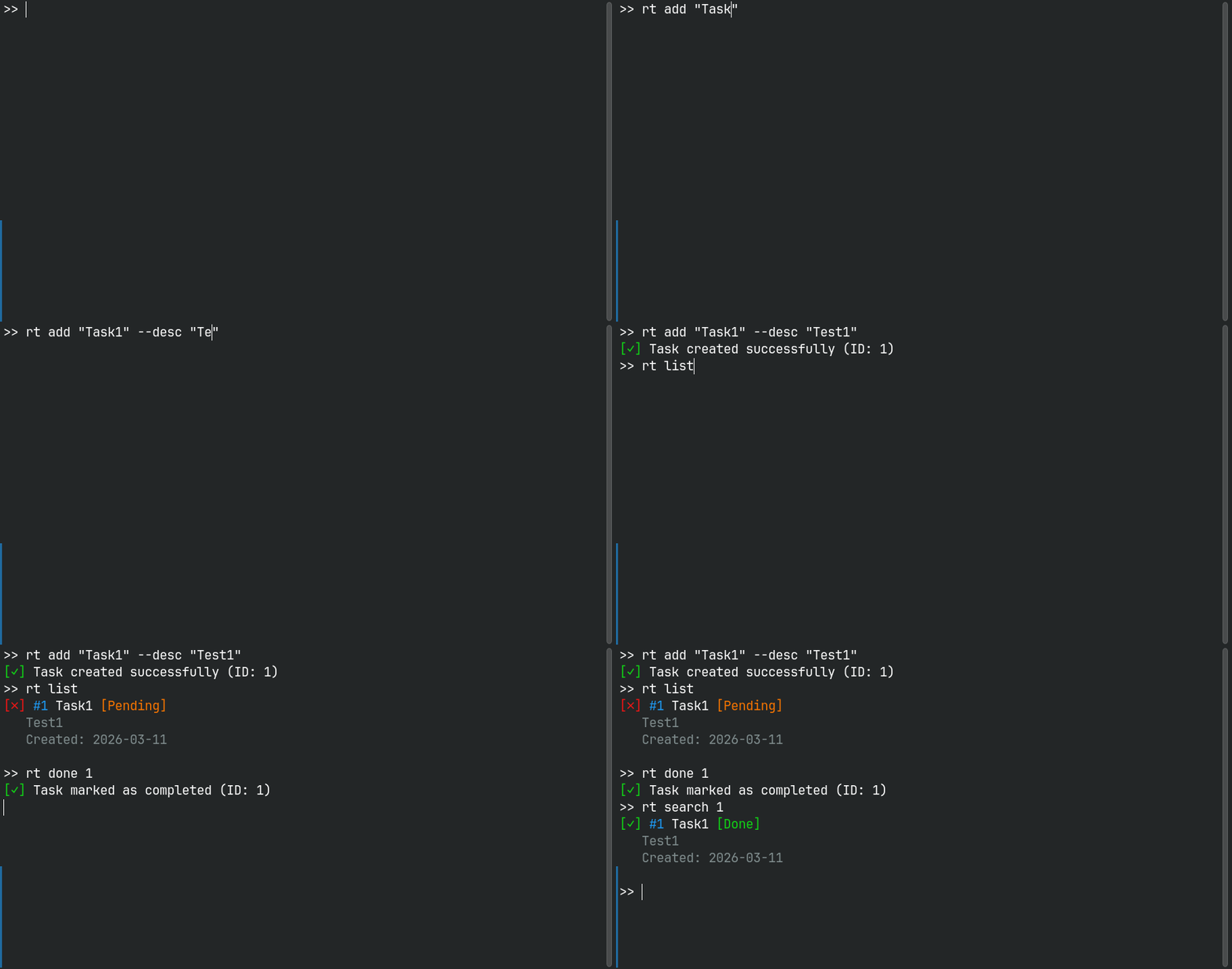 |
Why RazTodo?
Lightweight & Fast — Minimal dependencies, SQLite-powered, optimized for speed
Privacy-First — Your data stays local, no cloud services, no tracking
Developer-Friendly — Clean Architecture, well-tested, type-safe, modern Python
Simple & Powerful — Intuitive CLI, works out of the box, rich features
Cross-Platform — Works seamlessly on Linux, macOS, and Windows
Perfect for developers, power users, and anyone who wants a fast, reliable, local-first task manager.
Quick Start
Installation
# Recommended: Install via pipx (isolated environment)
pipx install raztodo

# Alternative: Install via pip
pip install raztodo
📖 For more installation options (virtual environments, from source), see the Installation Guide
Basic Usage
# Create a task with priority and due date
rt add "Buy groceries" --priority H --due 2024-12-31

# List all tasks
rt list

# Mark task as done
rt done 1

# Search for tasks
rt search "groceries"

# Update a task
rt update 1 --title "Buy groceries and milk"

# Delete a task
rt remove 1
📖 For complete command reference, see the Usage Guide
Features
- ✅ Task Management — Create, update, delete, and organize tasks
- 🏷️ Tags & Projects — Organize tasks with tags and project names
- 🔍 Full-Text Search — Search across all task fields
- 📅 Due Dates & Priority — Set deadlines and priority levels (L/M/H)
- 💾 Import/Export — Backup and restore tasks via JSON
- 🎨 Colored Output — Beautiful ANSI colors and icons
- 🗄️ SQLite Storage — No external services required
- 🚀 Cross-Platform — Works on Linux, macOS, and Windows
- ⚡ Fast Performance — Lazy loading and optimized architecture
- 🏗️ Clean Architecture — Maintainable and testable codebase
Commands
| Command | Description | Example |
|---|---|---|
add |
Create a new task | rt add "Task title" --priority H |
list |
List tasks with filters | rt list --pending --priority H |
update |
Update a task | rt update 1 --title "New title" |
done |
Mark task as done/undone | rt done 1 |
remove |
Delete a task | rt remove 1 |
search |
Search tasks | rt search "keyword" |
export |
Export to JSON | rt export backup.json |
import |
Import from JSON | rt import backup.json |
migrate |
Run database migration | rt migrate |
clear |
Delete all tasks | rt clear --confirm |
# Get help for any command
rt --help
rt add --help
📖 See the Usage Guide for detailed command documentation
Configuration
RazTodo can be configured using environment variables:
| Variable | Description | Default |
|---|---|---|
RAZTODO_DB |
Database filename or path | tasks.db |
LOG_LEVEL |
Logging level | ERROR |
Example:
# Use a custom database location
export RAZTODO_DB="/path/to/custom.db"

# Enable debug logging
export LOG_LEVEL="DEBUG"
📖 For detailed configuration options, see the Configuration Guide
Documentation
Complete documentation is available in the docs/ directory:
- 📦 Installation Guide — Install via pip, pipx, or from source
- 📖 Usage Guide — Complete command reference with examples
- ⚙️ Configuration Guide — Environment variables and options
- 🏗️ Architecture — Project structure and design patterns
- 🧪 Testing — Running tests and development setup
- 📝 Changelog — Release notes and version history
Contributing
Contributions are welcome! Here's how you can help:
- Fork the repository
- Create a feature branch:
git checkout -b feature/your-feature-name - Make your changes and ensure quality:
# Run tests
pytest

# Check code quality
ruff check src/ tests/
black --check src/ tests/
mypy src/
- Submit a pull request
For detailed guidelines, see the Contributing Guide.
License
MIT License
Support
- 🐛 Found a bug? Open an issue
- 💡 Have a suggestion? Open an issue
- 📧 Questions? Check the Documentation


Download files
Download the file for your platform. If you're not sure which to choose, learn more about installing packages.
Source Distribution
Built Distribution
Filter files by name, interpreter, ABI, and platform.
If you're not sure about the file name format, learn more about wheel file names.
Copy a direct link to the current filters
File details
Details for the file raztodo-0.2.1.tar.gz.
File metadata
- Download URL: raztodo-0.2.1.tar.gz
- Upload date:
- Size: 181.2 kB
- Tags: Source
- Uploaded using Trusted Publishing? No
- Uploaded via: twine/6.2.0 CPython/3.13.11
File hashes
| Algorithm | Hash digest | |
|---|---|---|
| SHA256 |
9ef582308da101e06998da92c98cda77bfa082b52048327d6da18f11e37972fc
|
|
| MD5 |
726f555077f7998bfc772201fbcde8bb
|
|
| BLAKE2b-256 |
08f7d356dc547ebe52732fe48060452a339fcd86ead98ca9c5376b5619581c15
|
File details
Details for the file raztodo-0.2.1-py3-none-any.whl.
File metadata
- Download URL: raztodo-0.2.1-py3-none-any.whl
- Upload date:
- Size: 45.1 kB
- Tags: Python 3
- Uploaded using Trusted Publishing? No
- Uploaded via: twine/6.2.0 CPython/3.13.11
File hashes
| Algorithm | Hash digest | |
|---|---|---|
| SHA256 |
4fbea72467abe63d8548242bb4fc11e360c51dee919ce2839294d36681ddfbea
|
|
| MD5 |
0e0580241158111d92d0b574badb429f
|
|
| BLAKE2b-256 |
0d731aa3530a87bdc924f895a55984226e133720c100a6cca444f6c1d9dce4aa
|






